Tactical cRPG Architecture: D&D 5e SRD & Godot 4 Infinity Engine Masterclass
The definitive architectural deep-dive into party-based tactical isometric cRPGs for video game nerds and D&D dungeon masters. Covers D&D 5e SRD mathematical action economy, Godot 4.3 GL Compatibility 2.5D isometric rendering, physical collision pathfinding, Flare RPG CC-BY-SA paperdoll asset pipelines, 3-mode expandable Activity Log, and autonomous Infinity AI Agent verification with 1080p video proof-of-work.
Take this masterclass directly in your browser with interactive lab checklists, instant quiz checks, and verifiable Knowledge Graph completion certificates.
Table of contents
- 1. Executive Architecture & Engine Topology
- 2. Module 1: D&D 5e Ruleset & Mathematical Action Economy
- 3. Module 2: Godot 4.3 Engine Runtime & 2.5D Isometric World
- 4. Module 3: Open-Source Asset Harvesting & Infinity Engine HUD Replica
- 5. Module 4: Autonomous Infinity AI Agent & Headless BDD Verification
- 6. Module 5: Knowledge Graph-First Game Architecture (
.robos/kgraphs/crpg) - 7. Interactive Hands-On Labs & Certification
- Launch central eLearning player loaded to the cRPG Masterclass
- Or launch the dedicated standalone desktop app
1. Executive Architecture & Engine Topology
The Tactical cRPG & Infinity AI Engine (crpg-realm) is RobOS’s reference implementation of a complete, production-grade video game built from scratch by AI agents adhering to Knowledge Graph-First standards. Inspired by legendary Infinity Engine classics (Baldur’s Gate, Icewind Dale, Planescape: Torment), the project combines authentic Real-Time with Pause (RTwP) combat, a 6.0-second combat round timer, multi-branch dialogue, and physical building collision geometry with cutting-edge autonomous AI verification.
graph TD
    subgraph GodotRuntime["Godot 4.3 Engine Runtime"]
        Tree["SceneTree (VillageSquare / Homestead)"]
        Camera["Camera2D (1920x1080 Viewport Clamped to 2560x1440)"]
        Physics["StaticBody2D Colliders (Layer 1 Physical Buildings)"]
        Path["Pathfinder.gd (RayCast2D Line-of-Sight & A* Corridors)"]
        Fog["FogOfWar.gdshader (Dynamic Vision Reveal)"]
        Combat["CombatEngine.gd (D&D 5e SRD 6.0s Round Timer)"]
        REST["GameControlServer.gd (HTTP :18090 Telemetry & Action Injection)"]
    end
    subgraph DataStore["Knowledge Graph-First Data Pipeline"]
        KGraph[".robos/kgraphs/crpg/package.jsonld"]
        Schemas["schemas/v1/*.schema.json"]
        Compiled["DataStoreV1.gd (Statically-Typed Singletons)"]
    end
    subgraph Verification["Autonomous Infinity AI Agent"]
        Agent["InfinityAIAgent (qa_player/infinity_ai_agent.py)"]
        Radar["Threat Radar (140px Trigger / 200px Pack Alerting)"]
        Xvfb["Xvfb Display :99 & FFmpeg 1080p MP4 Video Proof"]
    end
    KGraph --> Schemas --> Compiled --> Tree
    Tree --> Camera
    Tree --> Physics
    Tree --> Path
    Tree --> Fog
    Tree --> Combat
    Tree --> REST
    REST <--> Agent
    Agent --> Radar
    REST --> Xvfb
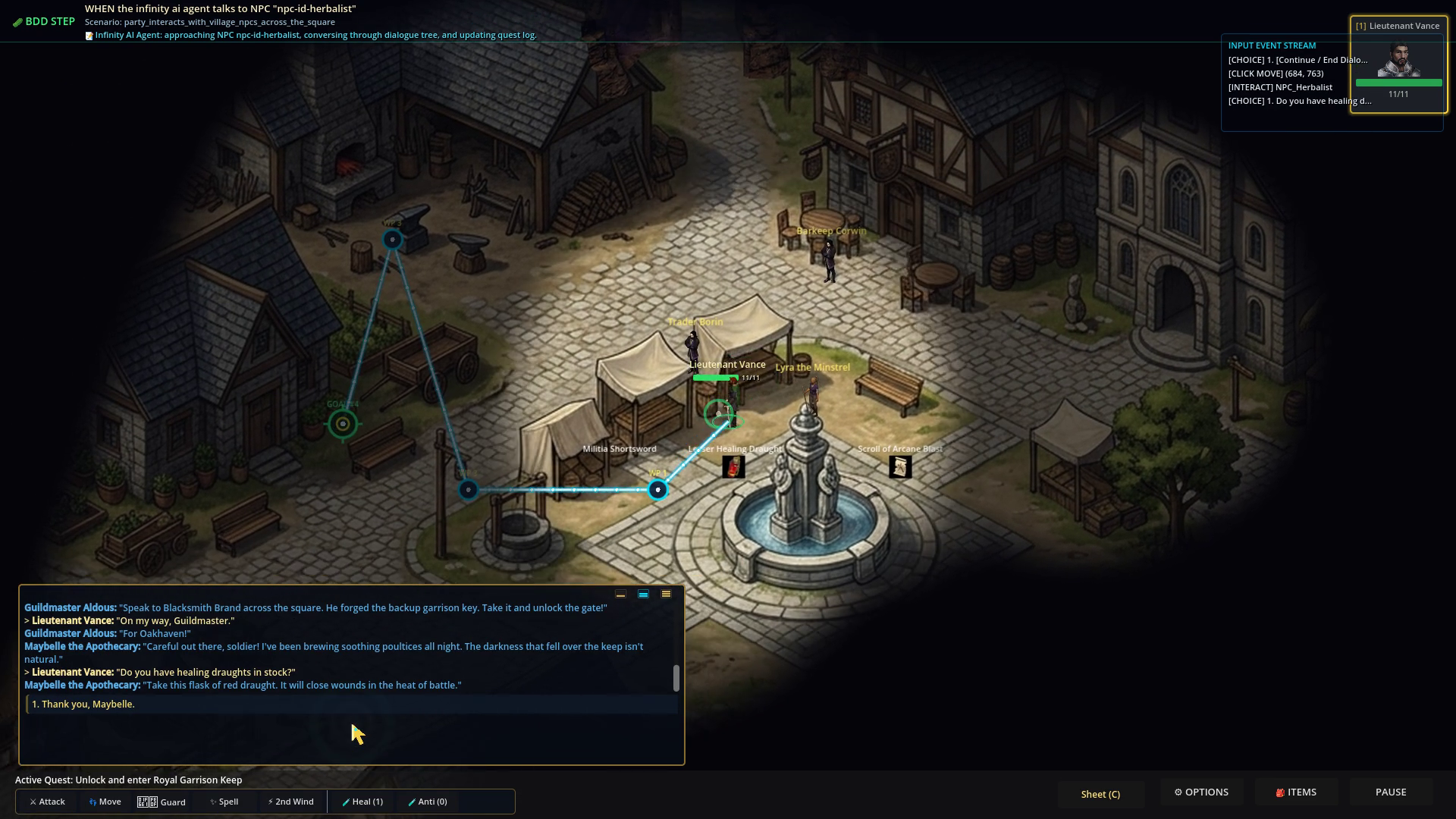
Figure 1: Oakhaven Village Square (2560x1440 pre-rendered plate) featuring 11 physical buildings, stone ramparts, animated NPCs, and the Infinity Engine HUD.
2. Module 1: D&D 5e Ruleset & Mathematical Action Economy
At the heart of the combat simulation is a strict mathematical implementation of the D&D 5th Edition System Reference Document (SRD 5.1) ruleset.
flowchart TD
    StartRound["Combat Round Start (6.0s Timer)"] --> InitRoll["Roll Initiative: 1d20 + DEX Mod"]
    InitRoll --> ActionBudget["Budget: 1 Action, 1 Bonus Action, 1 Reaction, 30ft Movement"]
    ActionBudget --> AttackChoice{"Action: Attack, Spell, or Dash?"}

    AttackChoice -- "Melee / Ranged Attack" --> CheckAdv{"Advantage or Disadvantage?"}
    CheckAdv -- "Advantage" --> RollAdv["Roll 2d20: Keep Highest"]
    CheckAdv -- "Disadvantage" --> RollDis["Roll 2d20: Keep Lowest"]
    CheckAdv -- "Normal" --> RollNorm["Roll 1d20"]

    RollAdv --> CalcToHit["To-Hit = Roll + Prof + STR/DEX"]
    RollDis --> CalcToHit
    RollNorm --> CalcToHit

    CalcToHit --> ACCompare{"To-Hit >= Target AC?"}
    ACCompare -- "Nat 20 Critical Hit" --> CritDmg["Double All Damage Dice + Modifiers"]
    ACCompare -- "Hit" --> RegDmg["Roll Weapon Damage + Modifier"]
    ACCompare -- "Miss / Nat 1" --> Miss["0 Damage (Combat Log Entry)"]

    CritDmg --> ApplyHP["Deduct Target HP & Check Death Saves"]
    RegDmg --> ApplyHP
    Miss --> RoundEnd["Tick 6.0s Round Timer"]
    ApplyHP --> RoundEnd
Mathematical Combat Formulas
-
Ability Modifier Calculation: \(\text{Modifier} = \left\lfloor \frac{\text{Ability Score} - 10}{2} \right\rfloor\) (e.g., Strength 16 $\rightarrow +3$, Dexterity 14 $\rightarrow +2$, Constitution 8 $\rightarrow -1$)
-
Armor Class (AC) Equations: \(\text{Unarmored AC} = 10 + \text{DEX Modifier}\) \(\text{Light Armor AC} = \text{Base Armor AC} + \text{DEX Modifier}\) \(\text{Medium Armor AC} = \text{Base Armor AC} + \min(\text{DEX Modifier}, 2)\) \(\text{Heavy Armor AC} = \text{Base Armor AC}\) \(\text{Total AC} = \text{Armor AC} + \text{Shield (+2)} + \text{Magic/Cover Bonuses}\)
- d20 Attack Roll Resolution: \(\text{Attack Roll} = 1d20 + \text{Proficiency Bonus} + \text{STR/DEX Modifier} \ge \text{Target AC}\)
- Natural 20 (Critical Hit): Always hits regardless of AC; doubles all damage dice rolled before adding flat ability modifiers.
- Natural 1 (Critical Miss): Always misses regardless of modifiers.
-
Advantage & Disadvantage Probability Shift: When rolling with Advantage ($\max(d20_1, d20_2)$), the expected roll increases from $10.50$ to $13.825$ (+3.325 equivalent bonus). When rolling with Disadvantage ($\min(d20_1, d20_2)$), the expected roll drops to $7.175$ (-3.325 penalty).
- Spell Save DC & Spell Attack Bonus: \(\text{Spell Attack Modifier} = \text{Proficiency Bonus} + \text{Spellcasting Ability Modifier}\) \(\text{Spell Save DC} = 8 + \text{Proficiency Bonus} + \text{Spellcasting Ability Modifier}\)
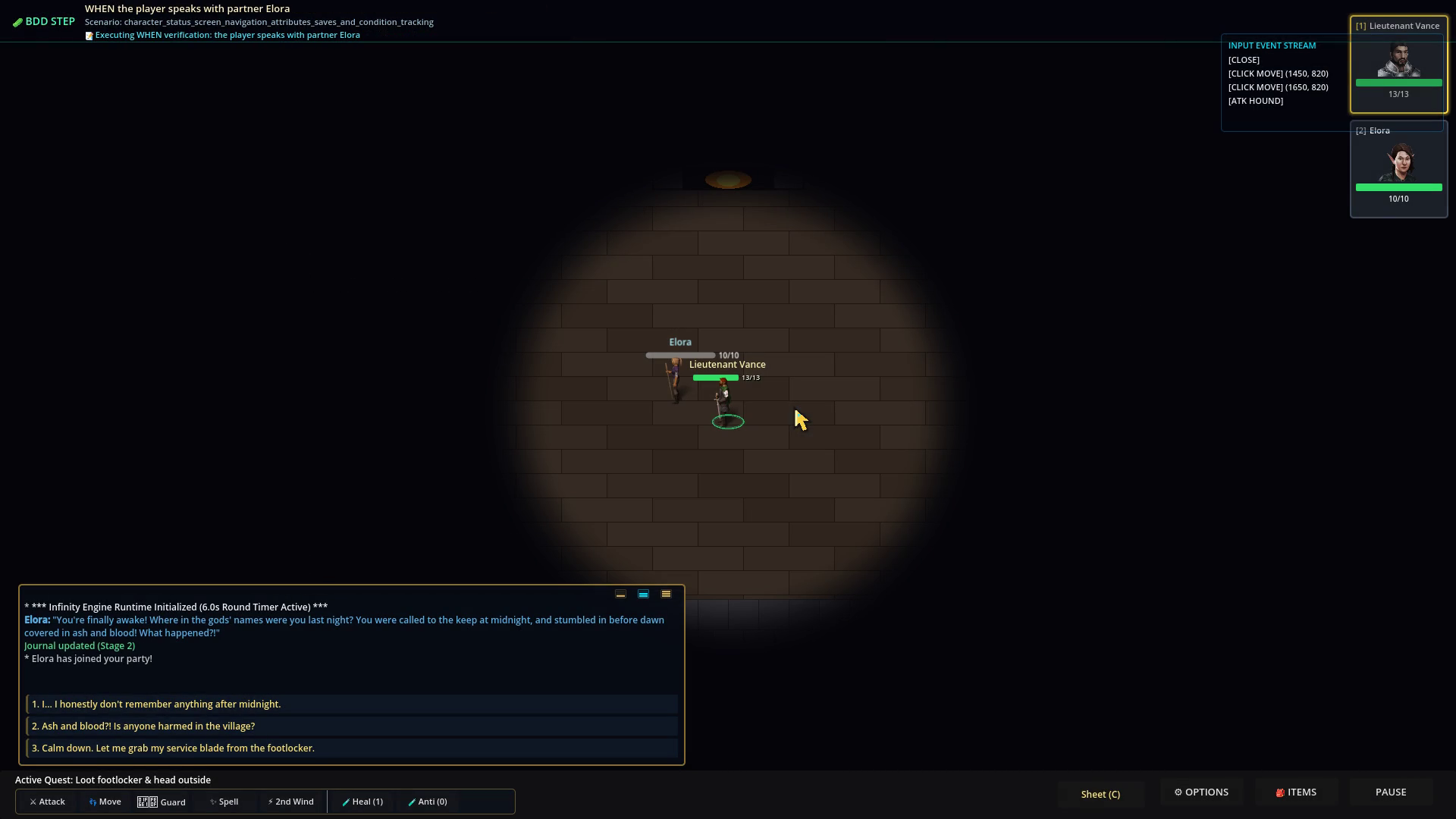
Figure 2: Complete D&D 5e Character Sheet tracking ability scores, modifiers, AC, saving throws, and status conditions.
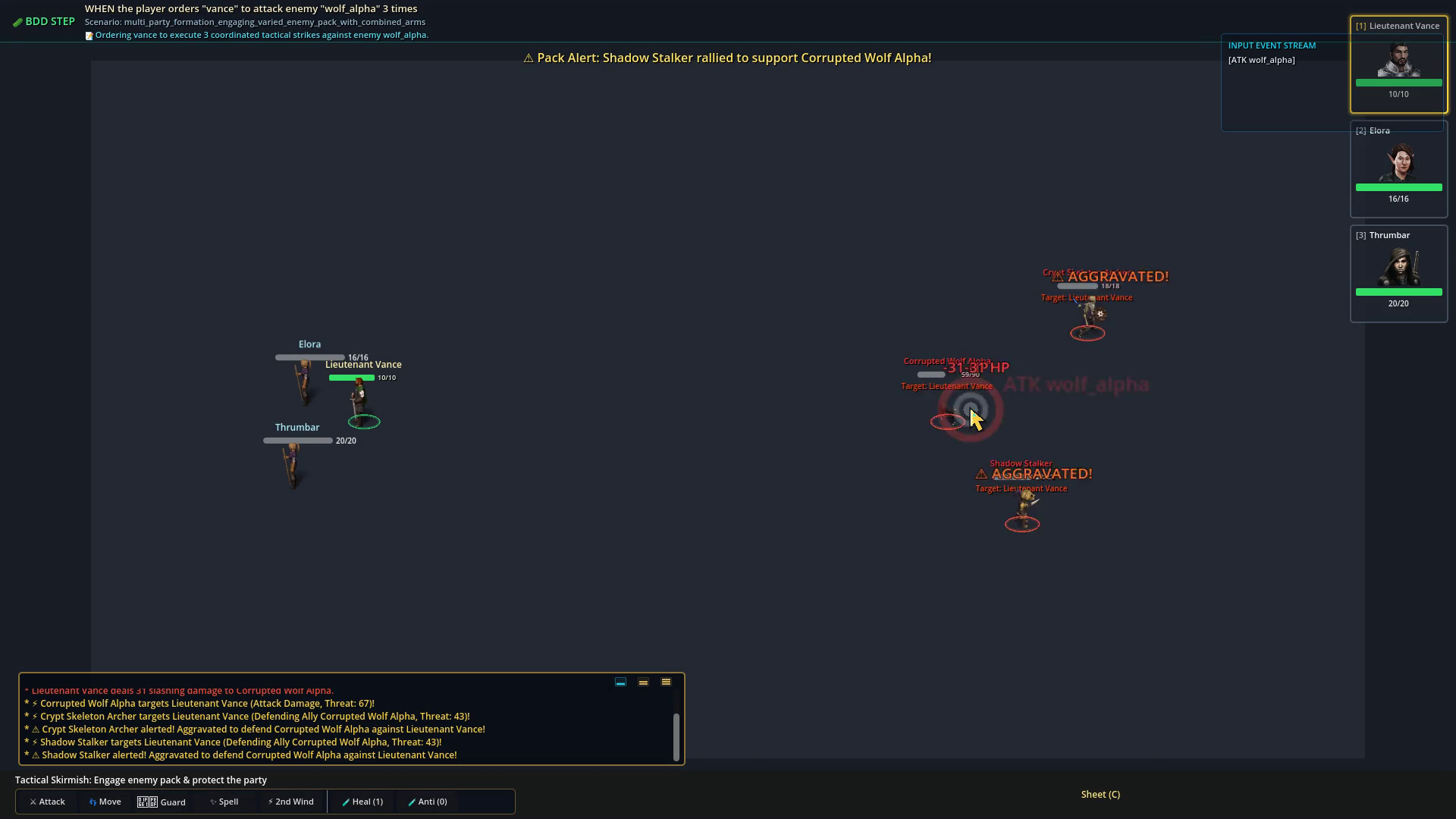
Figure 3: Tactical combat battlefield showing active threat aggro indicators, round progress timers, and spell targeting.
3. Module 2: Godot 4.3 Engine Runtime & 2.5D Isometric World
Why Godot 4.3 GL Compatibility Profile?
The engine uses Godot’s GL Compatibility (OpenGL 3.3 / ES 3.0 / WebGL 2.0) renderer rather than Vulkan Forward+:
- Zero Shader Stutter: OpenGL eliminates the infamous pipeline compilation freeze present in modern Vulkan pipelines.
- Headless Virtual Framebuffer Stability: Runs flawlessly inside Docker containers and headless Xvfb displays (
:99) without requiring expensive hardware GPUs. - Cross-Platform Parity: Identical rendering across Linux, macOS, Windows, and lightweight dev machines.
2560×1440 Pre-Rendered Plates & 1920×1080 Viewport Clamping
Maps are constructed using ultra-detailed 2560×1440 pre-rendered background plates (village_open_world_2560.png, Homestead.tscn, WhisperingForest.tscn). The player camera viewport runs at 1920×1080 native resolution, smoothly interpolating and clamping to map boundaries:
# Camera2D Boundary Clamping in Godot 4
func _process(delta: float) -> void:
    if target_hero:
        var target_pos = target_hero.global_position
        global_position = global_position.lerp(target_pos, delta * 5.0)
        global_position.x = clamp(global_position.x, 960, 2560 - 960)
        global_position.y = clamp(global_position.y, 540, 1440 - 540)
Physical Collision Geometry (Layer 1)
Every building in Oakhaven is a true physical obstacle with a StaticBody2D collider on Layer 1, preventing characters from walking through solid walls:
| Building Name | Node Name | Footprint Dimensions | Map Coordinates | Door Transition ID |
|---|---|---|---|---|
| The Rusty Dragon Inn | HouseInn | $360 \times 180\text{ px}$ | $(410, 640)$ | door-id-inn |
| Town Hall & Guildhouse | HouseTownHall | $320 \times 260\text{ px}$ | $(1090, 330)$ | door-id-townhall |
| Brand’s Forge & Armory | HouseBlacksmith | $220 \times 140\text{ px}$ | $(1520, 460)$ | door-id-blacksmith |
| Maybelle’s Remedies | HouseApothecary | $280 \times 140\text{ px}$ | $(1810, 600)$ | door-id-apothecary |
| Farmer Giles’ Cottage | HouseCottage | $240 \times 190\text{ px}$ | $(140, 1120)$ | door-id-farmhouse |
| Elder Martha’s Cottage | HouseElderCottage | $280 \times 180\text{ px}$ | $(670, 1340)$ | door-id-elder |
| Royal Guard Barracks | HouseBarracks | $340 \times 220\text{ px}$ | $(1620, 1250)$ | door-id-barracks |
| Ranger Kaelen’s Lodge | HouseRangerLodge | $320 \times 200\text{ px}$ | $(1990, 990)$ | door-id-ranger |
| Sister Althea’s Shrine | HouseShrine | $240 \times 200\text{ px}$ | $(2310, 340)$ | door-id-shrine |
| Miller Hob’s Windmill | HouseMill | $220 \times 220\text{ px}$ | $(2330, 130)$ | door-id-mill |
| Northern Garrison Gate | GarrisonGate | $400 \times 120\text{ px}$ | $(1280, 220)$ | door-id-1 |
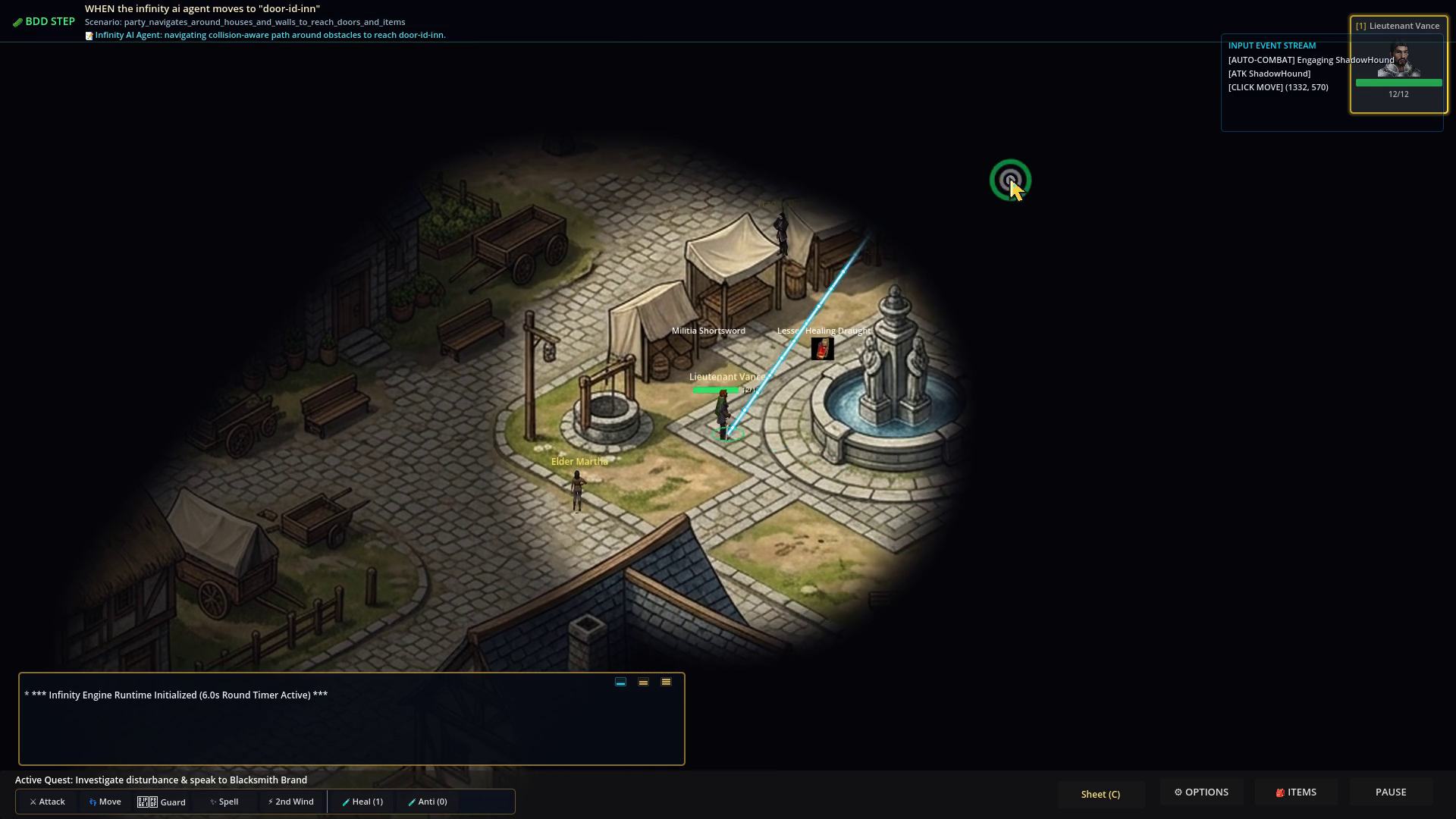
Figure 4: Physical house footprints blocking movement; party routes through safe street corridors.
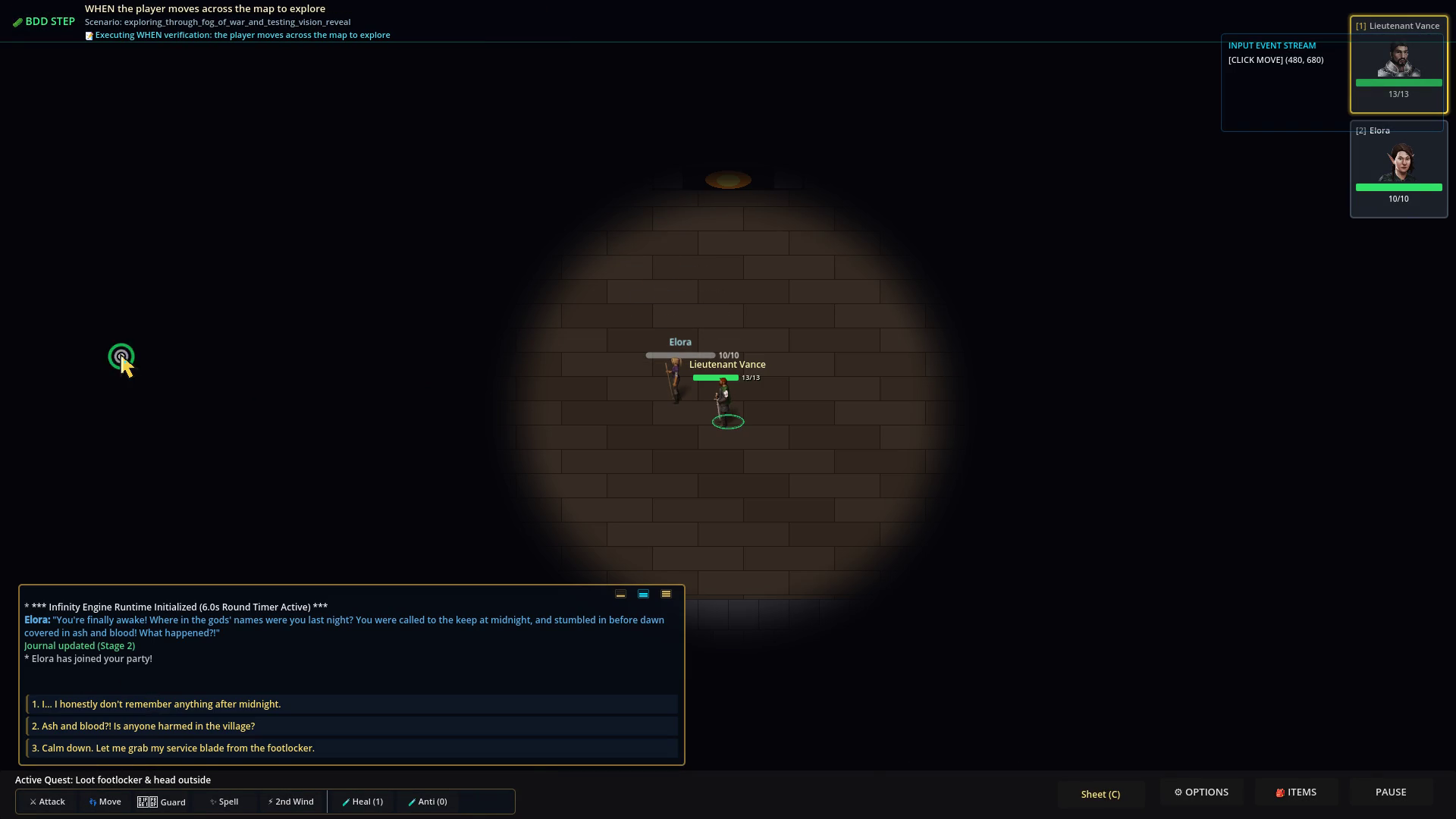
Figure 5: Custom dynamic Fog of War shader revealing shrouded terrain as heroes advance.
4. Module 3: Open-Source Asset Harvesting & Infinity Engine HUD Replica
100% Genuine Open-Source Creative Commons Pipeline
No copyrighted Bioware or Wizards of the Coast assets are used. RobOS sources all visual assets from:
- Flare RPG (
flareteam/flare-game): CC-BY-SA 3.0 animated 8-directional isometric characters (walk, attack, take damage, death animations) and modular paperdoll items (armor, robes, swords, shields, bows). - Game-Icons.net: Over 4,000 CC-BY 3.0 vector SVG icons for abilities, spellbooks, inventory, and status buffs.
- OpenGameArt.org: CC0/CC-BY sound effects for sword impacts, spell chanting, and UI clicks.
Three-Mode Expandable Activity Log
The game replicates the iconic Infinity Engine console at the bottom of the screen with three reactive expansion tiers:
graph LR
    ModeSmall["Small Mode (124px)<br/><i>Compact Combat & Telemetry Log</i>"] -->|Click Expand / Talk NPC| ModeMed["Medium Mode (240px)<br/><i>In-Log Numbered Dialogue Trees</i>"]
    ModeMed -->|Click History| ModeLarge["Large Mode (420px)<br/><i>Full d20 Roll Breakdown & Quest Journal</i>"]
    ModeLarge -->|Click Minimize| ModeSmall
Dialogue choices are presented directly inside the activity log, allowing keyboard selection (1–9) or direct mouse clicks without intrusive full-screen popups:
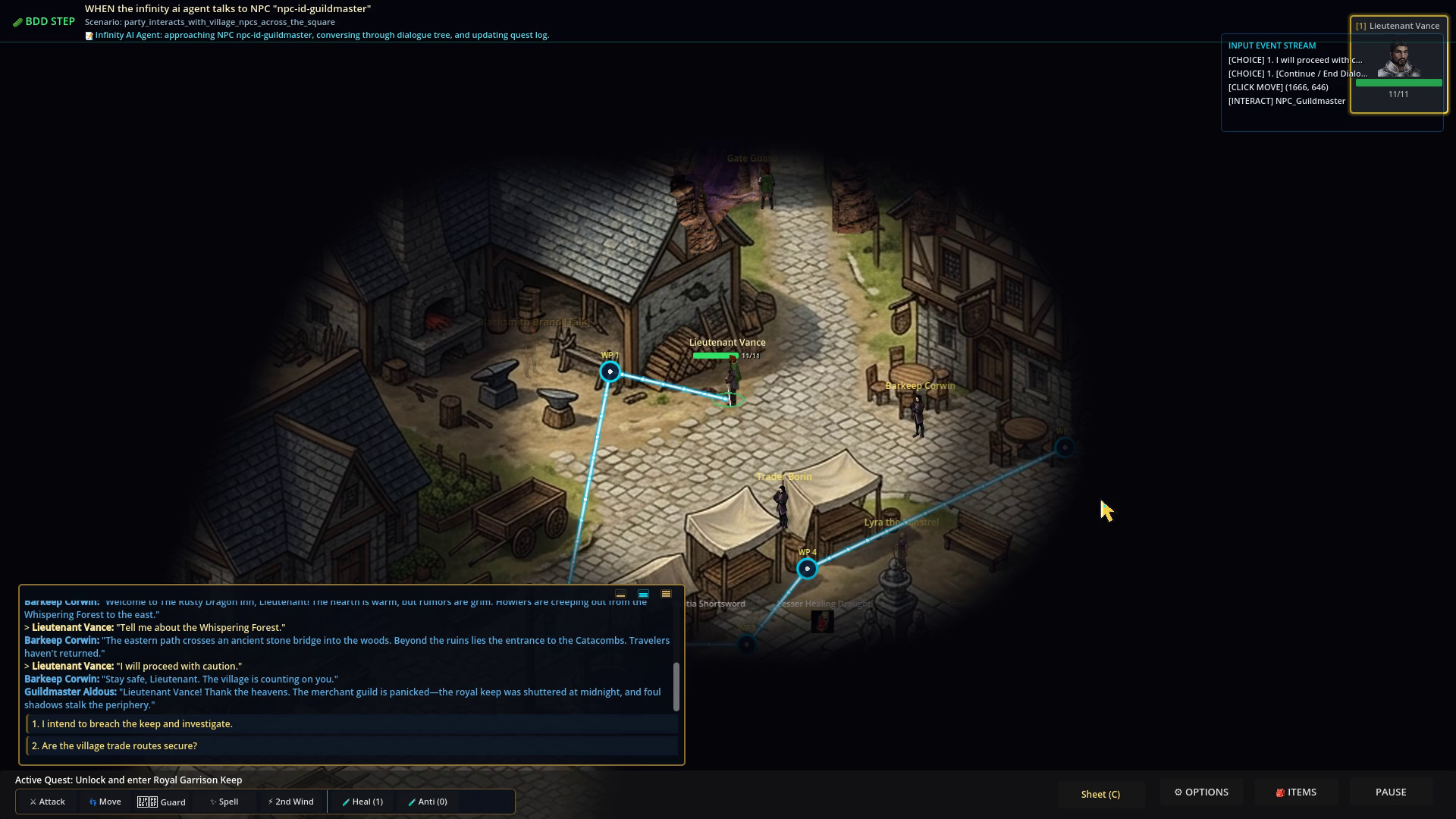
Figure 6: Multi-branch dialogue with Blacksmith Brand inside the 240px Activity Log showing numbered options and NPC facing.
5. Module 4: Autonomous Infinity AI Agent & Headless BDD Verification
The Infinity AI Agent (qa_player/infinity_ai_agent.py)
Rather than relying on human clickers or brittle hardcoded input recordings, RobOS features an autonomous decision-making agent capable of playing through the entire 5-Act campaign from character creation to defeating Captain Malakor.
flowchart TD
    Scan["Perception Scan: Query Proximity Entities via GET /api/v1/state"] --> CheckThreat{"Enemy within 140px Proximity Trigger?"}

    CheckThreat -- Yes --> AlertPack["Trigger 200px Pack Alerting Radius"]
    AlertPack --> PauseGame["Spacebar: Enter Tactical RTwP Pause"]
    PauseGame --> RoleTactics{"Assign Role-Based Orders"}

    RoleTactics -- Fighter --> Intercept["Move to Intercept Nearest Hostile & Taunt (Peel)"]
    RoleTactics -- Rogue --> Standoff["Maintain 180px Standoff Bow Range"]
    RoleTactics -- Wizard --> CastSpell["Cast Magic Missile / Fireball at Highest Threat Target"]
    RoleTactics -- Cleric --> CheckHP{"Any Companion HP < 40%?"}

    CheckHP -- Yes --> Heal["Cast Cure Wounds on Critical Ally"]
    CheckHP -- No --> Smite["Cast Sacred Flame on Frontline Enemy"]

    Intercept --> Unpause["Spacebar: Resume Simulation"]
    Standoff --> Unpause
    CastSpell --> Unpause
    Heal --> Unpause
    Smite --> Unpause

    CheckThreat -- No --> Explore{"Active Quest Waypoint Remaining?"}
    Explore -- Yes --> Route["Execute Pathfinder.gd Obstacle-Avoidance Corridors"]
    Explore -- No --> TalkNPC["Approach NPC and Trigger Numbered In-Log Dialogue Choice"]
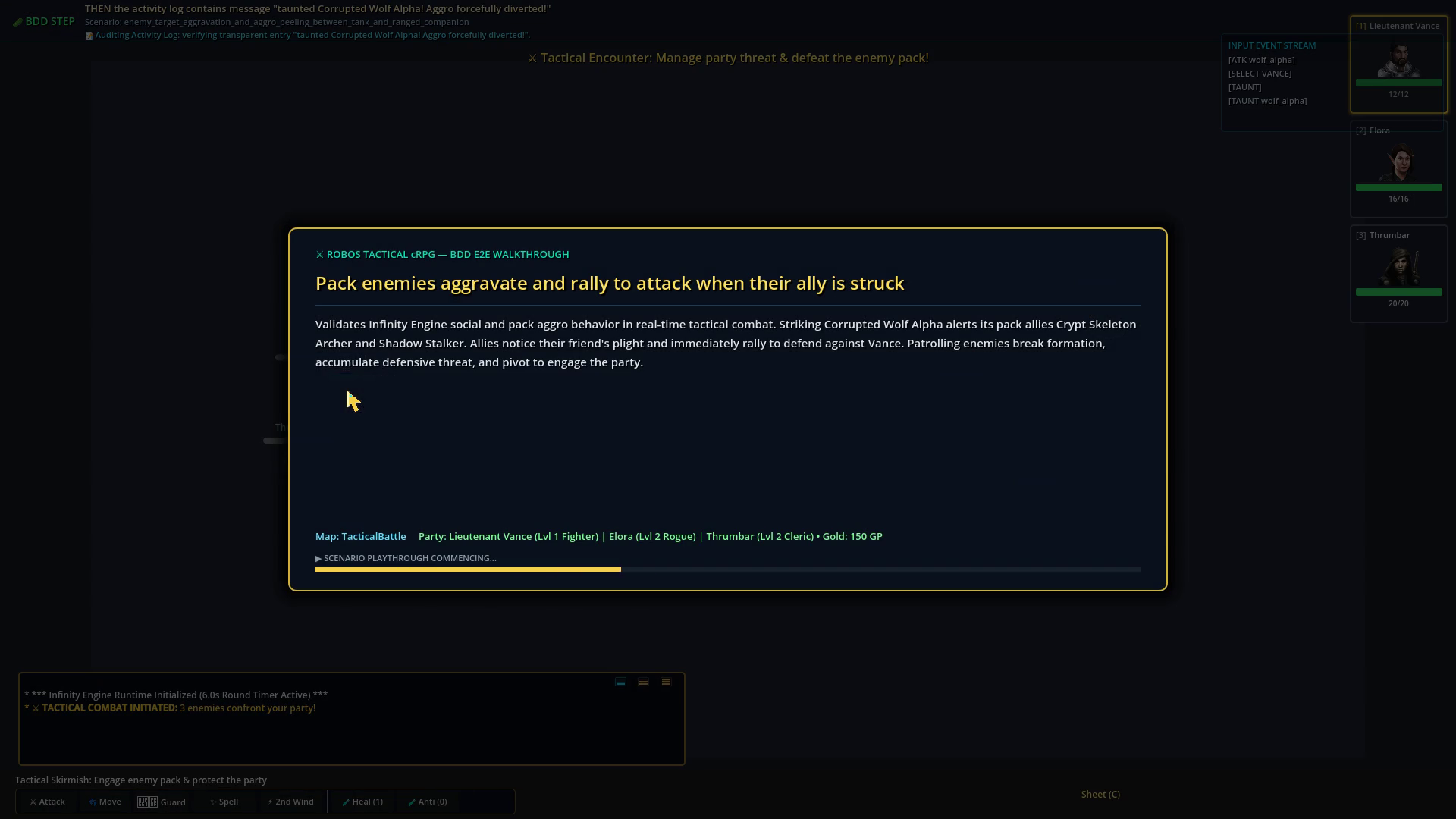
Figure 7: BDD scenario verifying enemy pack aggro alerting and frontline fighter peeling.
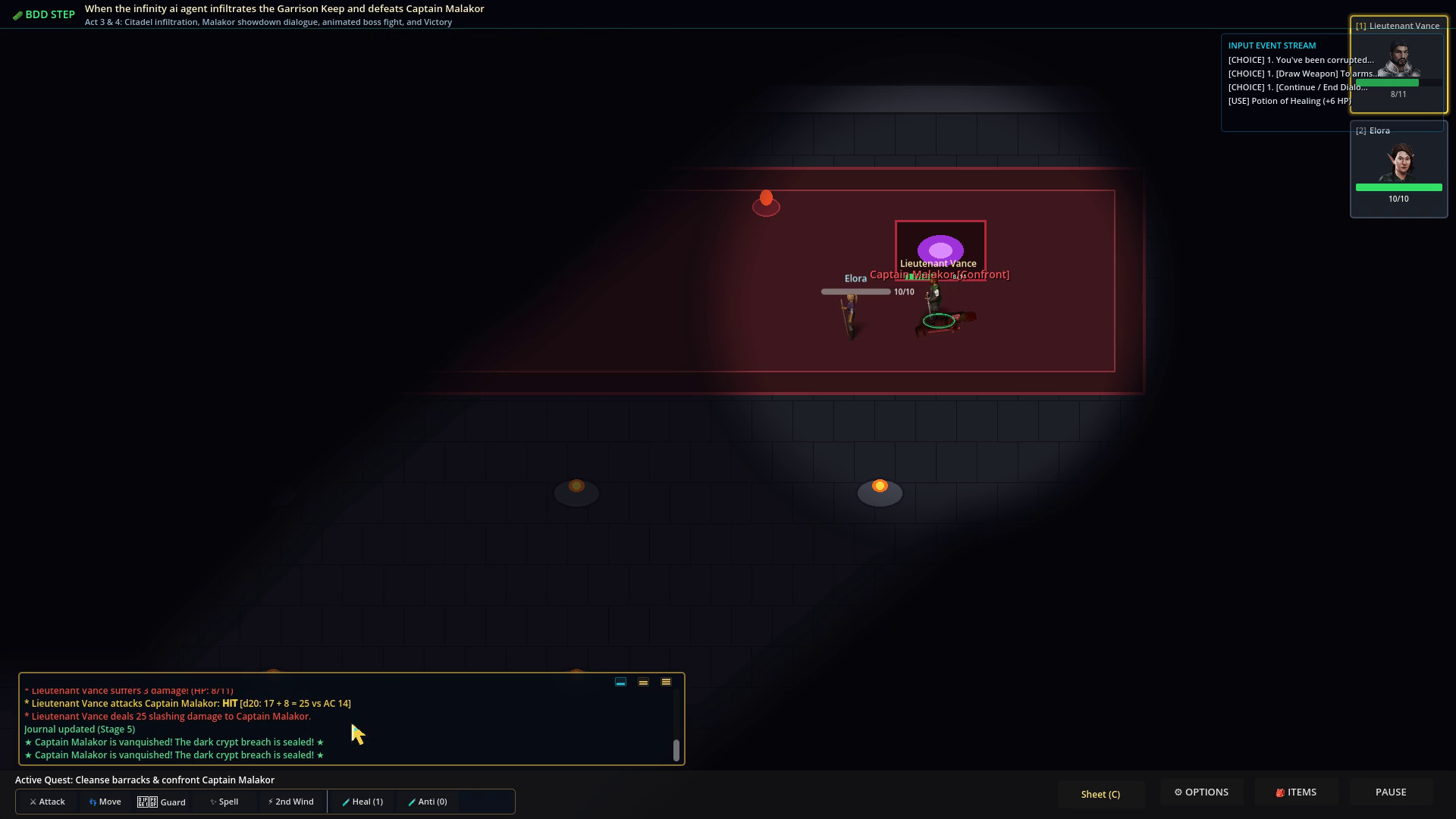
Figure 8: Autonomous campaign completion reached with 100% test pass rate across 482 steps.
6. Module 5: Knowledge Graph-First Game Architecture (.robos/kgraphs/crpg)
The 4-Phase Generation Pipeline
graph TD
    Phase1["Phase 1: Ontological Modeling<br/><i>.robos/kgraphs/crpg/package.jsonld & W3C SHACL Shapes</i>"] --> Phase2["Phase 2: Schema & Data Store Layer<br/><i>schemas/v1/*.json & games/crpg-realm/data/v1/*.json</i>"]
    Phase2 --> Phase3["Phase 3: Open-Source Asset Harvesting<br/><i>Flare RPG CC-BY-SA Sprites & Game-Icons.net SVGs</i>"]
    Phase3 --> Phase4["Phase 4: Scene & Systems Composition<br/><i>Godot 4.3 GL Compatibility & DataStoreV1.gd Singletons</i>"]
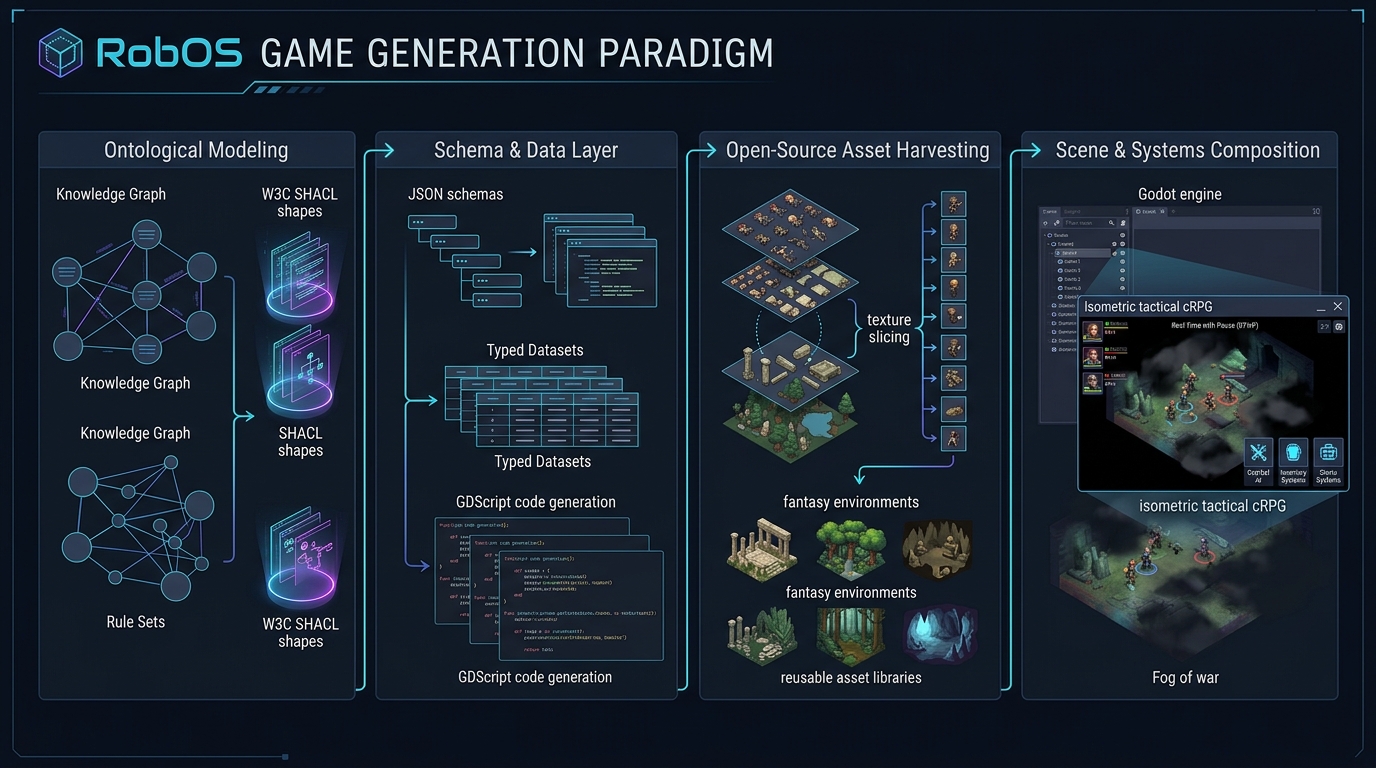
Figure 9: The 4-Phase RobOS Knowledge Graph-First Game Generation Paradigm.
Strict Zero-Hardcoding Rule
In RobOS, no game stats, monster health values, spell formulas, or dialogue trees may be hardcoded into engine scripts. Everything is defined in .robos/kgraphs/crpg/package.jsonld and JSON Schemas under schemas/v1/, which compile directly to typed GDScript singletons under src/generated/v1/DataStoreV1.gd:
# Auto-generated statically-typed DataStoreV1.gd
class_name DataStoreV1
extends Node

static func get_class_data(class_id: String) -> Dictionary:
    match class_id:
        "fighter":
            return {
                "hit_die": 10,
                "primary_ability": "STR",
                "saving_throws": ["STR", "CON"],
                "base_hp": 12
            }
        "wizard":
            return {
                "hit_die": 6,
                "primary_ability": "INT",
                "saving_throws": ["INT", "WIS"],
                "base_hp": 7
            }
    return {}
7. Interactive Hands-On Labs & Certification
You can launch and complete this full course interactively inside the RobOS eLearning Hub or online via GitHub Pages:
- 🌐 Interactive Web Edition: www.rowbose.com/projects/crpg-realm/elearning/
- 🖥️ Desktop Player: ```bash
Launch central eLearning player loaded to the cRPG Masterclass
electron packages/robos-elearning –course=robos-crpg
Or launch the dedicated standalone desktop app
electron packages/robos-crpg-elearning ```
Upon completing all 5 module labs and passing each module’s knowledge check with $\ge 80\%$, the system automatically issues a cryptographically verified RobOS Knowledge Graph Certificate of Completion conforming to schema:EducationalOccupationalCredential.