System Architecture (How RobOS Works Under the Hood)
The 8 architectural pillars, the Dual-State Comparison Engine, multi-app archetypes, and the secure desktop bridge powering RobOS.
Table of contents
- The 8 Pillars of RobOS
- Today vs. Tomorrow (The Dual-State Engine)
- Fast, Secure Desktop Bridge
- Next Steps
The 8 Pillars of RobOS
RobOS structures all development lifecycle information into 8 connected, plain-text categories stored directly in your Git repositories:
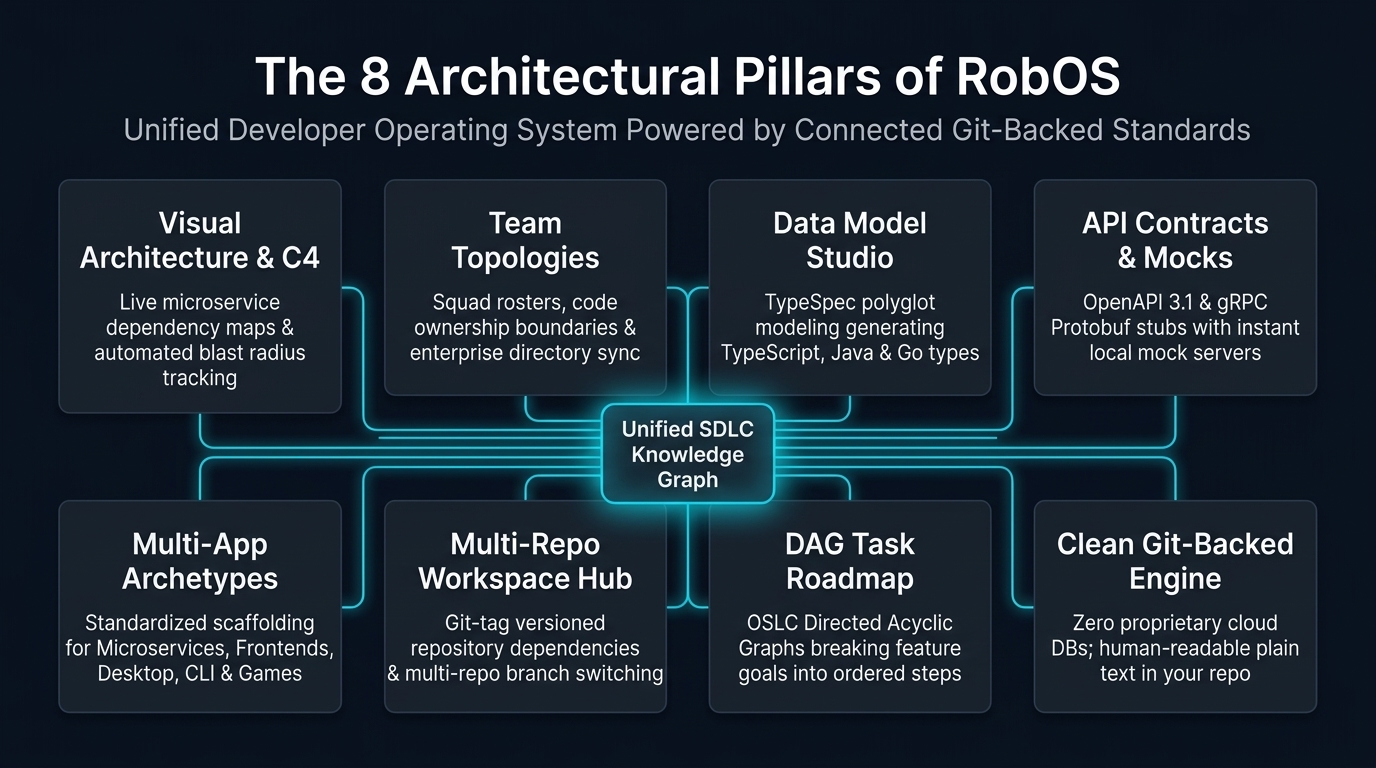
- Visual Architecture & Service Map: Visualizes all microservices, frontends, databases, and message queues with live dependency maps and blast radius impact tracking.
- Team Roster & Team Topologies: Clear directory of engineering squads (stream-aligned, platform, enablement, complicated-subsystem), service ownership, and enterprise directory sync (Okta, Azure AD, LDAP) stored in
.robos/teams.yaml. - Data Model Studio (TypeSpec): Define domain data models once and generate TypeScript, Java, and Go types automatically.
- API Contracts & Mock Servers: Define REST APIs (OpenAPI 3.1), gRPC Protobuf, and event streams with live mock servers for instant testing.
- Multi-App Archetypes & Packages: Standardized scaffolding and runtime definitions across 9 archetypes (
robos:Microservice,robos:FrontEndApp,robos:DesktopApp,robos:PCGame,robos:MobileGame,robos:ConsoleApp,robos:MobileApp,robos:DataPipeline,robos:Library) stored in.robos/packages.yaml. - Multi-Repo Workspace Hub: Switch between Git branches across multiple repositories simultaneously without duplicate disk storage.
- Step-by-Step Task Roadmap: Breaks high-level feature goals down into a clean checklist of prerequisite and dependent tasks (OASIS OSLC Change Management).
- Clean Git-Backed Files: Everything is saved in human-readable plain text files across Modular KGraph Packages under
.robos/(teams.yaml,packages.yaml,topology.yaml) with zero proprietary cloud databases.
Deep Dive: For the complete breakdown of packages, namespaces, Git-tag version pinning, and the zero-plaintext GPG password store vault, see the dedicated SDLC Knowledge Graph Guide.
Today vs. Tomorrow (The Dual-State Engine)
Traditional developer tools only understand the files currently on your laptop. RobOS tracks two versions of your system at the same time:
- World 1 (Live Production
main): What is running in production right now — deployed services, active API contracts, and live databases. - World 2 (Your Feature Branch): What the system will look like once your feature branch merges.
RobOS automatically computes the difference between the two states:
- Breaking API Changes: Flagged before any code is written via Spectral and SHACL validators.
- Missing Database Migrations: Caught and planned upfront.
- Affected Downstream Apps: Automatically identified so you can update client apps before releasing.
- Living Documentation Sync: System documentation (
docs/) and interactive training courses (.robos/elearning.yaml) are updated in lockstep with architectural changes.
Fast, Secure Desktop Bridge
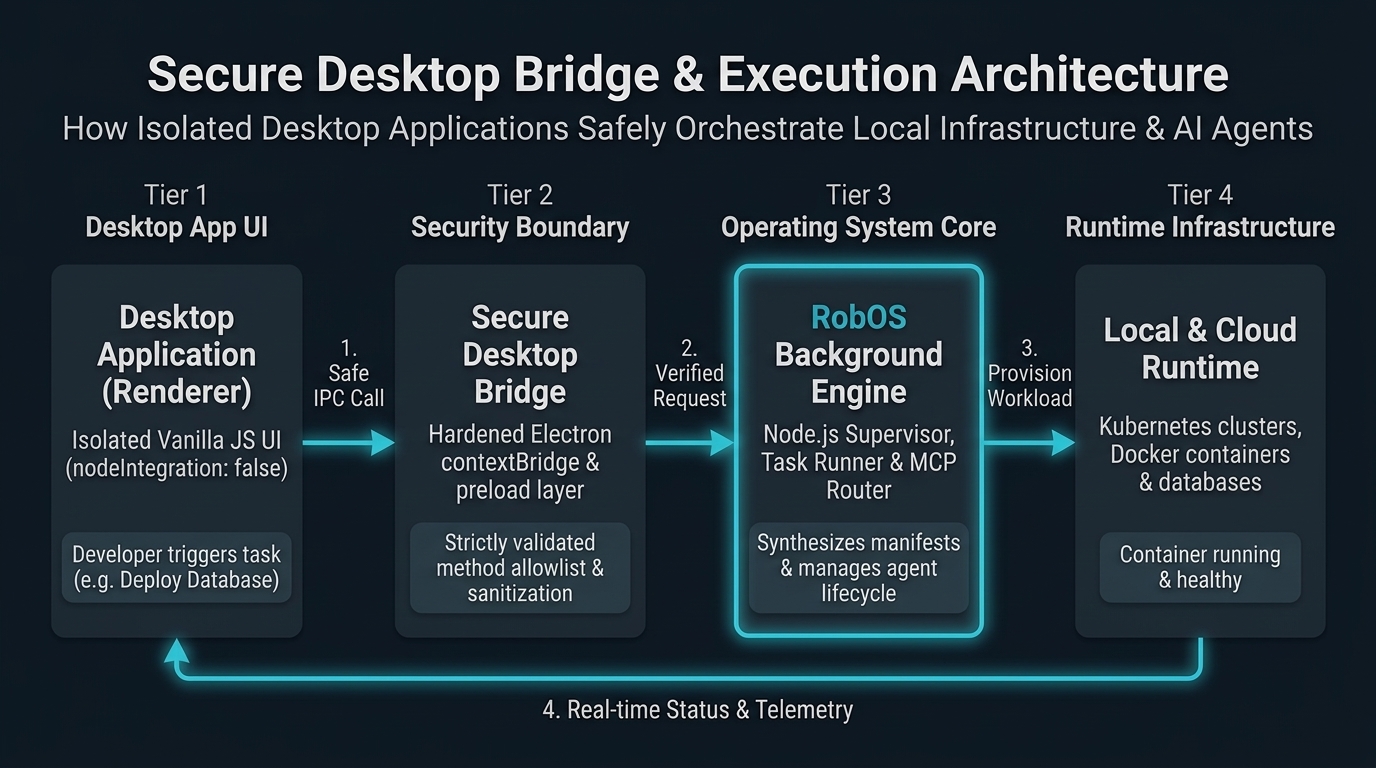
RobOS applications are built using lightweight vanilla JavaScript and Electron, communicating through secure desktop channels:
Shared System Libraries (/usr/local/share/robos/)
robos-lib: Desktop application management,.desktopfile parsers, and live visual testing tools (snapshot-cli.js).robos-icons: Central SVG icon registry for all RobOS applications.robos-graph: Open-standard OASIS OSLC 3.0 / W3C JSON-LD architecture parser, SHACL validator, and dual-state difference engine.robos-test: Containerized headless test fabric (Xvfb + Picom), automated DOM assertions, and neural text-to-speech voiceover generator (Piper TTS).robos-mcp-router: Fast tool router connecting AI models (Claude, Antigravity, Copilot, Gemini) to local developer tools.
Core Architectural Applications
- RobOS App Wizard (
packages/app-wizard): Scaffolds greenfield apps and ingests brownfield codebases across 9 multi-app archetypes with Spotify Backstagecatalog-info.yamlsynthesis and runnabledev-setup.sh. - RobOS Group Manager (
packages/group-manager): Enterprise directory sync (SCIM 2.0, Okta, Azure AD, LDAP) and Team Topologies management with active identity cards and role-based access control.Universal Knowledge Graph Data Backing (Zero Unbacked Data)
Every application in the RobOS 30+ suite is backed by the SDLC Knowledge Graph (
SDLCKnowledgeGraphStore): - Databases & Caches:
db-manager,nosql-manager, anddata-sourcespersist relational and NoSQL datastores asrobos:Databaseandrobos:NoSQLDatabasenodes in thecore-platformpackage with W3C SHACL shape enforcement. - Microservices & APIs: OpenAPI 3.1 contracts, Protobuf gRPC definitions, and GraphQL schemas are linked directly to
robos:Microservicenodes. - Cloud & Kubernetes:
kube-studioreconciles clusters (robos:KubernetesCluster) and GitOps applications (robos:GitOpsDeployment) in thedevopspackage. - AI Tooling & Context:
mcp-manager(robos:MCPServer),agents-manager(robos:AgentPersona),task-servers(robos:TaskServer), andcontext-manager(robos:ContextSource) are first-class ontology nodes. - Zero Plaintext Credentials: All credentials across all apps link to UNIX
passpassword-store paths viarobos:hasCredential(urn:robos:credential:...).
Next Steps
- RobOS Main Wins: Discover core architectural innovations and strategic advantages.
- Browse All 30+ Apps: Explore detailed specifications for every application in the suite.
- 💡 Explore the Ideas Store on GitHub: View raw idea dumps, community feature proposals, and structured architecture specs.