New Company Greenfield Setup in RobOS
How greenfield startups and new software engineering organizations initialize RobOS from day one: 5-minute company bootstrap, initial root administrator provisioning, foundational team topologies, greenfield VCS organization setup, central AI provider model tiering, and starter C4 architecture.
Table of contents
- Overview: The 5-Minute Startup Bootstrap
- Step 1: Company Profile & Root Administrator Initialization
- Step 2: Scaffolding Foundational Team Topologies & Knowledge Graph
- Step 3: Greenfield VCS Organization Setup
- Step 4: Central AI Provider & Shared MCP Registry
- Step 5: Starter C4 Architecture & Knowledge Graph
- E2E Walkthrough & Proof of Work
- Next Steps
Overview: The 5-Minute Startup Bootstrap
Starting a new software company traditionally involves weeks of friction: creating accounts on disparate platforms, copying .env secrets insecurely over chat, arguing about directory layouts, and manually writing boilerplate CI configurations.
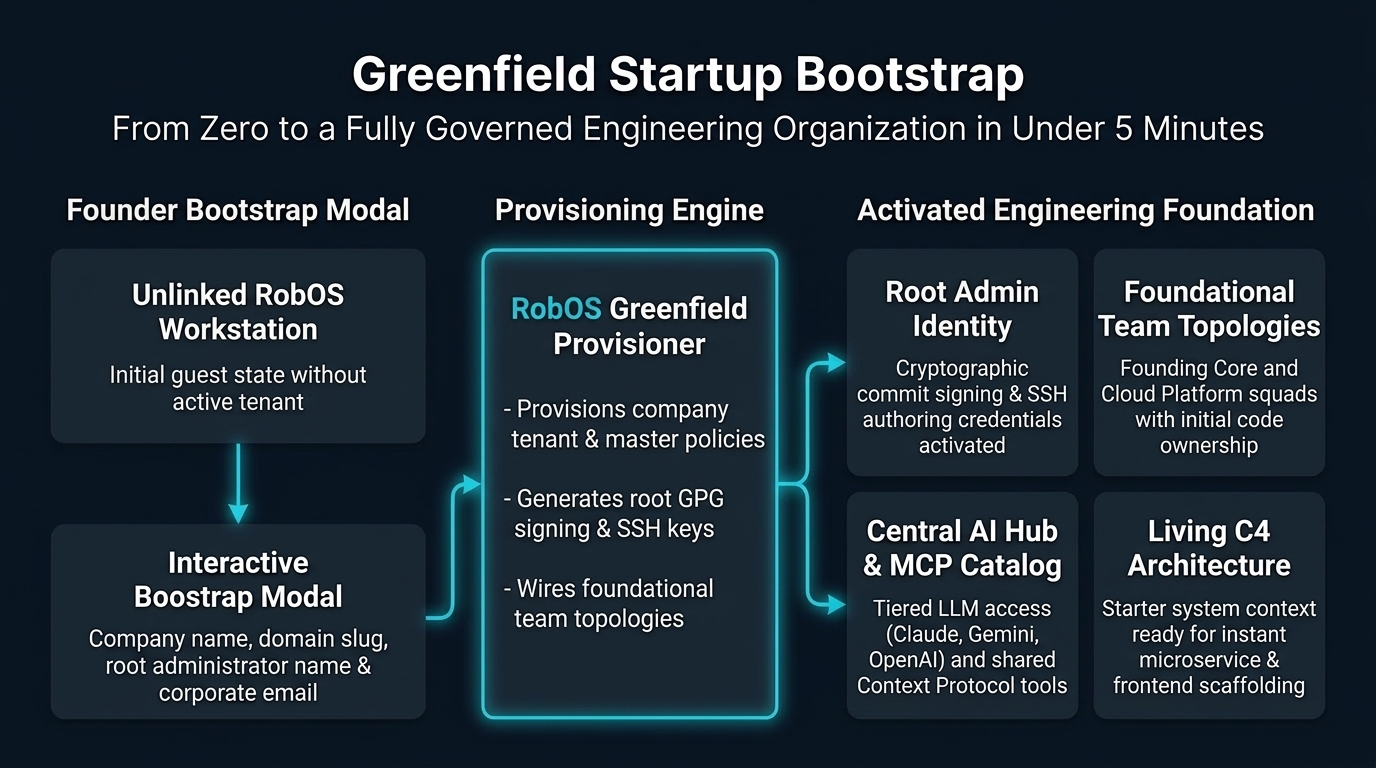
RobOS changes this with a unified Greenfield Company Bootstrap Wizard. In under 5 minutes, a technical founder or founding engineer establishes:
- Company Identity & Root Admin: Setting the organization domain, tenant metadata, and master administrator credentials.
- Foundational Team Topologies: Structuring startup teams (Founding Core Engineering, Cloud Platform) directly into
.robos/teams.yaml. - Greenfield VCS Organization: Connecting or creating a GitHub Organization or internal Gitea instance with standardized branch protection.
- Central AI Hub & Shared MCP Tools: Centralizing LLM API keys (Anthropic Claude, Google Gemini/Antigravity, OpenAI) and configuring shared Model Context Protocol servers.
- Baseline Security & Starter Architecture: Generating corporate cryptographic signing keys and an initial C4 Level 1 (System Context) Knowledge Graph.
Step 1: Company Profile & Root Administrator Initialization
Starting a greenfield company begins with declaring who you are and defining your company tenant. In Group Manager (packages/group-manager), founders do this directly through the interactive Greenfield Company Bootstrap Wizard:
1. Interactive Bootstrap Wizard
- Inspect Identity State: Group Manager displays an unlinked badge (
No Tenant / Unlinked). - Open Bootstrap Wizard: Click 🚀 Bootstrap in the sidebar.
- Configure Company & Root Administrator:
- Company Legal Name:
Acme Cloud Innovations - Domain Name / Slug:
acmecloud.io - Root Administrator Full Name:
Alex Rivera - Root Admin Corporate Email:
alex@acmecloud.io - Root Admin Role:
Chief Architect & VP Engineering
- Company Legal Name:
- Execute Bootstrap: Click Bootstrap Organization & Activate Admin.
2. Administrator Identity & Keyring Provisioning
RobOS immediately:
- Stores tenant configuration in
~/.config/robos/company.json:{ "name": "Acme Cloud Innovations", "domain": "acmecloud.io", "slug": "acme-cloud", "founded": "2026", "createdAt": "2026-09-05T17:45:35Z" } - Activates your root administrator identity in
~/.config/robos/identity.jsonand~/.config/robos/people/admin.json:{ "uid": "admin", "displayName": "Alex Rivera", "name": "Alex Rivera", "email": "alex@acmecloud.io", "role": "Chief Architect & VP Engineering", "isRootAdmin": true, "company": "Acme Cloud Innovations", "team": "founding-core", "createdAt": "2026-09-05T17:45:35Z" } - Sets global git author credentials (
git config --global user.name "Alex Rivera"anduser.email "alex@acmecloud.io"). - Updates the active identity badge in the UI to Alex Rivera · Chief Architect & VP Engineering · founding-core.
Step 2: Scaffolding Foundational Team Topologies & Knowledge Graph
Early-stage startups often make the mistake of assigning everything to everyone, leading to unclear code ownership and messy permissions. RobOS establishes clear Team Topologies from the start:
version: "1.0"
kind: TeamRoster
organization: "Acme Cloud Innovations"
domain: "acmecloud.io"
initializedAt: "2026-09-05T17:45:35Z"
teams:
  - id: founding-core
    name: Founding Core Engineering
    topology: stream-aligned
    lead: admin
    members:
      - id: admin
        name: Alex Rivera
        type: human
        role: Approver
  - id: cloud-platform
    name: Cloud Platform & Infrastructure
    topology: platform
    lead: admin
    members:
      - id: admin
        name: Alex Rivera
        type: human
        role: Approver
Modular KGraph Packages Registration
The bootstrap engine simultaneously registers the organization root admin and founding squads into the Modular KGraph Packages (organization package):
{
  "@id": "urn:robos:person:admin",
  "@type": ["oslc:Person", "robos:Developer"],
  "dcterms:title": "Alex Rivera",
  "robos:email": "alex@acmecloud.io",
  "robos:handle": "admin",
  "robos:role": "Chief Architect & VP Engineering",
  "robos:memberOf": "urn:robos:team:founding-core"
}
As the company scales and hires new engineers, additional stream-aligned teams (e.g., Mobile, Billing, Analytics) or platform teams are added to .robos/teams.yaml and the Knowledge Graph without altering security boundaries.
Step 3: Greenfield VCS Organization Setup
RobOS connects to your Git hosting provider:
- GitHub Organization: Connects via GitHub OAuth to create repositories and manage team permissions.
- Internal Gitea Instance: For privacy-focused or air-gapped startups, RobOS can deploy an internal Gitea server with zero external dependencies.
- Automated Branch Protection: Configures baseline branch protection rules on
main:- Require pull request reviews before merging.
- Require status checks to pass before merging.
- Require cryptographically signed commits.
Step 4: Central AI Provider & Shared MCP Registry
Individual API keys scattered across developer machines lead to billing headaches and security risks. RobOS centralizes AI model management:
- Central Model Providers: Configures shared corporate keys for:
- Anthropic Claude (Claude Sonnet 5 / Claude Opus 5)
- Google Gemini & Antigravity (Gemini 2.5 Flash / Gemini 2.5 Pro)
- OpenAI (GPT-5 / o3 / Codex)
- Local Ollama (offline DeepSeek, Llama)
- Shared MCP Tool Registry: Configures local Model Context Protocol servers:
system-mcp: OS and system resource management.task-manager-mcp: Issue backlog and sprint DAG dispatching.workspace-manager-mcp: Git worktree creation and repo orchestration.ide-bridge-mcp: Breakpoint debugging and IDE communication.
Step 5: Starter C4 Architecture & Knowledge Graph
RobOS automatically generates an initial C4 Level 1 (System Context) diagram in the Modular KGraph Packages (core-platform):
- Users: Target customers, administrators, and external API consumers.
- Software System: Acme Cloud Innovations platform boundary.
- External Dependencies: Payment providers, third-party auth, and cloud hosting.
This starter graph serves as the foundation for the visual architecture canvas in Topology Studio and ensures that as new microservices or frontend apps are created, they are automatically placed within the system context.
E2E Walkthrough & Proof of Work
See the complete, live end-to-end walkthrough video, audio narration, and verification logs:
Next Steps
- Develop a New App Guide: Scaffold a new application across 9 archetypes.
- RobOS Main Wins: Discover core architectural innovations and strategic advantages.
- 💡 Explore the Ideas Store on GitHub: View raw idea dumps, community feature proposals, and structured architecture specs.