New App Development Wizard
How application developers use the guided RobOS App Wizard (packages/app-wizard) to build brand-new applications from scratch across all 9 multi-app archetypes: Desktop Applications, Front End Applications, PC Games, Mobile Games, Microservices & Web APIs, Console CLIs, Mobile Apps, Data Pipelines, and Libraries.
Table of contents
- Overview: Fast Scaffolding Across 9 Archetypes
- Supported Multi-App Archetypes
- Step-by-Step Guided Creation Flow
- Generated Project Blueprint & Manifests
- Live E2E Video Walkthrough & Proof of Work
- How to Run the App Wizard E2E Demo Locally
- Next Steps
Overview: Fast Scaffolding Across 9 Archetypes
In conventional software development, creating a new application requires hours of tedious setup: stitching together boilerplate directories, writing Dockerfiles, creating local developer setup scripts (dev-setup.sh), setting up CI pipelines, configuring contract linting, and registering team ownership metadata.
The RobOS App Wizard (packages/app-wizard) eliminates this setup friction with a 4-step interactive wizard tailored to the application’s architectural archetype:
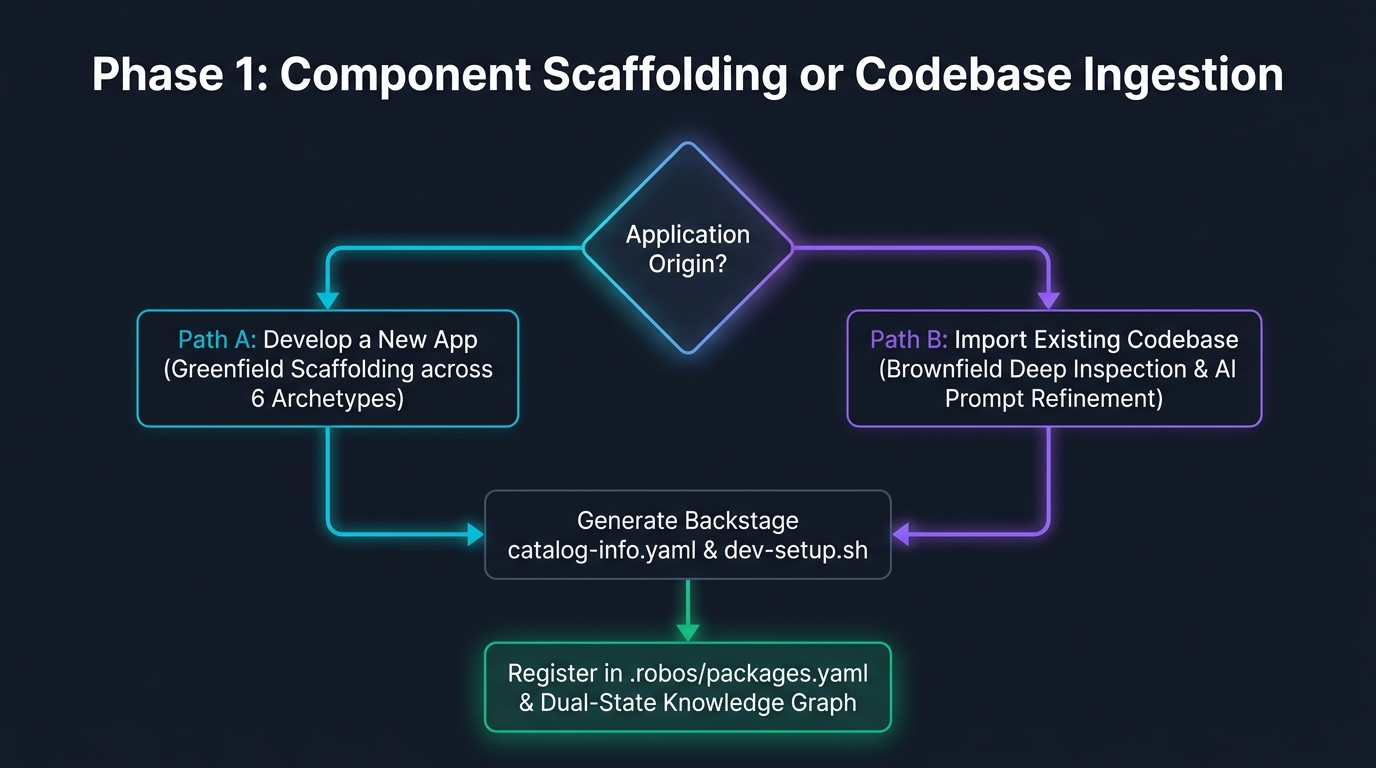
Supported Multi-App Archetypes
RobOS provides first-class support for 9 distinct software archetypes, each equipped with tailored scaffolding generators, runtime configs, and SDLC Knowledge Graph ontology definitions:
| Archetype | URN Format | Supported Technology Stacks | What RobOS Scaffolds |
|---|---|---|---|
robos:Microservice | urn:robos:microservice:<slug> | Java 21 / Spring Boot 3, Node / Express, Go Gin, Python FastAPI | OpenAPI 3.1 YAML contract, Prism mock server, Dockerfile, dev-setup.sh, Backstage manifest, Pact consumer test harnesses |
robos:FrontEndApp | urn:robos:frontend-app:<slug> | React 18, Vite, Next.js 14, Vue 3, Svelte | SPA/SSR application scaffold, Vite build config, TypeSpec client stubs, mock API proxy, dev-setup.sh |
robos:DesktopApp | urn:robos:desktop-app:<slug> | Electron 29, Tauri, Qt / C++ | .desktop file registration, DOM snapshot debugging port (19100+), Lucide vector icon, window manager configs |
robos:PCGame | urn:robos:pc-game:<slug> | Unreal Engine 5, Unity 6, Godot 4.2, Bevy | Desktop PC game project manifest, engine build profiles, DirectX 12/Vulkan profiles, asset pipeline configs |
robos:MobileGame | urn:robos:mobile-game:<slug> | Unity 6, Unreal Engine 5, Godot 4.2 | Mobile game workspace, iOS/Android build profiles, mobile mock server, touch input bindings, asset bundle configs |
robos:ConsoleApp | urn:robos:console-app:<slug> | Go Cobra, Rust Clap, Python Click, Node Commander | Command-line parser, subcommands & flags schema, shell auto-completion (zsh/bash), man pages, executable build scripts |
robos:MobileApp | urn:robos:mobile-app:<slug> | React Native, Flutter, iOS Swift, Android Kotlin | Mobile project config, simulator runner configs, deep-link URI schemes, mock API client |
robos:DataPipeline | urn:robos:pipeline:<slug> | Apache Kafka Streams, Celery, Apache Spark | AsyncAPI event schemas, Kafka broker docker-compose, event consumer/producer stubs |
robos:Library | urn:robos:library:<slug> | TypeScript/NPM, Python/PyPI, Rust/Crates, Java/Maven | Multi-target compilation configs, semantic release pipeline, living documentation generator |
Step-by-Step Guided Creation Flow
The following walkthrough demonstrates scaffolding a production-ready Payment Gateway API microservice using the live RobOS App Wizard.
Step 1: Select Application Archetype
Launch the App Wizard from the RobOS App Launcher (search for “App Wizard” in the application grid or desktop dock), or launch it from the terminal:
electron packages/app-wizard
The developer chooses between the 9 available archetypes. Clicking an archetype card immediately selects the corresponding architectural archetype and configures downstream options:
| Step 1: Multi-Archetype Selection Grid |
|---|
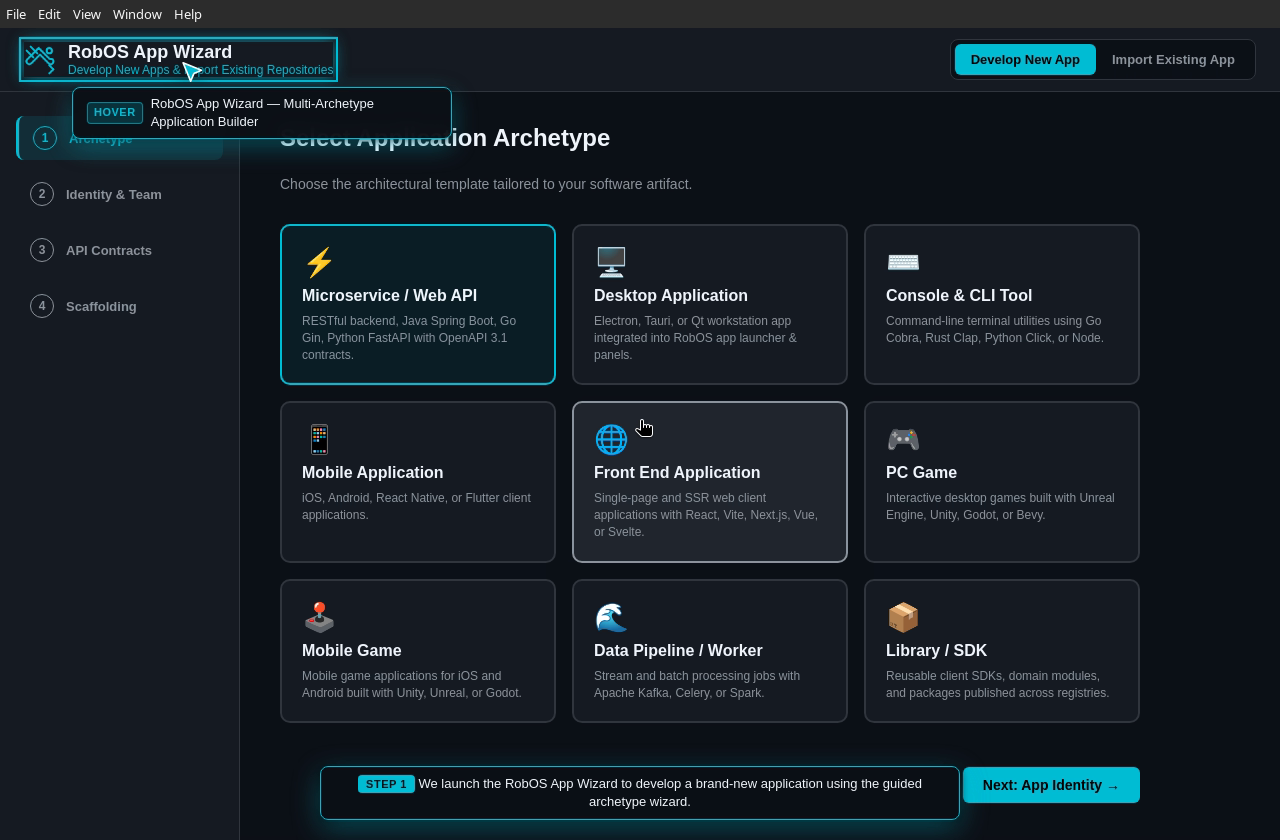 |
- Interactive Cards: High-visibility cards with archetype icons, titles, and concise technology descriptions.
- Archetype Binding: Sets
selectedArchetype(e.g.robos:Microservice,robos:FrontEndApp,robos:PCGame).
Step 2: App Identity & Team Ownership
In Step 2, the developer configures component identity, technology runtime, and organizational ownership:
| Step 2: App Identity & Ownership Configuration |
|---|
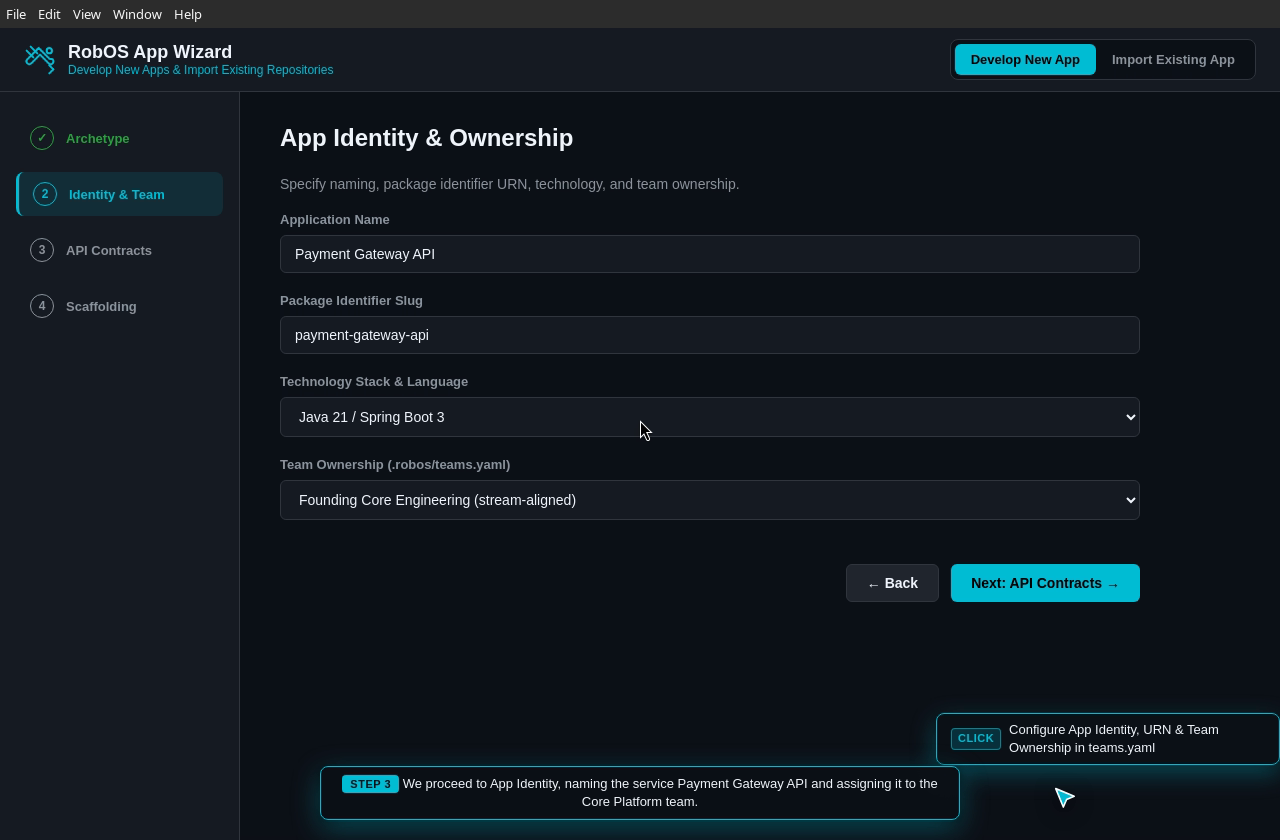 |
- Application Name: Human-readable name (e.g.
Payment Gateway API). - Package Identifier Slug: Lowercase hyphenated identifier (e.g.
payment-gateway-api). - Technology Stack & Language: Polyglot dropdown supporting Java 21 / Spring Boot 3, Node.js 20 / TypeScript / Express, Go 1.22 / Gin, Python 3.11 / FastAPI, Electron 29 / Vanilla JS, and Rust / Tokio.
- Team Ownership: Dynamic dropdown pulling active squads directly from
.robos/teams.yaml(e.g.Founding Core Engineering (stream-aligned)orPlatform Engineering (platform)), enforcing Team Topologies governance from day one.
Step 3: Contract & API Specification
RobOS enforces contract-first development. Before writing business logic, the developer inspects and refines the declarative interface contract:
| Step 3: Contract & API Specification Editor |
|---|
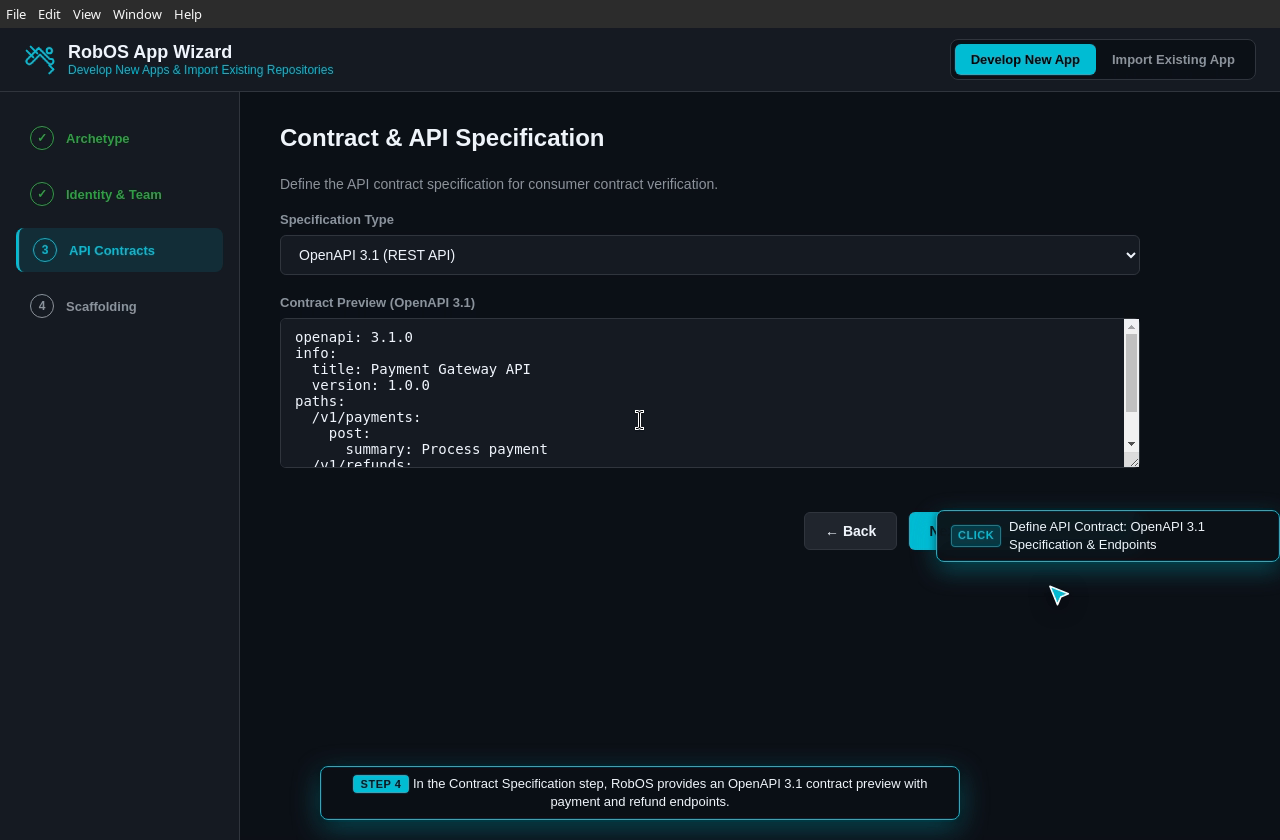 |
- Specification Types:
- OpenAPI 3.1 (REST API): Full YAML editor with initial endpoints (e.g.
POST /v1/payments,POST /v1/refunds). - Microsoft TypeSpec (
.tsp): Concise language for multi-protocol API contracts. - Protobuf gRPC (
.proto): High-performance microservice RPC stubs. - GraphQL Schema (
.graphql): Typed schema definition with queries and mutations.
- OpenAPI 3.1 (REST API): Full YAML editor with initial endpoints (e.g.
- Spectral Linting: Contracts are validated to ensure compliance with organization-wide style rules and backwards-compatibility guards.
Step 4: Scaffolding Blueprint & Review
Before generating code on disk, Step 4 presents a complete Scaffolding Blueprint summarizing the configuration:
| Step 4: Scaffolding Blueprint Preview |
|---|
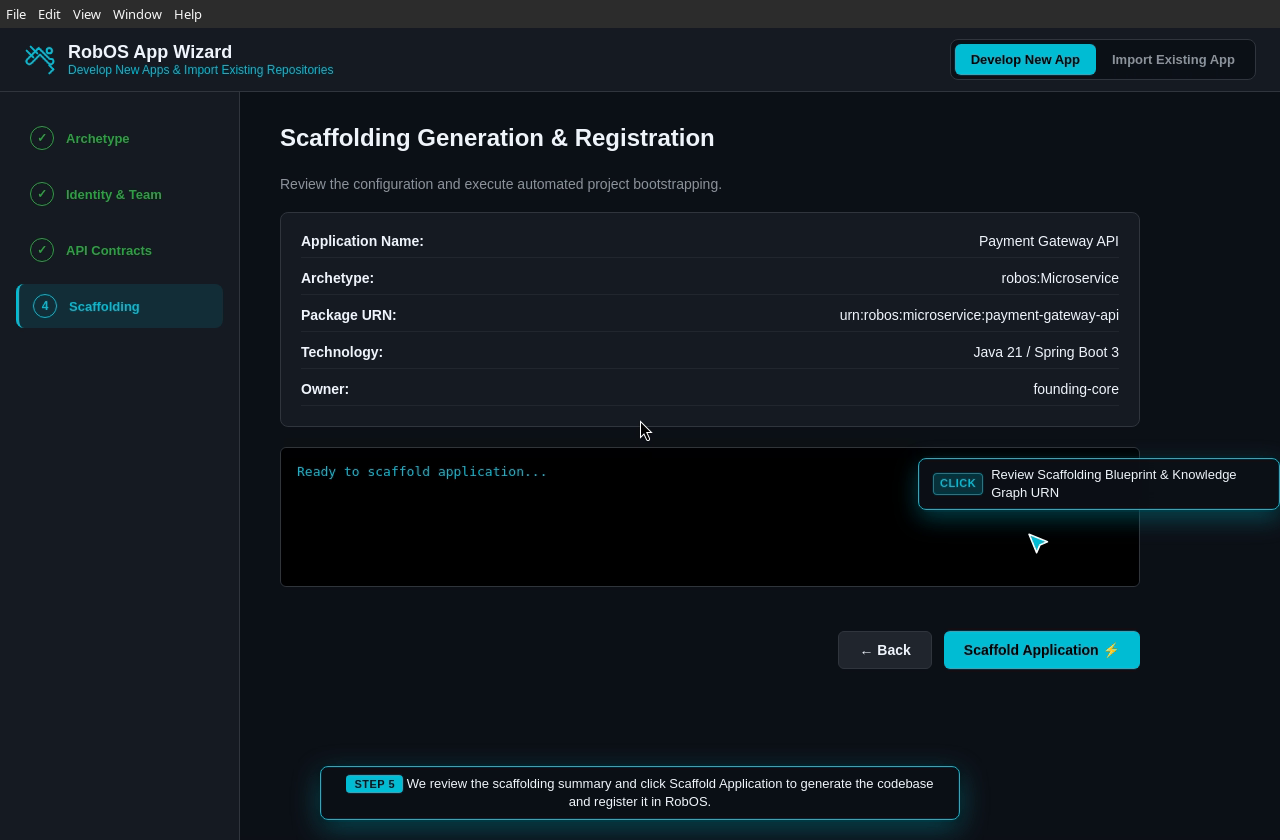 |
The summary validates:
- Application Name:
Payment Gateway API - Archetype:
robos:Microservice - Package URN:
urn:robos:microservice:payment-gateway-api - Technology:
Java 21 / Spring Boot 3 - Owner:
founding-core
Step 5: Automated Scaffolding & Knowledge Graph Registration
Clicking Scaffold Application ⚡ triggers the polyglot generator, compiling files directly into the repository and linking the component into the SDLC Knowledge Graph:
| Step 5: Execution Console & Knowledge Graph Registration Complete |
|---|
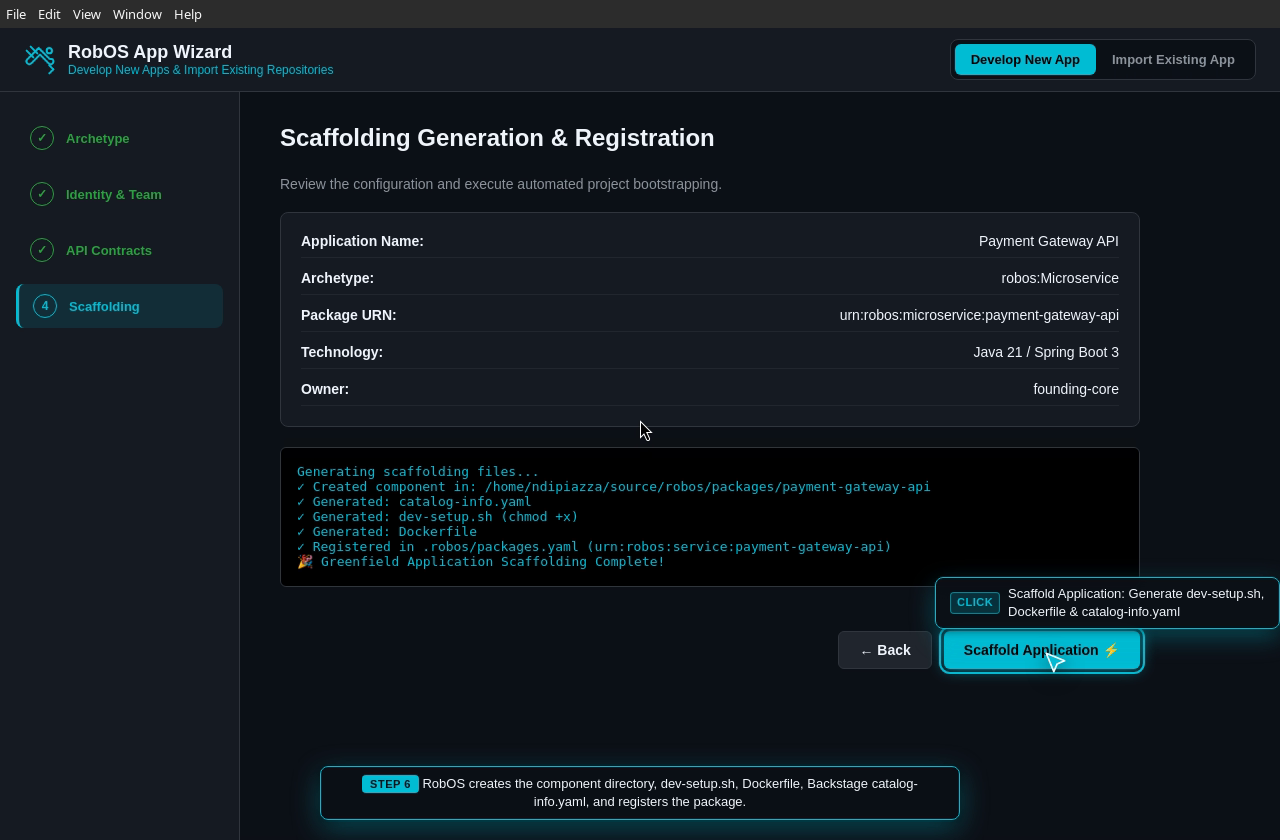 |
The generation process executes 5 coordinated tasks:
- Creates Component Workspace: Initializes
packages/<slug>/. - Generates Backstage Catalog Manifest (
catalog-info.yaml): Standard component metadata for service catalog indexing. - Generates Automated Dev Setup (
dev-setup.sh): Executable environment setup script (chmod +x). - Generates Container Definition (
Dockerfile): Production-ready container image build definition. - Registers in
.robos/packages.yaml& Knowledge Graph: Assigns the component to theservicesorapplicationspackage in the Dual-State SDLC Knowledge Graph.
Generated Project Blueprint & Manifests
1. Backstage Catalog Manifest (catalog-info.yaml)
apiVersion: backstage.io/v1alpha1
kind: Component
metadata:
  name: payment-gateway-api
  title: "Payment Gateway API"
  description: "RESTful backend service for payment processing and refund dispatching."
  tags:
    - microservice
    - java-21-spring-boot-3
    - openapi-3.1
spec:
  type: microservice
  lifecycle: experimental
  owner: founding-core
  system: core-platform
  definition:
    $text: ./openapi.yaml
2. Zero-Friction Developer Setup (dev-setup.sh)
#!/usr/bin/env bash
set -euo pipefail

echo "==> Setting up environment for Payment Gateway API..."

# 1. Audit language runtime
if ! command -v java >/dev/null 2>&1; then
  echo "Java 21 required. Installing via RobOS Lang Manager..."
  robos-lang install java 21
fi

# 2. Verify API contract linting
if command -v spectral >/dev/null 2>&1; then
  echo "==> Validating OpenAPI 3.1 contract syntax..."
  spectral lint openapi.yaml
fi

echo "==> Payment Gateway API environment ready!"
3. Container Definition (Dockerfile)
# Multi-stage build for Payment Gateway API
FROM maven:3.9-eclipse-temurin-21-alpine AS builder
WORKDIR /app
COPY pom.xml .
COPY src ./src
RUN mvn clean package -DskipTests

FROM eclipse-temurin:21-jre-alpine
WORKDIR /app
COPY --from=builder /app/target/*.jar app.jar
EXPOSE 8080
ENTRYPOINT ["java", "-jar", "app.jar"]
4. Knowledge Graph Package Registration (.robos/packages.yaml)
packages:
  - id: payment-gateway-api
    name: "Payment Gateway API"
    urn: "urn:robos:microservice:payment-gateway-api"
    archetype: "robos:Microservice"
    technology: "Java 21 / Spring Boot 3"
    owner: "founding-core"
    path: "packages/payment-gateway-api"
    packageStore: "services"
    contract: "packages/payment-gateway-api/openapi.yaml"
Live E2E Video Walkthrough & Proof of Work
The entire Greenfield Application Scaffolding lifecycle is verified with automated, headless 1080p video recording and DOM assertion logs:
- Captions / Subtitles: WebVTT synchronized narration embedded in the player.
- Persistent Walkthrough Archive: Stored in
~/.robos/development/walkthroughs/new-app-wizard/with timestamped history.
How to Run the App Wizard E2E Demo Locally
Execute the automated test and headless walkthrough recording with:
# Run the live E2E video demo recording with audio narration:
xvfb-run -a -s "-screen 0 1920x1080x24" node packages/robos-test/demos/new-app-wizard-demo.js

# Launch the App Wizard directly from the terminal (or open "App Wizard" in RobOS App Launcher):
electron packages/app-wizard
Next Steps
- Import Existing Apps Guide: Ingest brownfield codebases with automatic archetype detection.
- RobOS Main Wins: Discover core architectural innovations and strategic advantages.
- 💡 Explore the Ideas Store on GitHub: View raw idea dumps, community feature proposals, and structured architecture specs.