The Flow of RobOS Apps Used to Create an Application
The complete step-by-step developer journey: from establishing your organization identity in Group Manager, scaffolding or importing codebases in App Wizard, through visual architecture, breakpoint debugging, IDE pull request reviews, and live cloud deployment.
Table of contents
- Overview: The Power of an Integrated App Lifecycle
- Phase 0: Organization & Identity Foundation
- Phase 1: Component Scaffolding or Codebase Ingestion
- Phase 2: Task Planning & Visual System Architecture
- Phase 3: API Contracts & Live Mock Testing
- Phase 4: Multi-Repo Hub & Automated Dev Setup
- Phase 5: Autonomous AI Implementation & Breakpoint Debugging
- Phase 6: PR Review Process & The IDE Review Hub
- Phase 7: Live Database Schema & Query Consoles
- Phase 8: Git-Backed REST API Verification
- Phase 9: Kubernetes & Cloud Infrastructure Navigator
- Phase 10: Runtime Operations & Autonomous Agent Swarms
- Summary Table: The Complete Application Pipeline
- What to Explore Next
Overview: The Power of an Integrated App Lifecycle
In traditional software development, engineering teams juggle a fragmented maze of disconnected browser tabs, desktop windows, and terminal tools: Jira or GitHub for tickets, Figma or Miro for architecture sketches, Postman for API testing, DBeaver for database queries, IntelliJ or VS Code for writing code, terminal scripts for Docker/Kubernetes, and cloud web consoles for monitoring deployments.
Every time you switch between these separate tools, context is lost:
- Information entered in a task ticket never makes it to the API contract designer.
- Database schema changes made in a local console don’t update the architecture diagram.
- AI coding assistants only see isolated file snippets without understanding system topology.
- Code reviews happen in web browsers disconnected from IDE symbol indexes and debugger breakpoints.
RobOS changes this fundamentally. RobOS provides a unified desktop operating system and application suite where every tool shares the same underlying Git-backed Modular KGraph Packages.
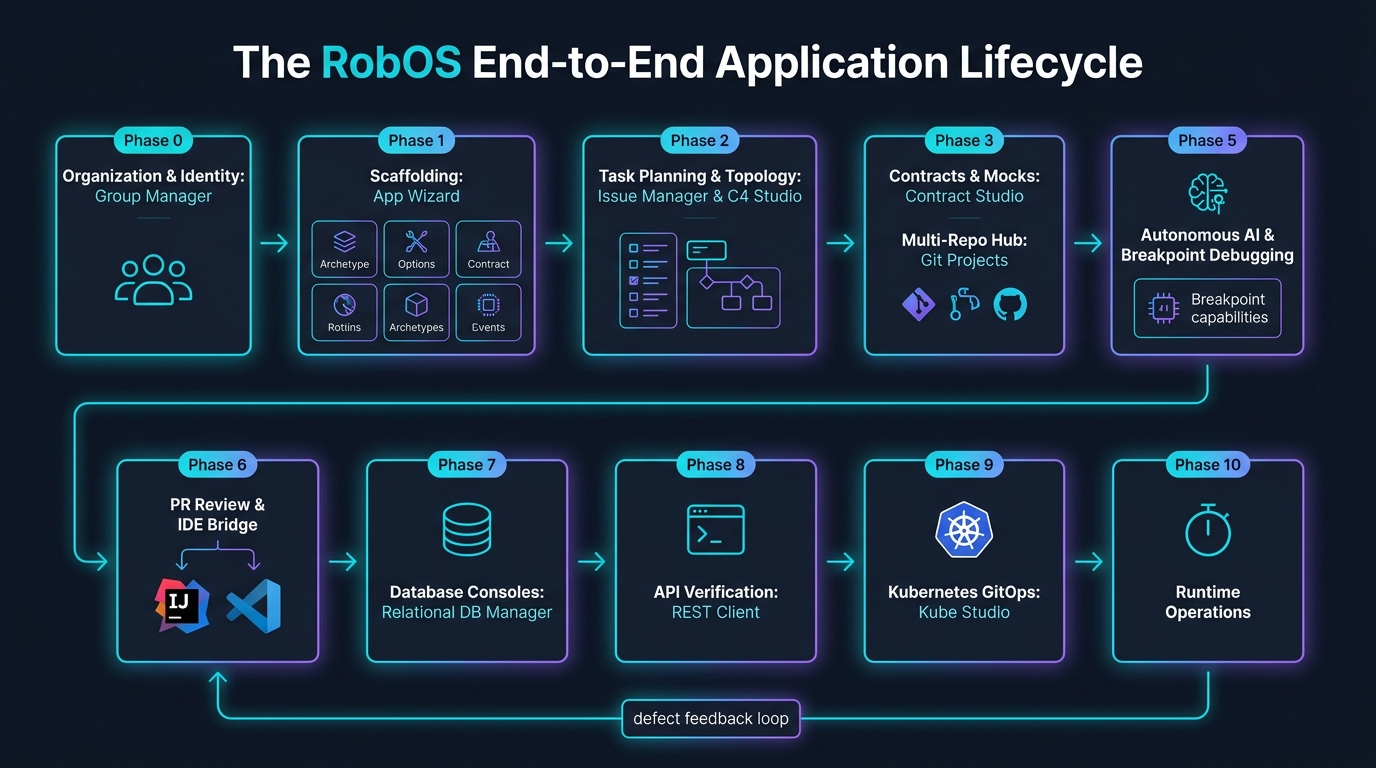
Below is the complete walkthrough of how developers and engineering teams use RobOS to build enterprise applications—illustrated by the real-world Acme Pet Store Platform—from Day-1 organization onboarding to live cloud operations.
Phase 0: Organization & Identity Foundation
Before planning features or scaffolding microservices, RobOS establishes your cryptographic developer identity, organization structure, and team boundaries. RobOS never relies on hardcoded assumptions—it identifies you and your team through two top-level enterprise workflows:
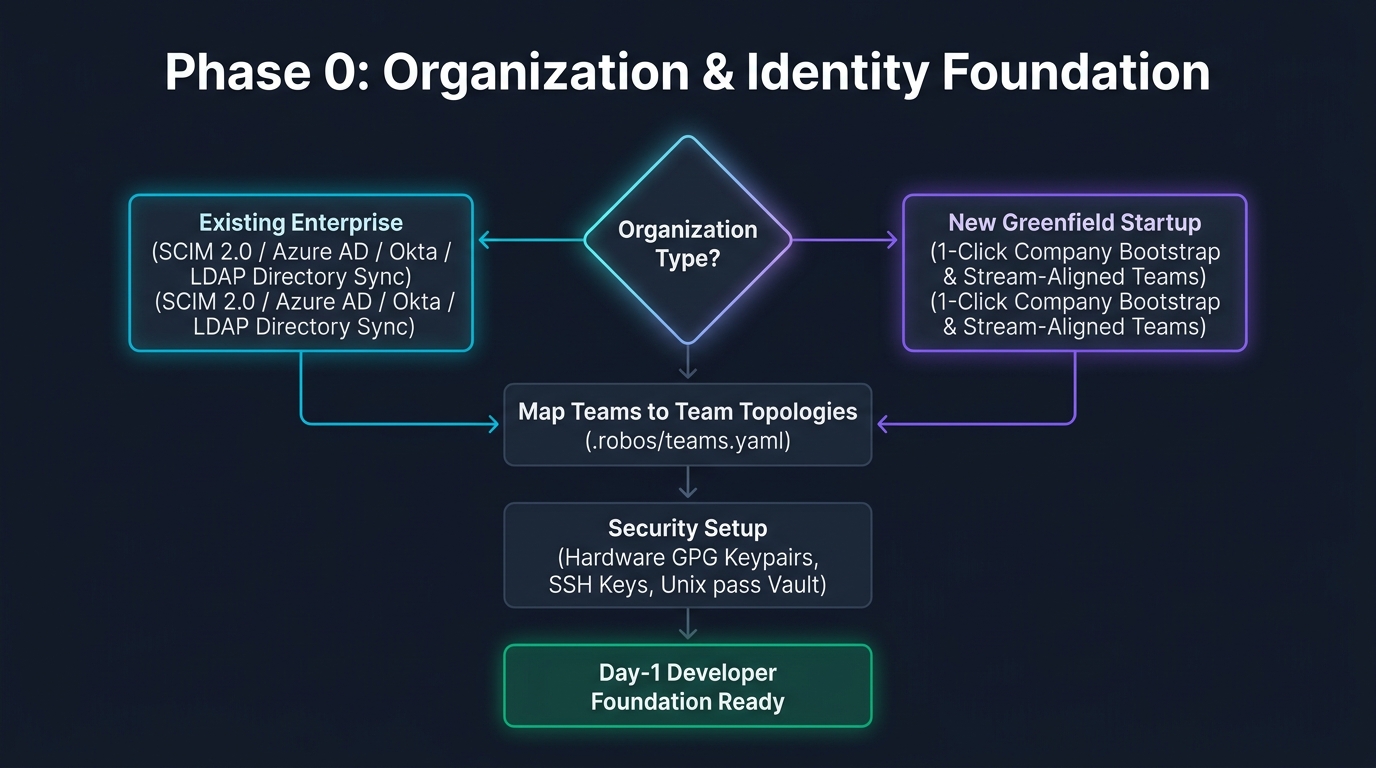
1. Existing Company Setup (Enterprise Directory Sync)
If joining or setting up an established enterprise, developers launch RobOS Group Manager (packages/group-manager):
- Connects via SCIM 2.0, Okta, Azure Active Directory, or LDAP.
- Ingests corporate departments, roles, and developer memberships in real time.
- Organizes squads according to Team Topologies principles (Stream-aligned, Platform, Enabling, Complicated-subsystem) and writes directly to
.robos/teams.yaml. - Configures role-based access control (RBAC) and reviewer groups.
- 👉 Read the Full Existing Company Setup Guide
2. New Company Setup (Greenfield Bootstrap)
If launching a new company or startup from scratch:
- Group Manager provides a one-click Company Bootstrap Wizard.
- Instantly initializes the organization tenant, Git author identity, and foundational squads (Order Stream Squad, Catalog Stream Squad, Core Platform Squad).
- Automatically generates
.robos/topology.yamland.robos/teams.yaml. - Pairs with Security Setup (
security-setup) to generate personal GPG/SSH keypairs for hardware-verified Git commit signing and standard Unixpassvault integration. - 👉 Read the Full New Company Setup Guide
Phase 1: Component Scaffolding or Codebase Ingestion
With organization and team identities established, developers provision their applications using the RobOS App Wizard (packages/app-wizard). Developers follow one of two standardized paths:
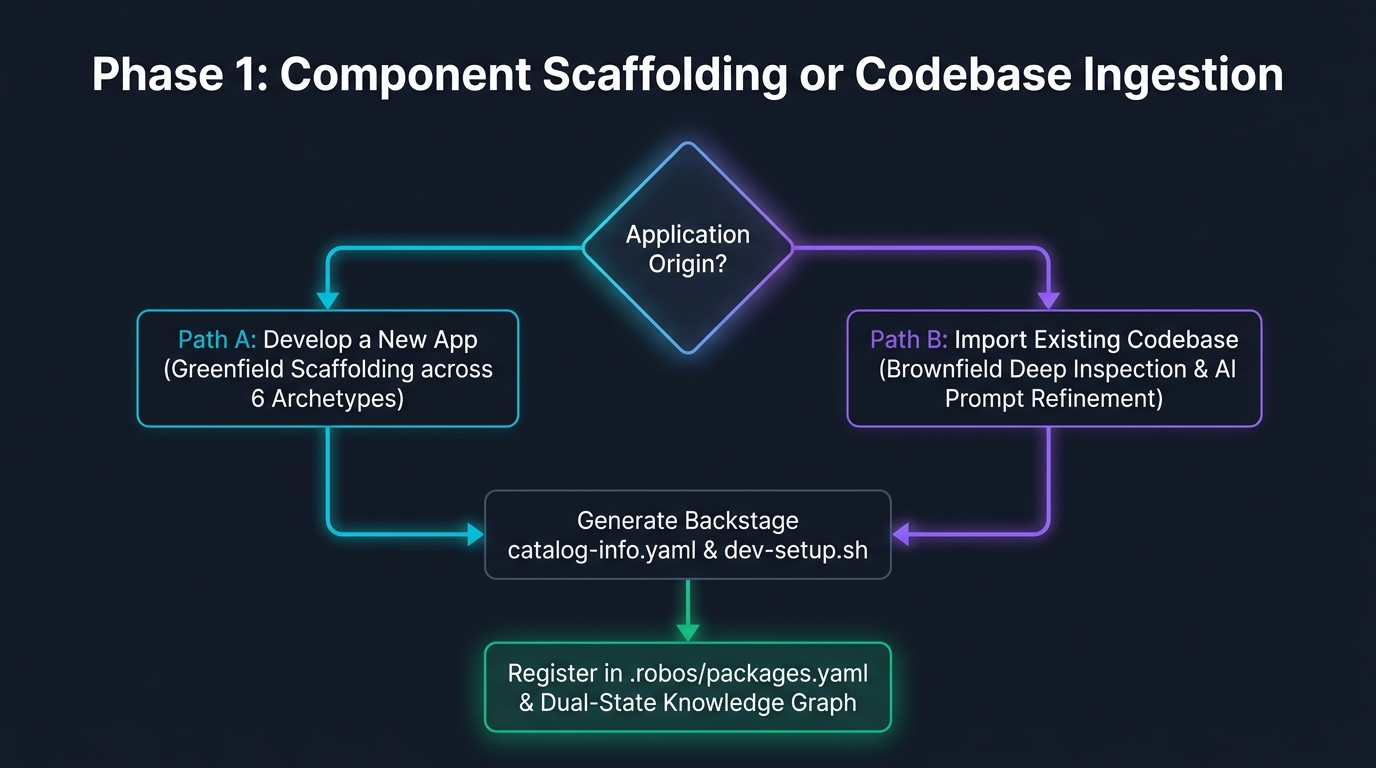
Path A: Develop a New App (Greenfield Scaffolding)
Developers generate a production-ready repository skeleton across 9 core multi-app archetypes:
- Microservice & Web API (
robos:Microservice): Java Spring Boot, Node Fastify/Express, Go Gin, Python FastAPI. Includes OpenAPI 3.1 / TypeSpec contracts and Dockerfiles. - Front End Application (
robos:FrontEndApp/schema:WebApplication): Single-page and SSR web clients with React 18, Vite, Next.js, Vue, or Svelte. - Desktop Application (
robos:DesktopApp): Electron, Qt, GTK, or Tauri desktop clients. - PC Game (
robos:PCGame/schema:VideoGame): Interactive desktop games with Unreal Engine 5, Unity 6, Godot, or Bevy. - Mobile Game (
robos:MobileGame/schema:VideoGame+schema:MobileApplication): Interactive mobile video games for iOS and Android. - Console & CLI Tool (
robos:ConsoleApp): Go Cobra, Rust Clap, Node Commander terminal utilities. - Mobile Application (
robos:MobileApp): React Native, Flutter, native iOS/Android. - Data Pipeline & Worker (
robos:DataPipeline): Kafka Streams, Apache Spark, Celery workers. - Library & SDK (
robos:Library): Reusable client SDKs, utility packages, and shared UI components.
The wizard creates Spotify Backstage catalog-info.yaml, Docker build manifests, dev-setup.sh, and maps the component to your team in .robos/teams.yaml.
Path B: Import Existing Apps & Multi-Resource Knowledge Graph Ingestion (Deep Thinking AI Agent)
For existing codebases, multi-repo architectures, and heterogeneous enterprise infrastructure, developers do not need to manually author dozens of manifest files. Instead, the RobOS App Import Wizard (packages/app-wizard in import mode) employs an autonomous Deep Thinking AI Agent equipped with multi-hop topological reasoning to parse unstructured inputs, extract SDLC Knowledge Graph entities across heterogeneous resources, enforce W3C SHACL shape conformance, and synthesize Backstage metadata in seconds.
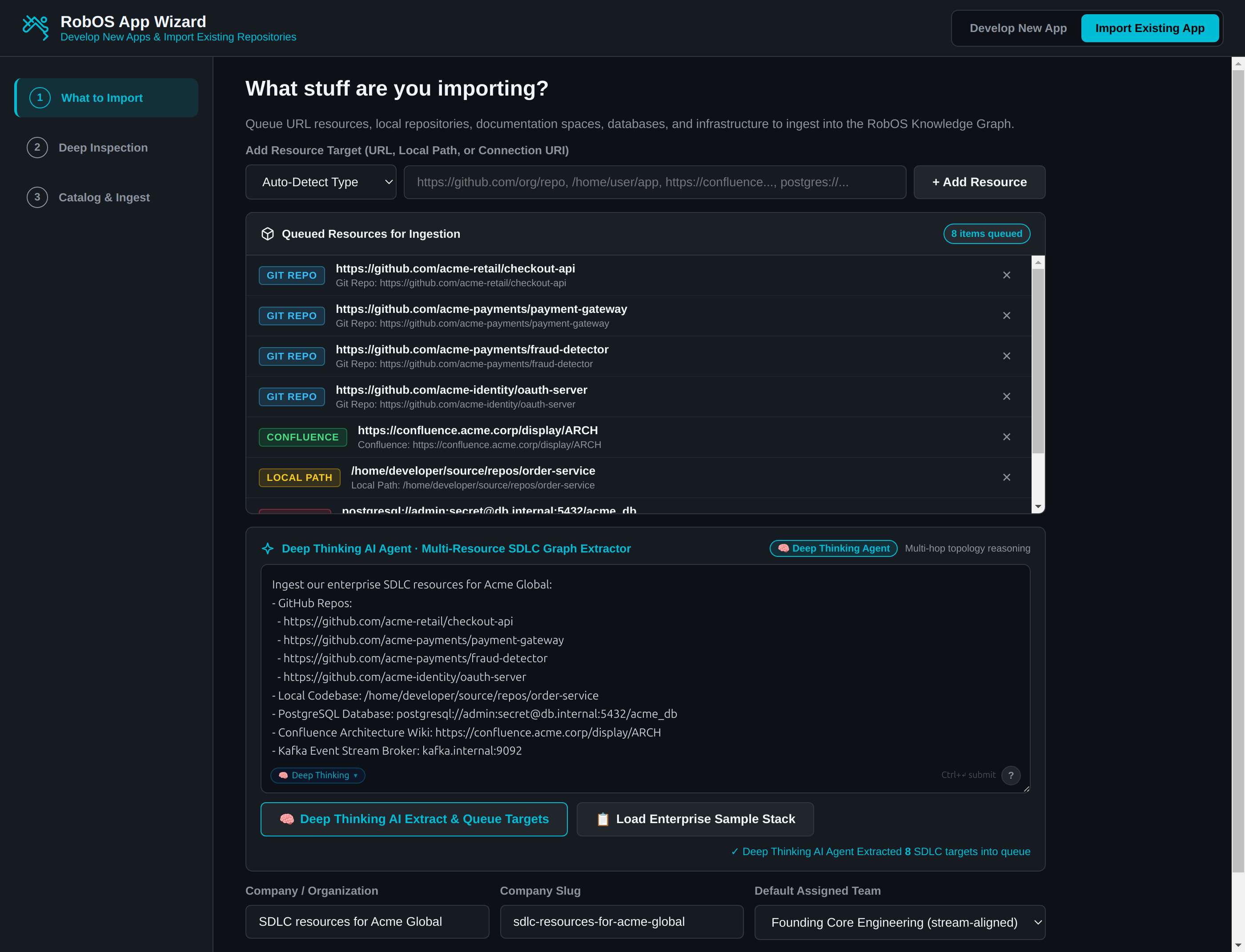
1. Entering Heterogeneous Targets into the Deep Thinking AI Agent
Rather than clicking through separate forms for every Git repository, database, and wiki space, developers declare their multi-resource targets directly in natural language inside the <robos-ai-textarea id="ai-import-prompt" agent="deep-thinking"> prompt bar.
A developer can paste a heterogeneous list combining:
- 4 GitHub Repository URLs:
https://github.com/acme-retail/checkout-api,https://github.com/acme-payments/payment-gateway,https://github.com/acme-payments/fraud-detector, andhttps://github.com/acme-identity/oauth-server - A Local Filesystem Codebase Directory:
/home/developer/source/repos/order-service - A Relational Database Connection:
postgresql://admin:secret@db.internal:5432/acme_db - A Confluence Architecture Wiki Space:
https://confluence.acme.corp/display/ARCH - An Apache Kafka Event Stream Broker:
kafka.internal:9092
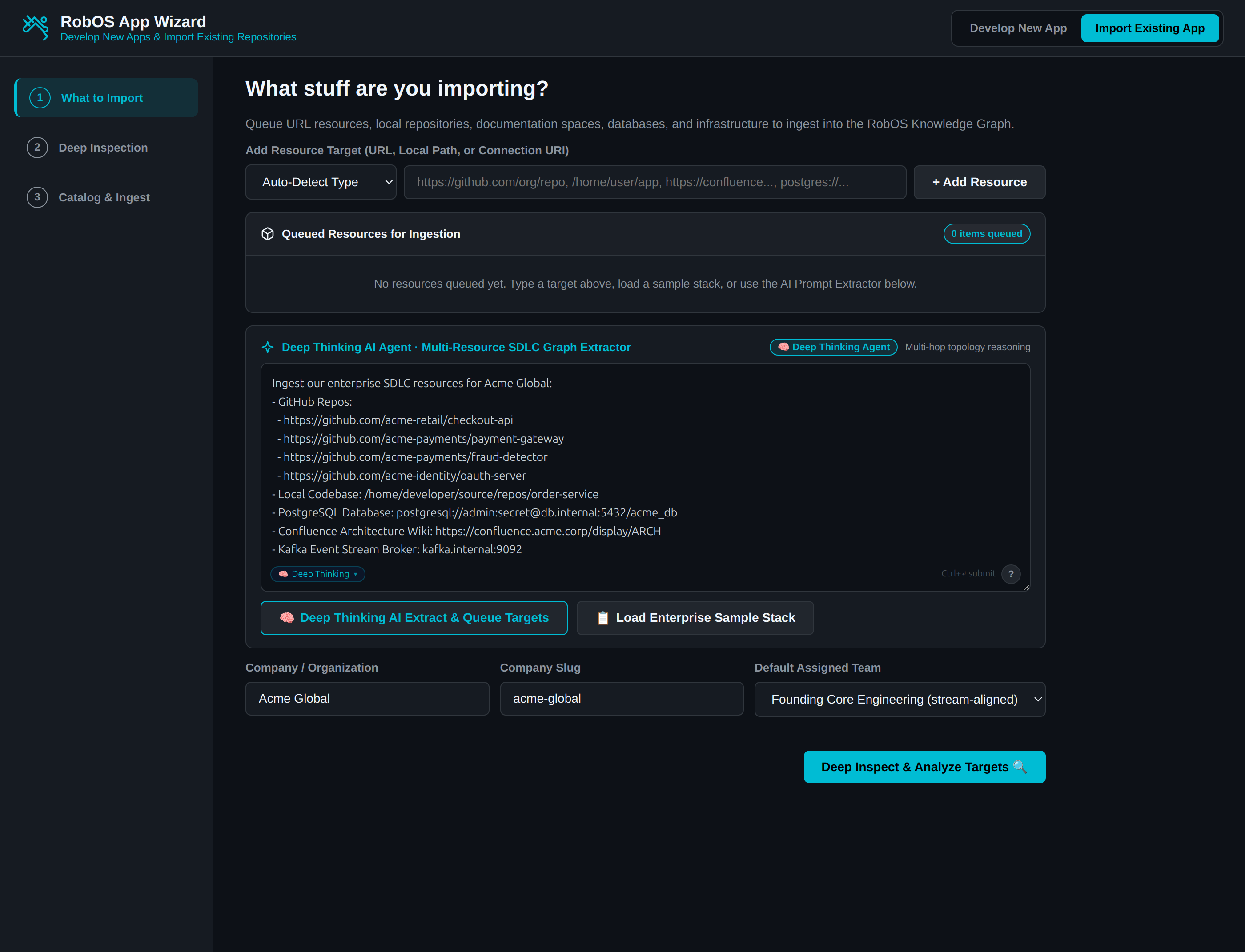
2. Autonomous Extraction & Queued SDLC Targets
Clicking Deep Thinking AI Extract & Queue Targets invokes the KGraphResourceImporter agent intelligence:
- Multi-Hop Extraction & Classification: The Deep Thinking AI Agent analyzes the prompt syntax, detects URL protocols, extracts organization boundaries (
acme-retail,acme-payments,acme-identity), classifies local codebase paths, extracts database connection parameters, and parses Kafka broker endpoints. - Company & Organization Context: Automatically infers the corporate entity (
Acme Global) and slug (acme-global). - Categorized Target Queue: Populates the Queued Resources for Ingestion list with color-coded badges (
GIT REPO,CONFLUENCE,LOCAL PATH,DATABASE,KAFKA), showing8 items queuedand confirming extraction with✓ Deep Thinking AI Agent Extracted 8 SDLC targets into queue.
3. Deep Inspection, Graph Topology & 100% SHACL Conformance
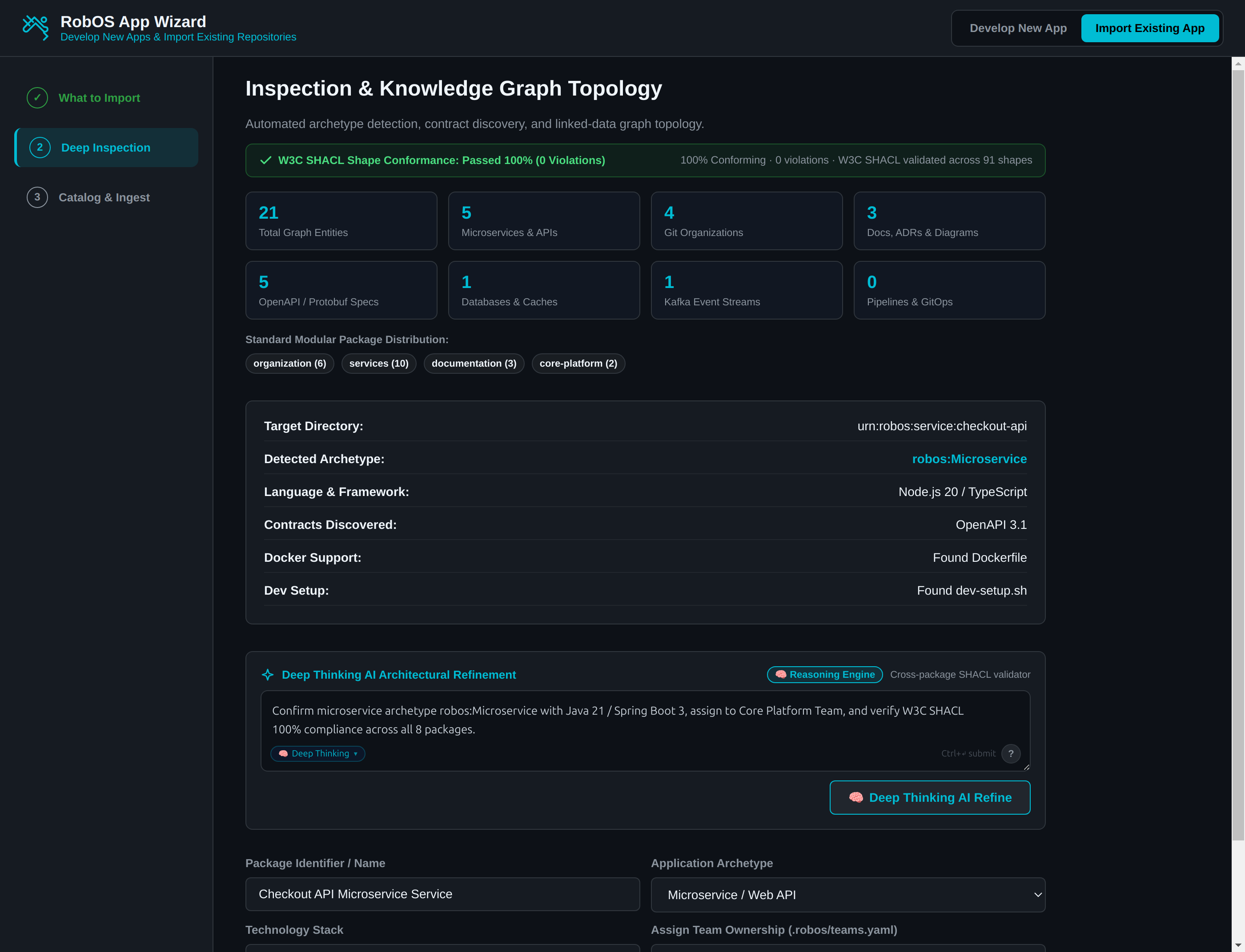
Clicking Deep Inspect & Analyze Targets 🔍 transitions to Step 2: Inspection & Knowledge Graph Topology:
- Topology Entity Discovery: The engine crawls the queued targets and identifies 21 total SDLC Graph Entities across 4 Git organizations, 5 microservices/APIs, 5 OpenAPI 3.1 contracts, 3 living documentation pages and ADRs, 1 database, and 1 Kafka cluster.
- 100% W3C SHACL Shape Conformance: Every single discovered node is validated in real time against 91 W3C SHACL constraint shapes across 8 standard modular packages (
organization,services,documentation,core-platform). - Deep Thinking AI Architectural Refinement (
<robos-ai-textarea>): Developers can use the dedicated Deep Thinking AI Architectural Refinement prompt bar to tune detected parameters before committing:- “Confirm microservice archetype robos:Microservice with Java 21 / Spring Boot 3, assign to Core Platform Team, and verify W3C SHACL 100% compliance across all 8 packages”
- “Reassign payment-gateway to Payments Stream Squad and set package slug to payment-gateway-api”
- “Map the Confluence wiki pages to living documentation with interactive Mermaid sequence flow”
4. Synthesis & Knowledge Graph Mapping Complete
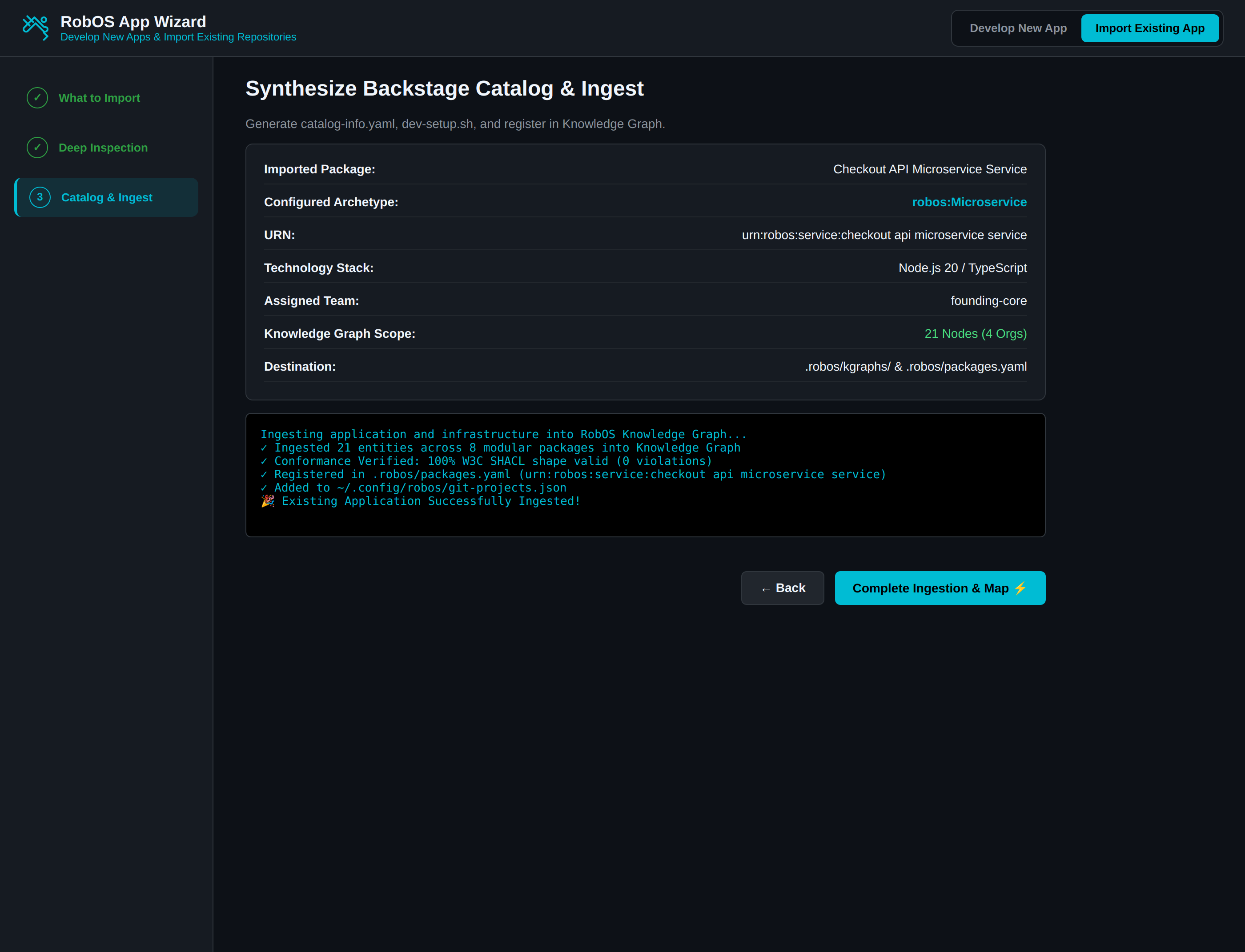
Proceeding to Step 3 and clicking Complete Ingestion & Map ⚡ finalizes the import:
- Backstage Manifest Synthesis: Generates Spotify Backstage
catalog-info.yamlwith detected archetypes, technology stacks, and squad ownership. - Zero-Friction Dev Setup (
dev-setup.sh): Generates an executable environment verification script checking required runtimes (Java JDK, Node, Docker) and pulling credentials from the UNIXpassGPG store. - Modular Package Ingestion: Commits all 21 validated entities into
.robos/kgraphs/(package.jsonld), updates.robos/packages.yaml, and automatically registers local workspaces in~/.config/robos/git-projects.json.
5. Exploring the Ingested Graph in SDLC Knowledge Graph Explorer
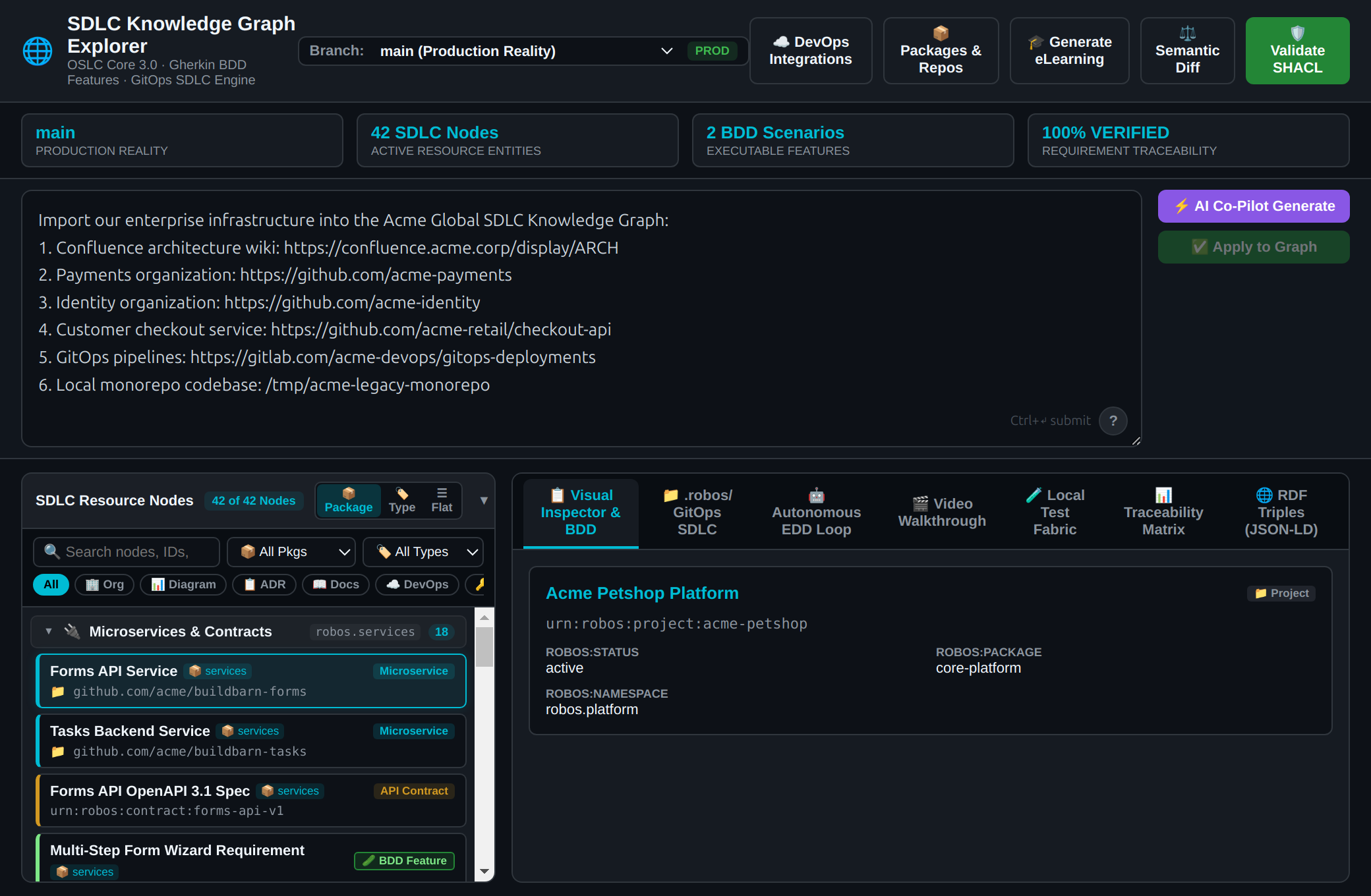
Once ingested, the entire system topology is immediately visible and queryable in SDLC Knowledge Graph Explorer (robos-graph):
- Developers can inspect linked microservices, browse contracts, examine Architecture Decision Records (ADRs), trace blast radius impact analysis, and trigger autonomous IDE reviews.
Phase 2: Task Planning & Visual System Architecture
Step 1: AI Task Planner & Backlog Breakdown
Primary Application: Task Planner (with Issue Manager)
Category: Planning & Project Management
Open Standards: OASIS OSLC 3.0 Change Management, GitHub REST API, Jira REST API
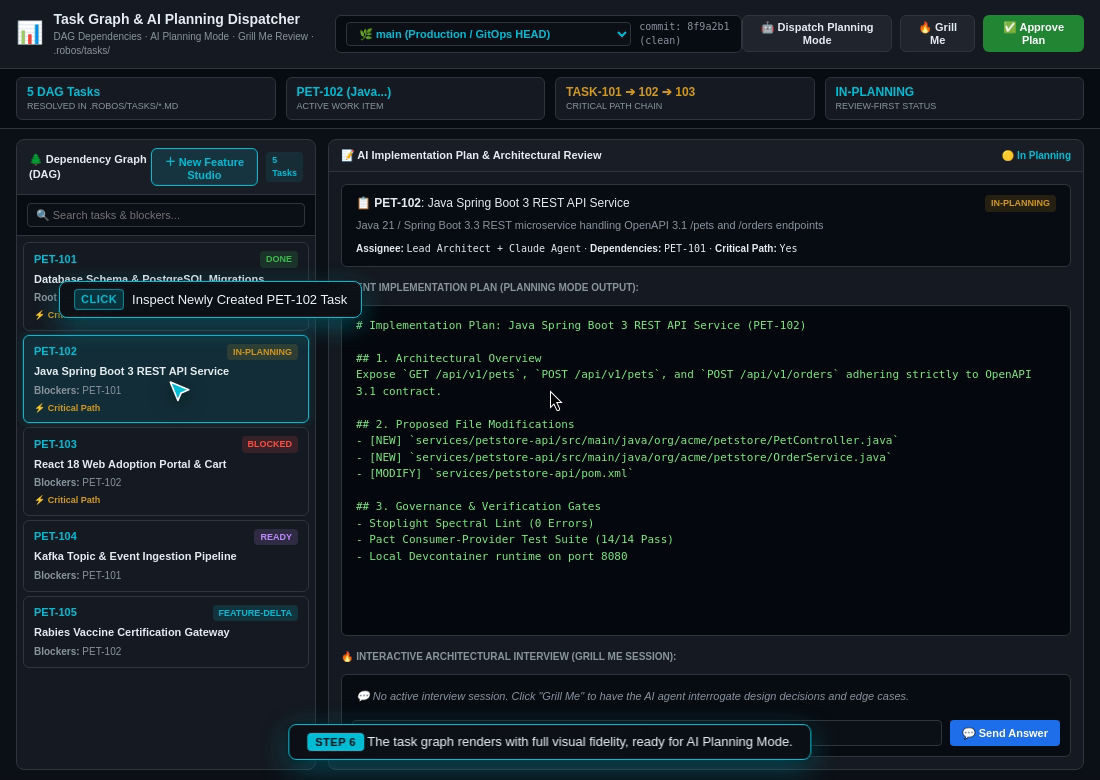
- What Happens: You type the high-level business goal into the AI prompt window (e.g., “Build a distributed pet store web application with a Java Spring Boot backend, a PostgreSQL relational database, an mTLS rabies vaccination verification gateway, an interactive React frontend, and an analytics warehouse”).
- The App’s Job: The AI analyzes the requirements and breaks the project into an ordered, step-by-step dependency graph (Directed Acyclic Graph / DAG). It identifies prerequisite tasks (e.g., “Database Schema must be defined before creating the REST API”) and automatically syncs numbered tickets (e.g.,
PET-101throughPET-116) to GitHub Issues or Jira. - Handoff to Next Step: The generated task list and dependency graph are saved directly to the Modular KGraph Packages, creating the blueprint for the architecture.
Step 2: Visual Architecture & System Topology
Primary Application: Topology Studio
Category: Visual Architecture & Modeling
Open Standards: C4 Architecture Model (Levels 1–3), Spotify Backstage (catalog-info.yaml)
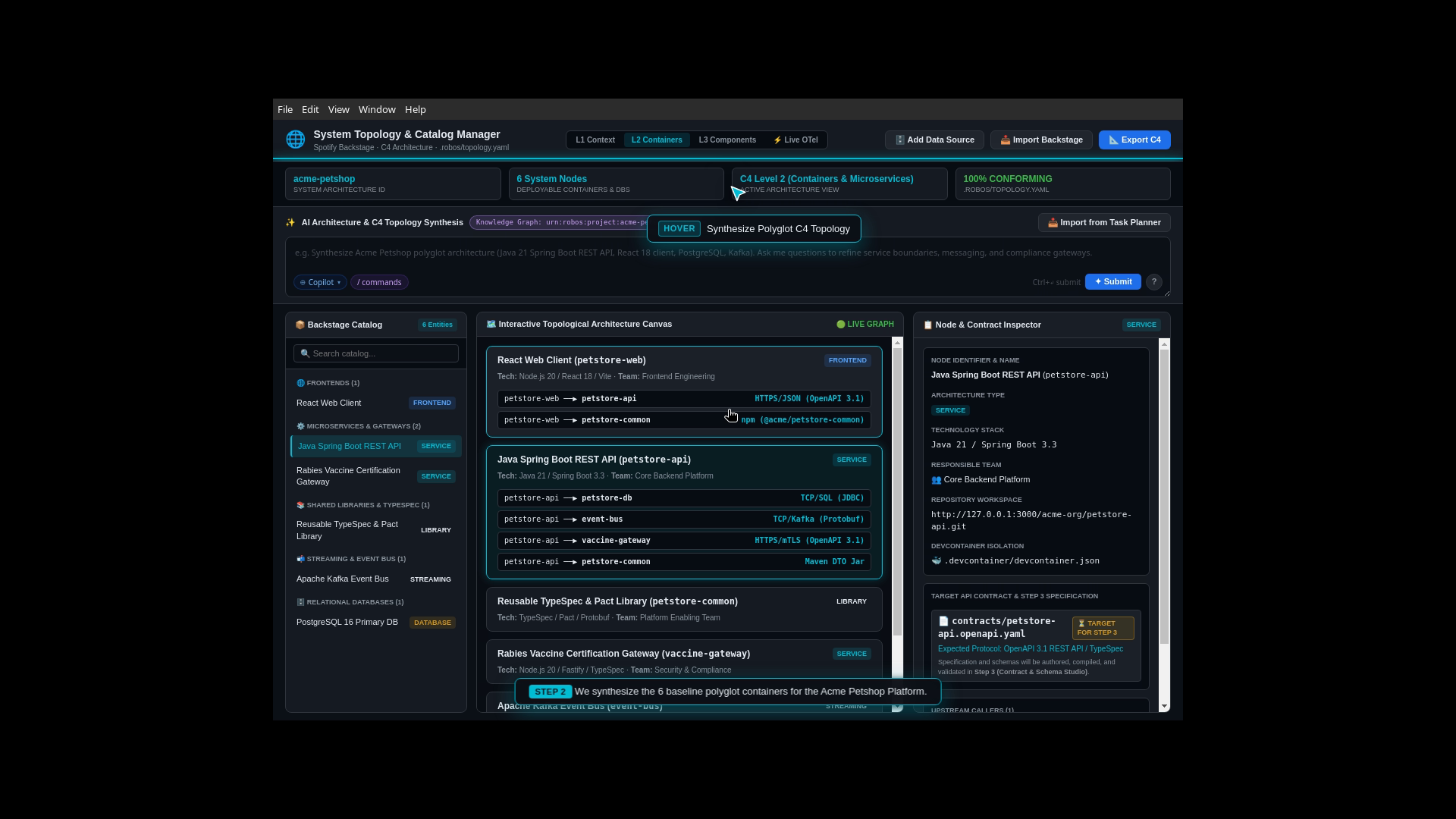
- What Happens: You open Topology Studio to inspect and customize the visual system map.
- The App’s Job: Reads the declarative Spotify Backstage
catalog-info.yamlfiles to render a zoomable architecture diagram:- Level 1 (System Context): Shows pet owners, veterinary clinics, and store staff interacting with the platform.
- Level 2 (Containers): Shows the React Web Frontend, the Pet Inventory Service, the PostgreSQL Database, the Apache Kafka Event Stream, and the Rabies Vaccine Gateway.
- Level 3 (Components): Shows internal controllers, repositories, and authentication filters.
- Impact Analysis (Blast Radius): If you add a new analytics microservice or alter an API connection, RobOS immediately highlights every connected component in purple/red, showing what other services could be impacted before any code is written.
- Handoff to Next Step: Topology Studio writes clean
catalog-info.yamlservice manifests directly into the Git repositories.
Phase 3: API Contracts & Live Mock Testing
Step 3: Contract Studio & Live API Mock Testing
Primary Application: Contract Studio
Category: API Design & Contract Testing
Open Standards: OpenAPI 3.1, Microsoft TypeSpec, AsyncAPI, Prism Mock Servers
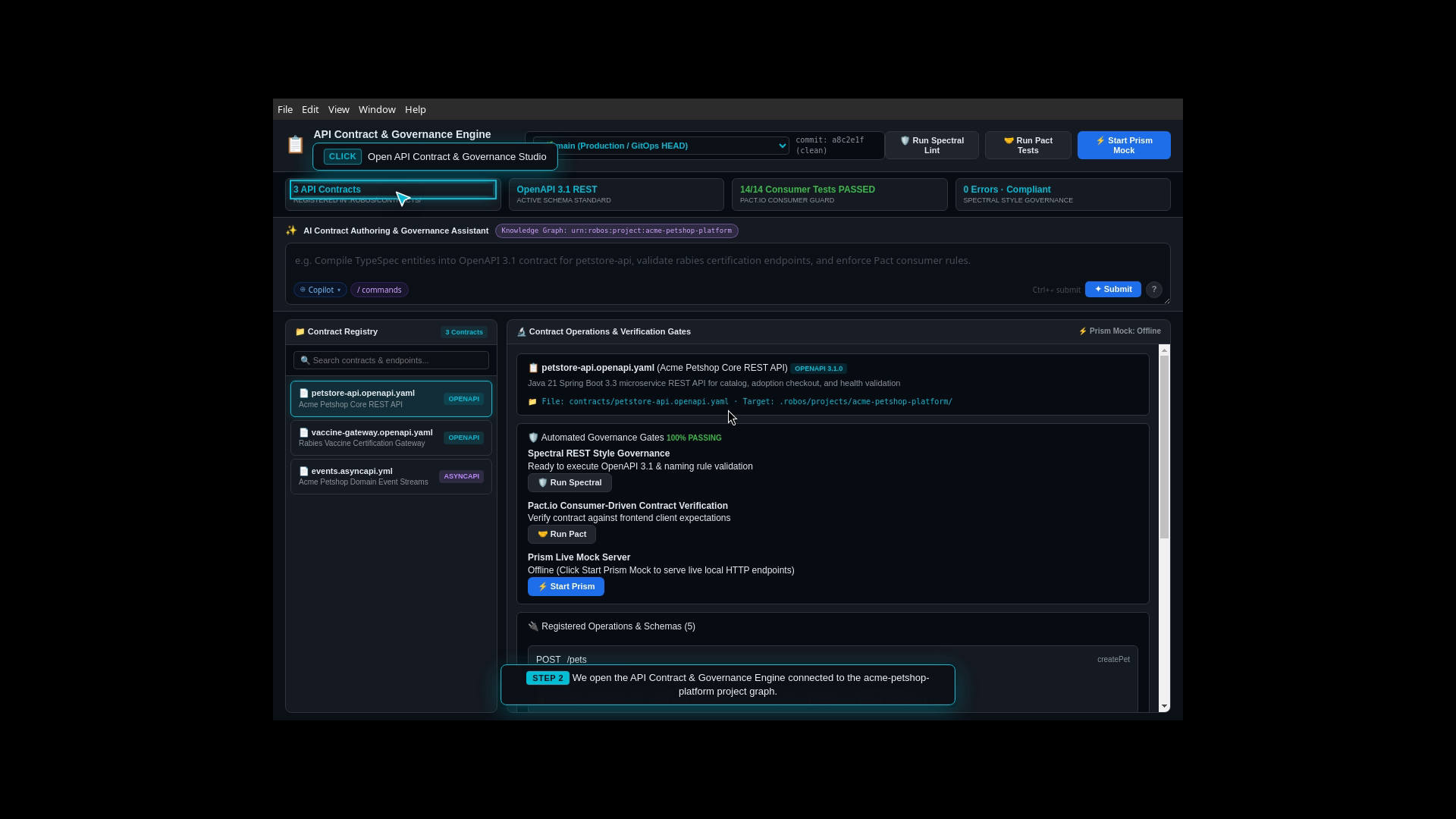
- What Happens: Before writing backend Java code or frontend React components, you define the exact data structures and HTTP endpoints that services will use to communicate.
- The App’s Job: Using Microsoft TypeSpec or OpenAPI 3.1, Contract Studio defines schemas for pets, orders, and vaccination certificates. It immediately spins up an instant Prism Mock Server on
http://localhost:4010. - Why This Matters: Frontend developers and AI agents can start building the React web UI against live mock data immediately, without waiting for the backend Java service to be written.
- Handoff to Next Step: Contract Studio saves
.tspdata models andopenapi.yamlcontracts into the Git repository.
Phase 4: Multi-Repo Hub & Automated Dev Setup
Step 4: Multi-Repo Git Hub & Automated Dev Setup
Primary Application: Git Projects
Category: Workspace & Repository Management
Open Standards: Git, POSIX Shell, GPG Vault
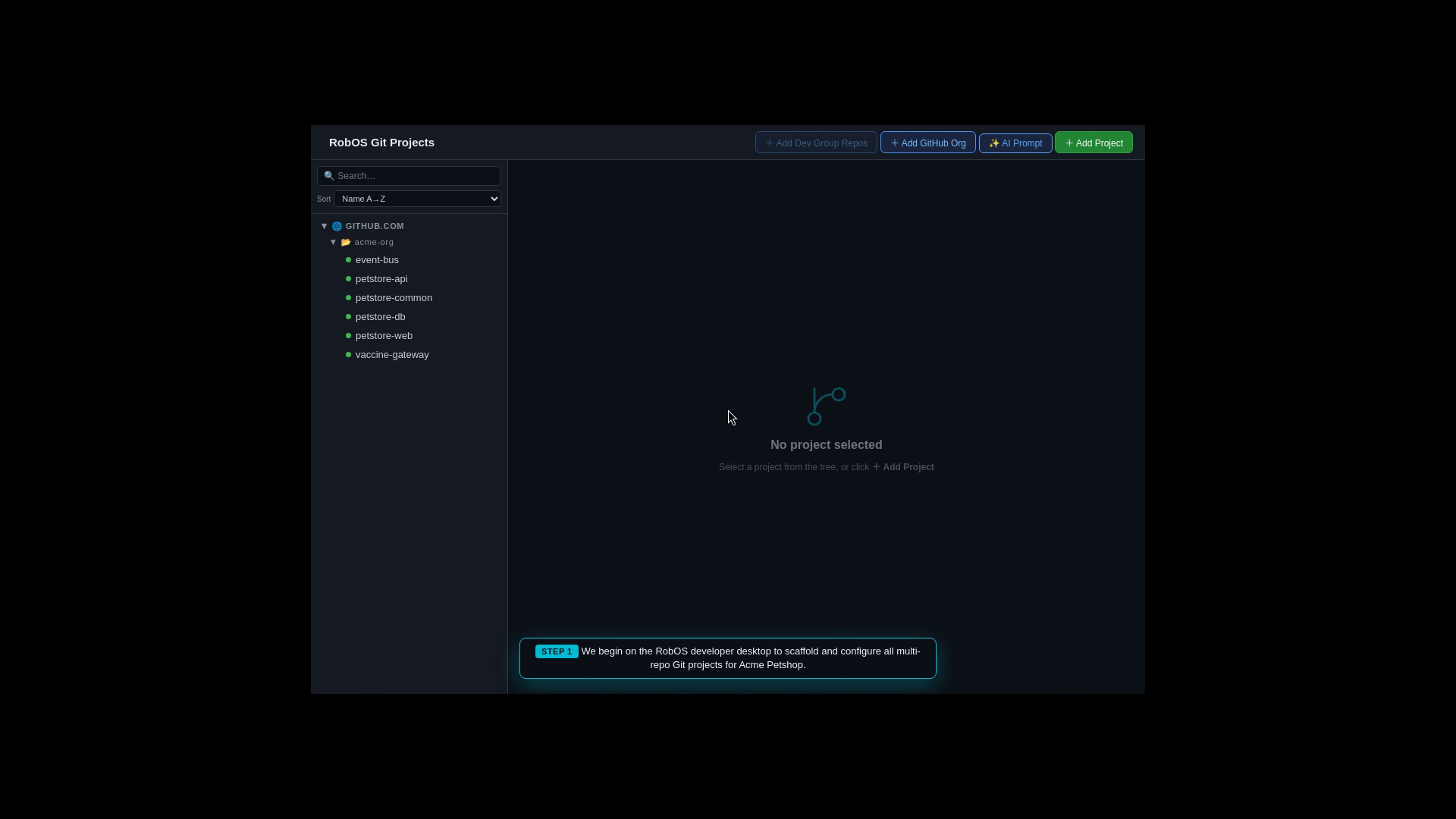
- What Happens: You open the multi-repo management hub to link the frontend, backend, and infrastructure repositories together.
- The App’s Job: Git Projects connects all related repositories in one window. It automatically generates a zero-friction developer setup script (
dev-setup.sh) that installs dependencies, verifies runtime SDKs (Java JDK 21, Node.js 20, Docker), and securely pulls environment variables from your GPG-encrypted vault (pass). - Handoff to Next Step: One click on a task ticket (e.g.,
PET-105: Implement Vaccine Gateway) provisions an isolated, clean Git branch workspace.
Phase 5: Autonomous AI Implementation & Breakpoint Debugging
Step 5: Autonomous AI Implementation & Automated Test Verification
Primary Application: AI Coding Agent & RobOS Swarm (Claude Code, Antigravity, Copilot, Gemini)
Category: Development & Automated Implementation
Open Standards: Model Context Protocol (MCP), Language Server Protocol (LSP), Git
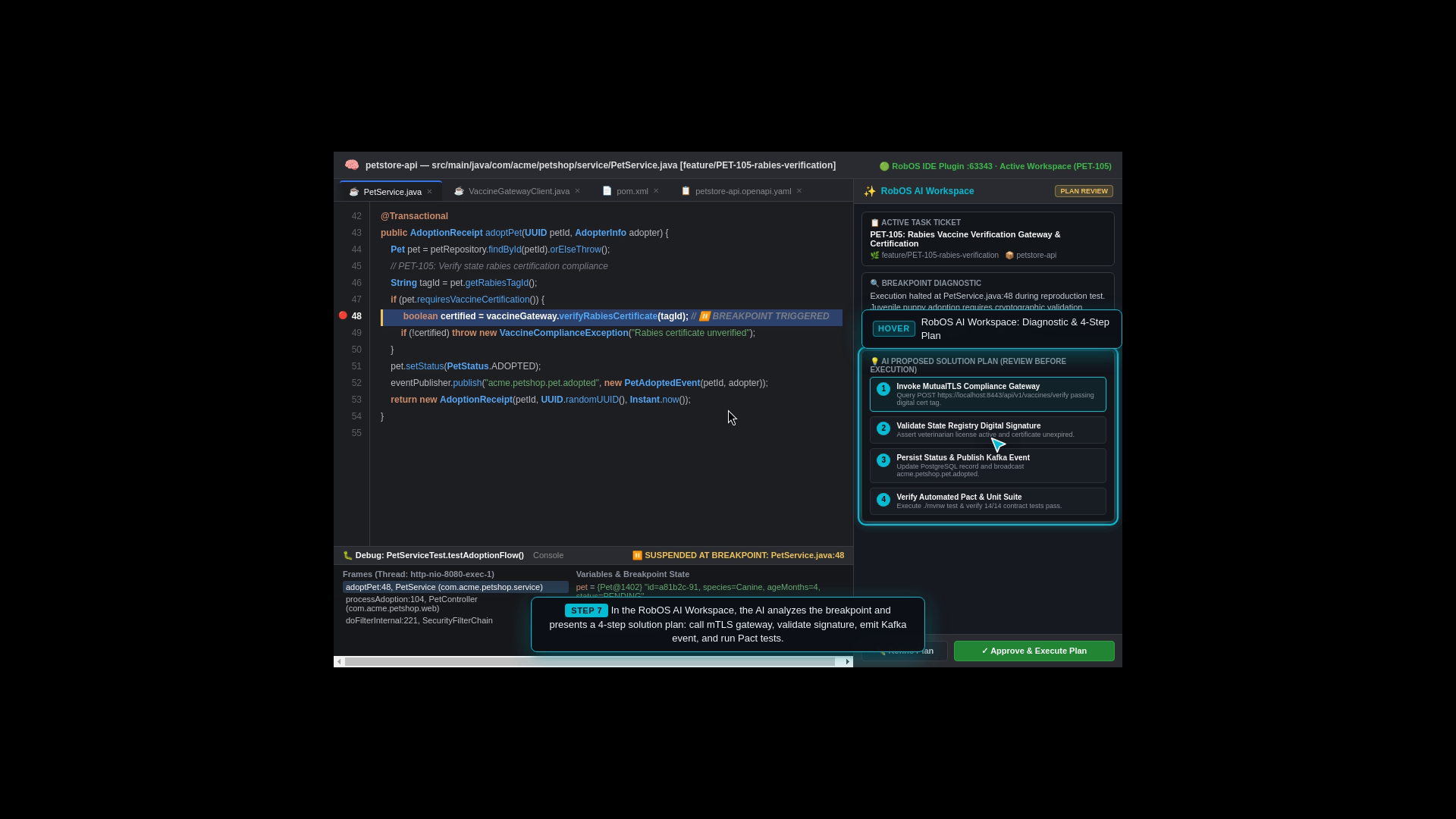
- What Happens: The AI agent picks up the task ticket (
PET-105: Implement Vaccine Gateway) from the backlog, provisions an isolated Git branch workspace, and formulates a concrete implementation plan. - The Agent’s Job:
- Autonomous Code Generation: Writes the required application logic, compiles TypeSpec data models, and configures endpoints (e.g.
VaccineGatewayClient.java). - Automated Test Generation & Execution: Synthesizes and executes unit tests, integration tests, and consumer-driven contract tests (Pact) against live mock servers.
- Interactive Breakpoint Debugging Feature: When reproducing a bug or investigating complex runtime state, RobOS agents can run a test and pause execution directly at a live debugger breakpoint in the IDE. This allows human engineers and autonomous agents to inspect live memory variables, stack traces, and local variables interactively.
- Autonomous Code Generation: Writes the required application logic, compiles TypeSpec data models, and configures endpoints (e.g.
- Handoff to Next Step: Once the code compiles and all test suites pass, the agent opens a Pull Request for human review.
Phase 6: PR Review Process & The IDE Review Hub
Step 6: PR Review Process & The IDE Review Hub
Primary Application: RobOS Agent Code Review Platform (with CI Monitor & IDE Review Plugins)
Category: Human Review, Code Auditing & IDE Quality Gates
Open Standards: Unified Git Diffs, GitHub Pull Requests, JetBrains IDE REST API, VS Code URI Scheme
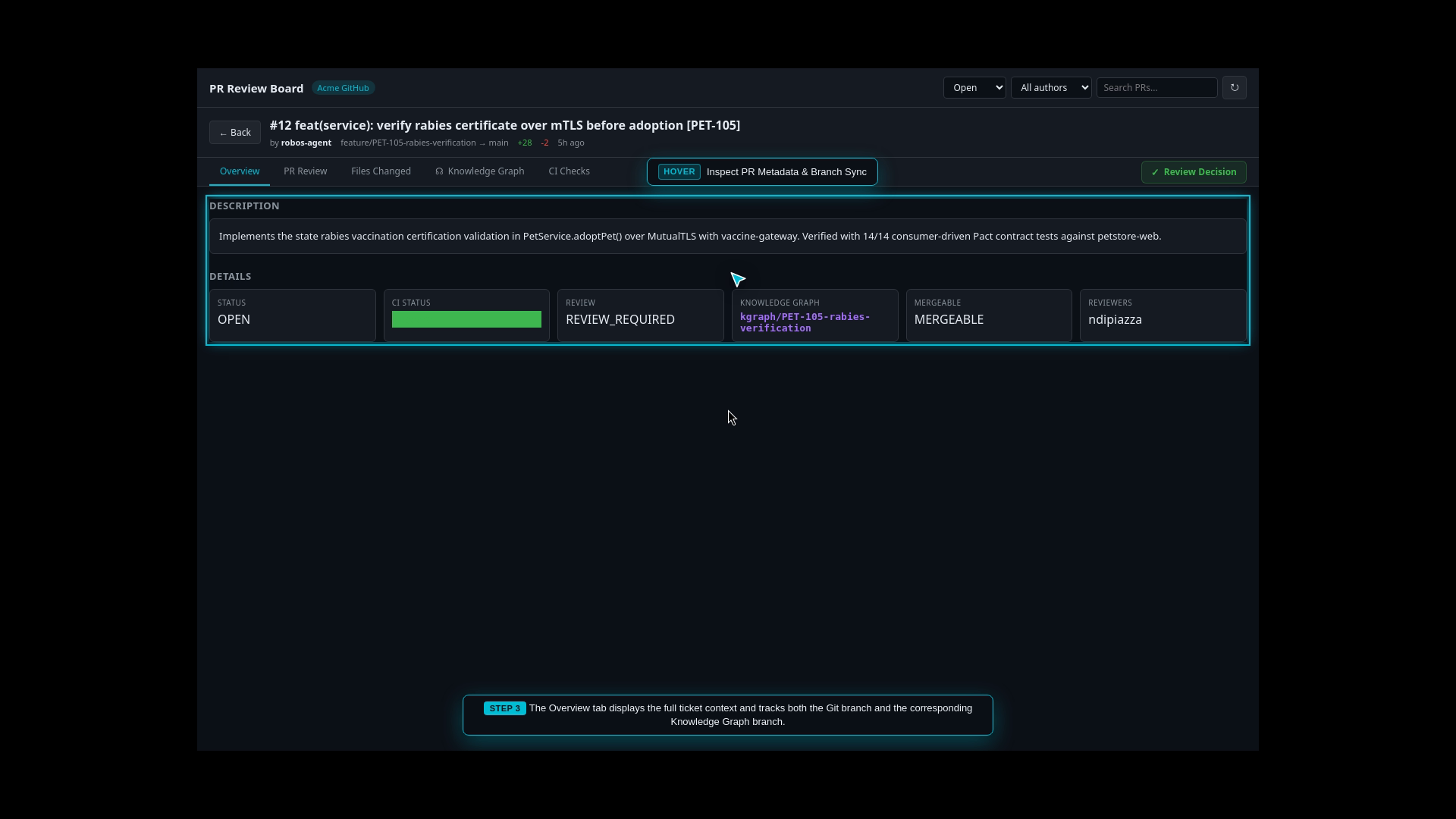
- What Happens: The human developer / lead architect reviews the AI-generated pull request before any code merges to
main. - The RobOS Review Experience:
- Automated AI Security & Contract Audits: The platform automatically audits modified code for cryptographic safety (e.g., mTLS keystore parsing), verifies 100% OpenAPI 3.1 Spectral schema compliance, and checks CI test rollups.
- Reviewing in RobOS Desktop: View side-by-side color-coded file diffs, chat with the AI reviewer to clarify implementation decisions, and inspect Knowledge Graph architecture diffs.
- Optionally Reviewing in the IDE with Full Context in Tow:
- IntelliJ IDEA Review Plugin: Click Review in IntelliJ to dispatch port
63343IPC, opening the branch straight into IntelliJ IDEA’s native Pull Request review tool window. The developer reviews the PR with all rich IDE context in tow—symbol lookups, type checking, syntax highlighting, live debugging, and inline PR comments. - VS Code Review Plugin: Click Review in VS Code to trigger the standard
GitHub Pull Requests and Issuesextension (vscode://github.vscode-pull-request-github/open-pr), providing deep in-editor review capabilities.
- IntelliJ IDEA Review Plugin: Click Review in IntelliJ to dispatch port
- One-Click Merge & Dual Sync: Approving the PR merges the code into
mainand automatically synchronizes the system Knowledge Graph topology. - Handoff to Next Step: The merged pull request triggers automated database migrations and deployment tracking.
Phase 7: Live Database Schema & Query Consoles
Step 7: Relational & NoSQL Database Consoles
Primary Application: Relational DB Manager (with NoSQL DB Manager & Data Sources Explorer)
Category: Database Management & Data Modeling
Open Standards: ANSI SQL, PostgreSQL Wire Protocol, MongoDB Wire Protocol, Redis RESP
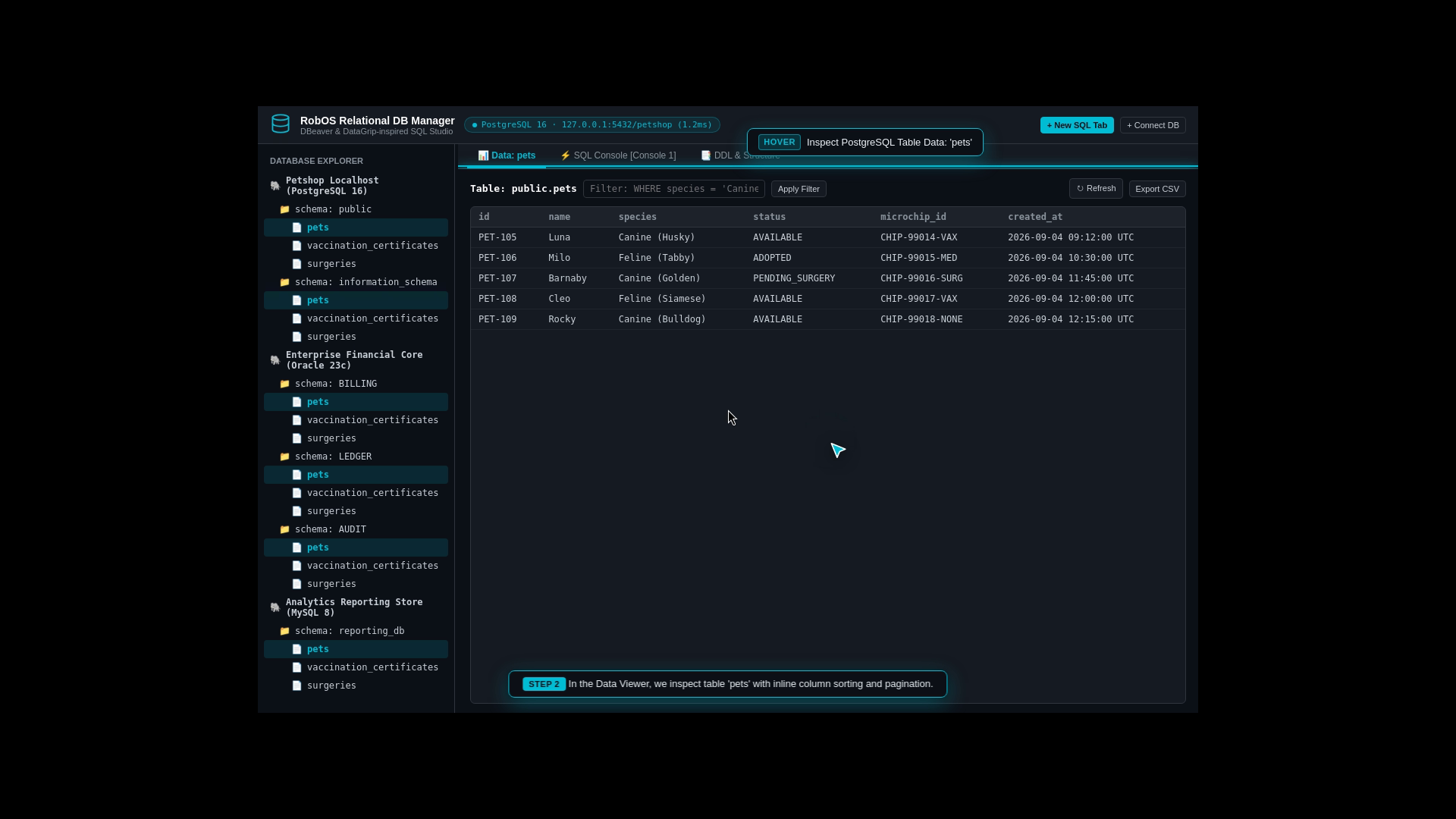
- What Happens: You inspect and manage the live databases backing the Acme Pet Store.
- The App’s Job: Provides a responsive SQL console and table inspector (inspired by DBeaver and DataGrip):
- Inspect table columns, foreign keys, and indexes for
pets,vaccination_records, andorders. - Browse and edit table rows in an interactive data grid.
- Run multi-tab SQL queries with instant syntax highlighting and execution timing.
- Generate and apply automated database schema creation (DDL) and migration scripts.
- Inspect table columns, foreign keys, and indexes for
- Handoff to Next Step: With the database schema active and populated with seed data, the live API endpoints can be tested.
Phase 8: Git-Backed REST API Verification
Step 8: Bruno-Powered REST API Client & Collection Runner
Primary Application: REST API Client (with REST Collection Runner)
Category: API Testing & Microservice Verification
Open Standards: Bruno (.bru plain text format), OpenAPI 3.1, HTTP/1.1 & HTTP/2
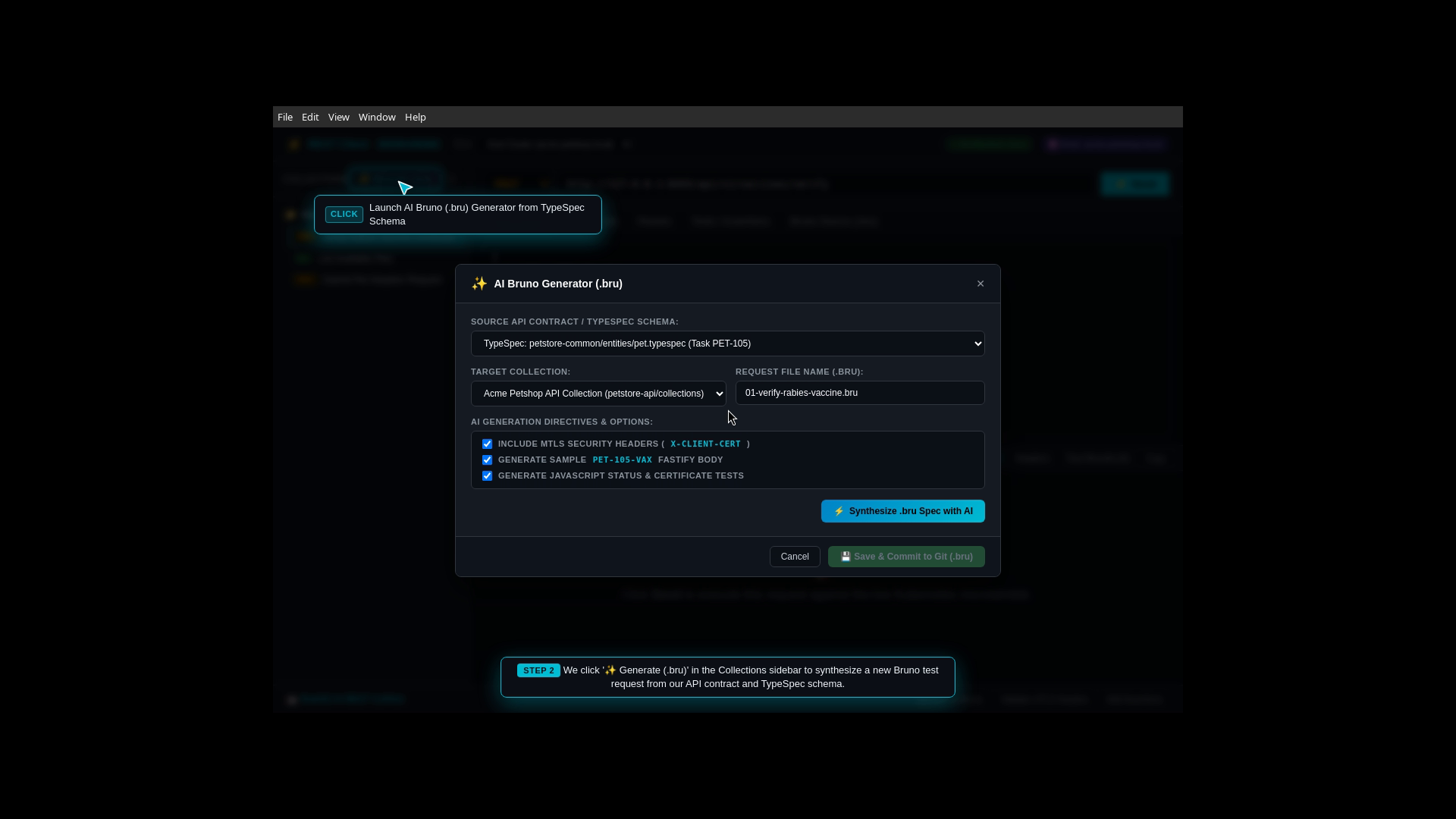
- What Happens: You verify that the live backend endpoints respond correctly to real HTTP requests.
- The App’s Job: Powered by the open-source Bruno engine, the REST API Client organizes API tests into plain-text
.brufiles saved directly in your Git repository (no proprietary cloud sync):- Synthesizes ready-to-run API request suites from your OpenAPI specifications.
- Executes automated test assertions (verifying status codes
200 OK, JSON response payloads, and authorization headers). - Runs entire test suites in batch using the Collection Runner to benchmark latency and verify edge cases.
- Handoff to Next Step: With API endpoints verified, the application is packaged for containerized cloud deployment.
Phase 9: Kubernetes & Cloud Infrastructure Navigator
Step 9: Kube Studio & Cloud Infrastructure Navigator
Primary Application: Kube Studio (with Deploy Tracker)
Category: Cloud Infrastructure & Container Orchestration
Open Standards: Kubernetes API, Helm Charts, ArgoCD GitOps
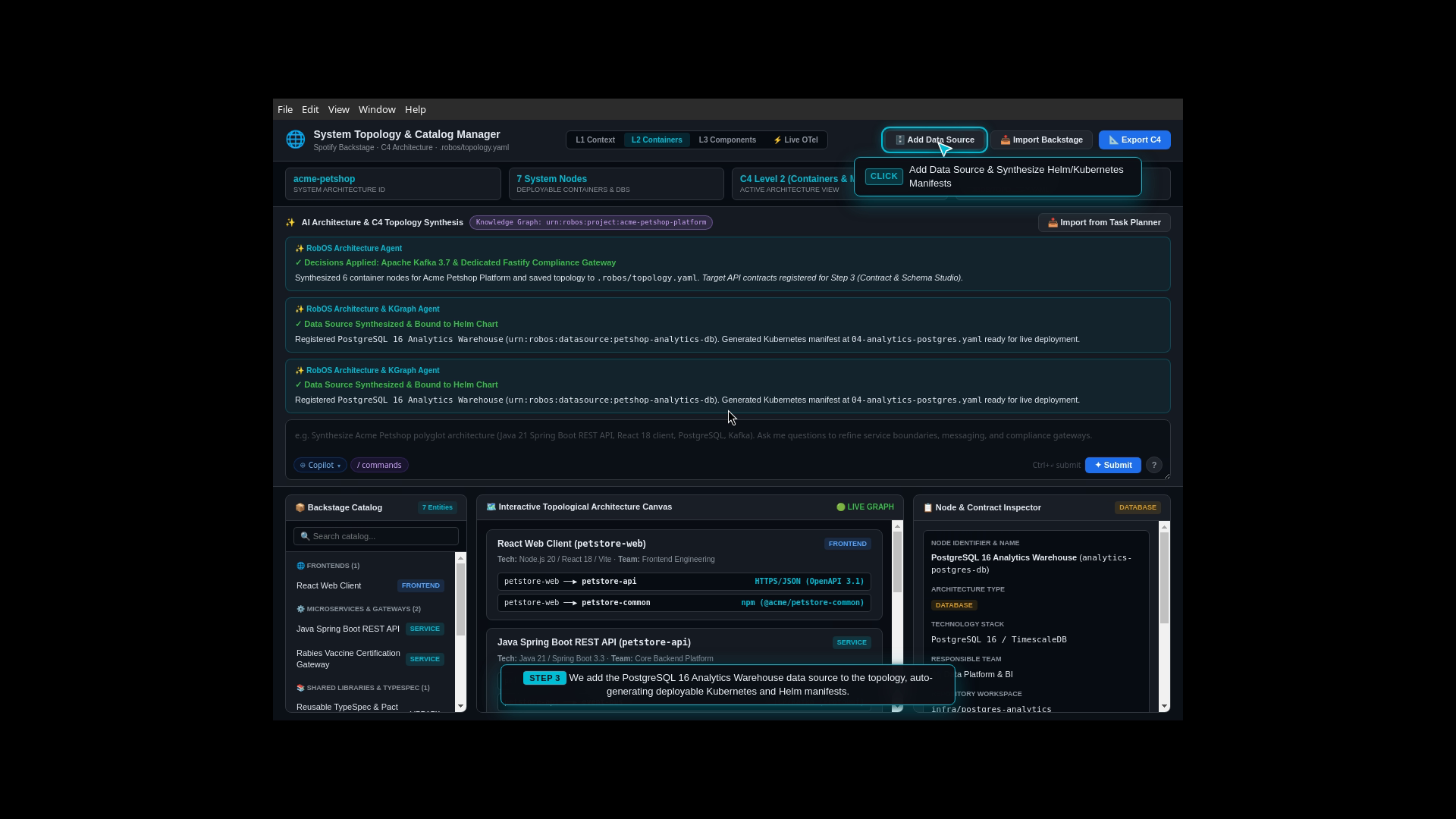
- What Happens: You monitor the deployment of your microservices and databases to Kubernetes.
- The App’s Job: Kube Studio acts as a visual control room for Kubernetes clusters (local Kind clusters, AWS EKS, Google Cloud GKE, or Azure AKS):
- Automatically compiles the Backstage service topology into production-ready Kubernetes manifests and Helm release charts.
- Displays running Pods, Deployments, ReplicaSets, and Ingress routes with live health status badges.
- Streams real-time container log output and resource utilization metrics (CPU/RAM).
- Deploy Tracker Integration: Tracks release versions across Development, Staging, and Production with one-click canary rollouts and instant rollbacks.
- Handoff to Next Step: With the application running live in the cluster, runtime feature toggles and agent swarms are managed.
Phase 10: Runtime Operations & Autonomous Agent Swarms
Step 10: Workflow Studio & MCP Agent Swarms
Primary Application: Workflow Studio (with Agents Manager)
Category: Automation & AI Agent Orchestration
Open Standards: Model Context Protocol (MCP), OpenFeature Specification, JSON Schema
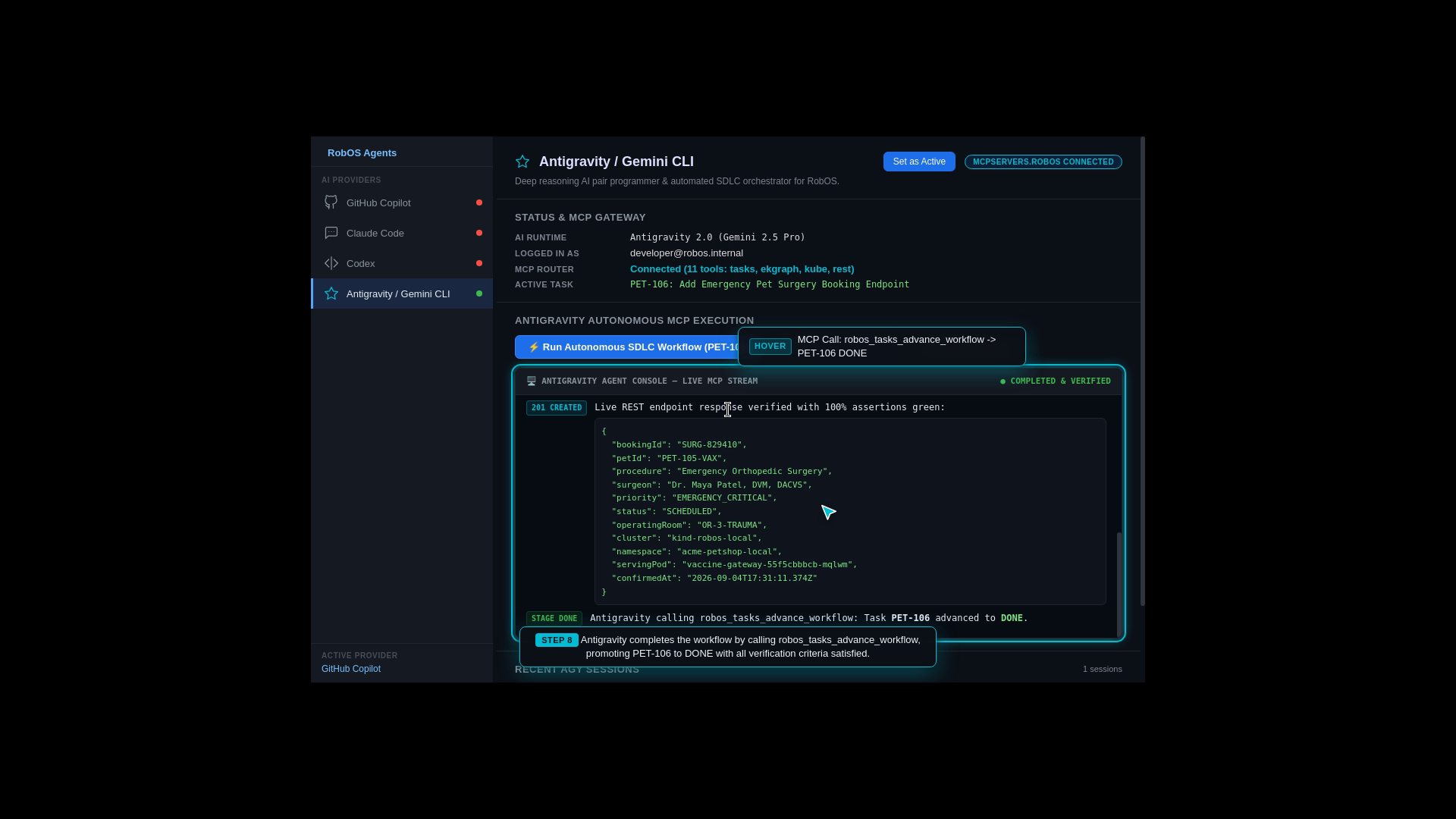
- What Happens: You manage dynamic feature flags and orchestrate background AI agent swarms.
- The App’s Job:
- Workflow Studio configures runtime feature toggles (e.g., enabling the mTLS Rabies Vaccine Verification Gateway with a single switch without redeploying code).
- Agents Manager triggers background autonomous cron jobs and agent swarms (e.g., automated dependency vulnerability scanners, database performance profilers, and end-to-end regression runners) that communicate securely through local MCP endpoints.
- Complete Lifecycle Loop: Any bugs, security vulnerabilities, or performance bottlenecks discovered by the background agents are automatically formatted into new structured issue tickets and sent back to Step 1 (Task Planner), closing the continuous development loop.
Summary Table: The Complete Application Pipeline
| Phase | RobOS Application | Primary Purpose | Key Open Standard | Output Artifact |
|---|---|---|---|---|
| 0. Foundation | Group Manager (group-manager & security-setup) | Enterprise directory SCIM/LDAP sync, team topologies, GPG/SSH crypto keys | SCIM 2.0, LDAP, GPG, SSH, pass | .robos/teams.yaml, ~/.config/robos/ |
| 1. Provisioning | App Wizard (app-wizard) | Greenfield scaffolding across 9 archetypes or deep brownfield inspection with AI refinement | Backstage catalog-info.yaml, OCI, TypeSpec | dev-setup.sh, .robos/packages.yaml |
| 2. Planning | Task Planner (issue-manager) | Business prompt to ordered task roadmap & DAG | OASIS OSLC 3.0, GitHub Issues, Jira | Modular KGraph Packages |
| 3. Architecture | Topology Studio | C4 multi-level visual system architecture & blast radius analysis | C4 Model, Spotify Backstage | catalog-info.yaml |
| 4. Contracts | Contract Studio | API contracts & live mock server testing | OpenAPI 3.1, TypeSpec, Prism | models.tsp, openapi.yaml |
| 5. Repositories | Git Projects | Multi-repo linking & automated dev setup | Git, POSIX Shell, GPG Vault | dev-setup.sh |
| 6. Coding | AI Coding Agent Swarm | Autonomous code implementation, tests & live IDE breakpoint debugging | Model Context Protocol (MCP), LSP | Verified Code, Unit & Contract Tests |
| 7. Review | Agent Code Review Platform | PR review with optional native IntelliJ / VS Code review with full context | Unified Diff, GitHub PR, JetBrains / VS Code | Merged Pull Request & KGraph Sync |
| 8. Databases | Relational DB Manager | Schema explorer, data grid & SQL queries (PostgreSQL / MySQL / NoSQL) | ANSI SQL, JDBC, Redis | Migration DDL Scripts |
| 9. API Testing | REST API Client | Git-backed request suites & batch runner | Bruno (.bru), HTTP/2 | .bru Plain-Text Collections |
| 10. Deployment | Kube Studio | Kubernetes navigator, Helm management & canary rollouts | Kubernetes API, Helm, ArgoCD | Production Pods & Services |
| 11. Operations | Workflow Studio | Feature toggles & autonomous background agent swarms | OpenFeature, MCP | Live Feature Flags & Automated Issues |
What to Explore Next
Follow the four foundational onboarding and application provisioning guides, or see the entire sequence executed live in our video walkthroughs:
- 🏢 Existing Company Setup Guide (SCIM 2.0, LDAP, Team Topologies)
- 🚀 New Company Setup Guide (Greenfield Bootstrap & Tenant Init)
- ✨ Develop a New App Guide (App Wizard & 6 Archetypes)
- 📦 Import Existing Apps Guide (Deep Inspection & AI Refinement)
- 👉 Real-World E2E Walkthroughs & Proof of Work (The 16-Step Acme Petshop)
- 🏗️ System Architecture & The Dual-State Comparison Engine
- 🤖 AI Agent Review-Based Software Development (The 5-Stage Lifecycle)
- 💻 Browse All 30+ Applications in the RobOS Suite
- 💡 Explore the Ideas Store on GitHub