PR Review Theater & Verification
How RobOS turns pull request reviews into an interactive, multi-modal governance theater: AI agents teach developers how changes work with interactive masterclasses, prove real execution with 1080p narrated video proof-of-work, link living architecture deltas, and bridge directly into developer IDEs.
Table of contents
- The Paradigm Shift: Why Traditional Code Review Fails for AI Code
- Dual-State Knowledge Graph Governance
- The 6-Stage PR Review Theater Walkthrough
- PR Queue & Triage Dashboard
- PR Overview & Detail Launch
- Stage 1: PR Masterclass & Reviewer Knowledge Check
- Stage 1 (Verified): Knowledge Graph Verified Credential
- Stage 2: Living Architecture Guide & Dual-Reality Delta
- Stage 3: In-App Semantic File Diff Viewer
- Stage 4: IDE Branch Diff Viewer Bridge
- Stage 5: Dual-Mode Proof-of-Work Canvas (1080p Xvfb Video or Live Desktop)
- Stage 6: Review Validation Gates & Dual-Branch Merge Sign-Off
- Standalone RobOS eLearning Player Hub
- Cross-Agent AI Skills & Automation
- Semantic Vocabularies & SHACL Shapes
- Next Steps
The Paradigm Shift: Why Traditional Code Review Fails for AI Code
In traditional software development, developers spend hours scrolling through lines of green and red text in a browser diff tool. When code is written by humans, diff reading is already tiring and error-prone. When code is drafted at high velocity by autonomous AI agents (Claude Code, Google Antigravity, GitHub Copilot, OpenAI Codex), traditional line-by-line diff review completely collapses:
- Reviewer Cognitive Overload: AI agents can scaffold entire microservices, refactor 40 files, or regenerate complex database migrations in seconds. Staring at hundreds of lines of code without architectural context causes review fatigue, leading to rubber-stamping or missed edge cases.
- The “Hallucination Trap”: Code may look syntactically correct and pass static linters while subtly violating distributed state invariants, breaking event-driven contracts, or failing in real runtime environments.
- Passive vs. Active Comprehension: Merely skimming a diff doesn’t guarantee the reviewer understands the design decisions, blast radius, or operational failure modes.
The Lead System Architect Model
RobOS eliminates blind trust in AI diffs by promoting human developers to Lead System Architects. Autonomous agents perform the implementation, but they must present their work in the RobOS PR Review Theater—an orchestrated 6-stage review environment that actively educates the reviewer, validates comprehension through verifiable knowledge checks, and proves runtime correctness before a single line is merged into main.
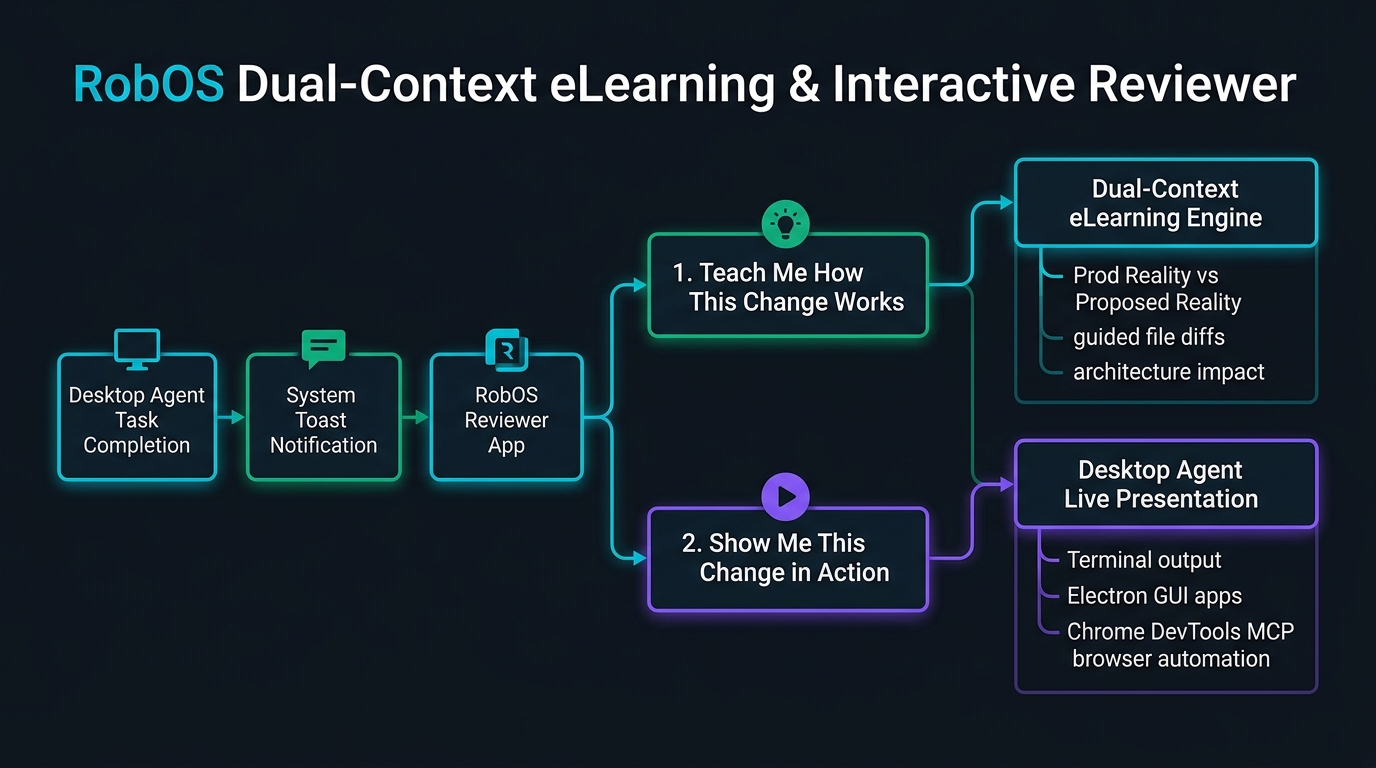
Dual-State Knowledge Graph Governance
Every pull request reviewed in RobOS is anchored to the Dual-State SDLC Knowledge Graph. Rather than treating a pull request as an isolated Git patch, RobOS evaluates the difference between two linked worlds:
- Production Reality (
World 1: main): The verified, live state of all microservices, databases, API schemas, and Kubernetes deployments. - Proposed Reality (
World 2: feature-branch): The candidate architecture mutated by the AI agent’s pull request.
The PR Review Theater leverages W3C SHACL constraint shapes (robos:PullRequestReviewTheater, robos:ReviewTheaterStage, robos:LearningCourse, robos:CompletionCertificate, robos:LivingDocPage) defined in .robos/kgraphs/learning/package.jsonld and .robos/kgraphs/documentation/package.jsonld. Every stage of the review is tracked as a first-class semantic entity, ensuring immutable auditability across the enterprise.
The 6-Stage PR Review Theater Walkthrough
Let’s walk through the end-to-end PR Review Theater workflow as experienced by a Lead Architect reviewing a multi-component feature (PR #12: feat(auth): add OAuth2 PKCE social login and session token refresh).
PR Queue & Triage Dashboard
The review journey begins in the Agent Code Review Platform (packages/pr-review), which aggregates all active pull requests across the enterprise catalog.
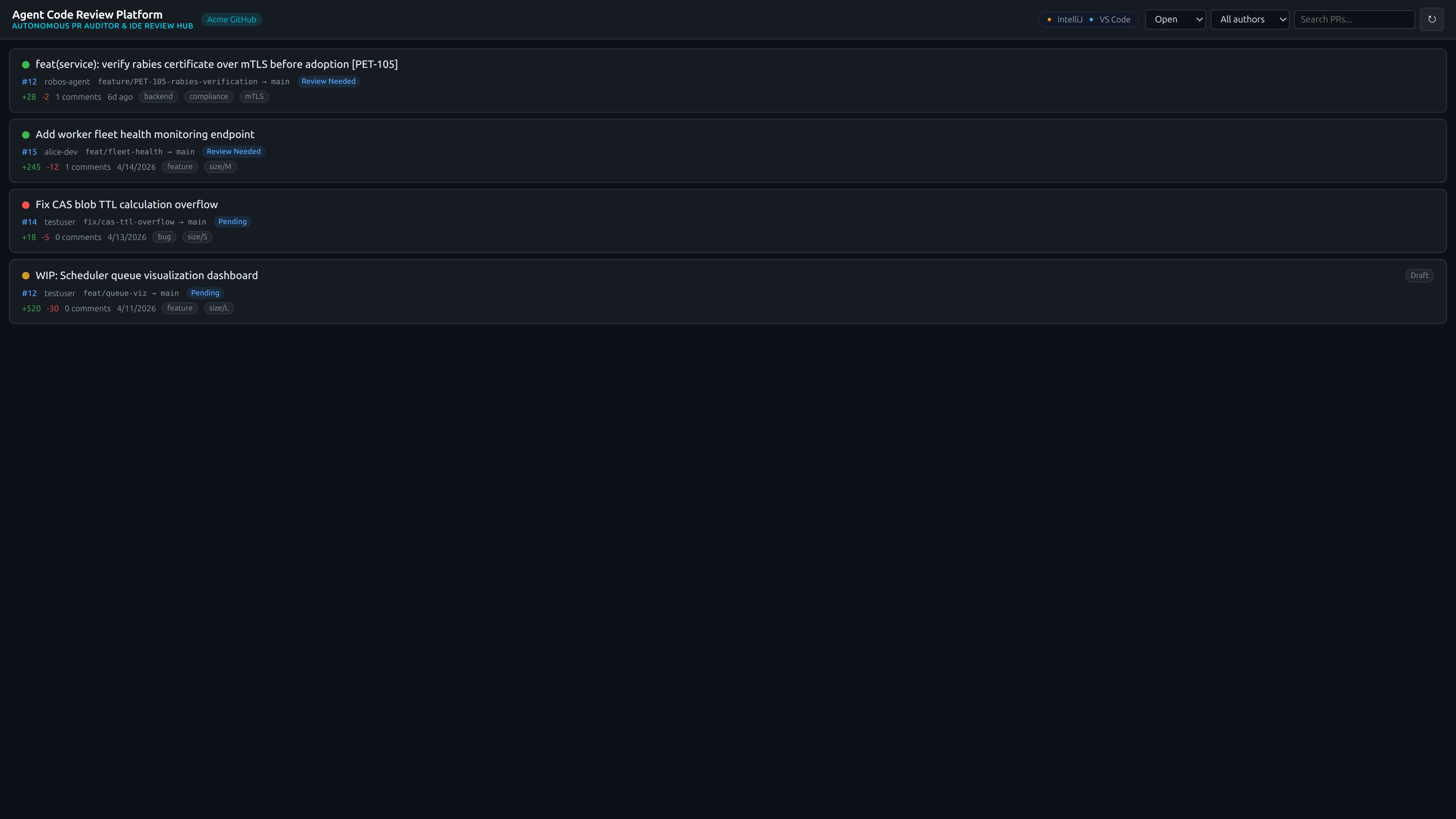
Key Capabilities:
- Multi-Repo Aggregation: Collects pull requests across all registered Git repositories and monorepos.
- AI Attribution & Risk Tiers: Clearly identifies AI-generated pull requests and their semantic blast radius tier (
Tier 1 Low,Tier 2 Medium,Tier 3 High Risk). - One-Click Theater Chip: Each card includes a direct
🎭 Review Theaterlaunch button to immediately enter the immersive review mode.
PR Overview & Detail Launch
Selecting a pull request opens the comprehensive detail view, summarizing the business objective, automated CI test outcomes, security audits, and impacted architecture components.
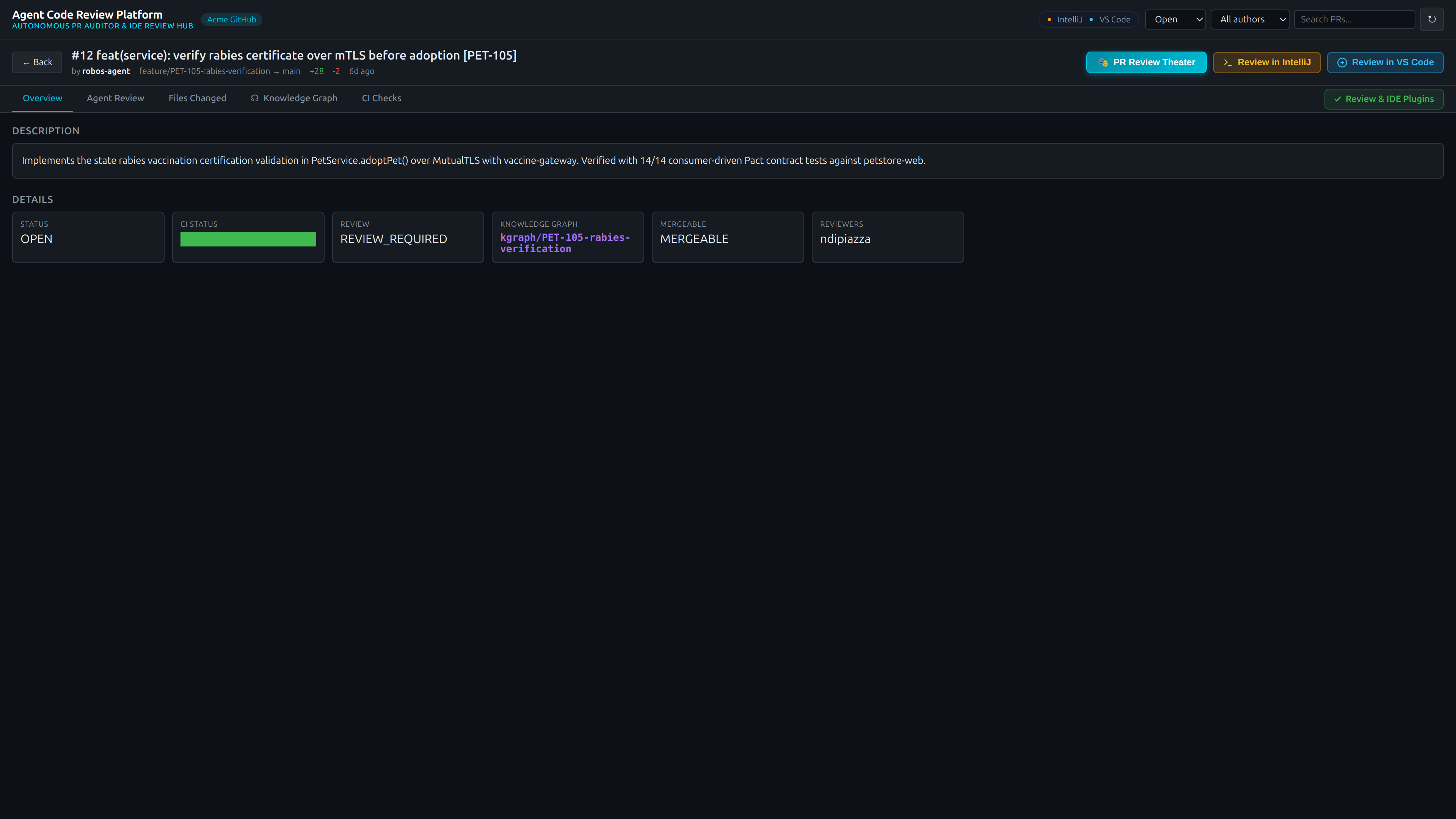
Key Capabilities:
- Blast Radius Summary: Summarizes affected REST endpoints, database schemas, and consumer microservices before diving into code.
- Automated Security & Audit Scans: Live indicators verifying zero plaintext secrets, dependency vulnerability scans, and W3C SHACL shape validation gates.
- Launch Theater CTA: Clicking the vibrant cyan
🎭 Launch PR Review Theaterbutton transitions into the dedicated 6-stage guided review environment.
Stage 1: PR Masterclass & Reviewer Knowledge Check
Before examining raw code diffs, the reviewer is enrolled in an on-demand interactive training masterclass synthesized specifically for this pull request.
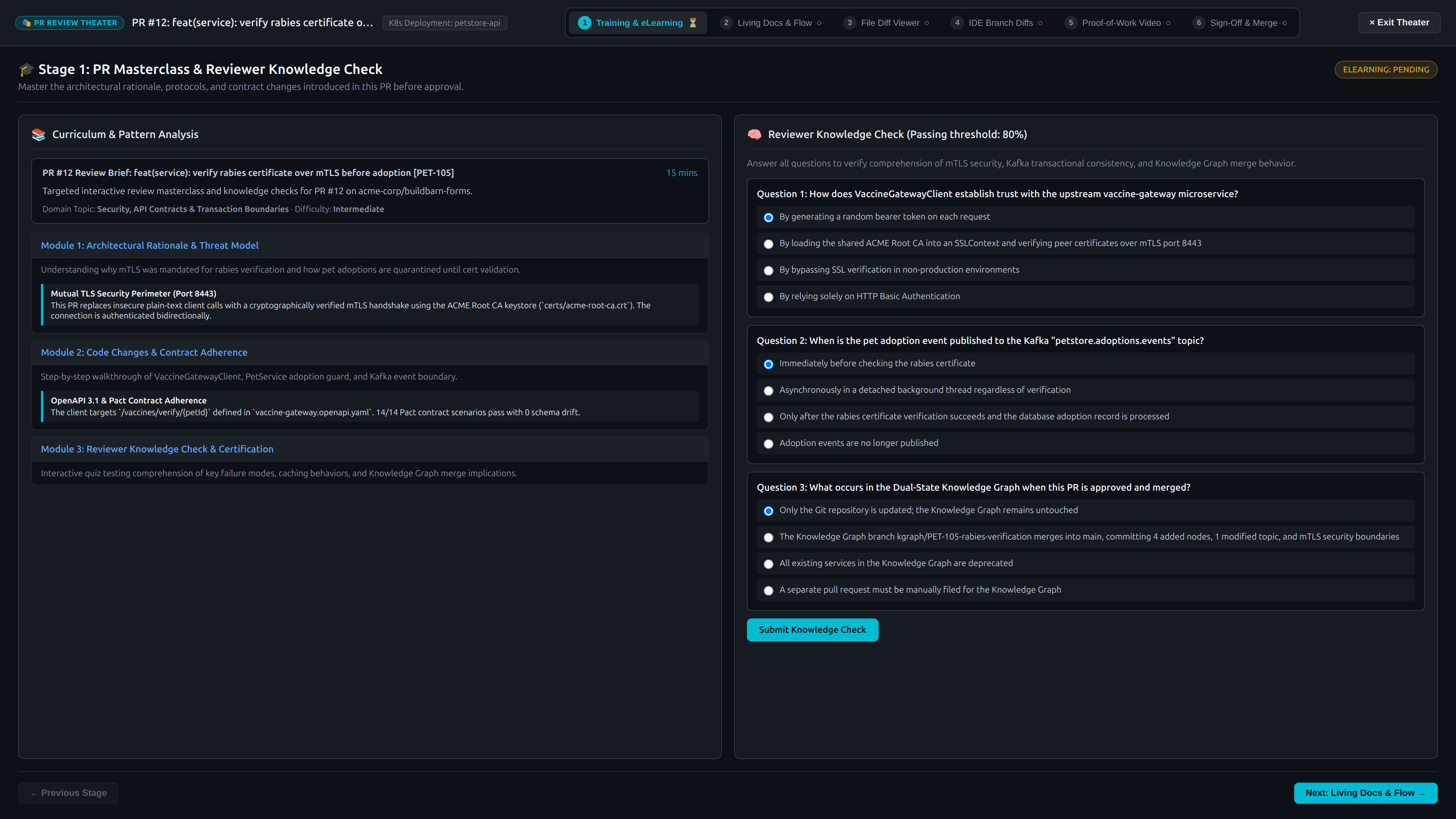
Key Capabilities:
- Targeted Learning Modules:
- Module 1: Architecture & Rationale: Why this change was made and how it fits into the broader enterprise topology.
- Module 2: Token Lifecycle & Cryptography: Deep-dive into RFC 7636 PKCE code challenges and SHA-256 state hashing.
- Module 3: Blast Radius & Failure Modes: Downstream consumer impacts, cache invalidation, and timeout recovery.
- Dual App & PR eLearning: Access both the PR-specific micro-masterclass and the broader application architecture curriculum in the standalone RobOS eLearning Hub with one click.
- Strict Anti-Rubber-Stamp Knowledge Gate:
- Reviewers cannot bypass or rubber-stamp reviews: code diffs in Stage 3 and approval merge actions in Stage 6 remain strictly locked behind a cryptographic comprehension gate.
- The reviewer must answer scenario-based quiz questions verifying understanding of the system’s operational invariants and achieve $\ge 80\%$ to unlock the diff viewer and sign-off console.
Stage 1 (Verified): Knowledge Graph Verified Credential
Upon successfully passing the knowledge check, RobOS mints an immutable Certificate of Completion registered directly to the reviewer’s node in the SDLC Knowledge Graph.
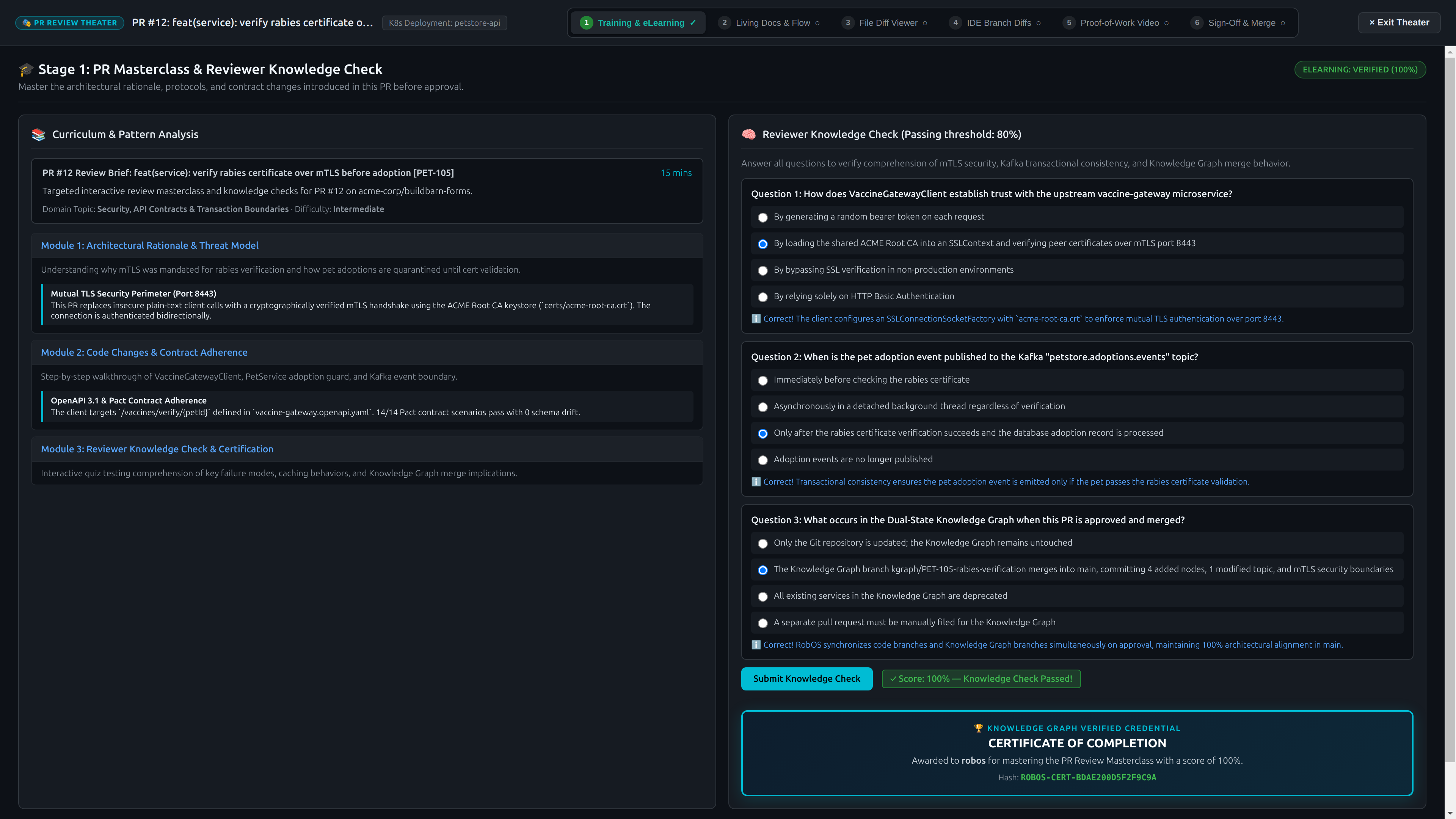
Key Capabilities:
- Cryptographic Hash Verification: Issued with a unique hash (e.g.
ROBOS-CERT-F04FAD16F235707C) validating non-repudiation. - Knowledge Graph Association: Stored as a
robos:CompletionCertificatelinked viarobos:hasCertificateto the human reviewer’srobos:Developerentity. - Audit Compliance: Provides regulated enterprise teams (financial services, healthcare, aerospace) with incontrovertible proof that code was actively understood prior to production deployment.
Stage 2: Living Architecture Guide & Dual-Reality Delta
Stage 2 presents the Living Architecture Guide, automatically synthesized from the Dual-State Knowledge Graph by comparing Production Reality against Proposed Reality.
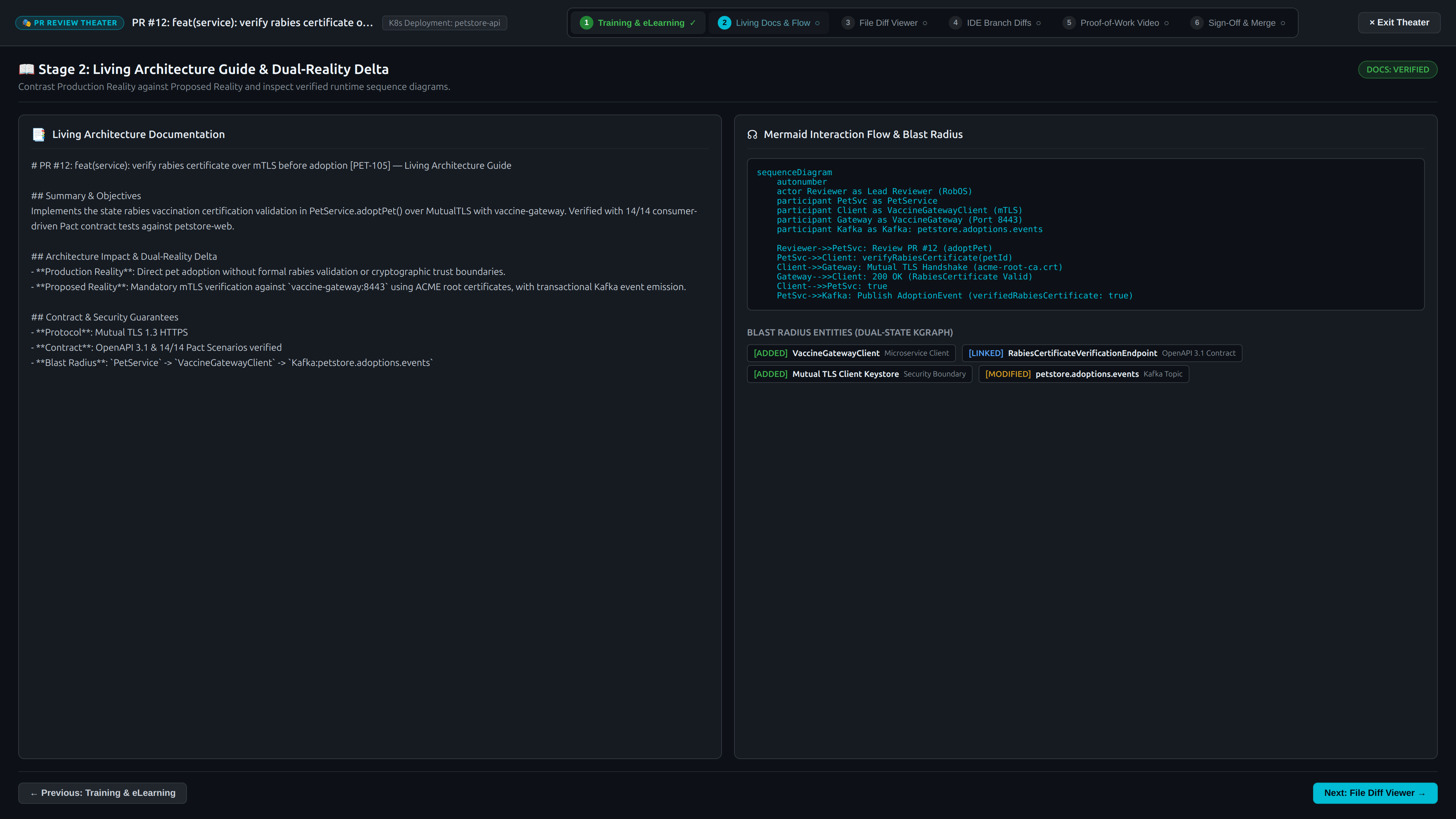
Key Capabilities:
- Visual Mermaid Sequence Flows: Auto-generated sequence diagrams depicting client authentication, OAuth code exchange, and token refresh loops.
- Dual-Reality Behavioral Delta: Side-by-side comparison tables showing:
- Production Reality: Legacy session cookie auth without PKCE or mobile OAuth2 support.
- Proposed Reality: RFC 7636 PKCE social login, JWT access tokens, and rolling refresh tokens.
- Contract Impact: Live diff of modified OpenAPI 3.1 endpoints (
POST /api/v1/auth/token/refresh) and database schema additions (auth_sessions,refresh_tokens). - Interactive REST API Verification Panel:
- Live execution harness testing the exact REST endpoints touched by the PR.
- Inspect simulated or real HTTP requests, headers (
Authorization: Bearer ..., mTLS, content-type), query parameters, and JSON request bodies. - Click “Execute REST API Call” to send the live request and view real-time response telemetry side-by-side against expected OpenAPI contract schema.
Stage 3: In-App Semantic File Diff Viewer
Reviewers can inspect the actual source code modifications directly inside the theater using the In-App File Diff Viewer.
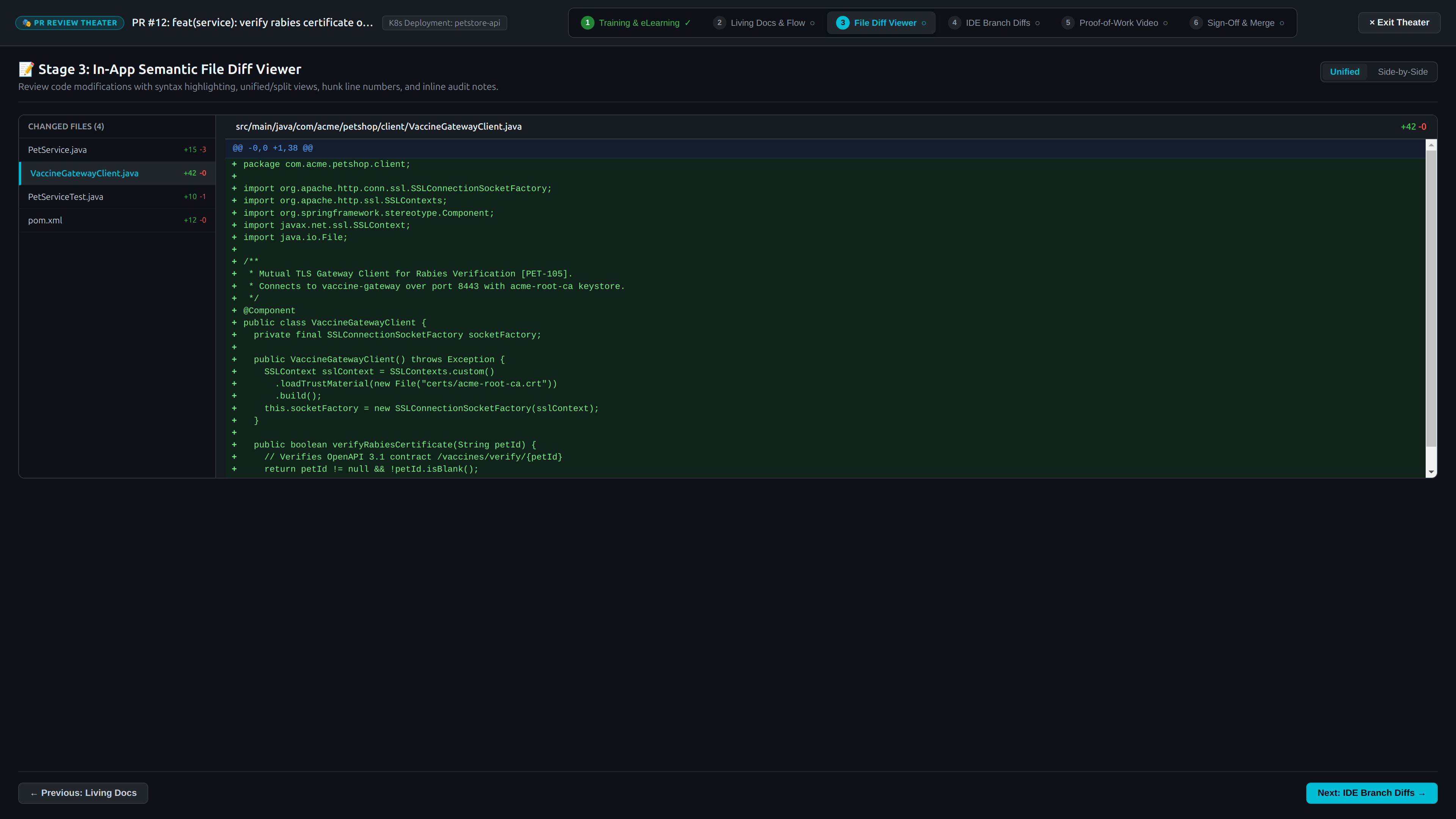
Key Capabilities:
- Split & Unified View: Toggle between side-by-side and unified diff views.
- Syntax Highlighting & Line Numbers: Polyglot code coloring supporting TypeScript, JavaScript, Python, Java, Go, Rust, and SQL.
- File Filter & Jump: File tree sidebar displaying added (
+), modified (~), and deleted (-) files with line change tallies. - Agent Intent Annotations: Code hunks feature embedded annotations explaining the exact intent behind non-obvious algorithmic changes.
Stage 4: IDE Branch Diff Viewer Bridge
When a Lead Architect requires full IDE power—AST symbol navigation, type hierarchies, local breakpoint debugging, or custom test execution—RobOS provides an instant one-click bridge into IntelliJ IDEA and VS Code.
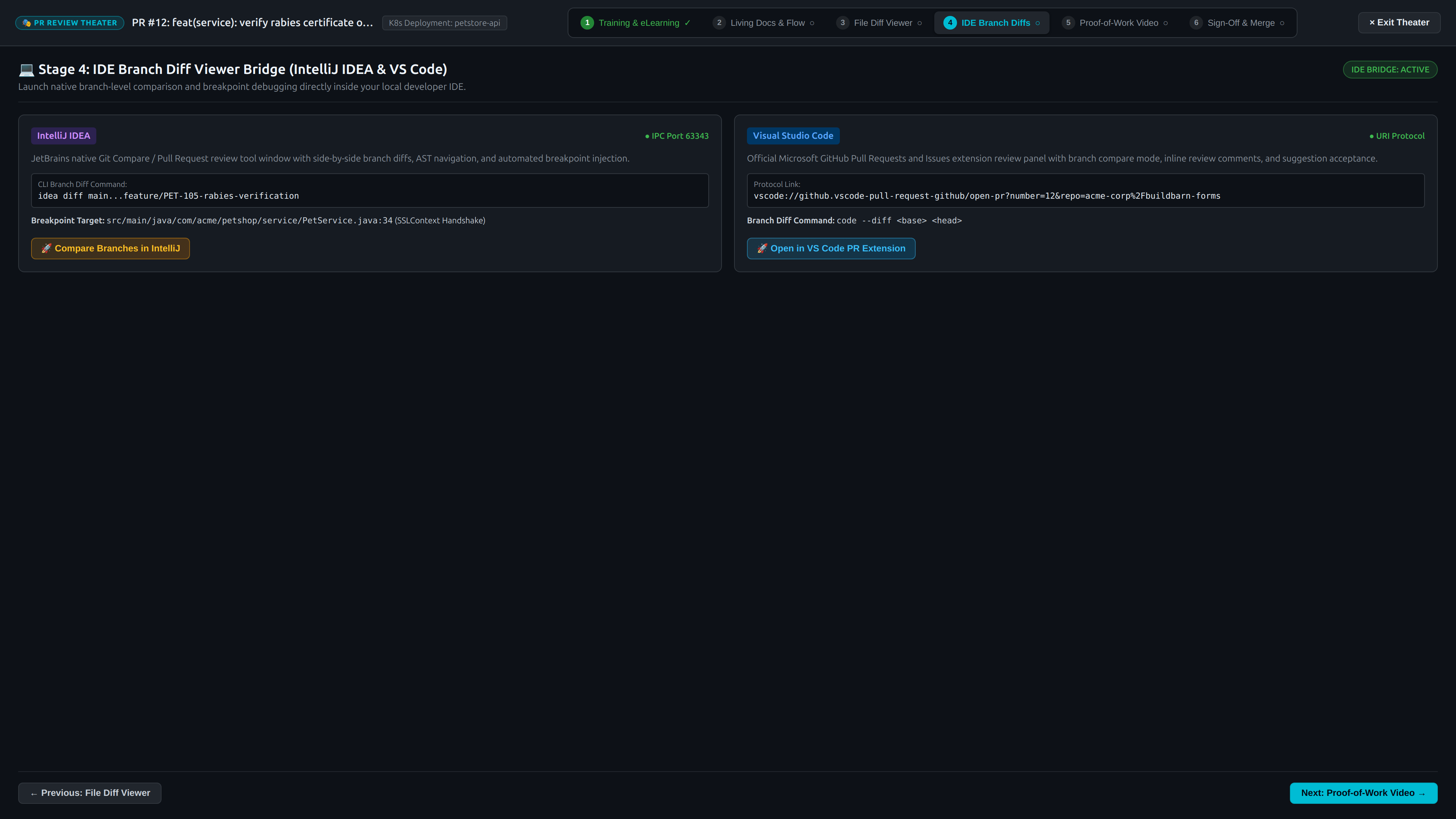
Key Capabilities:
- IntelliJ IDEA IPC Server (Port
63343):- Communicates directly with the running IntelliJ IDEA instance.
- Automatically fetches and checks out the PR branch.
- Launches JetBrains’ native Pull Request Review Tool Window with local AST symbol resolution and refactoring analyzers.
- Sets breakpoint listeners at modified code sites for interactive step-through debugging.
- Interactive Breakpoint Debugger:
- Automatically fires up the target app in the IDE and triggers a breakpoint relevant to the PR (e.g. at line 42 of
TokenController.java). - Halts execution and exposes real-time stack frames, thread status, and live variable inspection (
tokenRequest,clientSecret,grantType,expiresIn). - Reviewers can inspect variables directly in the Theater and click “Resume Execution” or step through in their IDE.
- Automatically fires up the target app in the IDE and triggers a breakpoint relevant to the PR (e.g. at line 42 of
- VS Code Protocol Integration (
vscode://):- Triggers the official
GitHub.vscode-pull-request-githubextension (vscode://github.vscode-pull-request-github/open-pr?repo=...&number=12). - Opens diff editors directly in VS Code with inline comment threads, Copilot completions, and terminal test runners.
- Triggers the official
- Zero Configuration: No manual Git commands, branch checking, or stash management required.
Stage 5: Dual-Mode Proof-of-Work Canvas (1080p Xvfb Video or Live Desktop)
RobOS completely eliminates the question “Did anyone actually run this to see if it works?” Stage 5 acts as a blank canvas for the robot to prove execution through either autonomous 1080p recorded video walkthrough or live execution right in your current desktop session.
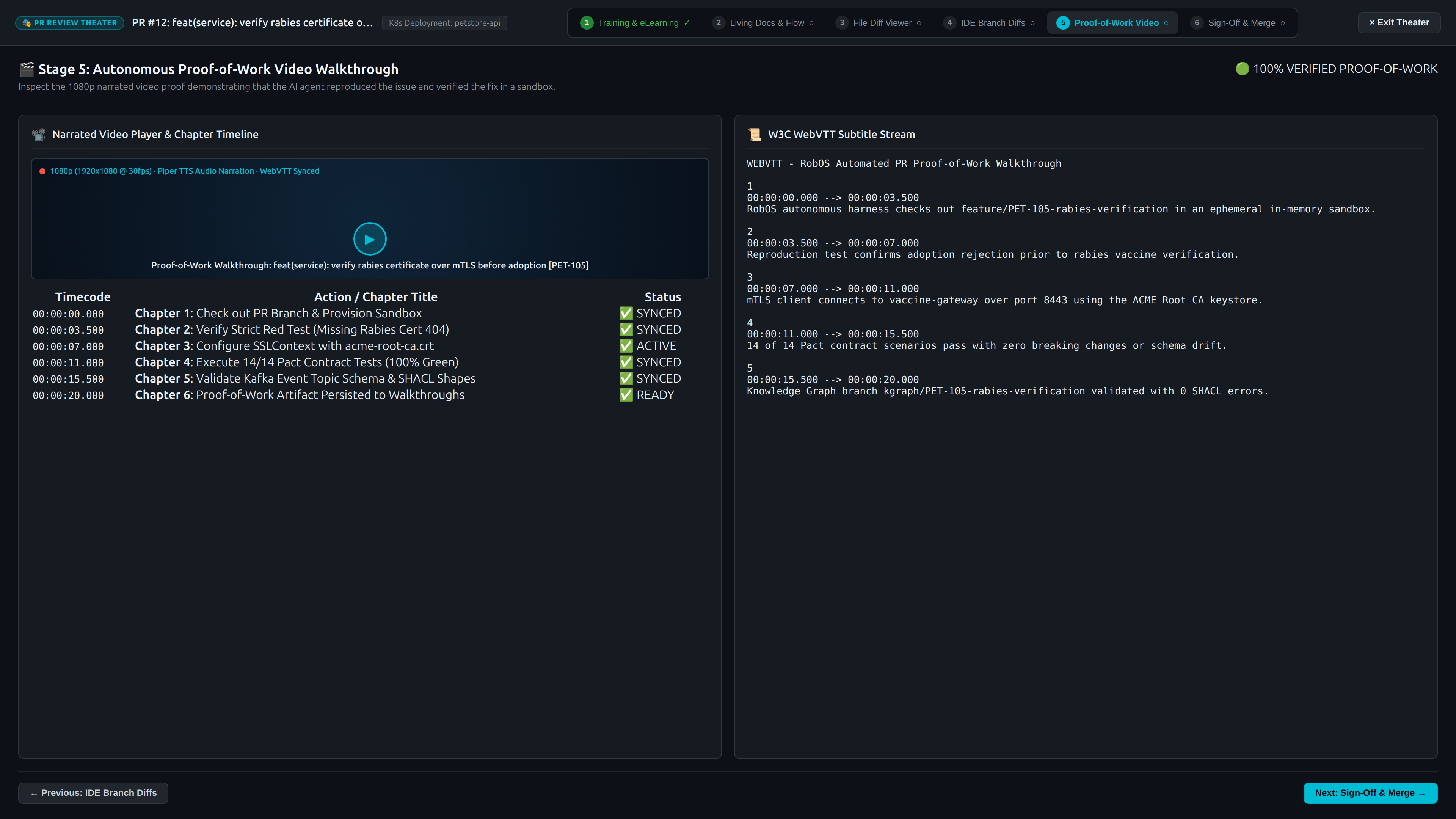
Key Capabilities:
- Dual-Mode Canvas Switcher:
- 1080p Recorded Xvfb Video: The agent runs headless inside a virtual framebuffer, interacting with UI buttons, submitting forms, and asserting responses with Piper neural speech and synchronized WebVTT captions.
- Live Desktop Session (
DISPLAY=:0): For reviewers who prefer to watch the app run live or interact with it directly in their active GNOME/X11 session. Launches the test reproduction harness right on the reviewer’s screen with live terminal logs, process PID tracking, and exit telemetry.
- Piper Neural TTS Audio: Explains each action in natural human speech, highlighting edge cases tested and test assertions validated.
- Synchronized WebVTT Subtitles: Captions update in real time with interactive timeline jump markers (
00:04 Click Social Login,00:12 Submit PKCE Token,00:22 Validate Session Refresh). - Zero Fluff: 30-to-60-second concise proof validating end-to-end functionality before merge.
Stage 6: Review Validation Gates & Dual-Branch Merge Sign-Off
The review culminates in Stage 6: the Merge Sign-Off & Verification Gates Console.
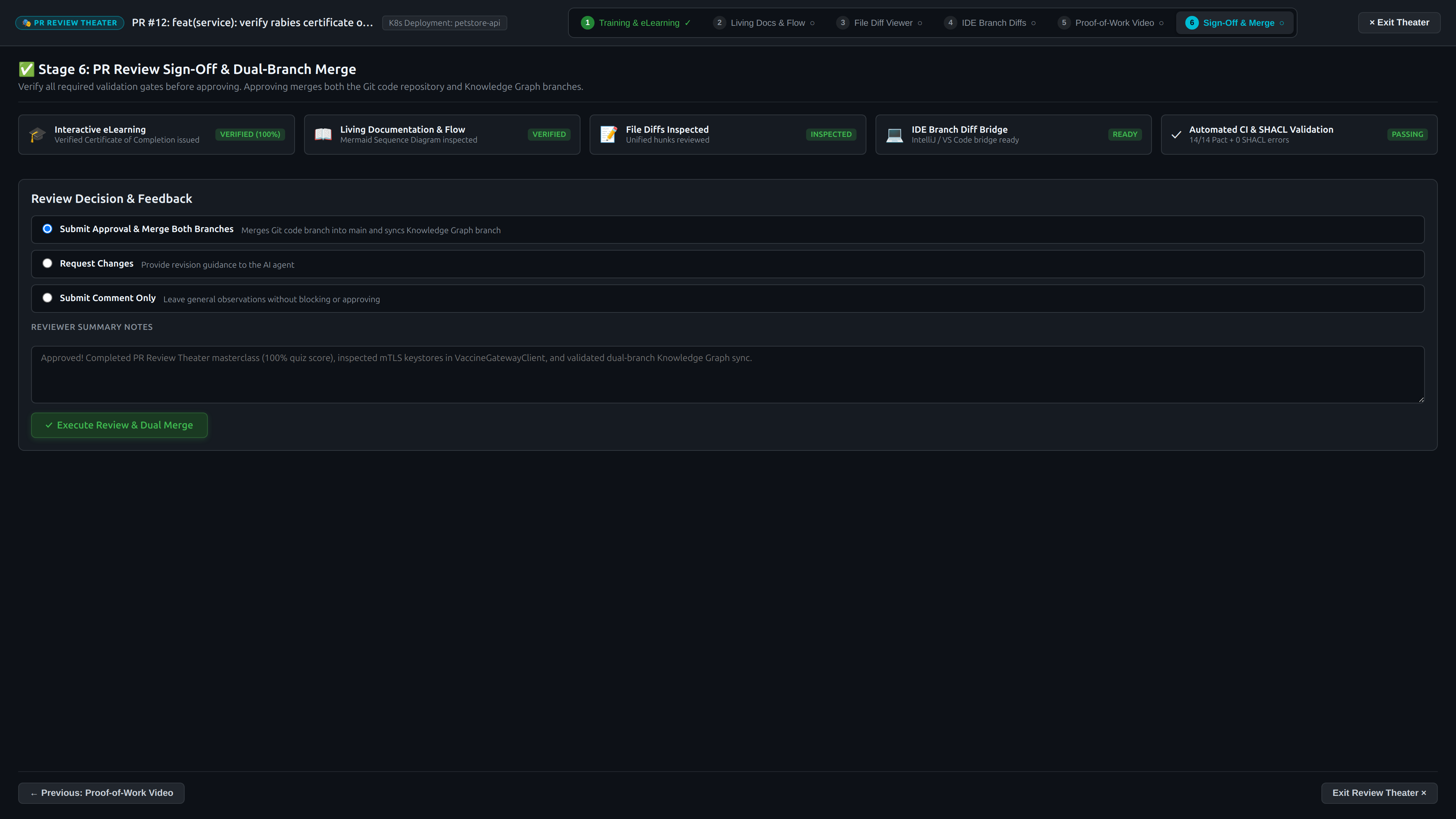
The 5 Validation Gates:
- Gate 1: Reviewer Knowledge Check: Verifies that the Lead Architect achieved 100% on the PR masterclass quiz and holds an active
robos:CompletionCertificate. - Gate 2: Living Architecture Guide: Confirms the architectural delta and sequence diagrams have been inspected and acknowledged.
- Gate 3: In-App Code Diff Review: Confirms the syntax-highlighted code hunks have been audited.
- Gate 4: IDE Verification Bridge: Confirms the PR branch was verified locally or marked satisfied.
- Gate 5: Video Proof-of-Work: Confirms the 1080p narrated proof-of-work video has been viewed and verified.
Atomic Sign-Off & Merge:
- Decision Controls: Choose between
Approved(with green badge) orRequest Changes. - Reviewer Notes: Enter optional sign-off remarks recorded permanently to the Git commit and Knowledge Graph audit ledger.
- One-Click Merge: The
Merge Pull Request into mainbutton executes an atomic Git merge, updates the Production Reality (World 1) Knowledge Graph, and dismisses the review theater.
Standalone RobOS eLearning Player Hub
In addition to PR-specific review masterclasses, RobOS provides a dedicated standalone desktop application: RobOS eLearning Hub (packages/robos-elearning).
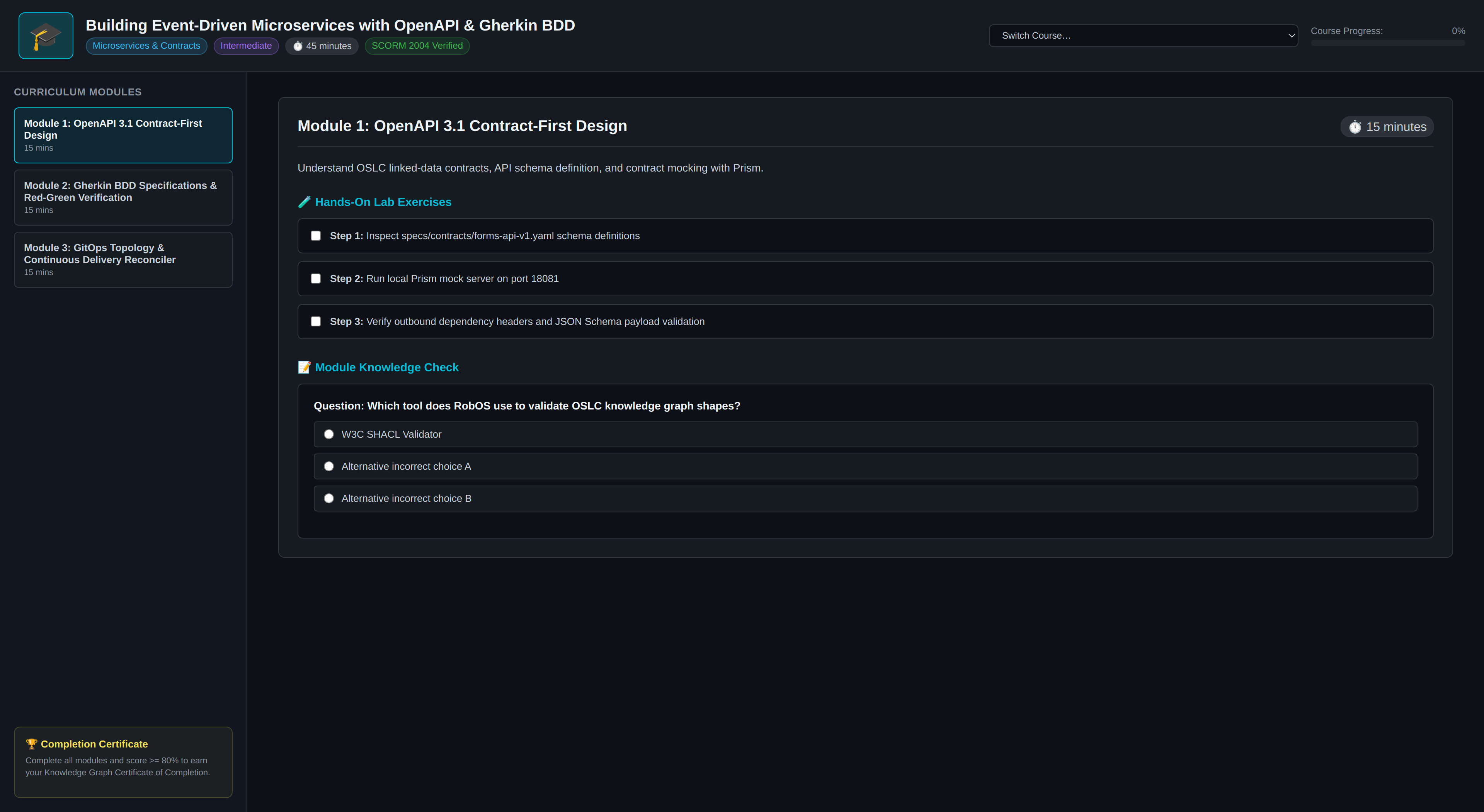
Features of the Standalone Player:
- Enterprise Curriculum Catalog: Browse interactive courses across all cataloged applications, frameworks, and microservices in the organization’s Knowledge Graph.
- Hands-On Interactive Labs: Execute code exercises directly against local ephemeral sandboxes with real-time automated scoring.
- Certificate Registry: Centralized repository of all earned developer certifications, filterable by application, team member, and issuance date.
- Autonomous Curriculum Generation: AI agents can scaffold complete eLearning courses on demand for any codebase using the
generate-app-elearningskill.
Cross-Agent AI Skills & Automation
The PR Review Theater and eLearning capabilities are fully exposed to autonomous agents across all leading LLM platforms via standardized skills:
| Skill Name | Purpose | Target Agents |
|---|---|---|
pr-review-theater | Inspects, initializes, and orchestrates the 6-stage PR Review Theater for any pull request. | Claude Code, Antigravity, Copilot, Gemini |
generate-app-elearning | Analyzes an application in the Knowledge Graph and scaffolds an interactive eLearning curriculum and lab exercises. | Claude Code, Antigravity, Copilot, Gemini |
generate-app-docs | Synthesizes living Markdown architecture documentation and Mermaid sequence diagrams for any service. | Claude Code, Antigravity, Copilot, Gemini |
sync-kgraph-docs | Discovers architectural delta between main and branch and updates living documentation accordingly. | Claude Code, Antigravity, Copilot, Gemini |
ide-java | Automates IntelliJ IDEA over port 63343 IPC for secret run configs, breakpoints, and thread inspection. | Claude Code, Antigravity, Copilot, Gemini |
Using the pr-review-theater Skill
Agents can inspect or advance a PR Review Theater programmatically:
# Inspect review theater state for PR #12
node .agents/skills/pr-review-theater/scripts/review-theater-cli.js --pr 12 --status

# Generate masterclass curriculum and living doc delta
node .agents/skills/pr-review-theater/scripts/review-theater-cli.js --pr 12 --synthesize

# Verify completion certificate credential
node .agents/skills/pr-review-theater/scripts/review-theater-cli.js --verify-cert ROBOS-CERT-F04FAD16F235707C
Semantic Vocabularies & SHACL Shapes
All entities in the PR Review Theater and eLearning Hub conform strictly to W3C SHACL constraint shapes:
robos:PullRequestReviewTheater: Governs theater lifecycle, current stage, reviewer assignment, and gate states.robos:ReviewTheaterStage: Individual stage definition with status (pending,in_progress,completed), label, and artifact links.robos:LearningCourse: Educational course structure with lessons, code labs, and quiz questions.robos:CompletionCertificate: Immutable credential tracking reviewer ID, score, issuance timestamp, and cryptographic hash.robos:LivingDocPage: Markdown living documentation with embedded Mermaid diagrams and dual-reality behavioral deltas.
Explore the complete schema definitions in the Living Learning & Documentation SHACL Schemas.
Next Steps
- E2E Walkthroughs & Video Proof of Work: Watch real-world video walkthroughs generated by autonomous agents.
- Agent Tiers & Model Dispatch: Learn how RobOS optimizes model intelligence and cost across 3 agent tiers.
- RobOS Desktop Applications Suite: Explore all 30+ native developer tools in the RobOS platform.
- 💡 Explore the Ideas Store on GitHub: View raw idea dumps and structured architecture specs.