AI Agent Review-Based Development
How RobOS flips the software development lifecycle: AI agents investigate bugs, draft plans, write code, and prove their work with automated tests — while human developers steer the vision as Lead Architects and Reviewers.
Table of contents
- Why Agent Review-Based Development?
- The 5-Stage Development Workflow (In Plain English)
- Clean, Isolated AI Workspaces (Zero Desktop Clutter)
- Universal AI Tool Connections (Model Context Protocol)
- Next Steps
Why Agent Review-Based Development?
Traditional AI coding assistants (autocomplete plugins and sidebar chat boxes) only help you write code line-by-line. You still spend most of your day reading stack traces, setting up test databases, and compiling code manually.
RobOS changes your role from code typist to Lead Architect:
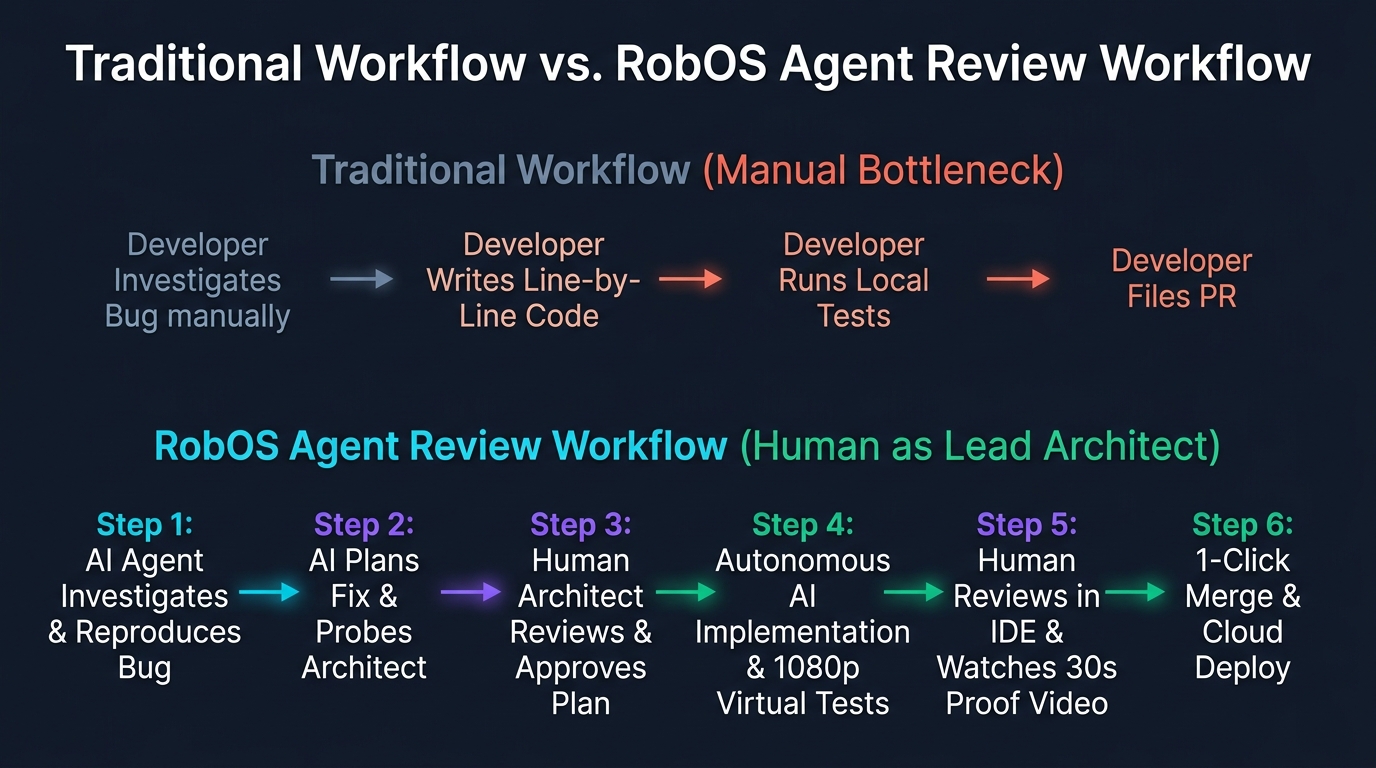
The 5-Stage Development Workflow (In Plain English)
1. Task Intake & Bug Investigation
When a ticket is assigned (from GitHub Issues, Jira, or Dev Central), the AI agent:
- Spins up an isolated, temporary workspace for the specific branch.
- Launches the required databases and services automatically.
- Analyzes the codebase, reproduces test failures, and can optionally use the breakpoint debugging feature to pause execution at an exact line in the IDE for variable inspection if needed.
2. Proactive Human Alignment & Plan Review
Before touching any source code, the agent drafts a clear, structured technical plan grounded in the Knowledge Graph:
- Lists all API endpoints, database tables, and configuration files that need updates.
- Identifies any downstream services that could be impacted (blast radius).
- The workflow actively picks and probes at the human architect—clarifying design trade-offs, testing edge cases, and ensuring you are intimately involved in what is being built before execution begins.
3. Autonomous Code Implementation & Infrastructure Generation
Once you approve the plan:
- The AI implements the code across frontend, backend, and database repositories.
- If a new database or message queue is needed, the AI adds it to the visual architecture map and auto-generates the Kubernetes deployment manifests and Helm charts.
- Compiles data models and packages automatically across TypeScript, Java, and Go.
4. Automated Visual Testing & Video Proof-of-Work
Instead of simply claiming that the code works, the AI runs a complete automated test verification:
- Launches a private virtual screen so your active monitor is never interrupted.
- Clicks real buttons, tests forms, runs SQL queries, and validates API responses.
- Records a 1080p video with spoken voiceover explanations detailing what was built and tested.
- Packages the video, subtitles, and test results for your review.
5. Human PR Review & IDE Review Integration
The human developer opens the review dashboard:
- Reviews the visual code diffs, automated security audits, and architectural changes.
- Optionally opens the project in their IDE (IntelliJ IDEA or VS Code) using RobOS to review the PR directly inside the IDE with all IDE context (syntax tree, symbol lookup, type checking, local tests, and debugger) in tow.
- Watches the 30-second narrated verification video.
- Approves and merges the pull request with a single click.
Clean, Isolated AI Workspaces (Zero Desktop Clutter)
AI agents in RobOS do not pollute your personal desktop user account. Every agent runs in a sandboxed, temporary environment:
| Feature | Your Personal Account (robos) | AI Agent Workspace (agent-task-108) |
|---|---|---|
| Filesystem | Physical Hard Drive (/home/robos) | High-Speed RAM Memory (/home/agent-...) |
| Running Apps | Your Permanent Desktop Apps | Automatically closed upon task completion |
| Display | Your Main Monitor | Private Virtual Screen or Bridged Window |
| Passwords & Keys | Encrypted Master Password Vault | Short-lived, temporary session tokens |
| Cleanup | Permanent | Zero Residue: Memory is wiped completely clean on exit |
Universal AI Tool Connections (Model Context Protocol)
RobOS equips all AI coding assistants (Claude Code, Google Antigravity, GitHub Copilot, Google Gemini) with a standardized set of development tools:
- Architecture Tool: Read and modify system topology maps and services.
- API Contract Tool: Validate OpenAPI and TypeSpec data models.
- Workspace Tool: Automatically create, switch, and manage Git branches.
- Cloud & Kubernetes Tool: Trigger container deployments and stream live server logs.
- Database & REST Tool: Run live SQL queries and execute REST API test suites.
Next Steps
- RobOS Skills & CLI Macros: Master cross-agent AI skills and parameter validation.
- RobOS Main Wins: Discover core architectural innovations and strategic advantages.
- 💡 Explore the Ideas Store on GitHub: View raw idea dumps, community feature proposals, and structured architecture specs.