Existing Company Setup & Enterprise Onboarding
How established engineering organizations migrate to RobOS: enterprise directory synchronization (SAML, Okta, Active Directory, LDAP, GitHub Enterprise Teams), mapping corporate departments to Team Topologies, connecting existing task trackers (Jira / GitHub Projects), and bridging secrets vaults.
Table of contents
- Overview: Zero-Friction Enterprise Migration
- Step 1: Enterprise Directory & Identity Synchronization
- Step 2: Mapping to Team Topologies (
.robos/teams.yaml) - Step 3: Enterprise VCS & Task Tracker Migration
- Step 4: Enterprise Secrets Vault & Commit Governance
- Step 5: Multi-Cluster Kubernetes & ArgoCD Ingestion
- E2E Walkthrough & Proof of Work
- Next Steps
Overview: Zero-Friction Enterprise Migration
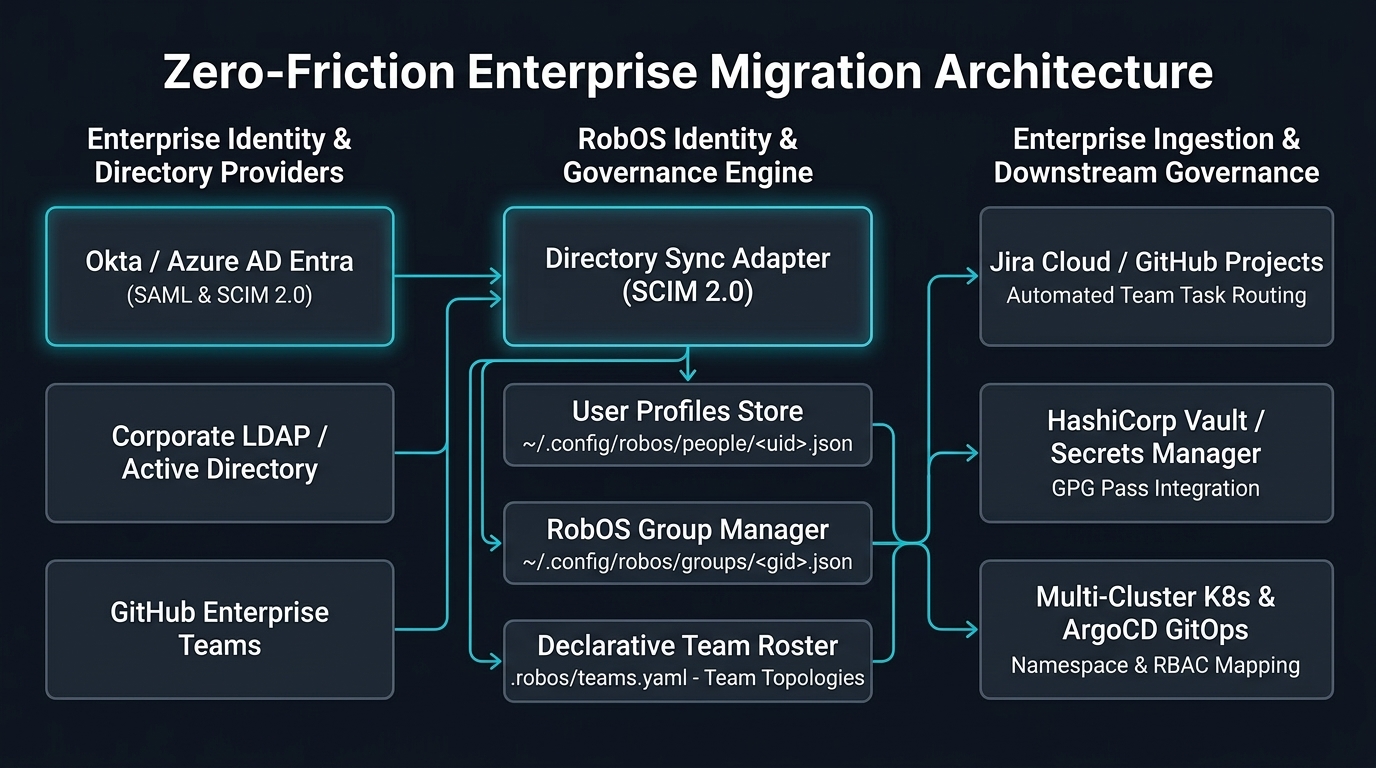
When an existing software organization adopts RobOS, they rarely start from a blank slate. They have dozens or hundreds of engineers, pre-existing identity providers, hundreds of Git repositories, active Jira or GitHub issue tracking projects, enterprise secret vaults, and multi-cluster Kubernetes deployments.
RobOS is built on open standards (OASIS OSLC 3.0, Team Topologies, SCIM 2.0, Backstage, and POSIX) so that migrating an established organization requires no proprietary lock-in:
Step 1: Enterprise Directory & Identity Synchronization
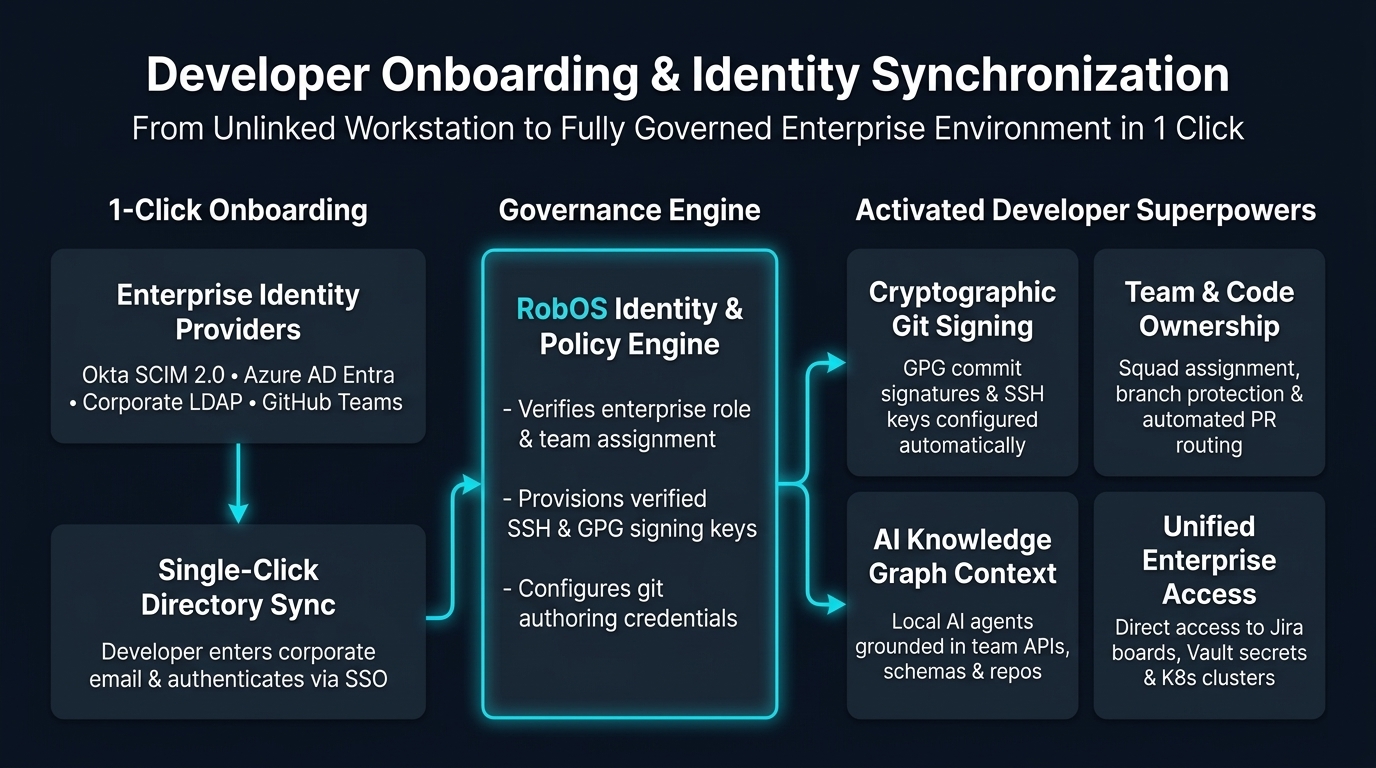
When joining an existing enterprise using RobOS, developers do not need to wait for IT tickets or manually copy config files. RobOS provides a direct Enterprise Directory Sync & Identity Onboarding Wizard in Group Manager (packages/group-manager):
1. Developer Identity Input & Onboarding Wizard
- Inspect Identity Badge: Upon launching Group Manager, the sidebar Active Identity Card displays the current developer status (initially
Not Identified / Guest / Unlinked). - Open Sync Wizard: Click 🏢 Sync Directory in the sidebar to open the enterprise identity onboarding modal.
- Configure Developer Credentials:
- Developer Full Name: e.g.,
Sarah Connor - Corporate Email: e.g.,
sarah.connor@acmeglobal.com - VCS / GitHub Username: e.g.,
sconnor - Enterprise Organization: e.g.,
Acme Enterprise Global - Directory Provider: Select
Okta SCIM 2.0 (SAML / OAuth2),Microsoft Entra / Azure AD SCIM,Corporate LDAP / Active Directory, orGitHub Enterprise Teams. - Assigned Team: Assign primary squad, e.g.,
Core Platform & Infrastructure (Lead).
- Developer Full Name: e.g.,
- Execute Synchronization: Click Sync Directory & Activate Identity.
2. Active Identity Persistence (~/.config/robos/identity.json)
Upon execution, RobOS binds your active identity locally, sets global git config user.name and user.email, and writes your active profile to ~/.config/robos/identity.json:
{
  "uid": "sconnor",
  "displayName": "Sarah Connor",
  "name": "Sarah Connor",
  "email": "sarah.connor@acmeglobal.com",
  "handle": "sconnor",
  "role": "Lead Architect & Approver",
  "department": "Platform Engineering",
  "company": "Acme Enterprise Global",
  "provider": "Okta SCIM 2.0",
  "team": "core-platform",
  "identifiedAt": "2026-09-05T17:44:11Z"
}
The active identity badge immediately updates to Sarah Connor · Lead Architect & Approver · core-platform.
3. Enterprise User Directory Materialization (~/.config/robos/people/)
Every synchronized enterprise employee profile is materialized locally under ~/.config/robos/people/<uid>.json:
{
  "uid": "sconnor",
  "displayName": "Sarah Connor",
  "email": "sarah.connor@acmeglobal.com",
  "role": "Lead Architect & Approver",
  "team": "core-platform",
  "sshKeys": ["ssh-ed25519 AAAAC3NzaC... sarah@acme"],
  "gpgFingerprint": "8F3B 29A1 ...",
  "syncedAt": "2026-09-05T17:44:11Z"
}
Step 2: Mapping to Team Topologies (.robos/teams.yaml)
RobOS avoids messy ad-hoc permission schemes by standardizing on Team Topologies:
- Stream-Aligned Teams: Dedicated to a single product stream (e.g. Order Processing & Payments).
- Platform Teams: Enable stream-aligned teams by providing infrastructure and developer platforms (e.g. Core Platform & Kubernetes).
- Enabling Teams: Cross-cutting guilds propagating new tech, architecture, and security practices (e.g. Architecture Guild).
- Complicated Subsystem Teams: Own mathematically or cryptographically intensive components.
Declarative Team Definition (.robos/teams.yaml)
version: "1.0"
kind: TeamRoster
organization: "Acme Enterprise Global"
directoryProvider: "Okta / Azure AD SCIM"
syncedAt: "2026-09-05T12:00:00Z"
teams:
  - id: core-platform
    name: Core Platform & Infrastructure
    topology: platform
    lead: sarah-connor
    members:
      - id: sarah-connor
        name: Sarah Connor
        type: human
        role: Approver
      - id: marcus-wright
        name: Marcus Wright
        type: human
        role: Developer
  - id: order-processing
    name: Order Processing & Payments
    topology: stream-aligned
    lead: kyle-reese
    members:
      - id: kyle-reese
        name: Kyle Reese
        type: human
        role: Developer
  - id: architecture-guild
    name: Enterprise Architecture Guild
    topology: enabling
    lead: john-connor
    members:
      - id: john-connor
        name: John Connor
        type: human
        role: Approver
Modular KGraph Packages Synchronization
Simultaneously, RobOS materializes the developer profile and team nodes directly into the Modular KGraph Packages (organization package):
{
  "@id": "urn:robos:person:sconnor",
  "@type": ["oslc:Person", "robos:Developer"],
  "dcterms:title": "Sarah Connor",
  "robos:email": "sarah.connor@acmeglobal.com",
  "robos:handle": "sconnor",
  "robos:role": "Lead Architect & Approver",
  "robos:memberOf": "urn:robos:team:core-platform"
}
This enables autonomous AI coding agents, PR review platforms, and IDE bridges to resolve robos:memberOf and cryptographically enforce code ownership boundaries immediately upon login.
Step 3: Enterprise VCS & Task Tracker Migration
Generating Company Knowledge Graph Entries with AI Agent (import-company-kgraph)
When onboarding an existing company or engineering organization with dozens or hundreds of repositories across GitHub, GitLab, HTTP service portals, or AWS S3 inventories, developers should tell their autonomous AI agent to use the import-company-kgraph skill:
# Ingest company repository inventory from an AWS S3 bucket
node plugins/robos/skills/import-company-kgraph/scripts/import-company-kgraph.js \
  --source s3://acme-cloud-governance/sdlc-catalog/enterprise-repos.json \
  --company-name "Acme Global" \
  --company-slug "acme" \
  --import-to-robos

# Or ingest from an internal HTTP service portal / Backstage catalog
node plugins/robos/skills/import-company-kgraph/scripts/import-company-kgraph.js \
  --source https://developer.internal.acme.com/api/catalog-entities.json \
  --company-name "Acme Global" \
  --output ./acme-kgraph.jsonld

# Or scan local directories of cloned workspaces
node plugins/robos/skills/import-company-kgraph/scripts/import-company-kgraph.js \
  --source /home/developer/source/repos \
  --company-name "Acme Global" \
  --import-to-robos
The skill deeply analyzes every repository, detects archetypes (robos:Microservice, robos:FrontEndApp, robos:DesktopApp, robos:PCGame, robos:MobileGame, robos:ConsoleApp, robos:MobileApp, robos:DataPipeline, robos:Library), synthesizes OpenAPI 3.1 contracts, and automatically generates valid OSLC JSON-LD package files ready to import directly into RobOS.
Bulk Git Repository Ingestion & Git Projects Linking
Once the Knowledge Graph entries are generated, RobOS Git Projects (~/.config/robos/git-projects.json) links all repositories into the multi-repo explorer:
# Ingest all repositories under an enterprise GitHub / Gitea organization
node packages/robos-cli/bin/robos.js git import --org acme-enterprise --vcs github-enterprise
RobOS scans all cloned repositories, registers them into the Git Projects catalog, and assigns default team ownership based on repository metadata and .robos/teams.yaml.
Task Tracking Integration (Jira & GitHub Projects)
RobOS Task Servers connect to enterprise Jira Cloud, Jira Data Center, or GitHub Enterprise:
- Open Task Servers (
packages/task-servers) or configure in~/.config/robos/task-servers.json. - Connect OAuth tokens or personal API credentials.
- Map Jira project keys (e.g.,
PAY,INFRA,CORE) to RobOS task roadmaps. - Sprint tickets automatically synchronize into the Directed Acyclic Graph (DAG) task engine.
Step 4: Enterprise Secrets Vault & Commit Governance
Bridging Corporate Secrets Engines
RobOS stores runtime credentials in standard GPG-encrypted Unix pass format (~/.password-store). For enterprise environments, RobOS bridges external secrets engines:
- HashiCorp Vault: Syncs development secrets via
vault kv geton demand. - AWS Secrets Manager: Authenticates with AWS SSO to pull non-production API tokens.
- 1Password CLI (
op): Unlocks secrets directly into developer memory without storing unencrypted files on disk.
Mandatory Commit Signing Governance
Enterprise security policies often require signed Git commits:
- Every imported user profile contains verified GPG public keys and SSH signing keys.
- RobOS enforces cryptographic commit signature validation:
git log --show-signature -1 # Good "gpg" signature from "Sarah Connor <sarah.connor@acme-enterprise.com>" - Autonomous AI agents run in isolated tmpfs workspaces and sign commits using team agent identities under human approval.
Step 5: Multi-Cluster Kubernetes & ArgoCD Ingestion
Enterprise Kubernetes infrastructure connects seamlessly into Kube Studio (packages/kube-studio):
- Kubeconfig Discovery: Ingests all active contexts from
~/.kube/config(EKS, GKE, AKS, and bare-metal clusters). - Namespace Mapping: Maps namespaces (
production,staging,dev) to container nodes in the Modular KGraph Packages (core-platform). - ArgoCD GitOps Sync: Connects to the ArgoCD API to display live deployment synchronization status and rollback history.
E2E Walkthrough & Proof of Work
See the complete, live end-to-end walkthrough video, audio narration, and verification logs:
Next Steps
- New Company Setup Guide: Bootstrap a new greenfield organization and foundational squads.
- RobOS Main Wins: Discover core architectural innovations and strategic advantages.
- 💡 Explore the Ideas Store on GitHub: View raw idea dumps, community feature proposals, and structured architecture specs.