A Day in the Life: From Business Idea to Production
How an engineering team uses the unified suite of RobOS applications to take a raw business concept through architecture, scaffolding, autonomous agent implementation, multi-protocol verification, and IDE code review, all the way to verified cloud production.
Table of contents
- The End-to-End Application Lifecycle
- Phase 1: Planning & Architecture
- Phase 2: Scaffolding & Contracts
- Phase 3: Autonomous Implementation
- Phase 4: Data & Protocol Testing
- Phase 5: Verification & Review
- Phase 6: Cloud Ops & Live Observability
- Next Steps
The End-to-End Application Lifecycle
In traditional software engineering, delivering a new feature requires context-switching across a dozen disconnected tools—web issue trackers, architecture diagrams, terminal shells, database GUIs, API testing apps, and web pull request screens.
RobOS unifies this entire journey into an AI-First SDLC Platform & Agent Governance Harness. Every application shares the same Git-backed Modular KGraph Packages, allowing autonomous AI swarms and human architects to collaborate seamlessly.
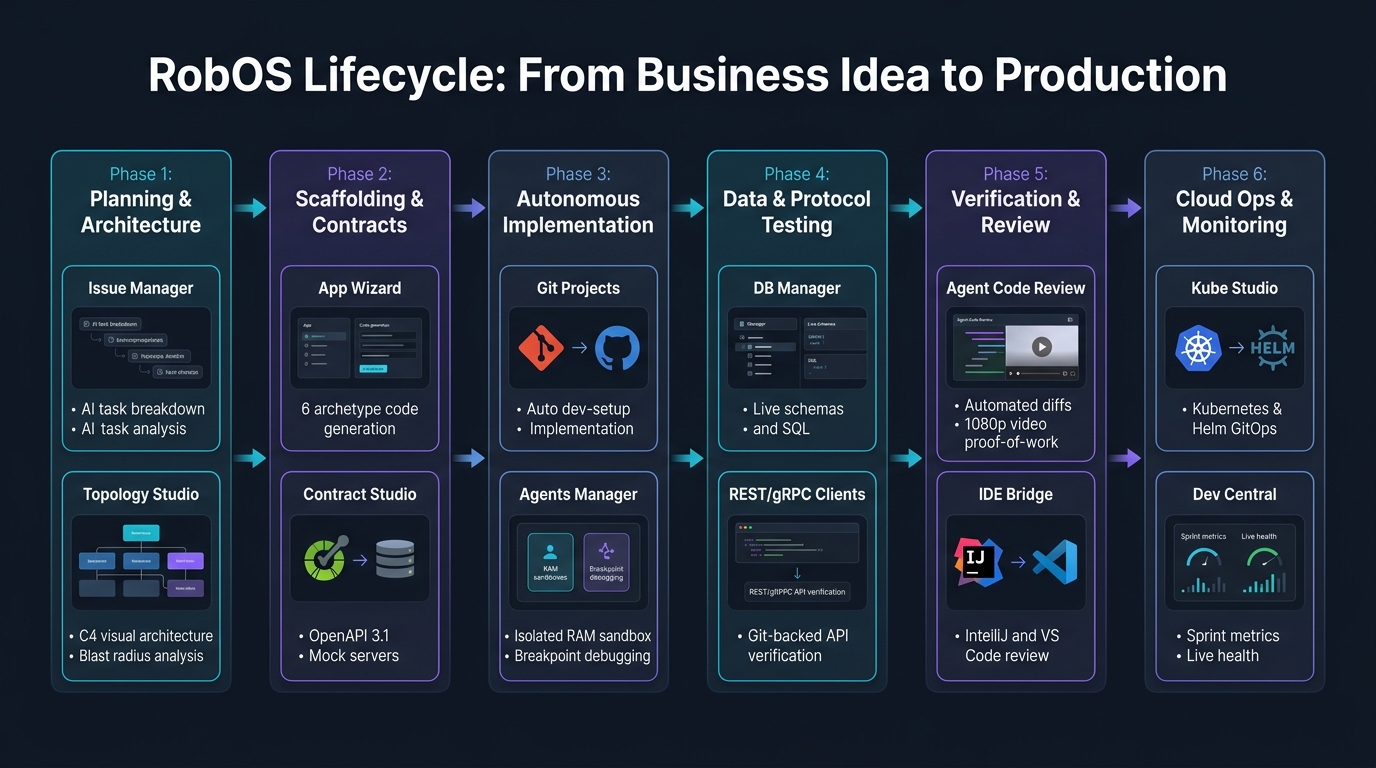
Phase 1: Planning & Architecture
Every new capability begins with clear alignment on business intent and architectural impact before any code is generated.
📋 Issue Manager
- What It Does: Serves as the issue tracking and task management command center.
- Role in the Lifecycle: When a new feature request or user story arrives, the engineer inputs the prompt or business specification. The Issue Manager decomposes the requirement with AI into an executable dependency DAG (Directed Acyclic Graph) of child tasks, linking each ticket to corresponding Modular KGraph Packages nodes.
- Proactive Human Alignment: The Issue Manager continuously probes the human architect regarding architectural trade-offs, scope boundaries, and acceptance criteria.
🗺️ System Topology Studio
- What It Does: Provides an interactive visual C4 architecture canvas (System Context, Container, Component).
- Role in the Lifecycle: Maps the proposed changes against the current system topology. It computes the Automated Blast Radius—immediately flagging which downstream microservices, mobile apps, database tables, or client SDKs will be affected before implementation starts.
- GitOps Backing: Every node and edge is synchronized directly with Spotify Backstage
catalog-info.yamlfiles and.robos/topology.yaml.
🌐 SDLC Knowledge Graph Explorer & Dual-State Architecture
- What It Does: Open-standard OASIS OSLC 3.0 & W3C JSON-LD living architecture explorer, resource catalog, and dual-state diff engine.
- Role in the Lifecycle:
- Adding Resources to Build the App: Engineers and AI agents add new architectural resources (microservices, databases, API contracts, Kafka topics, BDD test scenarios) directly to the Knowledge Graph, establishing the grounded context required for code generation.
- Dual-State Synchronization (World 1 vs World 2): Maintains two simultaneous models of reality—World 1 (Production
main) and World 2 (Feature Branchfeature/*). Before any code is written or merged, the engine runs sub-100ms semantic graph diffs (+3 / ~0 / -0delta), validates W3C SHACL constraint shapes, and computes the automated blast radius across all downstream consumers.
Phase 2: Scaffolding & Contracts
Once the architectural boundaries are established, RobOS establishes strict interface contracts and generates boilerplate across polyglot components.
🪄 App Wizard
- What It Does: Scaffolds greenfield projects or ingests existing codebases across 9 multi-app archetypes (
Microservice,FrontEndApp,DesktopApp,PCGame,MobileGame,ConsoleApp,MobileApp,DataPipeline, andLibrary). - Role in the Lifecycle: Generates idiomatic directory structures, dependency manifests, Devcontainers, Dockerfiles, and
dev-setup.shprovisioning scripts. Automatically registers the new package into.robos/packages.yamland the central Knowledge Graph.
📜 Contract Studio
- What It Does: Multi-protocol API and data contract design environment.
- Role in the Lifecycle: Defines API schemas using Microsoft TypeSpec, OpenAPI 3.1, and AsyncAPI. It immediately spins up local Prism mock servers, allowing frontend and client developers to begin integration testing against mock endpoints while backend agents build the live services.
- Pact Consumer Contracts: Guarantees compatibility between consumers and providers before merge.
Phase 3: Autonomous Implementation
With specifications and contracts locked, autonomous AI coding swarms carry out implementation inside secure, isolated environments.
📁 Git Projects
- What It Does: Multi-repository workspace hub with Monaco editor integration and built-in terminal runners.
- Role in the Lifecycle: Checks out feature branches, runs automated
dev-setup.shdependency installs, and ensures git commit signing with local GPG keys managed via Pass Manager.
🤖 Agents Manager & MCP Router
- What It Does: Manages multi-agent execution swarms (Claude Code, Google Antigravity, GitHub Copilot, Gemini) connected via Model Context Protocol (MCP).
- Role in the Lifecycle: Provisions Ephemeral In-Memory Sandboxes mounted in high-speed RAM (
tmpfs) on dedicated virtual X11 displays (Xvfb). Agents write code, execute builds, and invoke tools without polluting the developer’s host machine. - Interactive Breakpoint Debugger: If an agent hits a tricky runtime issue or reproduction failure, it triggers an interactive breakpoint, allowing human developers to step through code execution over IPC.
Phase 4: Data & Protocol Testing
RobOS equips developers and agents with native GUI clients covering all enterprise protocols—avoiding proprietary third-party subscriptions or bloated web apps.
🗄️ Relational & NoSQL DB Managers
- What It Does: High-performance database managers for SQL (PostgreSQL, MySQL, Oracle) and NoSQL (MongoDB, Redis).
- Role in the Lifecycle: Executes schema migration scripts, displays live table data grids, inspects document collections, and executes queries via multi-tab consoles with sub-millisecond query execution metrics.
🔌 REST, gRPC & GraphQL Clients
- What It Does: Protocol-specific API exploration and batch verification suites.
- Role in the Lifecycle:
- REST API Client: Git-backed collection runner saving plain-text request files directly in the repo.
- gRPC Client: Connects via Protobuf server reflection to stream RPC methods and inspect payloads.
- GraphQL Client: Queries GraphQL schemas with auto-completion and variables inspection.
Phase 5: Verification & Review
No code change reaches human review on trust alone. RobOS produces deterministic, visual proof-of-work before opening a pull request.
🔍 Agent Code Review Platform
- What It Does: Autonomous PR audit engine and proof-of-work review console.
- Role in the Lifecycle:
- Performs semantic AST diff analysis, secret detection, and automated OWASP security scans.
- Records a 1080p Video Proof-of-Work capturing the running application, executing DOM assertions, and narrating the walkthrough using offline Piper neural text-to-speech with synchronized WebVTT subtitles.
- Allows lead architects to verify full end-to-end functionality in a 30-second video review rather than spending 20 minutes pulling branches and seeding test databases.
💻 IDE Review Bridge (IntelliJ IDEA & VS Code)
- What It Does: Bi-directional IPC bridge connecting RobOS to your daily developer IDE.
- Role in the Lifecycle: With a single click, developers can open the pull request inside IntelliJ IDEA (via port 63343 IPC server) or VS Code (
vscode://github.vscode-pull-request-github/open-pr). Reviewers get full AST navigation, symbol lookup, type checking, and local debugging tools directly inside their familiar editor.
Phase 6: Cloud Ops & Live Observability
After approval and merge, RobOS automates deployment and tracks production health without manual YAML wrangling.
☸️ Kube Studio & Deploy Tracker
- What It Does: Multi-cluster Kubernetes navigator, Helm release manager, and GitOps sync console.
- Role in the Lifecycle: Visual architecture nodes automatically generate deployable Kubernetes manifests and Helm charts stored in
.robos/. Kube Studio tracks pod rollouts, displays real-time resource metrics, streams container logs, and synchronizes state with ArgoCD.
📊 Dev Central
- What It Does: The unified daily engineering cockpit.
- Role in the Lifecycle: Aggregates sprint burndown velocity, PR health metrics, deployment statuses, blocker radar, and automated AI daily standup summaries. Closes the feedback loop by streaming runtime defects back to the Issue Manager.
Next Steps
- RobOS Main Wins: Learn about the core architectural innovations and strategic advantages powering this lifecycle.
- Installation & Getting Started: Install RobOS and configure your development environment.
- App Development Flow: Follow the step-by-step developer tutorial using the reference Acme Pet Store Platform.
- Browse All 30+ Apps: Explore detailed specifications for every application in the suite.
- 💡 Explore the Ideas Store on GitHub: View raw idea dumps, community feature proposals, and structured architecture specs.