💡 RobOS Feature Ideas Store
The open repository of community feature proposals, raw idea notes, structured architectural specifications, and implementation plans.
Browse the Complete Ideas Store on GitHub
Inspect raw text dumps in the inbox, structured feature specifications, and approved project epics directly in the Git repository.
Table of contents
- The Ideas Workflow Pipeline
- Active Feature Proposals & Specifications
- Prompt-Driven Open Source: How RobOS Changes Community Contribution
- Next Steps
The Ideas Workflow Pipeline
RobOS turns rough thoughts into executable software blueprints through a 4-stage automated pipeline:
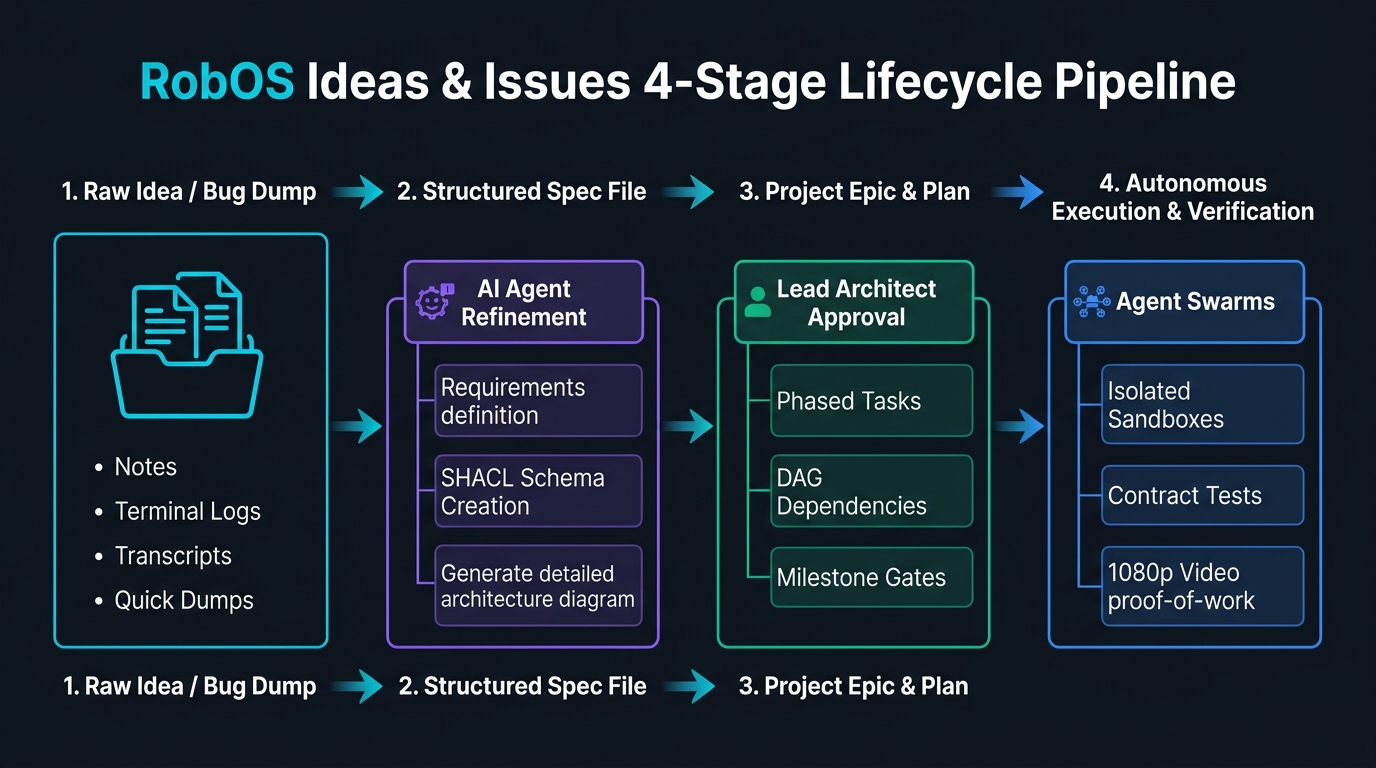
- Inbox / Raw Ideas (
docs/ideas/inbox/): Dump quick bullet points, voice recordings, raw user feedback, or terminal logs. - Structured Feature Specs (
docs/ideas/specs/): AI agents use thecreate-feature-specskill to convert raw notes into formalized requirements, SHACL schema impacts, and architecture diagrams. - Approved Plans (
docs/project-plan/): Once reviewed, feature specs graduate into official development epics and phased task plans. - Implementation & Proof-of-Work: Agents execute in isolated sandboxes, producing code, consumer contract tests, and narrated 1080p video proofs.
Active Feature Proposals & Specifications
| Feature Proposal | Raw Idea Note | Structured Feature Spec | Target Subsystems |
|---|---|---|---|
| RobOS Desktop Agents | raw note | feature spec | Linux OS Base, robos-agent-session, desktop-agents |
| Dual-Context eLearning & Interactive Reviewer | raw note | feature spec | context-manager, robos-reviewer, Chrome DevTools MCP |
| Contract-Driven Project Graph & Agent Deployment Engine | raw note | feature spec | project-graph, robos-graph, dev-central |
| Unified RobOS Setup Assistant & AI Provisioner | raw note | feature spec | robos-onboarding, security-setup, git-login-manager |
| Ephemeral Agent User Profiles with Direct Host Display Bridging | raw note | feature spec | robos-profiled, packages/desktop-shell, agents-manager |
| Dev Central — AI Agent Review-Based Development Hub | raw note | feature spec | packages/dev-central, robos-agent-session, IDE Plugin |
| Dual-State SDLC Knowledge Graph & E2E-Driven Verification | raw note | feature spec | Knowledge Graph Engine, Dev Central, Graph Studio |
| Hermetic Gitea Git Forge for E2E Test Suite | raw note | feature spec | Test Harness, packages/robos-test, Container Runner |
| RobOS People & Groups — Multi-Cloud Identity & Guided OAuth | raw note | feature spec | people-directory, group-manager, robos-preferences |
| RobOS File Storage & MCP Agent-Driven File Sharing | raw note | feature spec | packages/file-storage, robos-file-storage-mcp |
| RobOS Learning Management System (LMS) & SDLC Course Player | raw note | feature spec | packages/robos-lms, context-manager, workspace-manager |
| Local Open-Source Task Server & Task Servers Integration | raw note | feature spec | packages/task-servers, packages/robos-task-client, MCP |
| AI-Generated Implementation Plan as First-Class KGraph Object | raw note | feature spec | packages/task-planner, packages/robos-graph, Git Store |
| First-Class KGraph Object for Prompt & Run Logging | raw note | feature spec | packages/robos-graph, packages/ai-prompt, Shell Hooks |
| Terraform & OpenTofu Infrastructure as Code (IaC) Synthesis | raw note | feature spec | packages/kube-studio, packages/devops, Git Store |
| Search Studio — OpenSearch, Elasticsearch, Solr & Vector Analytics | raw note | feature spec | packages/search-studio, packages/data-sources, KGraph |
Prompt-Driven Open Source: How RobOS Changes Community Contribution
RobOS fundamentally changes how open-source software is conceived, specified, and built:
“RobOS changes how open source works: we just create task workflows we want to run, and ask someone in the community (or their autonomous AI agent) to run them for us!”
In traditional open source, feature proposals often become abandoned text threads. Someone requests a capability, maintainers ask for an implementation, and contributors struggle with complex local setup, missing dependencies, and unverified diffs that linger in PR purgatory.
In RobOS, every feature idea is an executable prompt contract. Because RobOS provides disposable in-memory sandboxes (tmpfs), containerized headless E2E verification (scripts/e2e-container.sh), and the Dual-State Knowledge Graph, anyone in the community can act as an AI Task Runner. You don’t need to spend 40 hours hand-writing boilerplate. You simply trigger an AI agent workflow, review the automated 1080p video proof-of-work, and submit an airtight pull request.
The 4-Stage Prompt-Driven Workflow
flowchart LR
    A["💡 1. Draft Task Workflow<br/><i>Author / Community</i>"] --> B["🤖 2. Community Runner<br/><i>Autonomous Agent Execution</i>"]
    B --> C["🎥 3. Video Proof-of-Work<br/><i>Docker + Xvfb 1080p</i>"]
    C --> D["🛡️ 4. Blast-Radius PR<br/><i>KGraph Diff & IDE Bridge</i>"]
Stage 1: Authoring the Feature Specification
If you have a feature idea or architectural improvement, create an executable specification in docs/ideas/specs/. Provide your agent (Claude Code, Google Antigravity, GitHub Copilot, or Gemini CLI) with this prompt:
You are a Lead System Architect for RobOS. I want to specify a new feature:
"<BRIEF_IDEA_DESCRIPTION>"

Please execute the following:
1. Run the `create-feature-spec` skill (or read docs/ideas/TEMPLATE.md guidelines).
2. Save a raw concept summary to `docs/ideas/inbox/<spec-slug>.txt`.
3. Synthesize a formal engineering specification at `docs/ideas/specs/<spec-slug>.md` containing:
   - Problem statement and high-leverage architectural rationale
   - C4 component topology diagram (Mermaid) showing impacted RobOS apps/services
   - W3C SHACL shape impacts and OASIS OSLC JSON-LD Knowledge Graph node updates
   - Concrete BDD Gherkin user scenarios (Given/When/Then)
   - Step-by-step implementation plan across packages/
   - Verification plan using containerized headless E2E tests and 1080p video proofs
4. Register the new specification in docs/ideas/README.md and docs/ideas.md.
Stage 2: The Community Runner Execution (Run for Us!)
Found an idea in docs/ideas/specs/ that you want to see in RobOS? You can be the hero who runs it!
Feed this prompt to your local AI coding agent inside the RobOS repository:
You are an autonomous RobOS Core Engineer. We need you to implement the approved specification:
`docs/ideas/specs/<spec-slug>.md`

Follow the RobOS Agent Review-Based Development harness (AGENTS.md):
1. Workspace Isolation: Create a git branch `feat/<spec-slug>`.
2. Architecture & KGraph:
   - If new apps or services are added, register them in `.robos/kgraphs/` conforming to W3C SHACL shapes.
   - Follow standard Electron conventions: contextBridge IPC (no nodeIntegration), config strictly in ~/.config/robos/, and shared robos-lib requires wrapped in try/catch.
3. Code Implementation:
   - Implement the required Electron apps or modules under `packages/<app-id>/`.
   - Register the app icon in `packages/robos-icons/index.js` (alphabetical order).
   - Assign a DOM snapshot debug port in `packages/robos-lib/snapshot-cli.js`.
4. E2E Verification:
   - Add automated BDD tests in `packages/robos-test/tests/`.
   - Ensure DOM tree snapshots and event handlers are validated.
Stage 3: Automated Verification & 1080p Video Proof-of-Work
RobOS eliminates blind trust in AI diffs. Before submitting code, the agent generates undeniable visual proof:
Run the RobOS containerized headless verification fabric:
1. Execute `./scripts/e2e-container.sh` to run the test suite inside an isolated Docker container with Xvfb virtual framebuffer and Picom compositor.
2. Record a 1080p narrated video walkthrough proof using the `record-demo` skill or `packages/robos-test/demos/`.
3. Verify that the video recording, WebVTT subtitles, and test pass assertions are generated in `~/.robos/development/walkthroughs/` or test output logs.
4. Ensure all unit and integration tests pass with 0 regressions.
Stage 4: Dual-State Blast-Radius Diff & PR Submission
The agent produces a clean, architecturally validated pull request:
Prepare the Pull Request for RobOS maintainers:
1. Run `kgraph-diff` to compare the feature branch against `main`. Ensure zero unauthorized schema drift or orphan nodes.
2. Format commit messages following Conventional Commits (`feat(<app-id>): ...` or `fix(<app-id>): ...`).
3. Draft a PR description linking to the spec `docs/ideas/specs/<spec-slug>.md`, embedding test run logs, the 1080p walkthrough video, and the RobOS IDE Review Bridge URI (IntelliJ IDEA / VS Code).
Ready to Contribute?
See CONTRIBUTING.md for the complete guide to using RobOS to contribute to RobOS, including pre-configured agent commands and development best practices.
Next Steps
- Browse Raw Ideas on GitHub: Read unformatted notes and community feature brainstorms.
- View All Feature Specs on GitHub: Inspect detailed architectural specifications.
- RobOS Main Wins: Discover core architectural advantages powering RobOS.