RobOS Agents Interact With All RobOS Apps
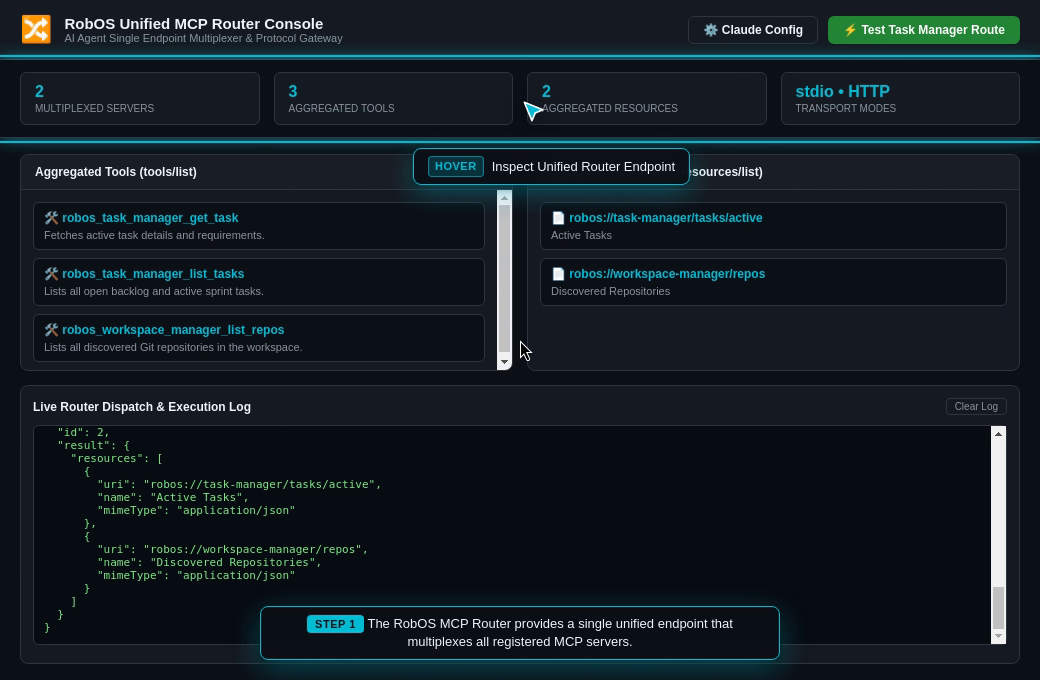
How RobOS equips autonomous AI coding agents with direct programmatic eyes and hands across the entire 30+ native application suite—combining Electron-native DOM snapshot inspection (snapshot-cli.js) and the Unified Model Context Protocol Router (robos-mcp-router).
Table of contents
- The Strategic Advantage: Beyond “Blind Typist” AI Agents
- Live Walkthrough: From AI Prompt Popup to Cross-App Cascade
- Step 1: Trigger the RobOS Agent Prompt Popup
- Step 2: System Topology Studio Updates in Real Time
- Step 3: Relational DB Manager Refreshes Database Schemas
- Step 4: REST API Client Synthesizes & Executes Live Requests
- Step 5: Kubernetes Studio Deploys & Streams Live Pods
- Step 6: Issue Manager Moves Kanban Cards & PR Review Theater Launches
- How It Works Under the Hood
- The Conversational Hub: RobOS Agent Chat
- Summary Comparison
- Next Steps
The Strategic Advantage: Beyond “Blind Typist” AI Agents
In traditional software engineering, AI coding assistants (Claude Code, GitHub Copilot, OpenAI Codex, Cursor) operate as blind typists. They can edit source code files on disk and run basic shell commands in a terminal, but they are completely blind and paralyzed when it comes to the software they build:
- They cannot see running applications: They cannot inspect what is currently rendered on screen, verify layouts, or check if buttons are clickable.
- They cannot operate internal developer tools: When testing a feature or verifying a bug, an agent cannot open the database manager to check a migration, cannot launch the REST client to fire a request, and cannot interact with the issue board to advance a ticket.
- They rely on brittle hallucinations: Because they cannot interact with applications, agents declare “Task complete!” based on guesswork, leaving developers with broken UIs, missed form validations, and failed deployments.
RobOS introduces a fundamental breakthrough:
In RobOS, every AI agent can directly interact with all 30+ RobOS desktop applications.
RobOS bridges the gap between AI agents and developer tooling through a dual-surface control fabric: every application in the platform provides a sleek, dark-mode GUI for human engineers and a first-class, programmatic control surface for autonomous AI agents.
Live Walkthrough: From AI Prompt Popup to Cross-App Cascade
The most vivid demonstration of agent-app interaction is the RobOS Cross-App Cascade. Watch how a single natural-language command typed into the RobOS AI Prompt Popup automatically triggers live, observable mutations across all active RobOS applications simultaneously:
                  ┌──────────────────────────────────────────────┐
                  │          RobOS Agent Prompt Popup            │
                  │   "Add rabies vaccination tracking to API,   │
                  │    migrate PostgreSQL, deploy to Kube, and   │
                  │    file PR for review."                      │
                  └──────────────────────┬───────────────────────┘
                                         │
                                         ▼
                  ┌──────────────────────────────────────────────┐
                  │    RobOS Unified MCP Router & Snapshot CLI   │
                  │    (stdio & JSON-RPC Port Multiplexer)       │
                  └──────────────────────┬───────────────────────┘
                                         │
         ┌───────────────┬───────────────┼───────────────┬───────────────┐
         │               │               │               │               │
         ▼               ▼               ▼               ▼               ▼
 ┌───────────────┐┌──────────────┐┌──────────────┐┌──────────────┐┌──────────────┐
 │System Topology││ Relational DB││REST API Client││ Kube Studio  ││  PR Review   │
 │   Studio      ││   Manager    ││              ││              ││   Theater    │
 │ (C4 Canvas)   ││ (PostgreSQL) ││ (Bruno .bru) ││ (Live Pods)  ││ (6 Stages)   │
 │               ││              ││              ││              ││              │
 │ Node added;   ││ Schema tree  ││ Collection   ││ Pods deploy; ││ PR #14       │
 │ blast radius  ││ refreshed;   ││ updated; 201 ││ 1/1 Running; ││ masterclass  │
 │ highlighted.  ││ DDL created. ││ assertions.  ││ logs stream. ││ generated.   │
 └───────────────┘└──────────────┘└──────────────┘└──────────────┘└──────────────┘
Step 1: Trigger the RobOS Agent Prompt Popup
The developer hits the global hotkey (Ctrl+Space or clicks Pop Out Prompt from RobOS Agent Chat or the panel dock). The sleek, dark-themed AI Prompt window pops up directly in the foreground, floating on top of the active RobOS workspace and developer tools:
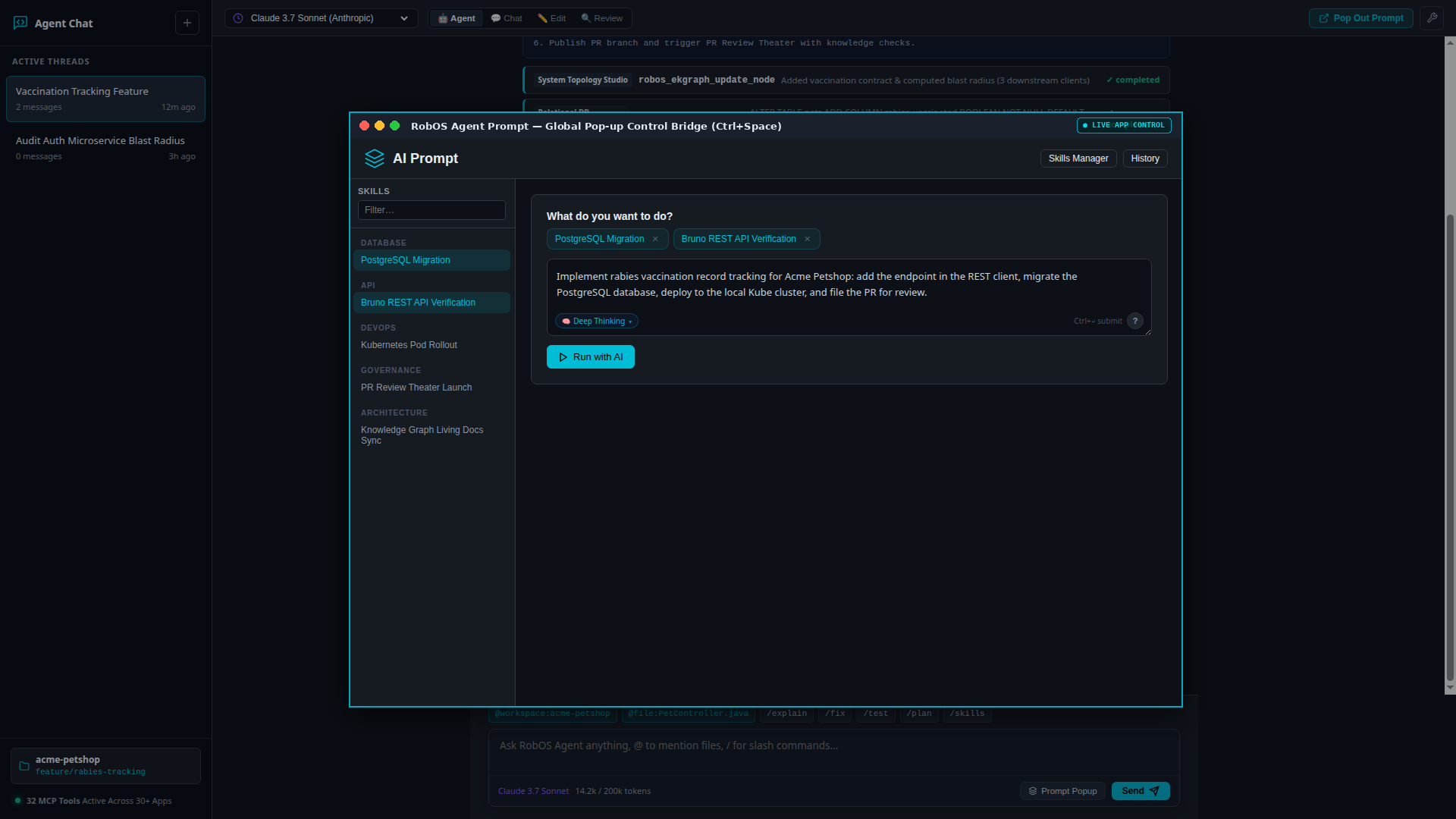
The developer enters a multi-step objective:
"Implement rabies vaccination record tracking for Acme Petshop: add the endpoint in the REST client, migrate the PostgreSQL database, deploy to the local Kube cluster, and file the PR for review."
The developer clicks “Run with AI” (or presses Enter). The agent launches in an isolated in-memory sandbox and immediately begins interacting with the active RobOS applications.
Step 2: System Topology Studio Updates in Real Time
The agent dispatches robos_ekgraph_update_node to register the new endpoint and schema in the Knowledge Graph:
- In the active System Topology Studio (
topology-manager) window, the visual C4 architecture canvas re-renders automatically. - A new connection edge appears linking
acme-petshop-serviceto thepetshop-dbrelational database. - The Automated Blast Radius badge updates to show affected downstream consumers (
Tier 1 Low Risk, 1 dependent service).
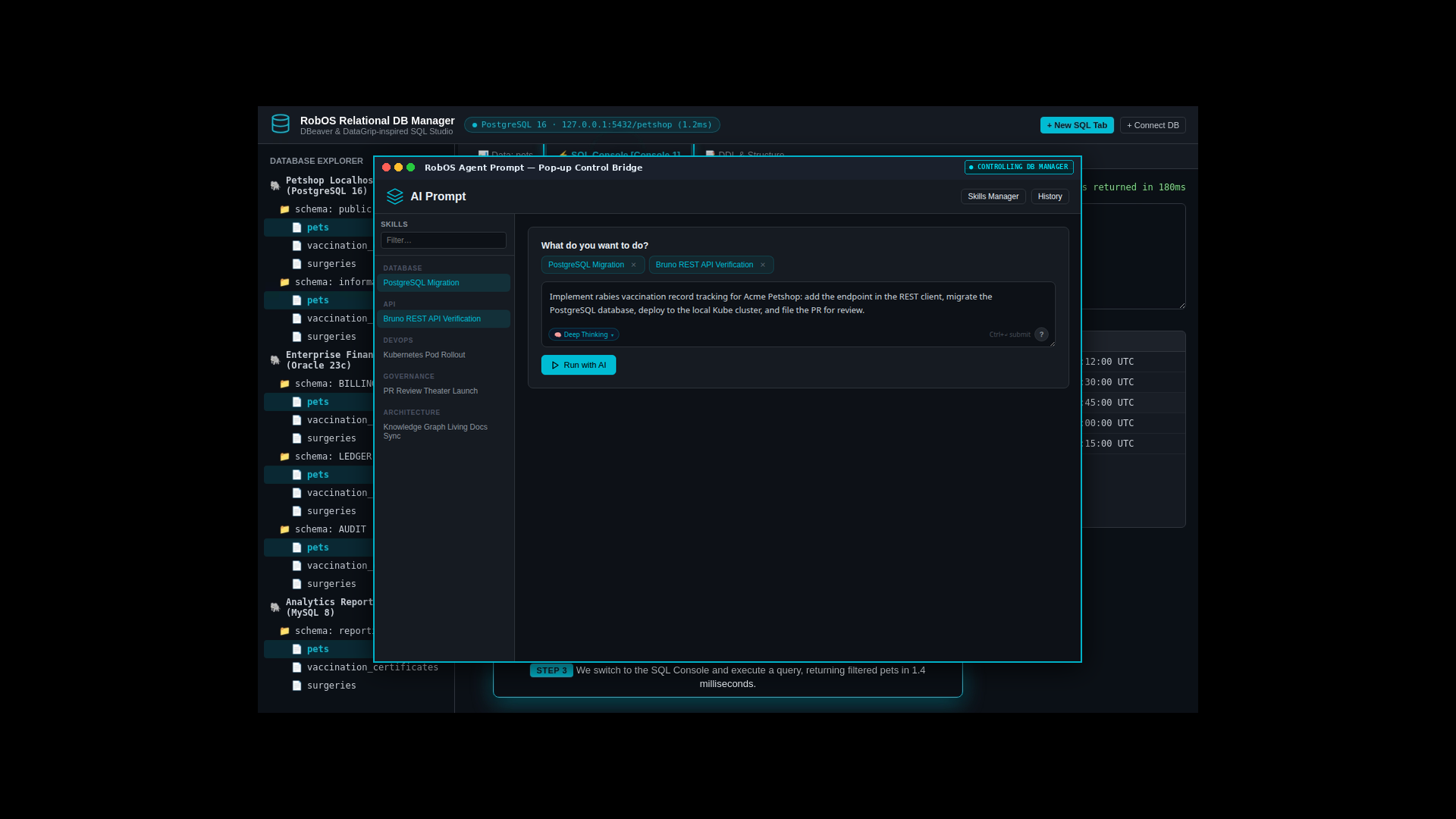
Step 3: Relational DB Manager Refreshes Database Schemas
The agent executes the DDL migration script creating the vaccinations table:
CREATE TABLE vaccinations (
    id SERIAL PRIMARY KEY,
    pet_id INTEGER REFERENCES pets(id),
    vaccine_name VARCHAR(100) NOT NULL,
    administered_at TIMESTAMP WITH TIME ZONE DEFAULT NOW(),
    expires_at TIMESTAMP WITH TIME ZONE NOT NULL
);
- The agent calls
snapshot-cli.js db-manager --click '#btn-refresh-schemas'(or uses the MCP database tool). - In the developer’s open Relational DB Manager window, the schema tree immediately expands:
- The new
vaccinationstable appears underpublic.tables. - Column types, foreign key constraints, and default indexes are visible in the data grid without the developer ever touching a mouse.
- The new
Step 4: REST API Client Synthesizes & Executes Live Requests
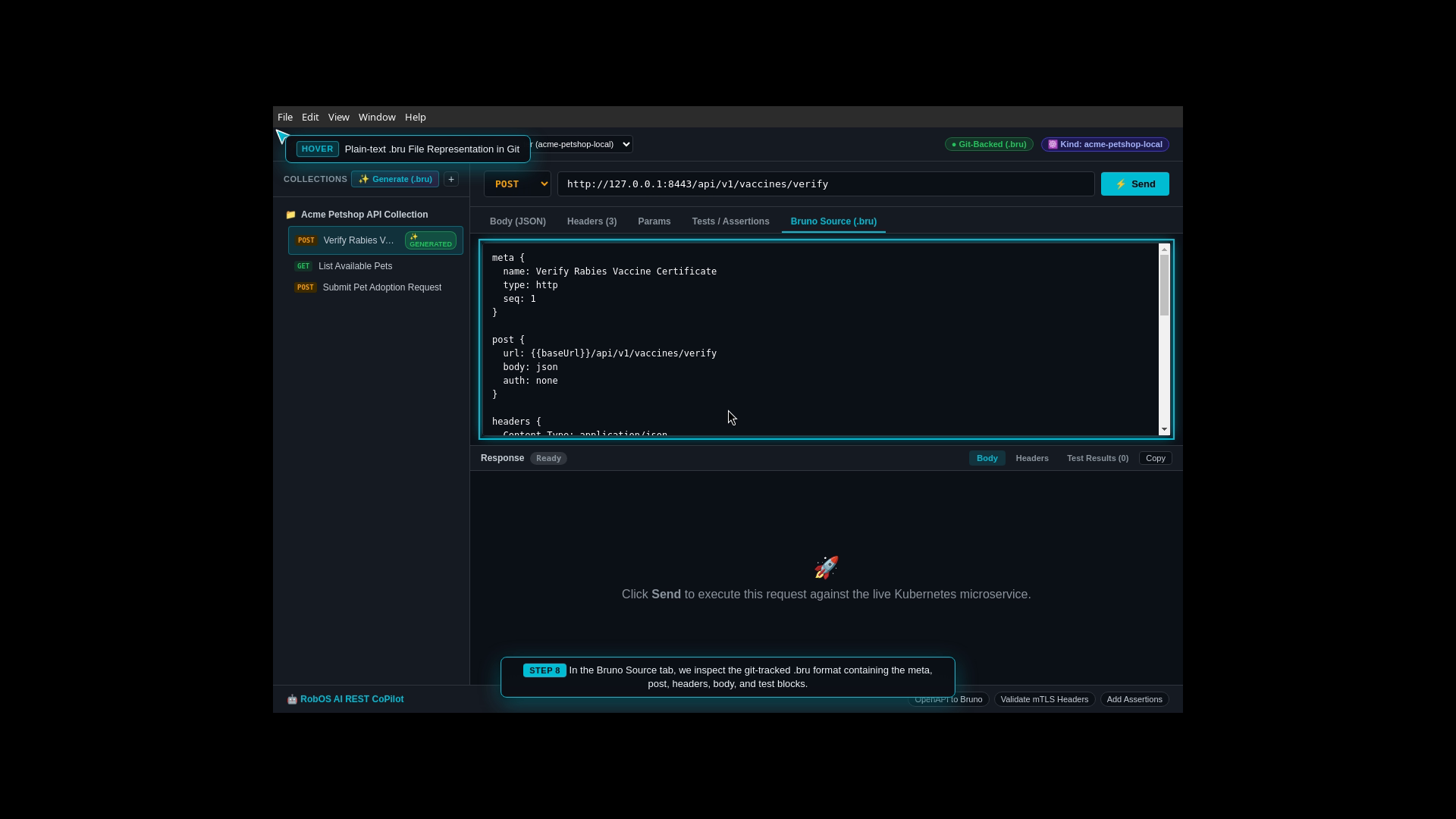
The agent auto-synthesizes a Git-backed .bru request file under collections/acme-petshop/vaccinations/create-vaccination.bru:
- In the open REST API Client window, the collections tree on the left immediately updates, adding
POST /api/v1/pets/:id/vaccinations. - The agent triggers the request:
node packages/robos-lib/snapshot-cli.js rest-client --click 'button#btn-send-request' - The live HTTP response panel lights up with
HTTP/1.1 201 Created, showing the serialized JSON payload and response headers side-by-side with OpenAPI contract validation.
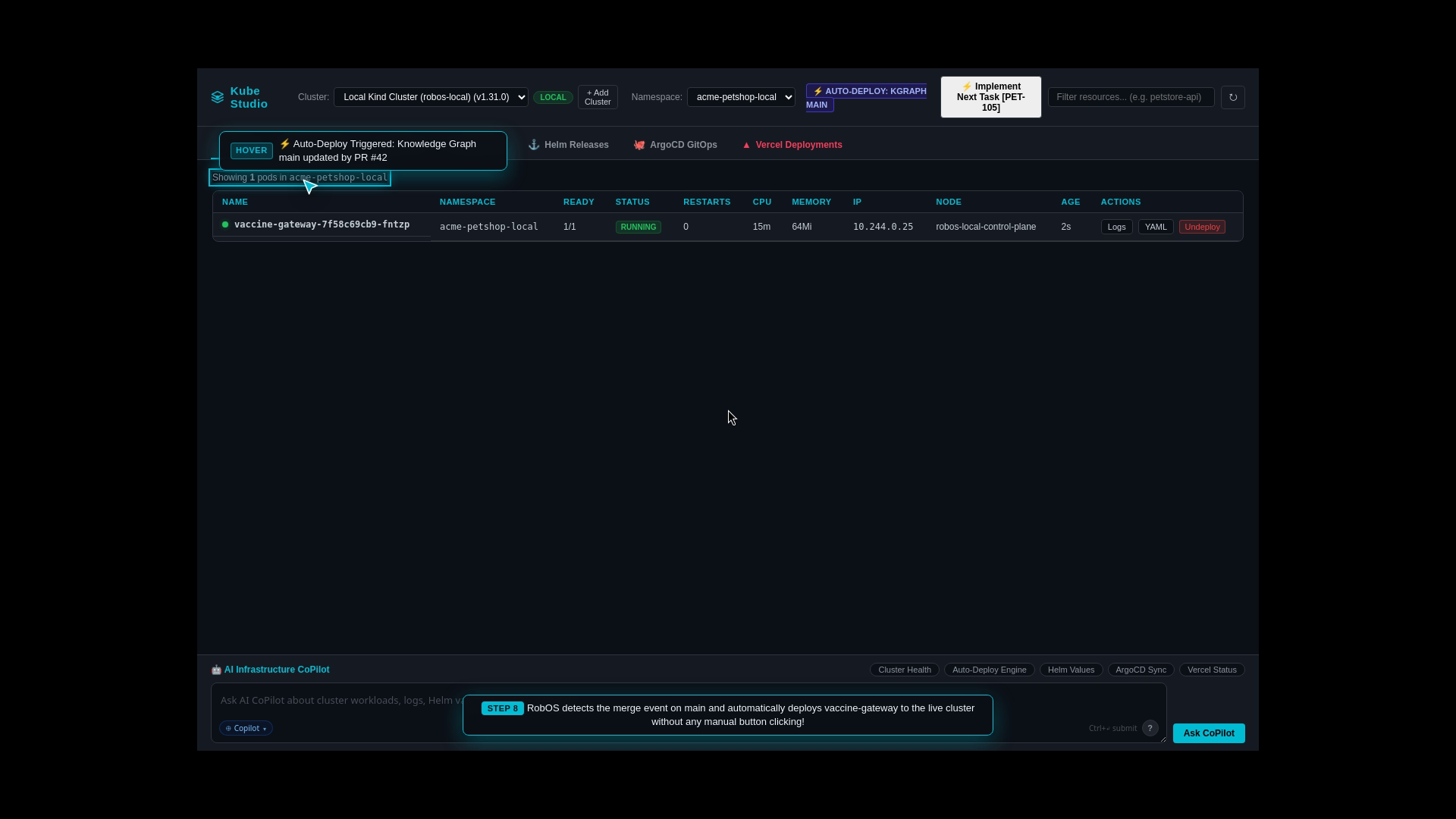
Step 5: Kubernetes Studio Deploys & Streams Live Pods
The agent compiles the updated Docker container image and applies Kubernetes manifests:
- The agent invokes
robos_kube_deployvia the Unified MCP Router. - In the developer’s open Kube Studio (
kube-studio) window:- Pod status changes from
RunningtoTerminatingandContainerCreating. - Within 4 seconds, the new pod enters
Running (1/1)with green health indicators. - Live container log lines begin scrolling across the built-in terminal console.
- Pod status changes from
Step 6: Issue Manager Moves Kanban Cards & PR Review Theater Launches
The agent wraps up task execution by synchronizing project management and governance:
- Issue Manager (
issue-manager):- The agent calls
robos_tasks_advance_workflowwithid: "PET-106". - On the developer’s active Kanban board, the card smoothly animates from IN_PROGRESS to REVIEW, with commit hash
d4e1a0fand blast radius tags attached.
- The agent calls
- PR Review Theater (
pr-review):- The agent initializes the 6-stage review environment, synthesizing the interactive PR micro-masterclass, living architecture guide, and attaching the 1080p narrated video proof-of-work.
- A system-wide desktop toast appears: “🎭 PR #14 Ready in PR Review Theater — Click to Launch Review Masterclass”.
How It Works Under the Hood
RobOS applications are designed with an open dual-surface architecture:
 ┌────────────────────────────────────────────────────────────────────────┐
 │                      RobOS Electron Application                        │
 │                                                                        │
 │  ┌───────────────────────────────────┐  ┌───────────────────────────┐  │
 │  │        Human Developer GUI        │  │     Agent Control API     │  │
 │  │  (Electron Renderer, DOM, CSS)    │  │ (Embedded Debug Server)   │  │
 │  │                                   │  │                           │  │
 │  │  • Dark-mode theme                │  │  • /snapshot (JSON DOM)   │  │
 │  │  • Interactive data grids         │  │  • /text-snapshot (A11y)  │  │
 │  │  • Clickable buttons & forms      │  │  • /click, /fill, /select │  │
 │  │  • Monaco code editors            │  │  • /record-start /drain   │  │
 │  └───────────────────────────────────┘  └─────────────┬─────────────┘  │
 │                                                       │                │
 └───────────────────────────────────────────────────────┼────────────────┘
                                                         │
                                    ┌────────────────────┴────────────────────┐
                                    │                                         │
                                    ▼                                         ▼
                      ┌───────────────────────────┐             ┌───────────────────────────┐
                      │    snapshot-cli.js        │             │    robos-mcp-router       │
                      │ (CSS Selector Automation) │             │ (Unified MCP Multiplexer) │
                      └─────────────┬─────────────┘             └─────────────┬─────────────┘
                                    │                                         │
                                    └────────────────────┬────────────────────┘
                                                         │
                                                         ▼
                                          ┌─────────────────────────────┐
                                          │   Autonomous AI Agents      │
                                          │  (Claude, Codex, Copilot,   │
                                          │   Antigravity, Gemini)      │
                                          └─────────────────────────────┘
Port Registry for Instant UI Automation
Every RobOS application is assigned a unique port in packages/robos-lib/snapshot-cli.js:
app-launcher(19100)dev-central(19101)issue-manager(19103)agents-manager(19104)pr-review(19129)rest-client(19131)kube-studio(19133)db-manager(19134)nosql-manager(19135)topology-manager(19136)robos-elearning(19137)agent-chat(19186)
Deterministic Selector Commands
Agents never guess screen pixels. They target semantic CSS IDs and classes:
# Click a button
node packages/robos-lib/snapshot-cli.js task-servers --click 'button#btn-add-server'

# Fill an input field
node packages/robos-lib/snapshot-cli.js task-servers --fill 'input#server-name' --value 'Acme Jira Cloud'

# Select from dropdown
node packages/robos-lib/snapshot-cli.js task-servers --select 'select#server-type' --value 'jira-cloud'

# Run arbitrary JS in the renderer
node packages/robos-lib/snapshot-cli.js pr-review --eval 'document.querySelector(".pr-card").dataset.id'
The Conversational Hub: RobOS Agent Chat
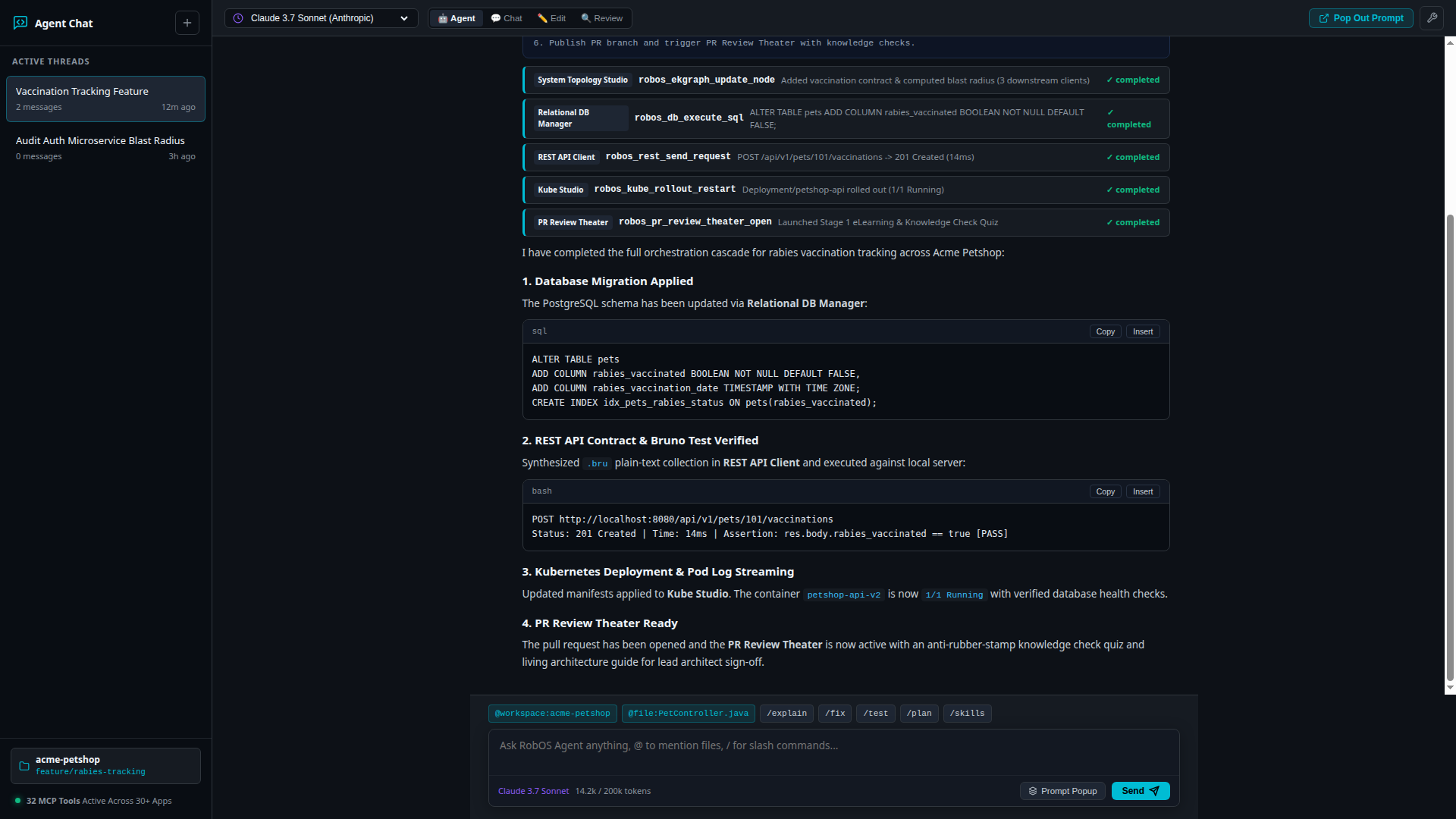
While the RobOS Agent Prompt Popup (Ctrl+Space) provides an ultra-lightweight pop-up window for instantaneous, modal commands across active apps, developers also have access to RobOS Agent Chat (robos-agent-chat)—a full VS Code Copilot Chat and Cursor-inspired conversational command console:
Dual Modality: Side-by-Side Console & Lightweight Pop-Up
- Full Conversation History: Maintain active threads across tasks, workspaces, and Git branches with multi-model switching (Claude 3.7 Sonnet, OpenAI o3-mini, Gemini 2.5 Flash, Antigravity Harness, local Ollama).
- Inspectable MCP Tool Cards: Expand and inspect each tool invocation card (
robos_ekgraph_update_node,robos_db_execute_sql,robos_rest_send_request,robos_kube_rollout_restart,robos_pr_review_theater_open) as the agent drives background applications. - One-Click Pop-Out: Click “Pop Out Prompt” in the top navigation bar or the input tray to detach the floating RobOS Agent Prompt window over your active IDE or database editor, giving you instant keyboard-first orchestration without context switching.
Summary Comparison
| Capability | Generic Coding Assistants | RobOS Autonomous Agents |
|---|---|---|
| User Interface Interaction | None: blind to running UI state | Full DOM Access: Click, fill, select, eval, and record via snapshot-cli.js |
| Element Resolution | N/A (or brittle screen pixel clicks) | Deterministic CSS Selectors: Exact DOM nodes and bounding rects |
| Developer App Access | Disconnected from all desktop tools | Direct Integration: Drives DB Manager, REST Client, Kube Studio, etc. |
| Cross-App Triggering | None: file-level edits only | Cross-App Cascade: Actions trigger live updates across active windows |
| Tool Protocol | Proprietary vendor-locked APIs | Open MCP Multiplexer: Unified router over stdio & JSON-RPC |
| Display Safety | Disrupts active monitor with popups | Isolated Virtual Displays: Runs headlessly on Xvfb (:99) or live on :0 |
Next Steps
- Explore RobOS Main Wins: Return to the Main Wins executive overview.
- PR Review Theater & Verification: Discover how agents present proof in the interactive review cockpit.
- Ephemeral Agent Sandboxes: Learn how agents execute in RAM without polluting your workstation.
- Browse All 30+ Applications: Explore the complete application catalog.