Autonomous E2E-Driven Dev with 1080p Video Proof-of-Work
How RobOS eliminates AI hallucinations and developer review fatigue by generating deterministic end-to-end verification evidence, 1080p recorded video walkthroughs, and synchronized neural voiceovers for every code change.
Table of contents
- The Strategic Advantage: Ending Review Fatigue & “Trust Me” Claims
- The 4-Stage Proof-of-Work Pipeline
- The Dev Central Review Experience: 30-Second Approvals
- Next Steps
The Strategic Advantage: Ending Review Fatigue & “Trust Me” Claims
The single greatest bottleneck in AI-assisted software development is Verification & Review Fatigue:
- Autonomous coding agents output enormous walls of text and diffs claiming “I have implemented the requested feature and all tests pass!”
- When the human developer tests the branch, they discover that buttons don’t click, modals render off-screen, API response formatting is mismatched, or the database migration failed to apply.
- To verify a change, the developer must spend 20 to 30 minutes manually checking out the branch, installing dependencies, seeding database fixtures, starting services, and manually clicking through the application.
RobOS introduces the Proof-of-Work Governance Standard:
In RobOS, no pull request or feature branch reaches human review without automated, verifiable, and visually recorded proof that the code actually works.
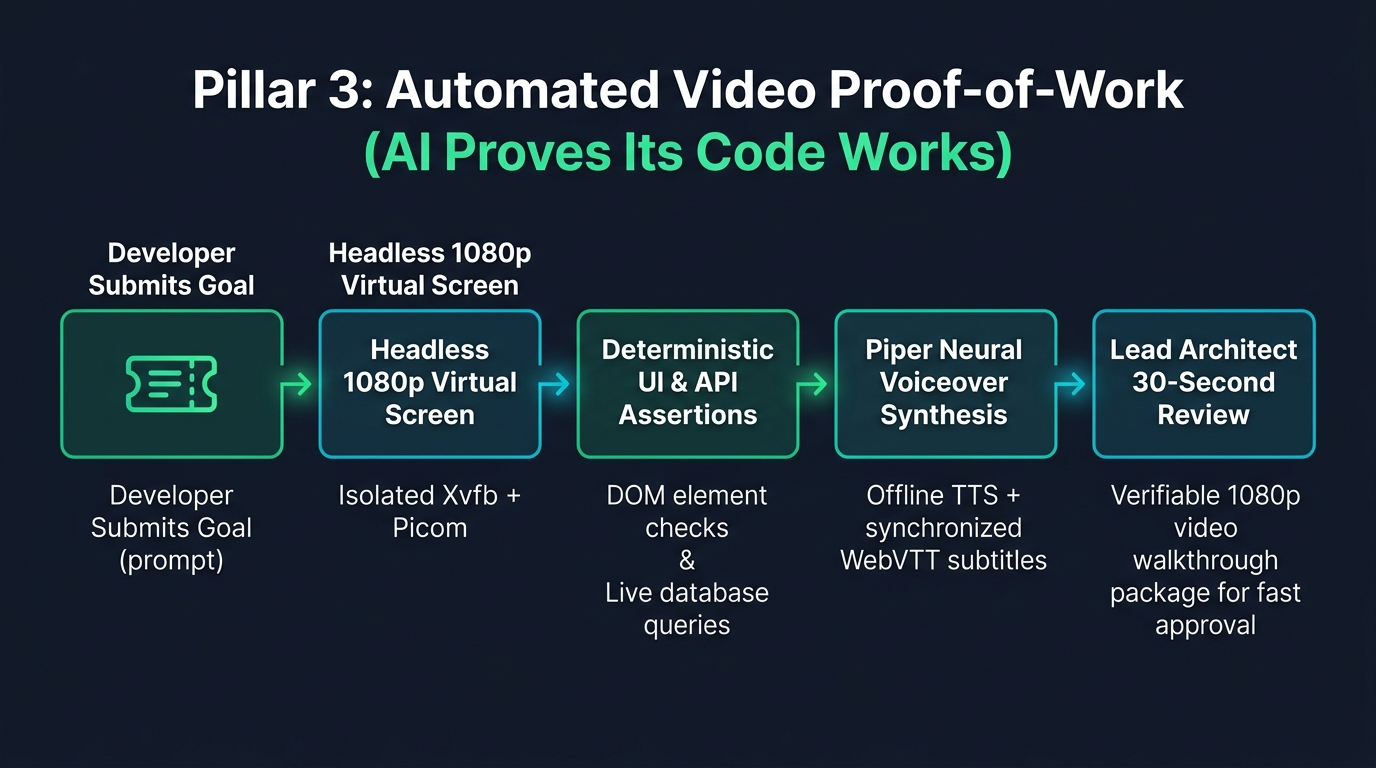
Whenever an autonomous agent implements a task, it executes an End-to-End Driven Development (EDD) loop inside an isolated virtual display. It interacts with real DOM elements, submits forms, verifies database mutations, and records a crisp 1080p video walkthrough accompanied by an offline neural voiceover (Piper TTS) and synchronized WebVTT subtitles. The lead architect watches a 30-second video demonstrating the running application, transforming code review from an exhausting chore into a rapid, confident approval.
The 4-Stage Proof-of-Work Pipeline
1. Deterministic Multi-Layer Assertions
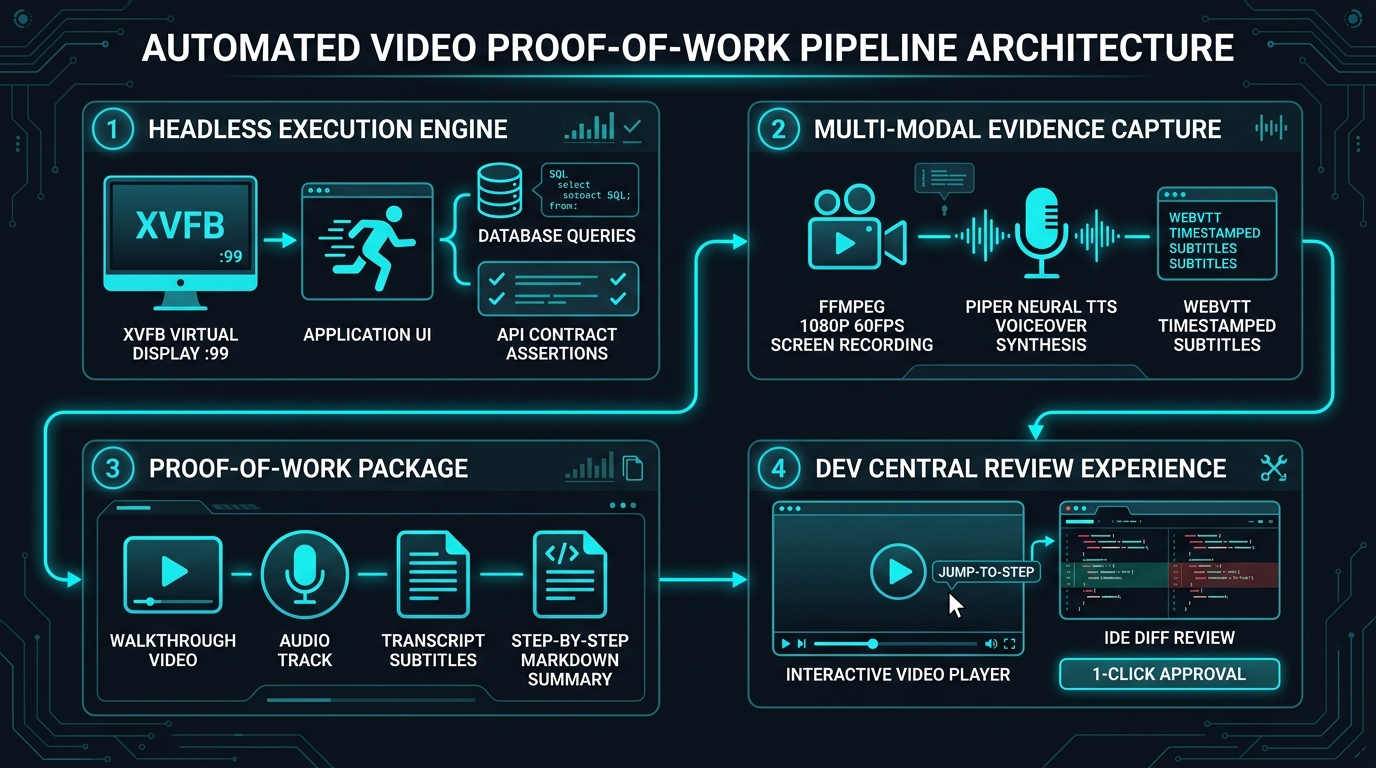
The test harness (packages/robos-test) runs deterministic assertions across every architectural layer:
- UI Layer: Asserts element visibility, text contents, input field values, button click states, and modal transitions.
- Data Layer: Executes direct SQL or NoSQL queries against the test database to assert that records were created or modified with the expected values.
- Contract Layer: Verifies that outgoing HTTP/gRPC network calls adhere strictly to OpenAPI and Protobuf schemas.
2. Headless 1080p Video Recording (FFmpeg)
Inside the Xvfb virtual display, FFmpeg captures high-definition 1080p video at 60 frames per second:
- Smooth cursor movements and visual click ripples demonstrate exact user interactions.
- Window resizing, dropdown menus, and CSS transitions render with complete visual fidelity.
- Produces lightweight, highly compressed WebM video files that load instantaneously.
3. Local Offline Neural Voiceovers (Piper TTS)
To make video walkthroughs accessible and immediately understandable, RobOS embeds Piper TTS, an ultra-fast, local neural text-to-speech engine:
- The AI agent authors a step-by-step narration script describing what the test is doing and why.
- Piper synthesizes a natural, pleasant voiceover in under 2 seconds completely offline without third-party cloud API latency or costs.
- Automatically generates synchronized WebVTT subtitle tracks aligned with the video timeline.
4. Step-by-Step Historical Walkthrough Archive
Every recorded walkthrough is archived permanently in the local GitOps directory:
~/.robos/development/walkthroughs/<feature-slug>/
├── walkthrough.webm        # 1080p video demonstration
├── audio.wav               # Neural voiceover audio
├── transcript.vtt          # Synchronized subtitles
├── summary.md              # Markdown breakdown with step timestamps
└── history/                # Timestamped historical snapshots
    └── 2026-09-08T08-30/
The Dev Central Review Experience: 30-Second Approvals
In RobOS Dev Central (packages/dev-central), pull requests are presented with an embedded, interactive Proof-of-Work Player:
- Synchronized Video & Subtitles: The lead architect watches the application interactively perform the requested user flow.
- Jump-to-Step Navigation: Clicking any step in the markdown checklist jumps the video directly to that assertion’s timestamp.
- AST-Aware Review: Developers can review the diffs in the PR Platform, or launch the branch into IntelliJ IDEA or VS Code with full AST navigation, symbol lookup, and local debugging tools.
- 1-Click Merge: If the video proof and diff look solid, one click merges the branch and dispatches deployment.
Next Steps
- Explore RobOS Main Wins: Return to the Main Wins executive overview.
- 100% Declarative GitOps Storage: Learn how visual topologies compile into cloud-ready Kubernetes manifests.
- Unified Data Sources Management: Discover RobOS’s integrated relational and NoSQL database suite.
- Real-World Walkthroughs: Watch recorded video walkthroughs and view sample test suites.
- 💡 Explore the Ideas Store on GitHub: View raw idea dumps, community feature proposals, and structured architecture specs.