Existing App Import Wizard
How application developers import existing codebases and Git repositories into RobOS using the App Import Wizard: deep automated code inspection, heuristic archetype detection, Backstage catalog-info.yaml generation, dev-setup.sh synthesis, and Knowledge Graph mapping.
Table of contents
- Overview: Bring Any Existing App Into RobOS
- Deep Inspection & Archetype Detection Engine
- Interactive AI Prompt Refinement (
<robos-ai-textarea>) - Step-by-Step Heterogeneous Resource & Codebase Ingestion Workflow
- What RobOS Generates on Import
- E2E Walkthrough Video & Proof of Work
- Next Steps
Overview: Bring Any Existing App Into RobOS
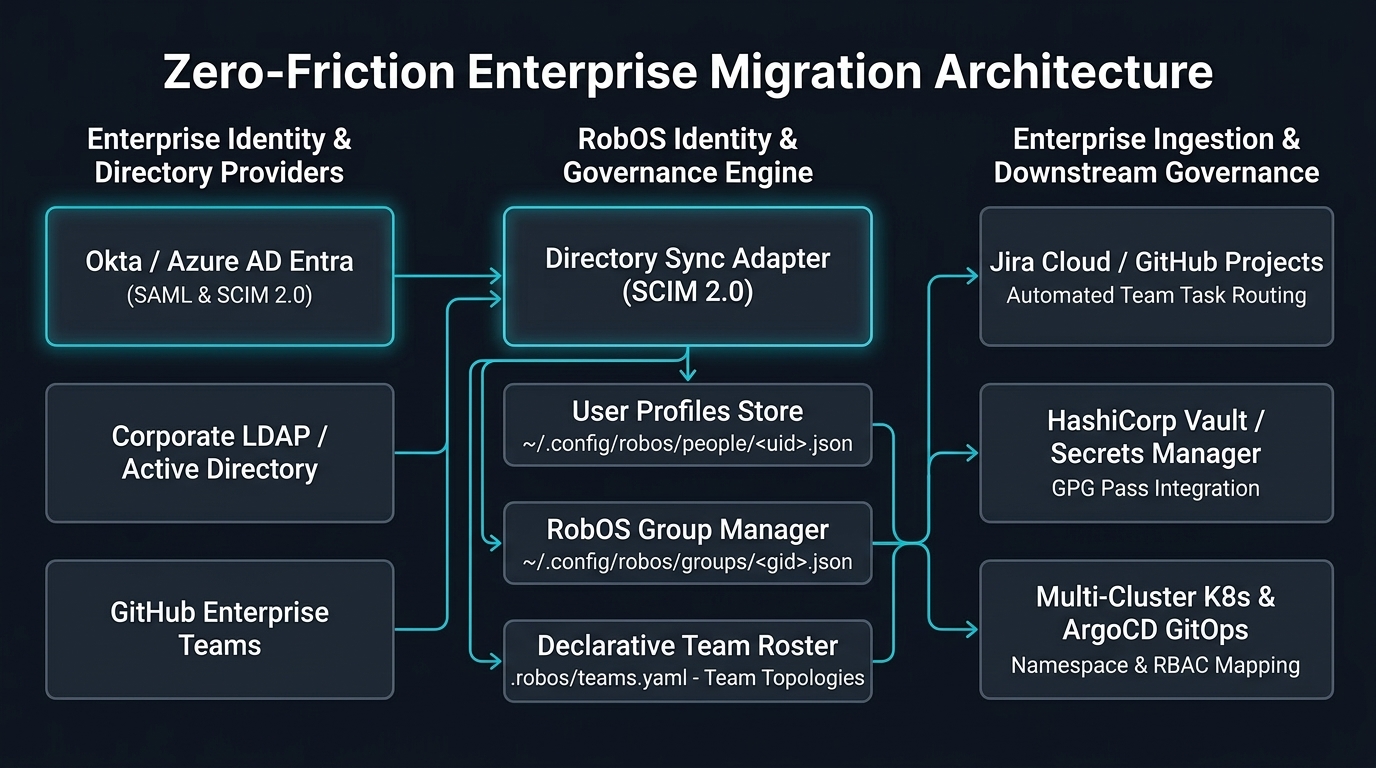
Most engineering teams have existing repositories that were built before adopting RobOS. Bringing these projects into RobOS should not require rewriting code, converting folder structures, or manually authoring dozens of metadata files.
The RobOS App Import Wizard (packages/app-wizard in import mode) automatically inspects existing codebases, extracts their capabilities and contracts, and integrates them into the RobOS ecosystem in seconds:
Deep Inspection & Archetype Detection Engine
When an existing project directory is provided, the inspection engine analyzes build files and dependency trees using heuristic detection rules:
Manifest Scanning Rules:
pom.xml/build.gradle:- Detects Java version (e.g., Java 17, Java 21).
- Identifies Spring Boot, Quarkus, or Micronaut dependencies.
- Classifies as
robos:Microservice.
package.json:- Scans dependencies:
- If
electronis present: classifies asrobos:DesktopApp. - If
react-nativeis present: classifies asrobos:MobileApp. - If
express,fastify,koa, ornest: classifies asrobos:Microservice. - Otherwise: classifies as
robos:Libraryor frontend client.
- If
- Scans dependencies:
go.mod:- Detects Go version.
- Scans for Gin, Echo, or Chi (Microservice) or Cobra (ConsoleApp).
Cargo.toml:- Scans for Tokio, Actix, or Axum (Microservice) or Clap (ConsoleApp).
requirements.txt/pyproject.toml:- Scans for FastAPI, Flask, Django (Microservice) or Celery (DataPipeline).
API Contract & Migration Extraction:
The engine also scans for:
- Existing OpenAPI / Swagger specifications (
openapi.yaml,swagger.json). - GraphQL schemas (
schema.graphql). - Protobuf RPC definitions (
*.proto). - Database migration directories (
db/migration, Flyway, Liquibase, Prisma, Alembic).
Interactive AI Prompt Refinement (<robos-ai-textarea>)
Automated heuristic detection is fast, but real-world enterprise codebases frequently have special architectural requirements or polyglot structures.
In Panel 2: Deep Inspection Results, RobOS equips developers with an interactive <robos-ai-textarea> prompt bar alongside direct editable controls:
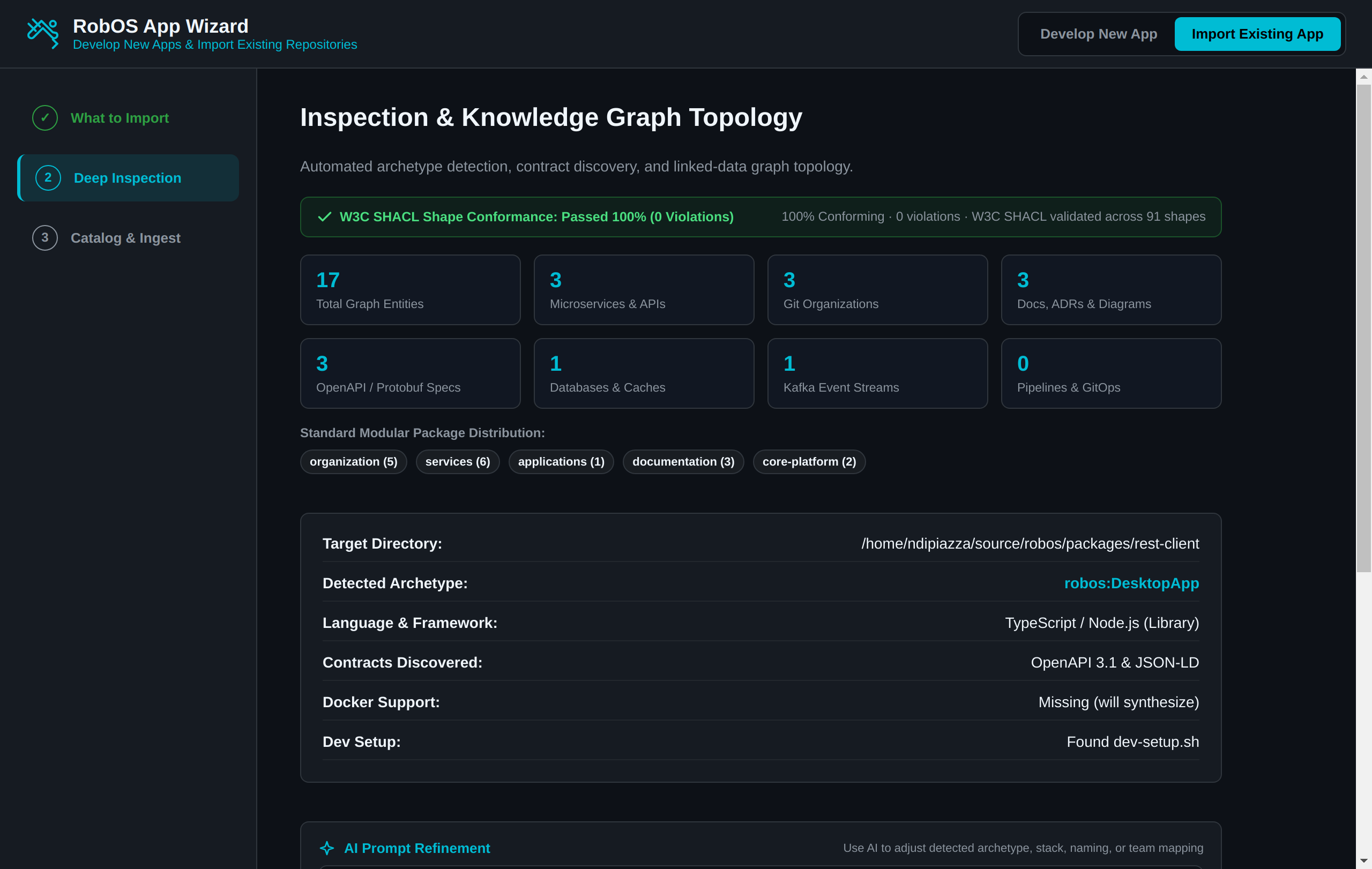
Developers can type natural language instructions to immediately alter the detected parameters:
- “Treat this as a Microservice using Spring Boot instead of a library”
- “Change the runtime stack to Node 20 with Fastify and TypeScript”
- “Assign this component to team core-platform with package slug auth-gateway”
Clicking Apply AI Refinement (or directly modifying the form fields) updates the archetype, technology stack, package name, and team assignment in real time before generating any configuration files.
Step-by-Step Heterogeneous Resource & Codebase Ingestion Workflow
The import workflow follows three streamlined panels powered by the RobOS Knowledge Graph Resource Importer (KGraphResourceImporter):
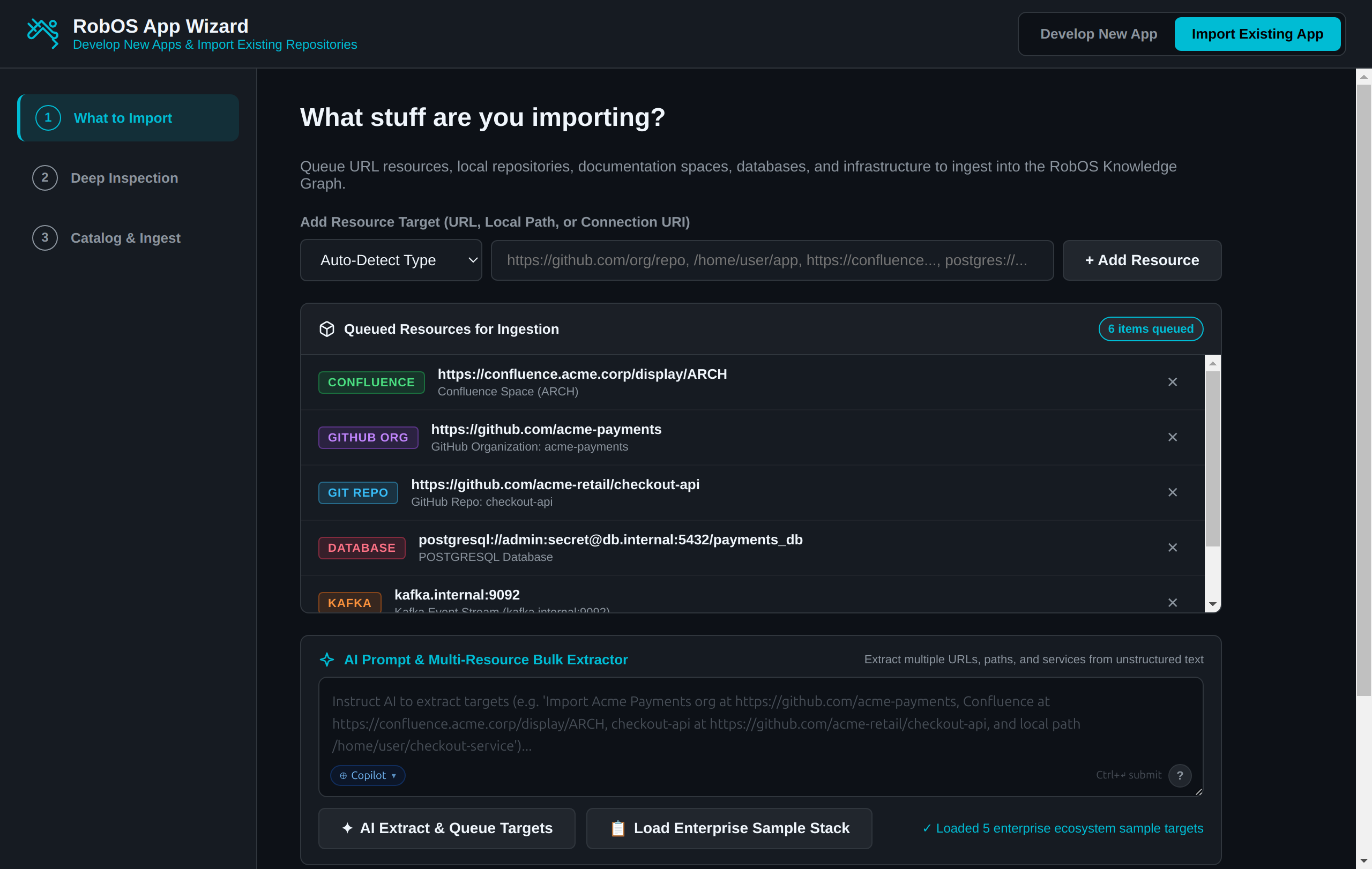
1. Step 1: What stuff are you importing?
Specify any combination of heterogeneous infrastructure resources to ingest into the dual-state SDLC Knowledge Graph:
- Git Repositories & URLs: Individual GitHub, GitLab, or Bitbucket repositories (
https://github.com/org/repo). - Git Organizations & Forges: Full GitHub organizations (
https://github.com/acme-payments), importing member repositories, forge metadata, and organization-level agent rules. - Local Directories & Monorepos: Local filesystem paths (
/home/user/app), scanning codebase manifests, packages, and markdown ADRs (docs/adr/*.md). - Confluence Spaces & Wikis: Confluence URLs (
https://confluence.acme.corp/display/ARCH), extracting living documentation pages, Architecture Decision Records (ADRs), and interactive Mermaid flowcharts. - Databases & Event Streams: Connection URIs for PostgreSQL, MySQL, Redis, MongoDB (
postgres://...), and Apache Kafka clusters (kafka.internal:9092). - Cloud Infrastructure & MCP Servers: Kubernetes clusters (EKS, GKE, AKS, K3s) and Model Context Protocol (MCP) server endpoints.
- AI Prompt & Bulk Extractor: Paste unstructured notes or natural language requests into
<robos-ai-textarea>to extract and queue targets automatically. - Enterprise Sample Stack: One-click preset loading a realistic enterprise stack for rapid exploration.
2. Step 2: Inspection & Knowledge Graph Topology
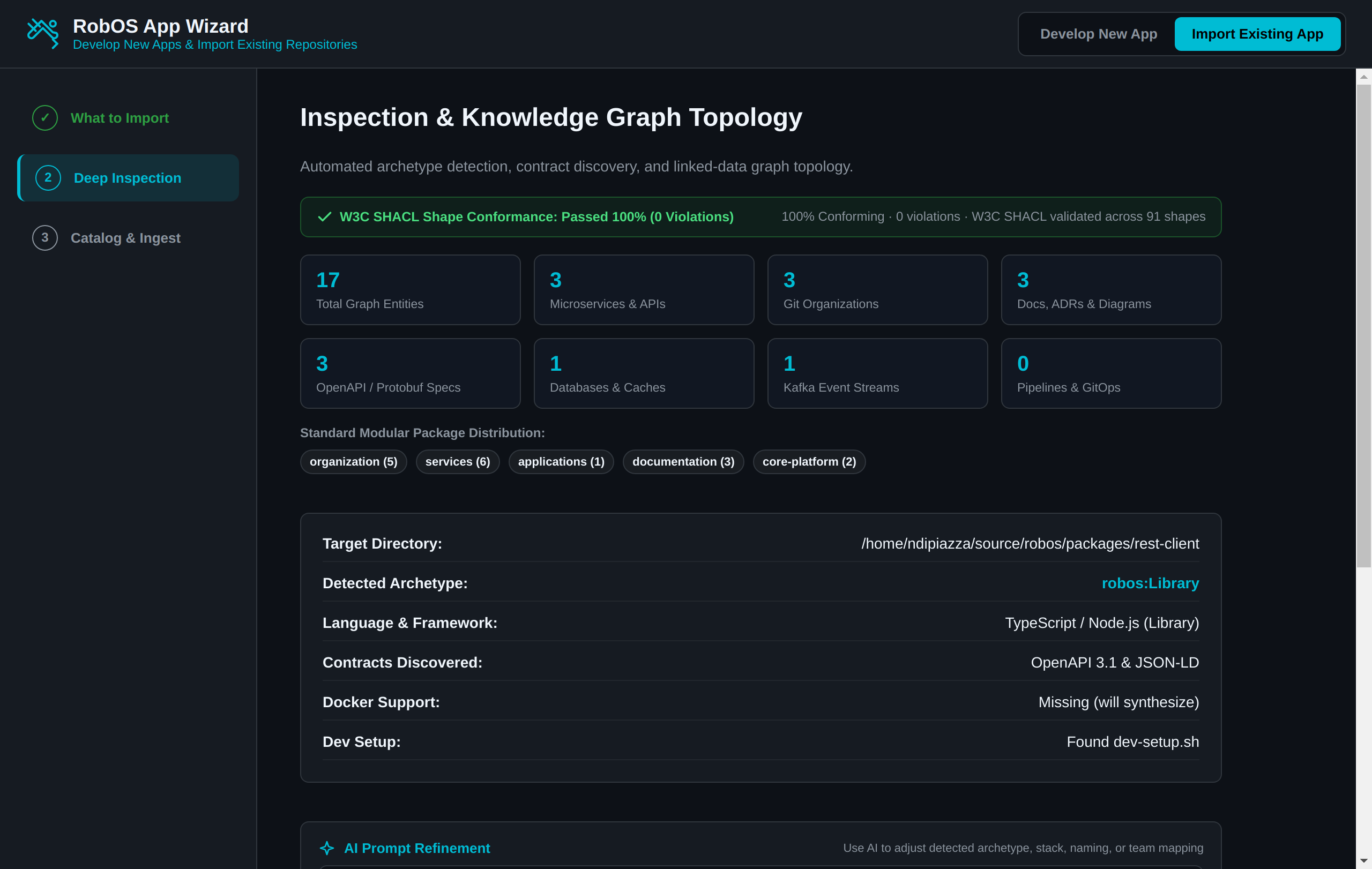
The inspection engine scans local manifests and simultaneously executes the KGraphResourceImporter pipeline:
- Topology Statistics: Discovers all entities across 8 standard packages (Microservices, Git Organizations, Confluence Docs, ADRs, Flow Diagrams, OpenAPI/Protobuf contracts, Databases, and Kafka brokers).
- 100% W3C SHACL Shape Conformance: Every discovered node is validated in real time against 91 SHACL constraint shapes.
- Interactive AI Prompt Refinement: Use the
<robos-ai-textarea>prompt bar to tune detected archetypes, technology stacks, naming, or team mapping in seconds.
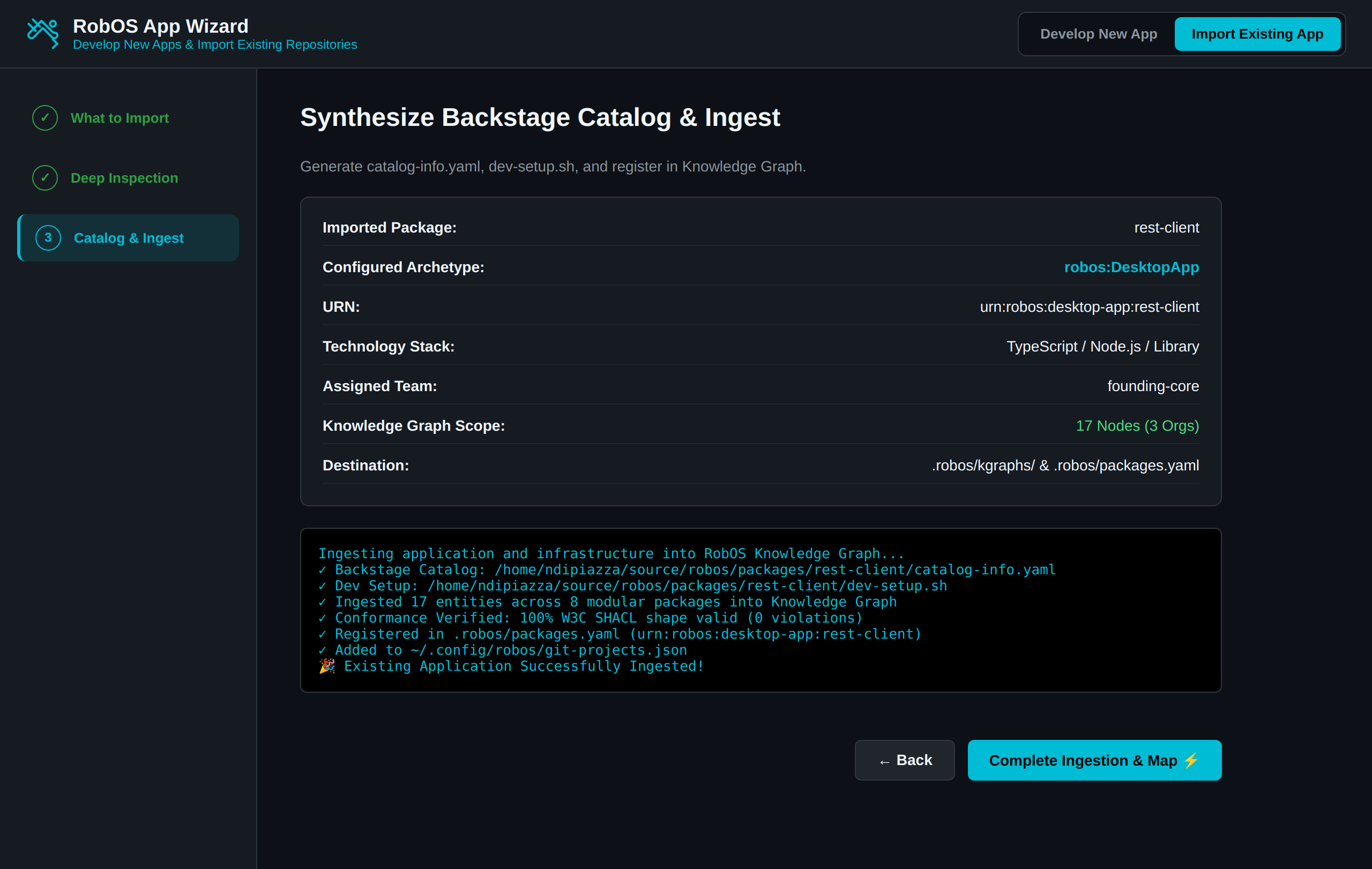
3. Step 3: Synthesize Backstage Catalog & Ingest
Executing ingestion automatically creates Backstage catalog-info.yaml, synthesizes executable dev-setup.sh environment runners, commits all validated nodes into .robos/kgraphs/, registers components in .robos/packages.yaml, and updates local workspace discovery in ~/.config/robos/git-projects.json:
What RobOS Generates on Import
- Backstage Catalog Component (
catalog-info.yaml): If the repository doesn’t already contain a Backstage manifest, RobOS generates one with the detected archetype, technology, and team ownership. - Zero-Friction Dev Setup Script (
dev-setup.sh): Synthesizes an executable environment verification script checking required runtimes (e.g. Node, Java JDK, Docker) and pulling credentials from the GPG vault. - Registration in Git Projects (
~/.config/robos/git-projects.json): Links the local directory into the multi-repo Git Projects manager for one-click branch switching and Monaco editor inspection. - Knowledge Graph Ingestion: Registers the package into
.robos/packages.yamland links the service into the live visual architecture map. - Bruno REST API Test Collections (
.bru): For microservices with OpenAPI contracts, RobOS automatically generates plain-text.brurequest collections ready for batch execution in the REST API Client.
E2E Walkthrough Video & Proof of Work
Watch the live end-to-end verification video showing deep inspection, AI prompt refinement, and Backstage synthesis with zero mocking:
Next Steps
- App Development Flow: Follow the step-by-step developer tutorial.
- RobOS Main Wins: Discover core architectural innovations and strategic advantages.
- 💡 Explore the Ideas Store on GitHub: View raw idea dumps, community feature proposals, and structured architecture specs.