Company KGraph Import Skill
Deep guide on using the import-company-kgraph AI agent skill to ingest an entire organization’s repository inventory across HTTP REST APIs, AWS S3 buckets, local file trees, or Git forges into RobOS Knowledge Graph package stores.
Table of contents
- Overview: Enterprise Knowledge Graph Ingestion
- Command Syntax & Parameters
- Command Syntax & Parameters
- Real-World Ingestion Examples
- Reusable Component:
KGraphResourceImporter - Heuristic Archetype & Tech Stack Inference
- Integration with “Use Existing Git Projects” Workflow
Overview: Enterprise Knowledge Graph Ingestion
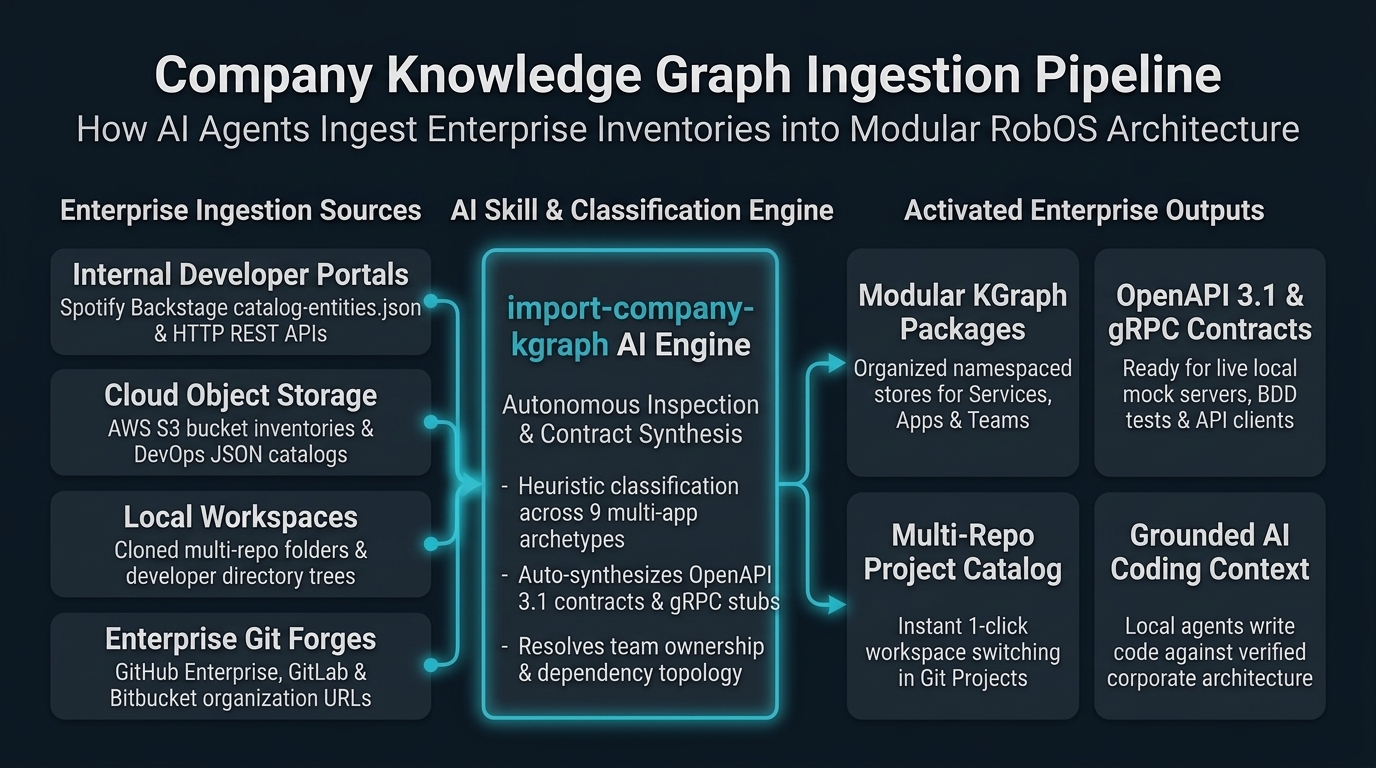
When engineering teams and organizations adopt RobOS, they typically have dozens or hundreds of existing repositories. These codebases and architectural components are cataloged across different systems:
- Internal Developer Portals: Spotify Backstage catalogs (
catalog-entities.json,catalog-info.yaml) or corporate microservice inventories. - Cloud Object Storage: Centralized inventory dumps on AWS S3 (
s3://company-sdlc-bucket/inventories/repos.json). - Local Filesystems: Cloned workspaces or existing
~/.config/robos/git-projects.jsonfiles. - Git Forges: Enterprise GitHub, GitLab, or Bitbucket organizations.
The import-company-kgraph skill enables autonomous AI coding agents (Claude Code, OpenAI Codex, Google Antigravity, GitHub Copilot, Gemini CLI) to automatically scan, normalize, classify, and synthesize these inventories into standard Dual-State OSLC JSON-LD Knowledge Graph package files.
Command Syntax & Parameters
Execute the companion engine via your AI agent or directly from the terminal:
Command Syntax & Parameters
Execute the companion engine via your AI agent or directly from the terminal:
# Natural Language Prompt Mode (AI Agent Prompt Analyzer)
node plugins/robos/skills/import-company-kgraph/scripts/import-company-kgraph.js --prompt "<unstructured prompt>" [options]

# Single Inventory Source Mode (HTTP, Filesystem, S3, Git URL list)
node plugins/robos/skills/import-company-kgraph/scripts/import-company-kgraph.js --source <source> [options]

# Multi-Resource List Mode
node plugins/robos/skills/import-company-kgraph/scripts/import-company-kgraph.js --resources <res1,res2,...> [options]
Supported Flags
| Flag | Shorthand | Type | Default | Description |
|---|---|---|---|---|
--prompt | -P | String | null | Natural language developer prompt describing heterogeneous infrastructure resources to discover and import. |
--source | -s | String | null | Path, HTTP URL, or S3 URI of the source repository inventory. |
--resources | -R | String | [] | Comma-separated list of repository URLs, Confluence spaces, or local filesystem paths. |
--source-type | -t | String | auto | Parser type: auto, http, file, s3, or git-list. |
--output | -o | String | ./<slug>-kgraph.jsonld | Destination path for the generated standalone JSON-LD file. |
--company-name | -n | String | "Acme Global" | Enterprise or organization display title. |
--company-slug | String | "acme" | Lowercase hyphenated slug for URN and package generation. | |
--default-team | String | "urn:robos:team:core-platform" | Default team ownership URN assigned to imported nodes. | |
--package | -p | String | "services" | Target package store: services, applications, core-platform, devops, or documentation. |
--import-to-robos | Flag | false | When set, automatically merges nodes into .robos/kgraphs/ package stores and registers repos in ~/.config/robos/git-projects.json. | |
--dry-run | Flag | false | Simulates ingestion and prints node counts without writing to disk. | |
--verbose | -v | Flag | false | Enables detailed discovery and parsing telemetry logs. |
Real-World Ingestion Examples
1. Smart Agent Prompt Ingestion (Heterogeneous Multi-Resource Ingestion)
The RobOS agent prompt analyzer extracts and resolves diverse infrastructure assets concurrently:
node plugins/robos/skills/import-company-kgraph/scripts/import-company-kgraph.js \
  --prompt "Import our enterprise assets: Confluence at https://confluence.acme.corp/display/ARCH, our payments org https://github.com/acme-payments, identity org https://github.com/acme-identity, checkout service https://github.com/acme-retail/checkout-api, GitLab GitOps repo https://gitlab.com/acme-devops/gitops-deployments, and local monorepo /tmp/acme-legacy-monorepo" \
  --output ./acme-global-kgraph.jsonld
2. Ingesting from an AWS S3 Bucket Inventory
Organizations storing service inventories or CI/CD catalogs in AWS S3 can ingest directly:
node plugins/robos/skills/import-company-kgraph/scripts/import-company-kgraph.js \
  --source s3://acme-cloud-governance/sdlc-catalog/enterprise-repos.json \
  --company-name "Acme Global" \
  --company-slug "acme" \
  --import-to-robos
3. Ingesting from an HTTP REST API or Spotify Backstage Catalog
Fetch live service catalogs from corporate developer portals:
node plugins/robos/skills/import-company-kgraph/scripts/import-company-kgraph.js \
  --source https://developer.internal.acme.com/api/catalog-entities.json \
  --company-name "Acme Global" \
  --output ./acme-kgraph.jsonld
4. Ingesting from a Local File or Directory
Scan existing local projects or registered git projects:
# Ingest from existing git-projects.json:
node plugins/robos/skills/import-company-kgraph/scripts/import-company-kgraph.js \
  --source ~/.config/robos/git-projects.json \
  --company-name "Acme Global" \
  --output ./acme-kgraph.jsonld

# Scan a folder containing cloned Git repositories:
node plugins/robos/skills/import-company-kgraph/scripts/import-company-kgraph.js \
  --source /home/developer/source/repos \
  --company-name "Acme Global" \
  --import-to-robos
Reusable Component: KGraphResourceImporter
The underlying ingestion engine is packaged as a reusable class exported by robos-graph:
const { KGraphResourceImporter } = require('robos-graph');

const importer = new KGraphResourceImporter({
  companyName: 'Acme Global',
  companySlug: 'acme',
  defaultTeam: 'urn:robos:team:core-platform',
});

// 1. Natural Language Prompt Execution
const { plan, importResult, summary } = await importer.importFromPrompt(`
  Import Confluence wiki https://confluence.acme.corp/display/ARCH,
  GitHub org https://github.com/acme-payments, and
  repo https://github.com/acme-retail/checkout-api
`);

console.log('Ingested Nodes:', summary.totalNodes);
console.log('SHACL Conformance:', summary.shacl.conforms);

// 2. Direct Array Ingestion
const result = await importer.importResources([
  { type: 'confluence', url: 'https://confluence.acme.corp/display/ARCH' },
  { type: 'github-org', url: 'https://github.com/acme-payments', org: 'acme-payments' },
  { type: 'github-repo', url: 'https://github.com/acme-retail/checkout-api' },
]);
Heuristic Archetype & Tech Stack Inference
The engine inspects repository names and manifest build files (package.json, pom.xml, go.mod, Cargo.toml, pyproject.toml) to classify components across all 9 RobOS archetypes:
| Inferred Archetype | URN Format | Supported Frameworks | Scaffolding / Synthesis |
|---|---|---|---|
robos:Microservice | urn:robos:microservice:<slug> | Java Spring Boot, Go Gin, Python FastAPI, Express | Generates OpenAPI 3.1 YAML contract, health check probes (/healthz), and CRUD paths. |
robos:FrontEndApp | urn:robos:frontend-app:<slug> | React 18, Vite, Next.js, Vue, Svelte | SPA/SSR application metadata and client bindings. |
robos:DesktopApp | urn:robos:desktop-app:<slug> | Electron 29, Tauri | Local workstation desktop application metadata. |
robos:PCGame | urn:robos:pc-game:<slug> | Unreal Engine 5, Unity 6, Godot 4.2, Bevy | Desktop PC game manifest and engine build profiles. |
robos:MobileGame | urn:robos:mobile-game:<slug> | Unity 6, Unreal Engine 5, Godot 4.2 | Mobile game workspace and touch binding metadata. |
robos:ConsoleApp | urn:robos:console-app:<slug> | Go Cobra, Rust Clap, Python Click | Command-line terminal utility metadata. |
robos:MobileApp | urn:robos:mobile-app:<slug> | React Native, Flutter, Swift, Kotlin | Mobile client metadata. |
robos:DataPipeline | urn:robos:pipeline:<slug> | Kafka Streams, Celery, Spark | Stream processing and worker job metadata. |
robos:Library | urn:robos:library:<slug> | TypeScript, Python, Rust, Maven | Shared module and client SDK metadata. |
Integration with “Use Existing Git Projects” Workflow
RobOS highlights the import-company-kgraph skill across all user touchpoints when onboarding existing codebases:
- Git Projects (
packages/git-projects):- In
#modal-add(“Add Git Project”): Tip banner directs users to ask their AI agent to run/import-company-kgraphto extract company repositories into KGraph entries and import them into RobOS. - In
#modal-org-picker(“Add Repos from GitHub Org”): Prompts users to run/import-company-kgraph --source <github-org-url>to extract full organization portfolios.
- In
- App Wizard (
packages/app-wizard):- In
#panel-import-1(“Existing App Import”): Tip card assists teams onboarding multiple projects simultaneously.
- In
- RobOS Graph (
packages/robos-graph):- In
#packages-modal(“KGraph Packages & Multi-Repo Manager”): Guides developers on generating ready-to-import KGraph package files.
- In