Zero-Plaintext DevOps Integrations & GPG Password Store (pass)
How RobOS protects multi-cloud developer infrastructure by eliminating plaintext credentials, encrypting secrets into the local UNIX password store (pass) with GPG, and referencing access paths via first-class Knowledge Graph nodes.
Table of contents
- The Strategic Advantage: Ending Plaintext Secrets & Token Leakage
- The 7 Categories & 25+ Supported Providers
- Technical Architecture: GPG Encryption & First-Class KGraph References
- Next Steps
The Strategic Advantage: Ending Plaintext Secrets & Token Leakage
In modern cloud engineering and autonomous AI agent workflows, credential management is notorious for catastrophic security leaks:
- Developers store sensitive API tokens, AWS access keys, and database passwords in plaintext
.envfiles, shell dotfiles, or hardcoded application configs. - Autonomous AI agents reading repository files accidentally ingest sensitive secrets into LLM contexts or commit them to public Git histories.
- Proprietary SaaS credential managers lock teams into expensive subscriptions and store company secrets on third-party cloud servers.
The RobOS Big Win:
RobOS provides interactive onboarding wizards across 7 categories and 25+ cloud providers with zero plaintext credentials stored in the Knowledge Graph or Git repositories.
All sensitive API keys, private certificates, and tokens are encrypted locally using GPG and stored directly into the standard UNIX password store (pass) at ~/.password-store/devops/. The RobOS Knowledge Graph stores first-class robos:PassCredential reference nodes that declare the secure path to the credential without ever exposing the sensitive secret.
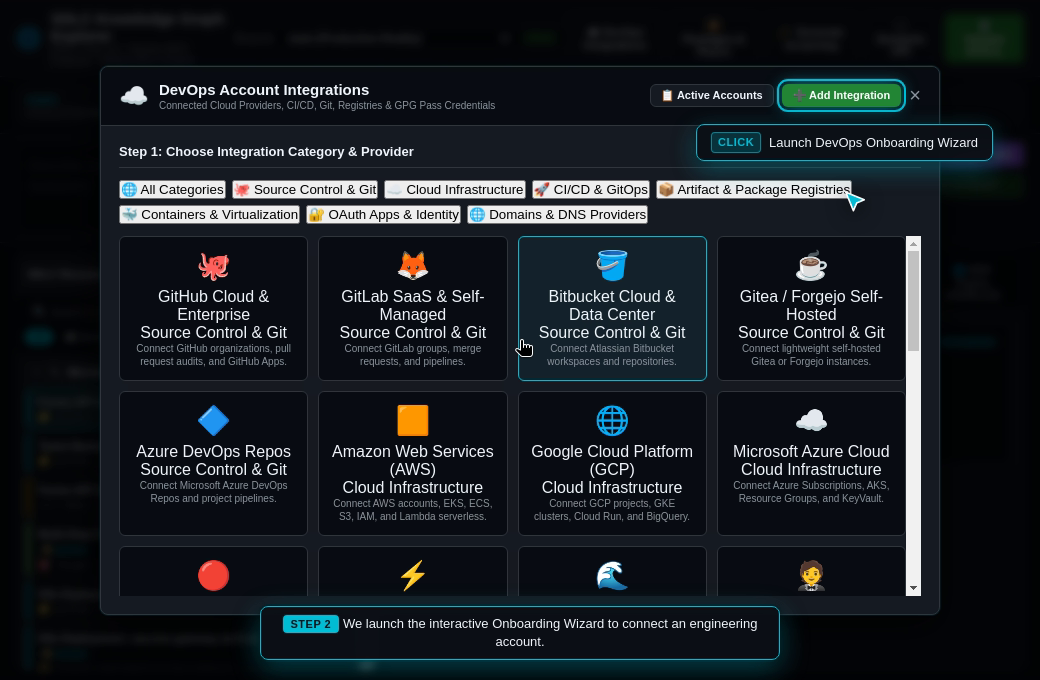
The 7 Categories & 25+ Supported Providers
RobOS includes purpose-built onboarding wizards across 7 essential infrastructure domains:
| Category | Supported Cloud & Infrastructure Providers | Credentials Managed Securely |
|---|---|---|
| 1. Source Control (VCS) | GitHub, GitLab, Bitbucket, Gitea, AWS CodeCommit | Personal Access Tokens (PAT), Deploy Keys, OAuth App Secrets. |
| 2. Cloud Infrastructure | AWS, Google Cloud (GCP), Microsoft Azure, OpenShift | AWS Access Keys / Secret Keys, GCP Service Account JSON, Azure Client Secrets. |
| 3. CI/CD & GitOps | ArgoCD, Jenkins, GitHub Actions, GitLab CI, CircleCI | Admin API Tokens, Webhook Secrets, Deployer Keyrings. |
| 4. Package Registries | JFrog Artifactory, Sonatype Nexus, Docker Hub, AWS ECR, npm | Docker Auth Configs, Maven Master Passwords, npm deploy tokens. |
| 5. Containers & Virt | Kubernetes, Podman, Docker, VMware vSphere, OpenStack | kubeconfig client certificates, cluster CA certs, API server bearer tokens. |
| 6. OAuth & Identity | Okta, Azure AD / Entra ID, OpenLDAP, Keycloak, Ping | SCIM Provisioning Tokens, LDAP Bind Passwords, Client Secrets. |
| 7. Domains & DNS | GoDaddy, Amazon Route 53, Cloudflare, Namecheap | DNS Management API Keys, Zone Access Tokens, API Secrets. |
Technical Architecture: GPG Encryption & First-Class KGraph References
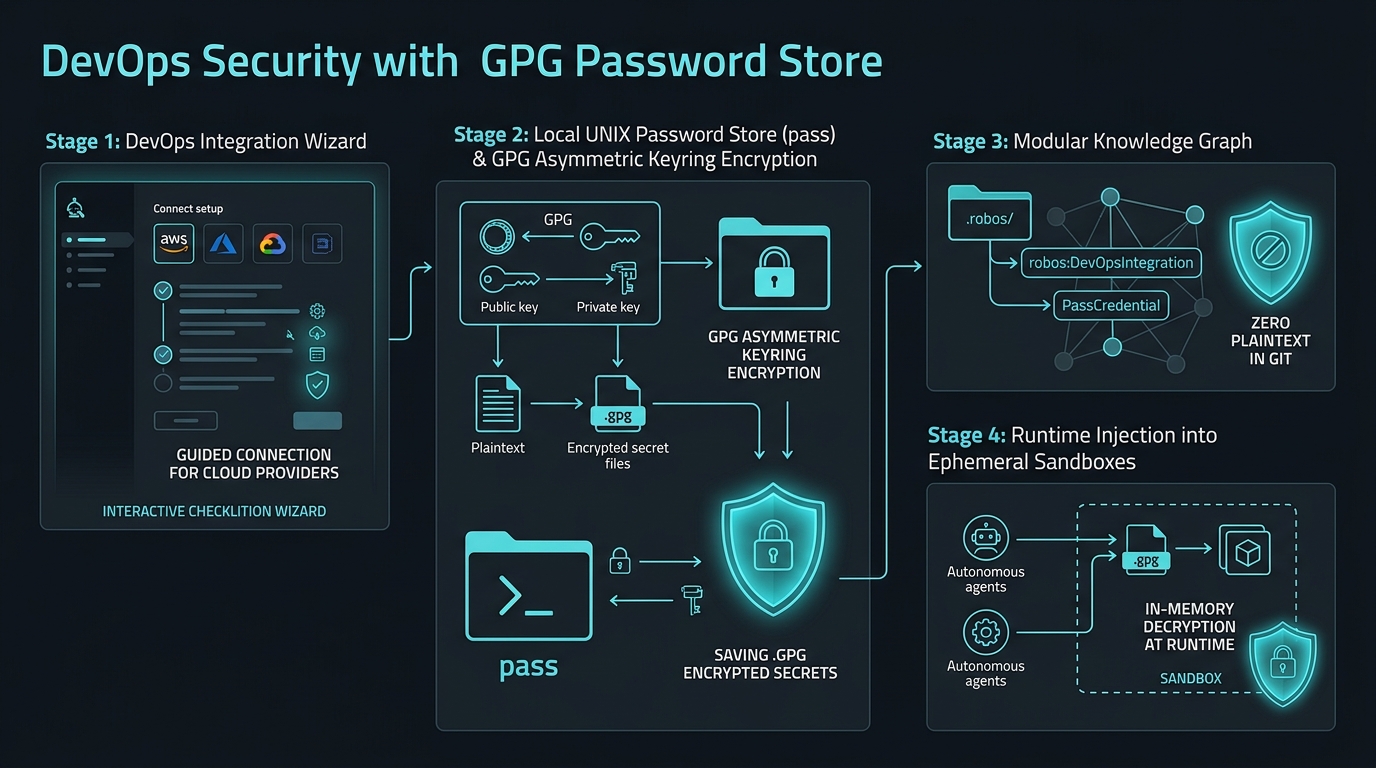
1. Zero Plaintext in the Knowledge Graph
When a cloud integration is registered, RobOS creates a linked node in the Knowledge Graph declaring metadata (provider name, API endpoints, enabled regions) and links it to a robos:PassCredential reference node:
{
  "@id": "urn:robos:integration:aws-production",
  "@type": "robos:DevOpsIntegration",
  "robos:category": "CloudInfrastructure",
  "robos:provider": "AWS",
  "robos:accountSlug": "acme-production-us-east-1",
  "robos:hasCredential": {
    "@id": "urn:robos:credential:aws-production-keys",
    "@type": "robos:PassCredential",
    "robos:passPath": "devops/cloud-infrastructure/aws/acme-production/access-key"
  }
}
Notice that no password, token, or secret value appears anywhere in the JSON-LD document. The file can be committed to public or private Git repositories with complete security confidence.
2. Standard UNIX Password Store (pass) Integration
RobOS relies on the battle-tested, open-source UNIX utility pass:
- Secrets are encrypted with your local GPG private master key (
gpg2). - Files are organized hierarchically:
~/.password-store/devops/<category>/<provider>/<account>/<key>.gpg. - Only the local authenticated developer or scoped ephemeral agent process can decrypt secrets into volatile memory at runtime.
3. Scoped Ephemeral Decryption
When an autonomous AI agent executes a build or deployment in an ephemeral RAM sandbox:
- The agent process requests credential injection via the RobOS security daemon.
- RobOS decrypts the secret into an environment variable directly within the agent’s in-memory
tmpfsspace. - The secret is never written to disk, never logged to stdout/stderr, and purged immediately upon process termination.
Next Steps
- Explore RobOS Main Wins: Return to the Main Wins executive overview.
- Ephemeral In-Memory Sandboxes: Learn how ephemeral Linux accounts isolate agents from host keys.
- KGraph-First App Generation & Modular Architecture: Read about the 6 standard namespaced package stores and 9 application archetypes.
- Existing Company Setup Guide: Walk through configuring enterprise SSO and directory synchronization.
- 💡 Explore the Ideas Store on GitHub: View raw idea dumps, community feature proposals, and structured architecture specs.