Ephemeral In-Memory Agent Sandboxes & Virtual Display Bridging
How RobOS isolates autonomous AI coding agents inside disposable Linux accounts mounted in high-speed RAM, rendering to private virtual displays with zero workstation pollution and complete credential protection.
Table of contents
- The Strategic Advantage: Solving the Machine Pollution Problem
- Technical Architecture: In-Memory
tmpfsExecution - Developer Experience: Live Stream & Breakpoint Inspection
- Next Steps
The Strategic Advantage: Solving the Machine Pollution Problem
When traditional AI coding assistants execute terminal commands or run autonomous loops directly within a developer’s primary user account, severe machine contamination occurs:
- Workstation Residue: Hundreds of megabytes of temporary build files, orphaned
node_modules, stray Docker containers, and conflicting background processes accumulate silently on your drive. - Port Collisions: Autonomous test runs bind to standard ports (
3000,8080,5432), crashing active development sessions and breaking local workflows. - Screen Intrusion: Running visual tests or browser automation steals window focus, flashes windows across your desktop, and disrupts your typing flow.
- Severe Security Hazards: Giving autonomous agents direct terminal execution access risks exposing your personal SSH keys (
~/.ssh/id_rsa), GPG keyrings, shell history, and environment variables.
RobOS introduces hermetic, disposable in-memory agent sandboxes:
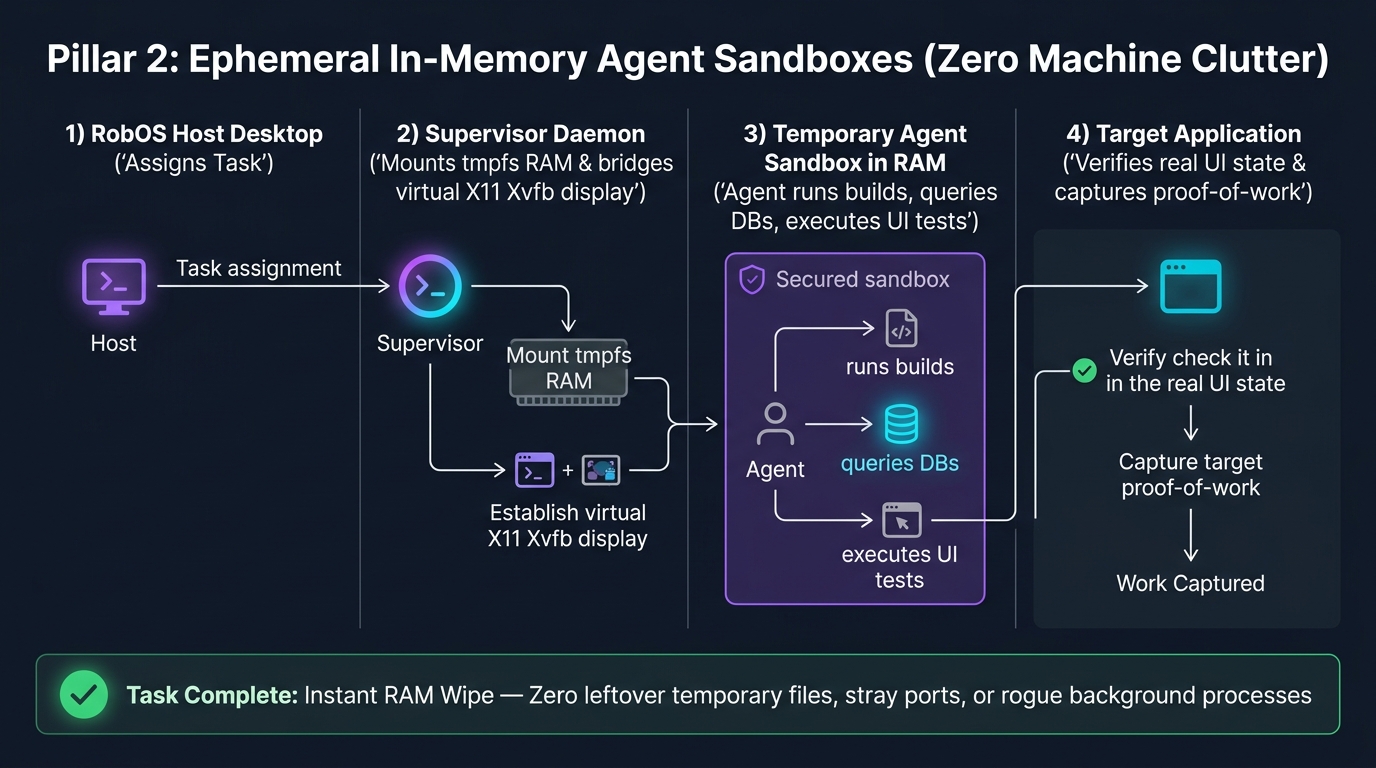
Instead of executing directly on your workstation, RobOS dynamically provisions dedicated, isolated Linux profiles mounted entirely in high-speed RAM (tmpfs) connected to private virtual X11 displays. When the task is complete, cancelled, or merged, the memory is wiped clean instantly—leaving zero leftover files, zero dangling containers, and zero security footprint.
Technical Architecture: In-Memory tmpfs Execution
Every autonomous agent session in RobOS is orchestrated by robos-profiled and the desktop agent manager:
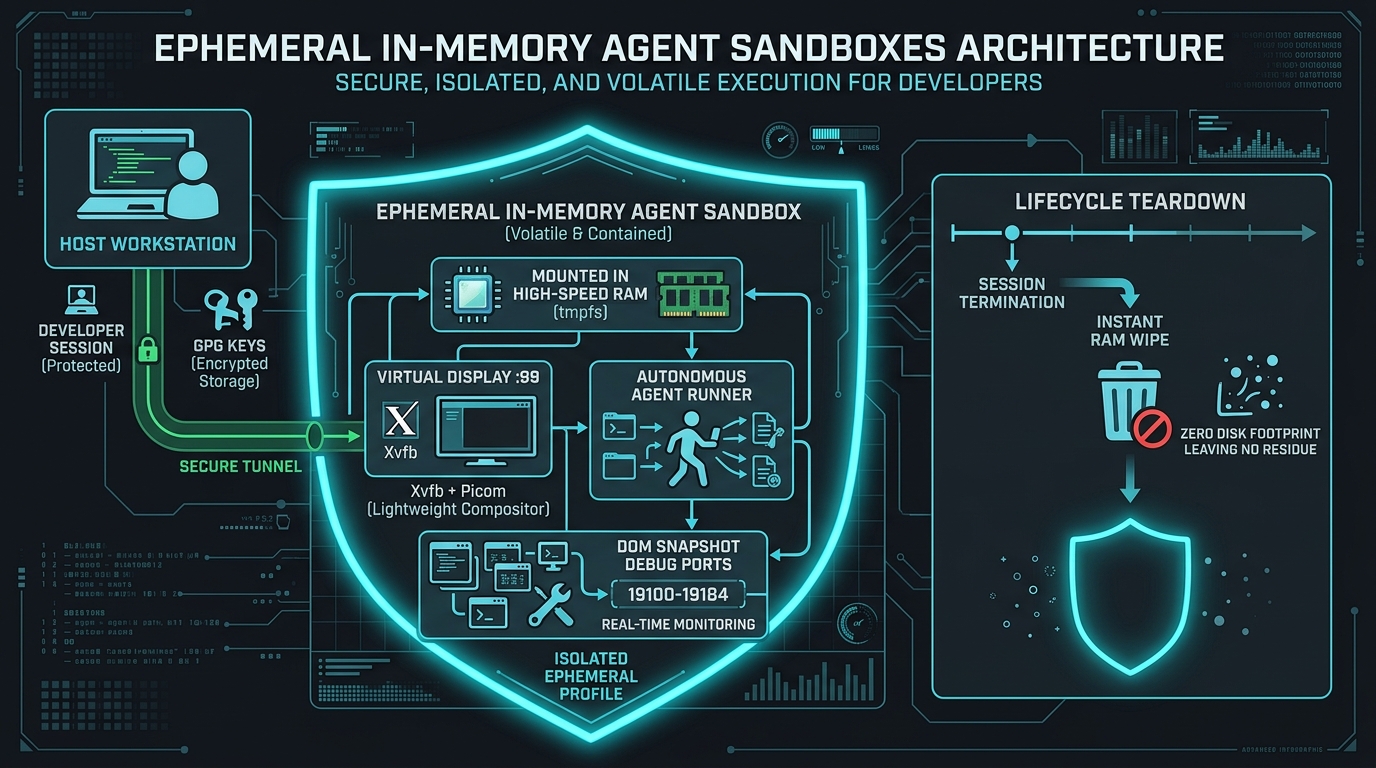
1. High-Speed RAM Execution (tmpfs)
- Workspaces and build directories are mounted directly to a RAM-backed
tmpfsfile system at/home/agent-<session-id>/. - Build times are dramatically accelerated because disk I/O bottlenecks are completely eliminated.
- When an agent compiles a Rust binary, builds a TypeScript project, or unpacks a 500MB
node_modulestree, it consumes high-speed volatile memory. - Upon completion, unmounting the
tmpfsinstantly reclaims all memory in sub-milliseconds without leaving fragmented blocks on your SSD.
2. Virtual Display Isolation (Xvfb + Picom)
- RobOS launches a dedicated headless virtual display (e.g.,
:99or:100) usingXvfbwith hardware-accelerated 24-bit truecolor rendering. - Compositing window managers (Picom or Mutter) run inside the virtual display, providing accurate CSS transitions, drop shadows, window animations, and opacity blending.
- Autonomous browser automation (Puppeteer, Playwright, Chrome DevTools MCP) and Electron applications launch directly onto the virtual display.
- Your active physical screen (Display
:0) remains 100% uninterrupted: you can code, browse, or join video calls without popups stealing window focus.
3. Dedicated DOM Debug & Snapshot Ports (19100–19183)
Each RobOS application and sandboxed window exposes a dedicated local debug port registered in PORT_REGISTRY (packages/robos-lib/snapshot-cli.js):
- Agents can query
http://127.0.0.1:19105/snapshotto retrieve an instant JSON DOM representation of the rendered UI. - The snapshot returns bounding client rects, computed CSS styles, accessibility roles, and interactive focus states with sub-pixel precision.
- Agents verify UI changes and validate layout fixes programmatically without needing bulky screenshots for every micro-assertion.
4. Scoped Credential Protection
The ephemeral Linux profile operates under strict POSIX user boundaries:
- The agent account has zero read access to
/home/<developer>/.ssh/,/home/<developer>/.gnupg/, or host shell history files (.bash_history,.zsh_history). - Credentials required for task execution (e.g., repository clone tokens, test database passwords) are injected as short-lived, environment-scoped tokens derived from the UNIX password store (
pass).
Developer Experience: Live Stream & Breakpoint Inspection
Even though the agent operates on an isolated virtual display, the human developer retains total visibility and control:
- Live Screen Mirroring: Dev Central and Agents Manager provide a 1-click “View Live Agent Screen” button. RobOS streams the virtual display via an ultra-low-latency local VNC/X11 pipe directly into an embedded Electron canvas.
- Interactive Breakpoint Debugging: If an agent encounters a reproduction failure or complex bug, it can pause execution at an interactive breakpoint, allowing the human developer to inspect variables, step through code, or interact with the application UI before resuming autonomous execution.
Next Steps
- Explore RobOS Main Wins: Return to the Main Wins executive overview.
- Autonomous Video Proof-of-Work: Discover how sandboxed agents record 1080p walkthrough videos and neural voiceovers.
- 100% Declarative GitOps: Learn how visual topologies compile into cloud-ready Kubernetes manifests.
- Feature Spec: Ephemeral Agent User Profiles: Review the deep architectural specification.
- 💡 Explore the Ideas Store on GitHub: View raw idea dumps, community feature proposals, and structured architecture specs.