Feature Spec: Ephemeral Agent User Profiles with Direct Host Display Bridging
- Status: Approved (Promoted to Ephemeral Agent User Profiles with Direct Host Display Bridging)
- Created Date: 2026-08-31
- Target Component: Linux Desktop Shell (
packages/desktop-shell,packages/desktop-manager), Host Session Daemon (robos-profiled), Taskbar Dock / Toolbar Widgets, App Launchers - Author/Idea Source: User Idea Dump
1. Overview & Vision
Developers and autonomous AI agents frequently need to launch and test multiple application instances concurrently (e.g. running 4 agent instances in parallel). Running these under the host user’s account (ndipiazza) causes state collision, dotfile pollution, browser profile conflicts, and credential contamination.
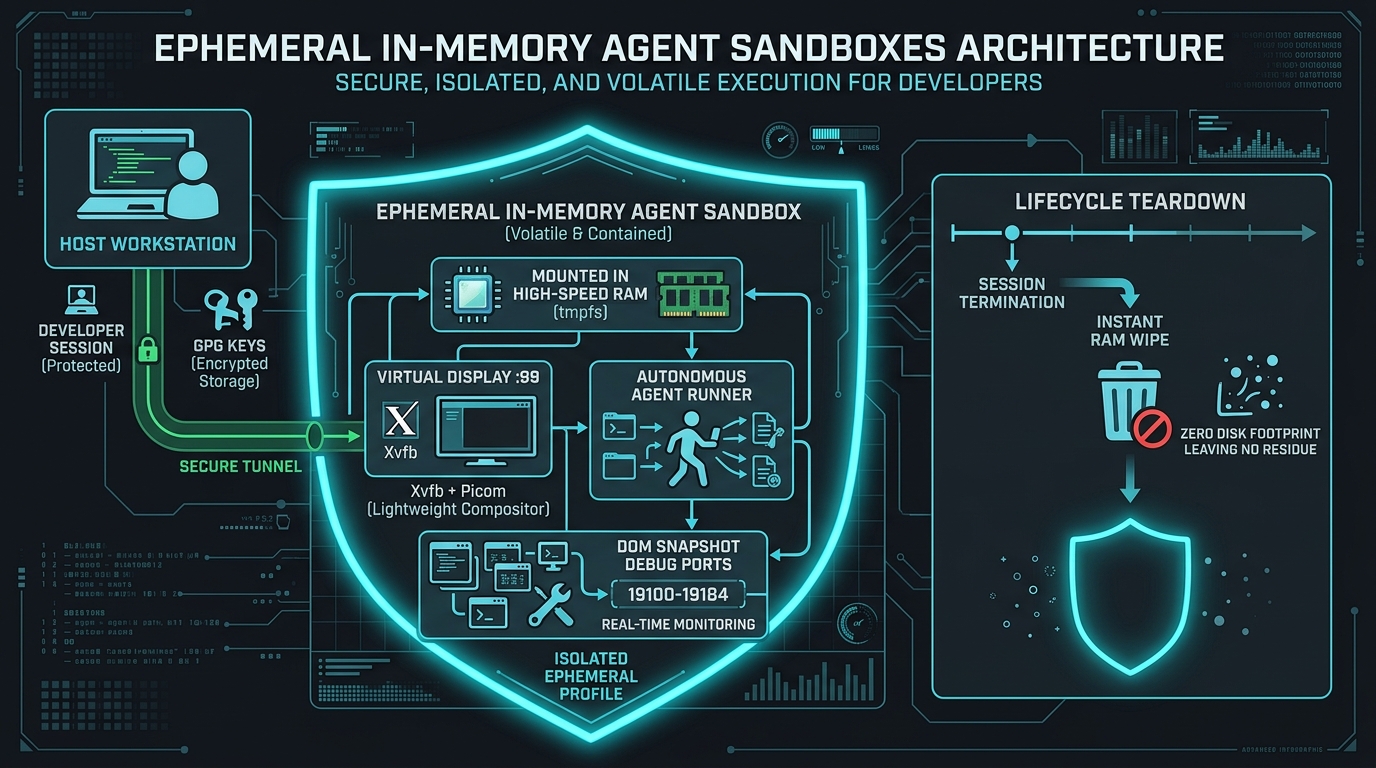
Ephemeral Agent User Profiles enables the host desktop to dynamically create lightweight, temporary Linux user profiles (/home/my-agent-{unique-name}) that exist strictly for the lifespan of the agent’s task or session.
Key differentiator: Direct Host Display Seamless App Rendering. Instead of requiring an isolated remote desktop streaming viewer, applications launched by the temporary agent users render directly on the developer’s host display (X11 / Wayland) side-by-side with native host windows. All essential subsystems (Display, Audio, GPU/DRI, Network, SSH agent, Git credentials, AI API keys) tunnel seamlessly from the host user, while $HOME remains completely isolated and is automatically wiped upon session termination.
A dedicated RobOS Toolbar / Taskbar Widget provides live visibility into all running agent accounts, their active windows and processes, and one-click session termination.
2. User Stories & Use Cases
- As a Developer (
ndipiazza), I want to spawn 4 independent AI agent sessions simultaneously, each running under its own user account (my-agent-1,my-agent-2, etc.), so that their file creations, caches, and local configurations never interfere with each other or my personal profile. - As a Developer, I want GUI apps launched by agent user accounts to render directly on my primary desktop workspace as native windows without having to open a nested VNC or streaming viewer window.
- As an Agent Runner, I want the agent process to inherit necessary display sockets, audio devices, GPU acceleration, SSH agent, and git configuration automatically without manual permission juggling (
xhost, socket permissions, PAM configs). - As a Developer, I want a RobOS toolbar widget that displays all active ephemeral agent profiles and their running apps/windows, allowing me to monitor activity and terminate any session with instant cleanup.
- As a System Administrator, I want ephemeral user home directories to live in memory (
tmpfs) or copy-on-write storage so that when an agent session exits, all temporary disk artifacts are completely purged with zero residue.
3. Key Capabilities & Scope
In Scope
- Dynamic Ephemeral User Account Lifecycle (
robos-profiled/ PAM helper):- Create on-demand Linux user accounts (e.g.,
my-agent-a1b2c3ormy-agent-<task-name>) with unique UIDs/GIDs. - Mount temporary
$HOMEdirectories usingtmpfsoroverlayfsover a clean/etc/skelskeleton. - Automatic teardown and secure cleanup (killing processes via cgroup/systemd transient scope, unmounting, and deleting user account + home).
- Create on-demand Linux user accounts (e.g.,
- Seamless Host Subsystem Bridging & Tunneling:
- Display Bridging: Automatic
xauthcookie injection / Wayland socket permissions allowing agent users to open windows on the host$DISPLAY/$WAYLAND_DISPLAY. - Audio Bridging: Forwarding PipeWire / PulseAudio native sockets (
PULSE_SERVER=unix:/run/user/<host-uid>/pulse/native) via ACLs. - GPU / Hardware Acceleration: Group membership (
render,video) and DRI node permissions (/dev/dri/*). - Credentials & Identity Tunneling:
SSH_AUTH_SOCKsocket access for git cloning over SSH.- GPG agent socket forwarding for signing.
- Git config inheritance (
user.name,user.email, credential helpers). - RobOS API tokens and environment variable propagation (
ANTHROPIC_API_KEY,OPENAI_API_KEY,GEMINI_API_KEY).
- Display Bridging: Automatic
- RobOS Toolbar / Taskbar Support (
packages/desktop-shell& dock widget):- Taskbar widget listing all active ephemeral agent profiles.
- Window manager tagging / badges indicating which agent account owns which window.
- Resource usage monitor per agent profile (CPU, RAM).
- One-click “Kill & Wipe” action for individual profiles or all active agents.
- CLI & IPC Launch Wrappers:
- CLI command:
robos-run-as --agent <name> <command>(e.g.robos-run-as --agent test-runner npm test,robos-run-as --agent code-agent code .). - IPC handler for Electron apps:
window.robos.spawnEphemeralAgent({ agentName, command, env, autoCleanup }).
- CLI command:
Out of Scope
- Multi-seat physical hardware isolation (all agents share the host workstation GPU and monitors).
- Persistent agent home directories that survive machine reboots (persistent accounts are handled by
robos-desktop-agents.md). - Virtual network interface isolation / dedicated VPN per agent (agents share the host network stack).
4. Architectural & System Integration
Impacted Packages & Components
packages/robos-profiled(New Daemon / Sudoers Helper):- System service managing ephemeral user creation, cgroups (
systemd-run --scope -p User=my-agent-...), and teardown. - Manages temporary
/home/my-agent-...tmpfs mount and file cleanup.
- System service managing ephemeral user creation, cgroups (
packages/desktop-shell/ GNOME Shell Extension / Taskbar Widget:- Status bar widget showing active agent sessions (
[ 🤖 3 Agents Active ]). - Dropdown menu displaying agent IDs, active windows, CPU/memory stats, and termination buttons.
- Status bar widget showing active agent sessions (
packages/desktop-manager&packages/robos-lib:- IPC endpoints exposing agent profile creation, process tracking, and lifecycle events.
- DOM snapshot and window tracking hooks for agent-owned windows.
packages/agents-manager/packages/dev-central:- Option in agent launch dialogs: “Run in Ephemeral Profile” toggle.
Plumbing & Security Mechanisms
| Subsystem | Host Bridging Mechanism |
|---|---|
| X11 Display | xauth add generated cookie into temporary agent ~/.Xauthority or dynamic setfacl on /tmp/.X11-unix/X0. |
| Wayland Display | setfacl -m u:my-agent-...:rw /run/user/<host_uid>/wayland-0 with WAYLAND_DISPLAY=wayland-0. |
| Audio (Pulse/PipeWire) | setfacl -m u:my-agent-...:rw /run/user/<host_uid>/pulse/native or PipeWire socket. |
| SSH Agent | setfacl -m u:my-agent-...:rw $SSH_AUTH_SOCK with inherited SSH_AUTH_SOCK env variable. |
| Storage Isolation | mount -t tmpfs -o size=2G,uid=<agent_uid>,gid=<agent_gid> tmpfs /home/my-agent-... |
| Process Grouping | systemd-run --unit=robos-agent-<name> --slice=agent.slice --uid=... for clean bulk process termination (systemctl stop). |
5. Proposed Implementation Plan
Phase 1: Core Daemon & Profile Provisioning (robos-profiled)
- Implement
robos-profiledCLI / service to create and destroy ephemeral user accounts (useradd --home /home/my-agent-<id> --skel /etc/skel). - Set up
tmpfsmounting for/home/my-agent-<id>with configurable size limits. - Implement permission and ACL setup scripts for X11, Wayland, PipeWire, and SSH sockets.
- Build
systemd-runexecution wrapper (robos-run-as) ensuring all child processes belong to a traceable cgroup.
Phase 2: Host Environment & Credential Propagation
- Create credential bridge for Git configurations (
.gitconfig), SSH socket forwarding, and AI environment variables. - Test GUI app launching (Chromium, Electron apps, Tilix, VS Code) from ephemeral agent accounts onto the host display.
- Verify window focus, keyboard input, copy/paste clipboard sync, and audio output.
Phase 3: Desktop Toolbar & App Integration
- Implement RobOS Taskbar / Dock widget showing active agent sessions and process counters.
- Integrate IPC endpoints into
packages/desktop-manager(agentProfile:create,agentProfile:list,agentProfile:terminate). - Add “Run in Ephemeral Profile” action inside
packages/agents-manager,packages/app-launcher, andpackages/git-projects. - Add window title decoration or visual badges for agent-owned windows.
Phase 4: Container & VM E2E Testing
- Write automated test harness in
packages/robos-testto test multiple concurrent ephemeral users. - Verify zero-residue cleanup after session termination (
userdel,umount, cgroup cleanup). - Add cloud-init provisioning and PAM configuration in
packages/desktop-shell/install.sh.
6. Acceptance Criteria
- A host user can launch a command/app via
robos-run-as --agent worker-1 <app>and have it run under Linux usermy-agent-worker-1with$HOME=/home/my-agent-worker-1. - Multiple agent user accounts (e.g. 4 concurrent accounts) can run simultaneously without colliding.
- Graphical windows opened by agent accounts appear directly on the host display server as native desktop windows with normal mouse, keyboard, and audio support.
- Agent processes inherit network access, GPU acceleration, and SSH/git credentials from the host user without leaking private host keys or modifying host
$HOME. - When an agent session ends, all spawned child processes are killed, the ephemeral user account is removed, and the temporary home directory is completely wiped.
- The RobOS desktop taskbar displays an active agent status widget with live agent counts and a termination menu.