
CRPG campaign editor tutorial
Walks through the RobOS cRPG Editor using the campaign that ships with the game, Rescue of Princess Jennifer. You open it, see which file each tab edits, bundle it into a cartridge and start it in Godot. The last section says what the game runtime does with a cartridge today, which decides how much of a new campaign you can play.
On this page
What the editor is
The editor is an Electron app in packages/crpg-editor. It reads and writes JSON-LD files directly in games/crpg-realm/. There is no database and no export step: Save writes the file, and the game reads the same file.
| Editor tab | Folder it edits (games/crpg-realm/) |
|---|---|
| Campaign | campaigns/<slug>.jsonld |
| Characters & NPCs | characters/<slug>.jsonld |
| Items | items/<slug>.jsonld |
| Enemies | enemies/<slug>.jsonld |
| Spells | spells/<slug>.jsonld |
| Abilities | abilities/<slug>.jsonld |
| Maps | maps/<slug>.jsonld, and assets/blockouts/<slug>.png when you build |
The editor also edits events/ and lists scenes/. Set the environment variable ROBOS_CRPG_DIR to point it at a different game folder.
Start it from the repository:
cd packages/crpg-editor
npm install
npm start
npm start runs electron . --no-sandbox --disable-gpu --disable-dev-shm-usage. Installed RobOS desktops also list it as the app RobOS cRPG Editor.
Open the shipped campaign
Pick Rescue of Princess Jennifer in the Campaign: drop-down at the top right. The status bar at the bottom shows the file that was loaded, games/crpg-realm/campaigns/rescue-the-princess.jsonld. The header buttons are + New, Save, Render as Game, Generate Cartridge and a delete button.
The Campaign tab has eight sub-tabs: Overview & Settings, Quest & Scenario Tree, Skyrim Quest Journal, Maps & Scenes, Characters & NPCs, Party & Inventory, Infinity AI Tactics & Arena, and Story Flags.
Overview & Settings
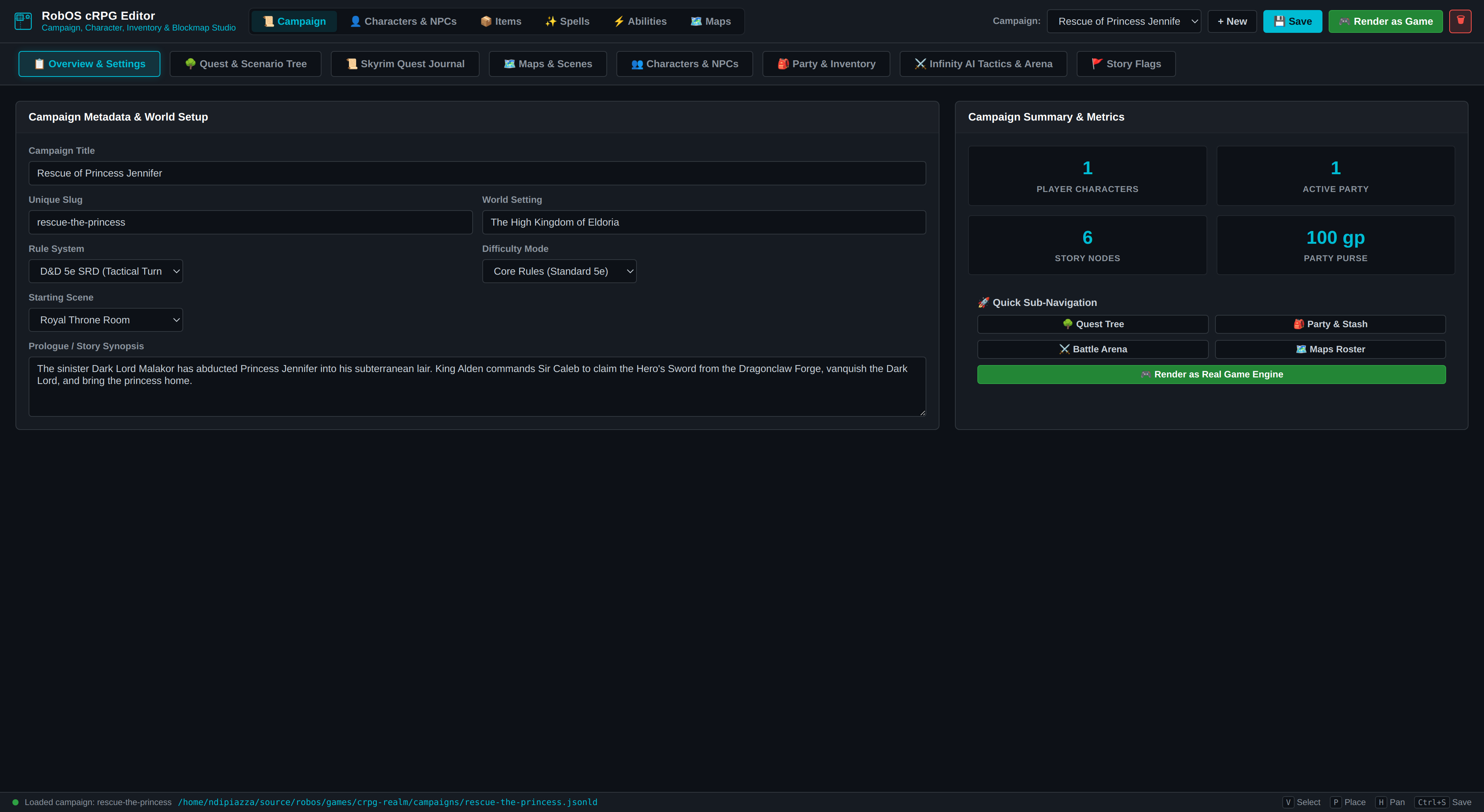 The fields on the left are the campaign’s title, slug, world setting, rule system, difficulty, starting scene and synopsis. The counters on the right come from the file.
These fields map to keys in the campaign file:
| Field | Key in campaigns/rescue-the-princess.jsonld |
|---|---|
| Campaign Title | dcterms:title |
| World Setting | robos:setting (The High Kingdom of Eldoria) |
| Rule System, Difficulty Mode | robos:ruleSet (D&D 5e SRD), robos:difficulty (Core Rules) |
| Starting Scene | robos:startingMap (throne-room) |
| Prologue / Story Synopsis | dcterms:description |
The file’s type is ["robos:CRPGCampaign", "schema:CreativeWork"] and its id is urn:robos:crpg:campaign:rescue-the-princess.
Maps & Scenes
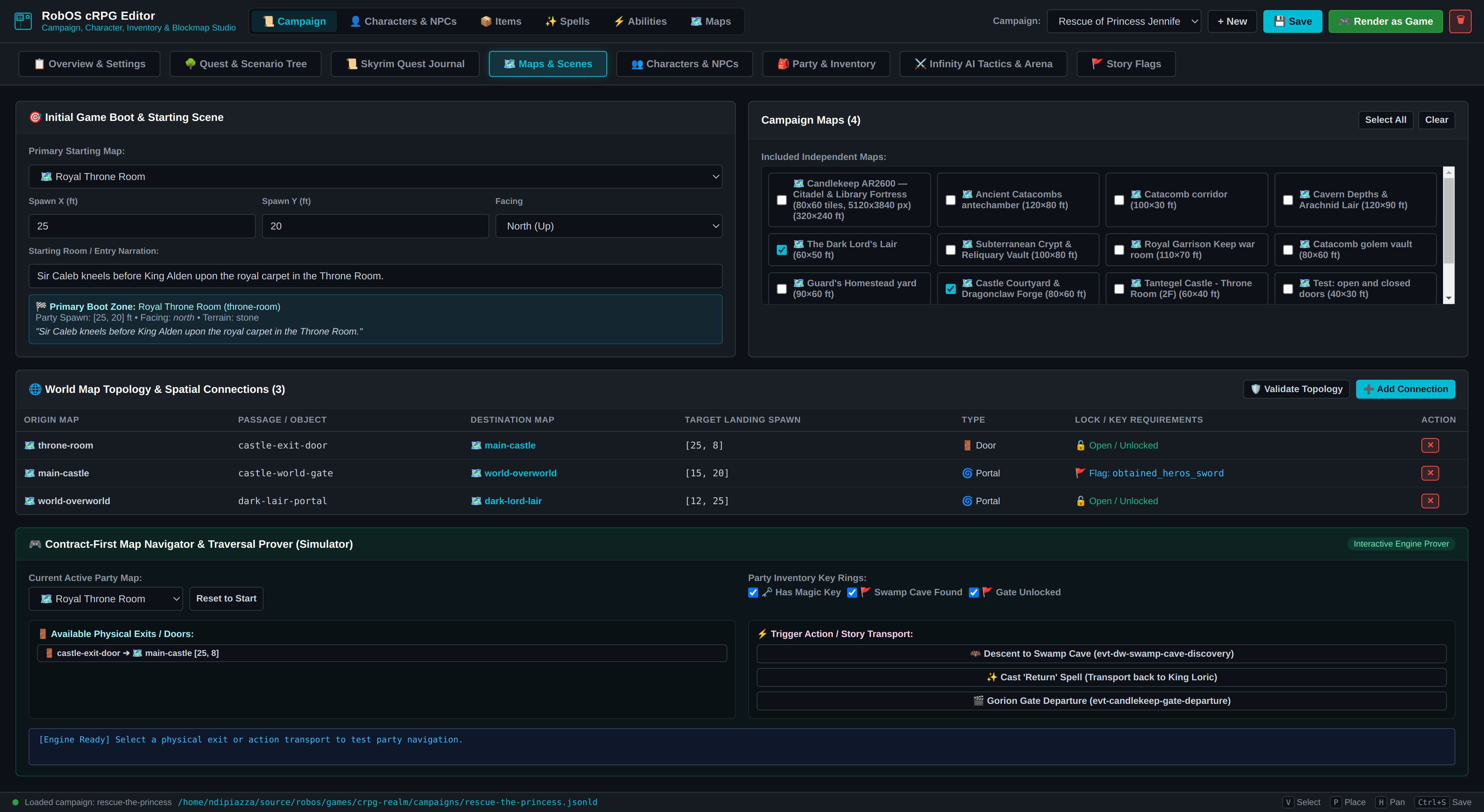 The table in the middle lists the three connections between the four maps. The last row of the screenshot is the editor’s simulator for walking a party through them.
This tab sets the starting map, spawn point and facing (robos:startingSpawn), which maps belong to the campaign (robos:maps, one URN per map), and the connections between them. Use Add Connection to add a row and Validate Topology to check the graph.
A connection is an entry in robos:mapConnections. This is the one that gates the overworld behind the Hero’s Sword:
{
  "id": "conn-castle-to-world",
  "fromMap": "main-castle",
  "fromObjectId": "castle-world-gate",
  "toMap": "world-overworld",
  "toObjectId": "castle-road-entry",
  "toSpawn": [15, 20],
  "toFacing": "east",
  "transitionType": "portal",
  "bidirectional": true,
  "requiredKey": null,
  "requiredFlag": "obtained_heros_sword",
  "label": "Castle Gate to World Realm (Requires Hero's Sword)"
}
fromObjectId must match the robos:objectId of an object on the fromMap. The cartridge runner reads fromMap, fromObjectId, toMap, toObjectId, toSpawn, bidirectional and requiredFlag. It ignores requiredKey.
Characters & NPCs, Items, Party & Inventory
Characters are separate files that the campaign lists in robos:characters. The shipped campaign lists six: hero-sir-caleb, npc-king-alden, npc-blacksmith-torvald, creature-projection-goblin, boss-dark-lord-malakor and npc-princess-jennifer. The top-level Characters & NPCs tab edits them: its File menu has New Player Character, New NPC and Save Character. A hero file carries class, level, ability scores and equipment:
{
  "@id": "urn:robos:crpg:character:hero-sir-caleb",
  "@type": ["robos:CRPGCharacter", "robos:CRPGHero", "schema:Person"],
  "name": "Sir Caleb",
  "class": "Fighter", "subclass": "Champion", "race": "Human", "level": 1,
  "hpMax": 16, "armorClass": 14, "speed": 30,
  "stats": { "str": 16, "dex": 14, "con": 15, "int": 10, "wis": 12, "cha": 13 },
  "robos:modelAssetRef": "res://assets/models/character_knight_pawn.glb",
  "robos:equipped": { "main_hand": "clothes", "body": "leather-armor" }
}
(Abridged. Most keys appear twice in the file, once with the robos: prefix and once without.) NPC files add role, interactionType, location, col, row, facing and a dialogue array of strings.
The Items tab edits one item per file. Its form has Item Name, Unique Slug, Category, Equip Slot, Gold Cost (GP), Weight (lbs), Rarity, Damage Dice, Damage Type, Base AC or Bonus, Consumable Effect and a 3D model section. The Hero’s Sword is items/heros-sword.jsonld: category weapon, slot main_hand, rarity rare, cost 500, damage 1d8 slashing, and the effect text +3 ATK, Dragonclaw Rune.
The Party & Inventory sub-tab edits robos:gameState: the active party, party formation, shared purse and starting inventory (gold: 100 and one potion-healing in this campaign).
Quest & Scenario Tree and Skyrim Quest Journal
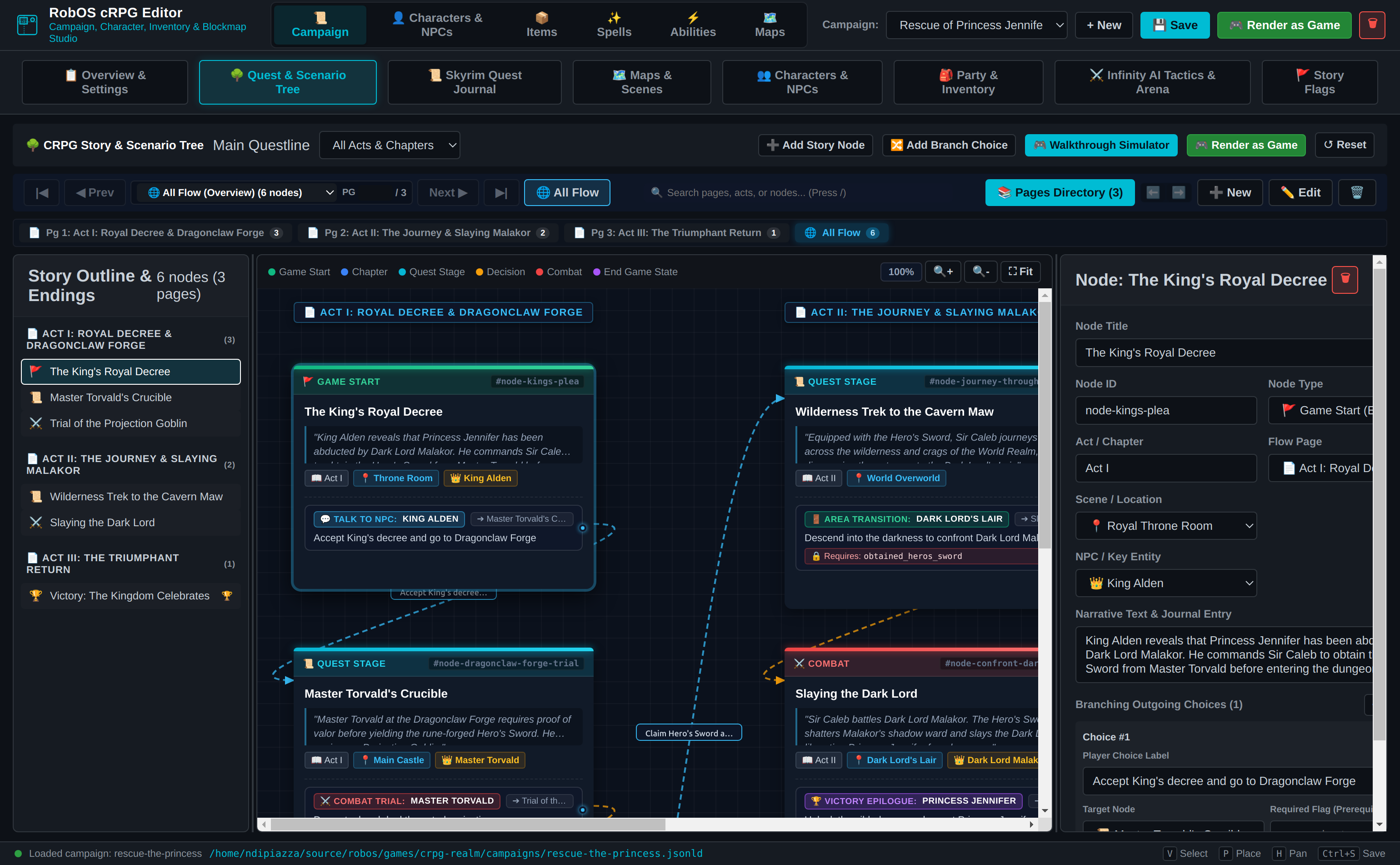 Each card is a story node. The pills at the bottom of a card are its choices, labelled with what triggers them (talk to an NPC, combat trial, area transition). The panel on the right edits the selected node.
The story tree edits robos:storyFlow: a robos:rootNodeId, three robos:flowPages (the acts) and six robos:storyNodes. A node has a robos:nodeType (for example game_start, quest_stage), a robos:location map, a robos:giver and robos:choices. Each choice has a targetNodeId and a robos:triggerType such as talk_npc or combat.
The journal edits robos:questLog. The campaign has a main quest (quest-rescue-princess) and a side quest, each with robos:questObjectives, numbered robos:questStages (0, 10, 20 and so on) and robos:questRewards.
The Story Flags sub-tab edits robos:worldFlags. This campaign starts with princess_kidnapped and talked_to_king set to true and five more set to false, including obtained_heros_sword.
Maps tab
The Maps tab edits one map at a time. Its toolbar has + New, Open, Close, Save, Build PNG & Grid and Export PNG. The canvas tools are Select, Place and Pan (keys V, P and H), with Undo and Redo on Ctrl+Z and Ctrl+Y, and Ctrl+S saves.
A map is a robos:CRPGBattleMap with a width and height in feet, a base terrain (the editor offers stone, grass, dirt, wood, sand, snow and cave) and a list of robos:mapObjects. The throne room is 50 by 40 ft with three objects. This one, abridged, is the exit door to the courtyard:
{
  "@type": "robos:CRPGMapObject",
  "robos:objectId": "castle-exit-door",
  "robos:objectType": "passage",
  "robos:shape": "rect",
  "robos:position": [23, 36],
  "robos:size": [4, 3],
  "robos:transition": { "targetMap": "main-castle", "targetSpawn": [25, 8],
                        "targetFacing": "south", "transitionType": "door" }
}
The object’s robos:transition block is read by the navigator in packages/crpg-builder (and so by the editor’s simulator and the bundler tests). The game takes passage destinations from the campaign’s robos:mapConnections, not from this block, so keep the two in step.
Build PNG & Grid runs python3 -m robos_crpg_blockout build for the open map. It draws a grey-box image into assets/blockouts/ and writes a 5-ft collision grid into the map file. The scenario engine uses that grid for tests (testing page); the cartridge runner does not. It needs Python 3 and Pillow. The tool’s own documentation is the blockout README.
The Rescue maps were not built with that tool. throne-room, main-castle and dark-lord-lair contain objects of type spawn, and dark-lord-lair has terrain dungeon. python3 -m robos_crpg_blockout validate rejects both. None of the four has a file in assets/blockouts/. They are drawn in the cartridge runner over background art (robos:backgroundImage).
Build a cartridge
A cartridge bundles a campaign with the maps, characters, items, enemies, spells and quests it references into one file.
In the editor, press Generate Cartridge. From a shell, use the bundler:
node packages/crpg-builder/bin/crpg-cartridge.js bundle rescue-the-princess
node packages/crpg-builder/bin/crpg-cartridge.js bundle-all
node packages/crpg-builder/bin/crpg-cartridge.js list
node packages/crpg-builder/bin/crpg-cartridge.js inspect rescue-the-princess
Both write games/crpg-realm/cartridges/<slug>.cartridge.json. bundle accepts an output path as a third argument. inspect prints the header, the maps with their background images, and the ids of the characters, items and quests. For the shipped campaign the header reads 4 maps, 6 characters, 12 items, 9 enemies, 26 spells and 2 quests.
The bundler finds maps through robos:maps, the starting map and every fromMap and toMap in the connections. It finds characters through robos:characters, the active party and robos:heroes, and items through the heroes’ equipment and inventory.
Play it
Character Select shows every cartridge in a drop-down with Play and Auto-Play buttons. Or skip the menu:
cd games/crpg-realm
./play.sh --cartridge rescue-the-princess
Render as Game in the editor does three things. It saves the campaign, rebundles the cartridge into games/crpg-realm/cartridges/, and overwrites games/crpg-realm/data/v1/active_campaign.json. Then it starts Godot with --path games/crpg-realm --cartridge <slug>, looking for the binary in $GODOT_BIN, ~/.local/bin/godot, ~/.local/bin/godot4, ~/apps/godot4, /usr/bin/godot4, /usr/local/bin/godot4 and /usr/bin/godot, and falling back to play.sh.
In the cartridge map, left-click to move and click NPCs, chests, items and passages to walk to them. Space or P starts and stops auto-play. See controls.
What the game plays today
The cartridge runner is scripts/CartridgeWorld.gd. It reads these things generically from any cartridge:
- Maps. Width, height, terrain,
robos:backgroundImageandrobos:mapObjects. Objects of typewall,pillaranddaisbecome obstacles. Typechest(or an id containingchest) becomes a chest. Typesitem,weapon,pickup,lootandequipmentbecome pickups. Typespassage,doorandportalbecome map transitions through the campaign’srobos:mapConnections. - The campaign state.
robos:heroes, the shared inventory, world flags and the quest log go intoGameState. - Items, NPCs and monsters are added to
DataStore.
It does not read these generically:
- NPC placement and dialogue. NPCs are placed by
_spawn_map_npcs, which tests the map slug and the character slug against fixed strings (throne-roomwithking,main-castlewithtorvald,dark-lord-lairwithmalakor, and the Dragon Warrior equivalents). Thelocation,col,rowanddialoguefields in a character file are not used. The lines NPCs speak are strings in_interact_with_npc. - Story logic. The quest steps (accept the quest, win the goblin trial, claim the sword, defeat the boss, escort the princess, victory) are functions in
CartridgeWorld.gdfor two stories, Rescue the Princess and Dragon Warrior. The story tree inrobos:storyFlowis bundled into the cartridge asstoryDAGbut not played. - Chest contents are chosen from the chest’s object id (
120g,key,torch,sword,herb).
So a new campaign gets its maps, walls, chests, pickups and passages in the game. Its NPCs, dialogue and quest steps need code in CartridgeWorld.gd until a generic runner exists. Treat the editor as an authoring tool for the data, and the Rescue the Princess campaign as the one end-to-end example.
Some cartridges do not use the cartridge runner at all. When it starts a cartridge, CartridgeManager.embark_cartridge loads the hand-built Homestead scene if the starting map’s slug contains candlekeep or homestead, VillageSquare for village, and AncientCatacombs for catacomb. The slugs throne-room, main-castle, world-overworld, dark-lord-lair, tantegel-throne-room and charlock-castle always go to CartridgeWorld. That is why candlekeep-prologue opens in the Homestead scene.
Verify your files
The bundler package has tests for the shipped campaign: starting map and spawn, the chain of map connections and the flag gate on the overworld, the story flow, and the quest journal. They use Node’s built-in runner, not Jest:
cd packages/crpg-builder
node --test tests/rescue-princess-tutorial.test.js tests/cartridge-system.test.js
Use node --test tests/*.test.js for all of the package’s tests. The editor package has its own, npm test in packages/crpg-editor, which covers the map undo history.