
CRPG controls
Every key and mouse input the game handles, taken from the input handlers in games/crpg-realm/scripts/. The last column names the script to edit if you want to change a binding.
On this page
The game is real-time with pause. Press Space to freeze the action, give orders, then press Space again. These controls apply to the hand-built scenes (Homestead, VillageSquare, WhisperingForest, AncientCatacombs, GarrisonKeep, TacticalBattle). Cartridge maps use a smaller set, listed below.
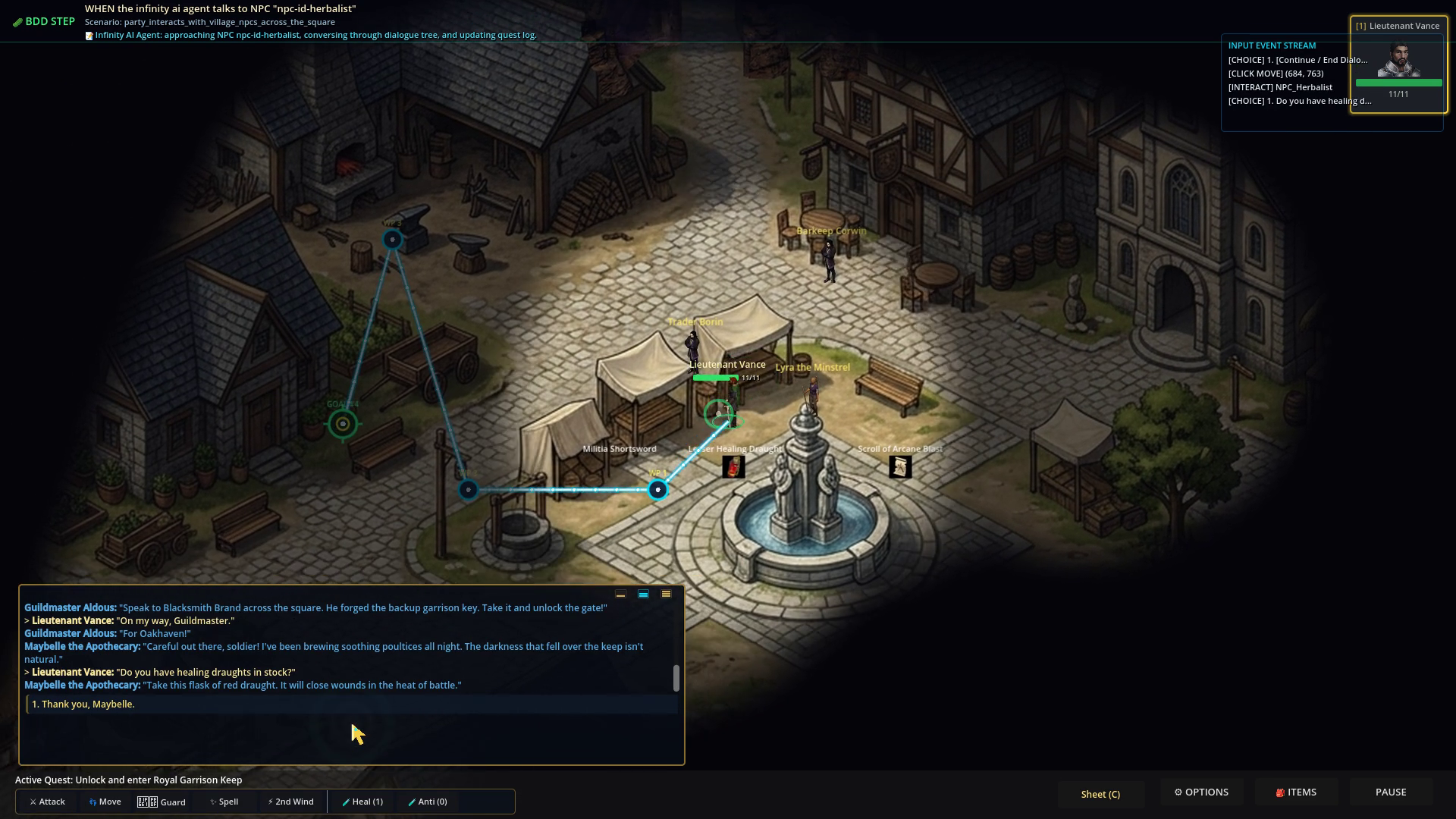 Look at the bottom edge: the toolbar (Attack, Move, Guard, Spell, 2nd Wind, Heal, Anti) and the Sheet (C), OPTIONS, ITEMS and PAUSE buttons. The banner and the input stream at the top are test overlays that you will not see in normal play.
Mouse
| Input | Action | Handled in |
|---|---|---|
| Left-click ground | Move the selected party members, arranged in the current formation | HeroPlayer._unhandled_input calls GameState.move_party_formation |
| Shift + left-click ground | Queue a waypoint instead of replacing the destination | same |
| Left-click NPC | Talk. The dialogue opens in the activity log. | NPCCharacter._input_event |
| Left-click enemy | Target and attack. The scene script handles the click. Invisible enemies ignore clicks unless you can see invisible. | TacticalEnemy._input_event |
| Left-click door or gate | Walk through. Locked doors need their key. | DoorPortal._input_event calls try_enter() |
| Left-click item on the ground | Pick it up | GroundItem._input_event |
| Left-click chest | Open it | TreasureChest._input_event |
| Left-click a detected trap | Send the party’s rogue (or the hero) to disarm it | Trap._input_event |
| Left-click a portrait | Select that member and make them party leader | PortraitToolbar |
| Shift + left-click a portrait | Add or remove that member from the selection | PortraitToolbar |
| Right-click a portrait | Open that member’s status window | PortraitToolbar |
| Mouse wheel over the log | Scroll the log | ActionLog._gui_input |
Keyboard
| Key | Action | Handled in |
|---|---|---|
| Space | Pause or resume | HeroPlayer._unhandled_key_input calls GameState.toggle_pause() |
| 1, 2, 3 | Select party member 1, 2 or 3. This does not change the leader. | HeroPlayer._unhandled_key_input |
Backslash or = | Select the whole party | HeroPlayer._unhandled_key_input |
| W A S D | Move the hero directly. This cancels a click-to-move. | HeroPlayer._physics_process |
| Arrow keys | Pan the camera | HeroPlayer._handle_camera_pan |
| Home | Clear the camera pan so the view is centred on the leader again | HeroPlayer.center_camera_on_hero |
| C or R | Toggle the character sheet | HeroPlayer._unhandled_key_input |
| 1 to 9, during a dialogue | Choose that numbered reply in the log | ActionLog._unhandled_key_input |
| Tab or L | Cycle the log size (small, medium, large) | ActionLog |
| Page Up, Page Down | Scroll the log | ActionLog |
| I, B or Esc | Close the inventory window | InventoryWindow._unhandled_input |
| O or Esc | Close the options window | SettingsModal._unhandled_input |
The number keys 1 to 3 are bound twice. During a dialogue the log uses them to pick a reply, and HeroPlayer also changes the selected member. Selection does not affect dialogue, but keep it in mind if you add number-key bindings.
The inventory and options windows have close keys but no open keys. Use the HUD buttons.
On-screen buttons
The HUD buttons are Sheet (C), OPTIONS, ITEMS and PAUSE. They open the character sheet, the options window and the inventory, and pause the game.
The action toolbar (ActionToolbar.gd) has:
| Button | What it does |
|---|---|
| Attack, Move, Guard | Log an order in the activity log. Attack tells you to click a target. Guard shows a “+2 AC” label, but no code applies an AC bonus. Clicking an enemy or the ground is what acts. |
| Spell | Shows the first prepared spell by name. Cure Wounds heals the hero. Other spells mostly do nothing from this button. See Combat, party and spells. |
| Special | Fighter: Second Wind, which heals 6 to 10 HP. Rogue: toggles Find Traps mode (reads Traps (ON) while active). Cleric (Turn) and wizard (Recovery): log a message and show a floating label, with no other effect. Other classes: log a message. |
| Heal (n), Anti (n) | Use a healing potion or an antidote. The number is how many you carry. |
| PAUSE | Pause or resume, same as Space |
| Six formation buttons | Rank and file, wedge, shield wall, marching column, defensive square, skirmish. See Combat, party and spells. |
The options window (GAMEPLAY & FEEDBACK OPTIONS) sets overhead health bars (always, damaged only, disabled), floating damage numbers, fog of war on or off globally, the vision radius (a slider from 200 to 800 px, default 425), and two auto-pause triggers: on sighting a hostile target, and when a character drops below 25% HP.
Cartridge maps
Maps loaded from a cartridge run in CartridgeWorld.gd, which has its own input handling:
| Input | Action |
|---|---|
| Left-click ground | Move the hero. Clicking while auto-play is running stops auto-play. |
| Left-click NPC, chest, item or passage | Walk there and interact |
| Space or P | Toggle auto-play, where the game plays the cartridge’s story itself |
Space does not pause the game in a cartridge map. It starts or stops auto-play instead.
Demo mode
Demo mode (see the quick start) has its own keys, handled in scripts/demo/DemoController.gd:
| Key | Action |
|---|---|
| M | Switch between the Scenario Arena demo and the real-scene demo |
| Space | Pause or resume the demo |
| Left, Right | Previous or next scenario |
| T | Show or hide the test pyramid drawer |
| 1 to 5 | Playback speed: 0.25x, 0.5x, 1x, 2x, 4x |
[ or -, ] or = | Slower or faster combat turns (0.4 to 6.0 seconds per turn) |
| Esc | Leave the demo |
Changing a binding
Only Space is registered in Godot’s Input Map (toggle_pause in project.godot). Every other key is matched on event.keycode in the scripts listed above. To rebind one, change the KEY_* constant in that script’s handler. To make it remappable, add an action under Project, Project Settings, Input Map, and switch the handler to event.is_action_pressed("your_action").
The BDD tests do not press keys. They call the HTTP control API (for example /api/v1/user_input/pan_camera), so rebinding a key does not break them.