
AI agents and API mode
RobOS does its AI work through the coding-agent CLIs you install and sign in to: Claude Code, Codex, Gemini CLI / Antigravity or GitHub Copilot. Nothing else is needed. API mode is an optional extra. It sends quick one-shot requests straight to a model API, and it adds local Ollama models and semantic search over the Knowledge Graph. It is off until you turn it on.
On this page
The default: your agent CLIs
Install one of these CLIs, sign in, and RobOS uses it. No API keys are involved.
| Agent | Command RobOS runs for a one-shot request | Provider id in ai-provider.json |
|---|---|---|
| GitHub Copilot | copilot -p <prompt> --allow-all-tools | github-copilot |
| Claude Code | claude --print --output-format text <prompt> | claude-code |
| Codex | codex exec -c approval_policy=never --skip-git-repo-check <prompt> | codex |
| Gemini CLI / Antigravity | gemini -p <prompt> | antigravity |
To choose the default, open RobOS Agents, select the agent, sign in, and click Set as Active. The choice is saved in ~/.config/robos/ai-provider.json. When nothing is set, RobOS uses GitHub Copilot.
The shared library behind these one-shot requests is robos-lib/ai-agent. These features use it:
- Create with AI and other generate buttons in Git Projects, Group Manager, People Directory and Workflow Studio. Where the app has an Agent menu, it picks a specific CLI for one request.
- The ? quick-ask button in the AI text box (
<robos-ai-textarea>) in AI Prompt Studio, Git Projects and the Knowledge Graph Explorer. - The AI Co-Pilot in the Knowledge Graph Explorer, which asks the agent for new graph nodes and checks them with SHACL before you apply them.
- RobOS Voice, when a spoken request falls through to an AI agent.
Agent tasks are separate. Task Implementer, Dev Central and Code Review start the agent CLIs with their own runners, so they never use API mode. See Agent tiers for how tasks reach an agent.
Optional API mode
API mode calls a model API directly through LangChain.js, in the shared robos-llm package. Use it when you want:
- faster quick requests than starting a CLI each time,
- a local model through Ollama, for example on an air-gapped machine,
- semantic search over the Knowledge Graph (see below).
It covers one-shot text requests only. The model cannot run commands or edit files, and agent tasks stay on the CLIs.
| Provider | Default model | Key | Embeddings (for semantic search) |
|---|---|---|---|
| Anthropic (Claude) | claude-haiku-5-5 | Anthropic API key | No |
| OpenAI | gpt-5-mini | OpenAI API key | text-embedding-3-small |
| Google Gemini | gemini-2.5-flash | Gemini API key | gemini-embedding-001 |
| Ollama (local) | llama3.2 | None | nomic-embed-text |
The default models are only starting points. Type any model your account or Ollama server has into API model.
Turn it on
- Open RobOS Preferences and choose AI Agents & API Mode.
- Check Use direct model APIs for quick requests (optional) and pick an API provider.
- Click Install API packages. RobOS runs
npm installonce, for the providers you selected, into~/.local/share/robos/llm-deps. This step needs network access. RobOS itself does not ship these packages. - For Anthropic, OpenAI or Gemini, paste the key into its field and click Save next to it. The key goes straight into the password store. For Ollama, start the server (
ollama serve) and pull the model first, for exampleollama pull llama3.2. Fill in Server URL if it is not onhttp://127.0.0.1:11434. - Click Save All.
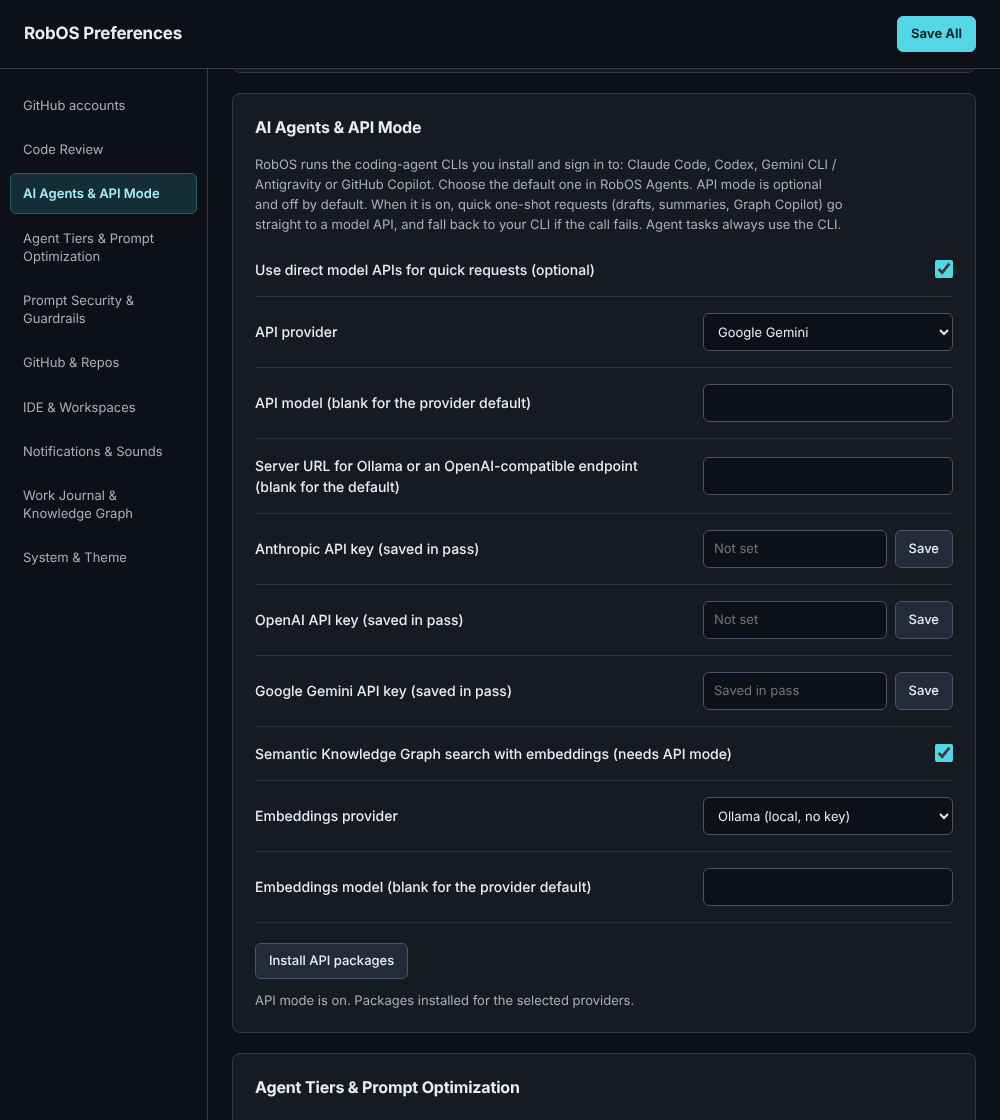
Look at the API key fields: each one saves to pass, and the status line under Install API packages says what is still missing.
To go back to CLI only, uncheck the box and click Save All. The installed packages and saved keys stay where they are but are not used.
How a request is routed
- If the feature asked for a specific CLI (from its Agent menu), that CLI answers. API mode is skipped.
- Otherwise, with API mode on, the request goes to the API provider.
- If the API call fails (no packages, no key, server unreachable, provider error), RobOS sends the same request to your active CLI. The first failure of each kind posts a notification that names the reason, so a broken key does not fail silently.
- If the prompt security policy blocks the request, it is not sent anywhere, not even to the CLI.
Feature menus show the default as, for example, “Default (Google Gemini API, then Claude Code)” while API mode is on.
Keys, privacy and stored data
- API keys are kept only in the
passpassword store, atrobos/ai/anthropic-key,robos/ai/openai-keyandrobos/ai/gemini-key. These are the entries the Setup Wizard already writes.ANTHROPIC_API_KEY,OPENAI_API_KEYandGEMINI_API_KEY(orGOOGLE_API_KEY) take priority when set. Keys are never written tosettings.json. - Older versions of Preferences saved keys as plain text in
settings.json. When you open Preferences, it moves any such key intopassand deletes it from the file. A key stays in place only when the password store is not set up yet. Run Security Setup, then reopen Preferences. - Every prompt goes through the Prompt Security Guard first, with your policy mode. Text sent for embeddings is always redacted.
- LangSmith tracing is forced off, so prompts are not sent to a tracing service.
| What | Where |
|---|---|
| API mode settings | ~/.config/robos/settings.json: ai_api_enabled, ai_api_provider, ai_api_model, ai_api_base_url, ai_semantic_search, ai_embeddings_provider, ai_embeddings_model |
| LangChain packages | ~/.local/share/robos/llm-deps (or ROBOS_LLM_DEPS_DIR) |
| API keys | pass: robos/ai/<provider>-key |
| Semantic search index | ~/.config/robos/vectors/kgraph-<id>.json |
Semantic Knowledge Graph search
Normal Knowledge Graph search matches words in a node’s id, title, description, role and tags. Semantic search ranks nodes by meaning instead, so “payments” can find a node titled “Invoice service”. It needs API mode.
To turn it on, check Semantic Knowledge Graph search with embeddings in the same Preferences section. Choose an Embeddings provider if your API provider has no embeddings API. Anthropic does not, so pick OpenAI, Gemini or Ollama. With Ollama, pull the model first: ollama pull nomic-embed-text.
Use it from:
- the command line:
kgraph search "where do we charge customers" --engine semantic - an agent, through the
robos_kgraph_semantic_searchtool on the EKGraph MCP server - code:
await store.semanticSearchNodes(query, filter)onSDLCKnowledgeGraphStore
The first search embeds every node and saves the vectors to the local index. Later searches embed only nodes that are new or changed. If you change the embeddings provider or model, the index is rebuilt rather than mixing vectors from two models. When semantic search is off or the embeddings call fails, you get the normal text results and a note that says why.
For app developers
Call the shared library from an app’s main process. Wrap the require in try/catch like the other shared libraries.
const aiAgent = require('/usr/local/share/robos/robos-lib/ai-agent');

const { ok, text, error, via } = await aiAgent.ask(prompt);        // default: API mode if on, else the active CLI
await aiAgent.ask(prompt, { providerId: 'codex' });               // always this CLI
await aiAgent.ask(prompt, { allowApi: false });                   // active CLI even when API mode is on
via is cli or api. When the API failed and the CLI answered, the result also has apiFallback with the API error.
To give an app’s AI text box a working ? button, register robos-lib/quick-ask in the main process and expose window.robosQuickAsk in the preload. The add-ai-text-area-to-app skill has both snippets.
Do not build a feature that only works in API mode. Users who installed only a CLI must get the same features.
Limits
- Answers arrive in one piece. Neither path streams tokens into the text box yet.
- For Antigravity, RobOS runs the Gemini CLI (
gemini -p). It does not use AGY’s ownagycommand. - The Knowledge Graph Explorer search box still uses text search. Semantic search is available from the
kgraphcommand, the MCP tool and the store API. @langchain/openaiis held at 1.5.8, the last release that supports the Node 20 runtime in the apps’ Electron version.- The AI Co-Pilot falls back to the old keyword template when no agent answers or the answer is not a usable list of new nodes. The proposal card says when that happened.