
RobOS on Your Smart TV
Turn any LG webOS, Samsung Tizen, Google TV / Android TV, Fire TV, or Roku Smart TV into a first-class RobOS display via Developer Mode sideloading, the 10-Foot Big-Screen Portal (:19210), and 4K 120Hz Moonlight/Sunshine game streaming.
Table of contents
Architecture Overview
RobOS Smart TV Studio (packages/robos-tv) and the shared TV engine (packages/robos-lib/tv-engine.js) bridge your RobOS workstation or appliance VM to any Smart TV on your local network without cloud dependencies.
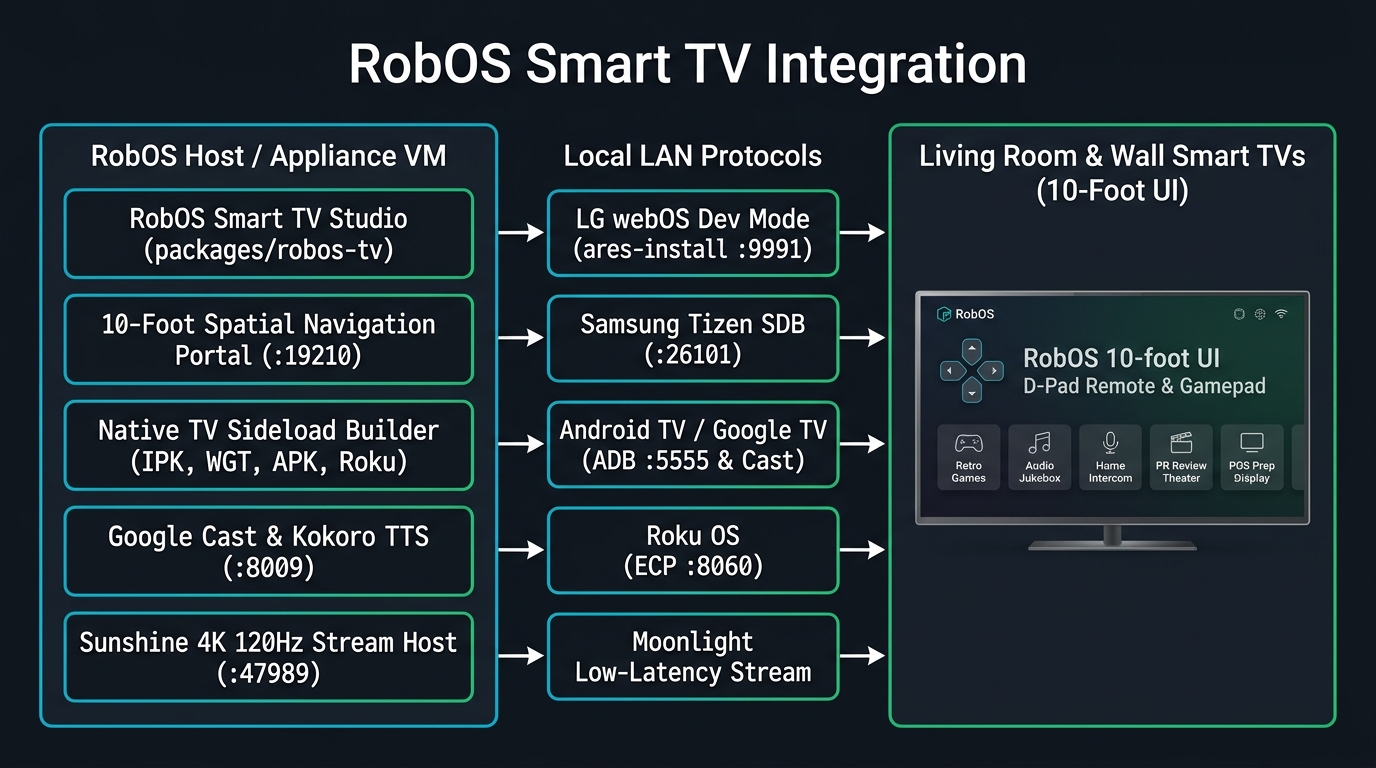
flowchart LR
  subgraph HOST["RobOS Host / Appliance VM (LAN IP e.g. 192.168.1.100)"]
    STUDIO["RobOS Smart TV Studio<br/>packages/robos-tv (:19206)"]
    PORTAL["10-Foot Spatial Nav Portal<br/>http://192.168.1.100:19210"]
    BUILDER["Native Sideload Builder<br/>robos-lib/tv-engine.js"]
    CAST["Google Cast & Kokoro TTS<br/>packages/home-speaker & audio-player"]
    SUN["Sunshine 4K 120Hz Host<br/>H.265 / AV1 + Gamepad"]

    STUDIO --> PORTAL
    STUDIO --> BUILDER
    STUDIO --> CAST
    STUDIO --> SUN
  end

  subgraph LAN["Local Network Protocols (Zero Cloud)"]
    WEBOS["LG webOS Dev Mode<br/>ares-install (:9991) + ares-extend-dev (1000h)"]
    TIZEN["Samsung Tizen SDB<br/>tizen install RobOSTV.wgt (:26101)"]
    ADB["Google TV / Android TV / Fire TV<br/>ADB Leanback (:5555) + Cast (:8009)"]
    ROKU["Roku OS<br/>ECP (:8060) + SceneGraph ZIP"]
    MOON["Moonlight Stream<br/>4K 60/120fps Low-Latency"]

    BUILDER --> WEBOS
    BUILDER --> TIZEN
    BUILDER --> ADB
    BUILDER --> ROKU
    SUN --> MOON
  end

  subgraph TV["Living Room & Office Wall Smart TVs"]
    LAUNCHER["Native 'RobOS TV' Home Row Icon<br/>Opens http://192.168.1.100:19210"]
    DPAD["TV Remote D-Pad + Bluetooth Gamepad<br/>Arrow Keys / OK / Back / Play-Pause"]
    APPS["8 Big-Screen Experiences<br/>Godot 4 Games · Virtual DJ Jukebox · Intercom · PR Theater · POS Board"]

    WEBOS --> LAUNCHER
    TIZEN --> LAUNCHER
    ADB --> LAUNCHER
    ROKU --> LAUNCHER
    MOON --> APPS
    LAUNCHER --> DPAD
    DPAD --> APPS
  end
Developer Mode Sideloading By TV OS
| TV Platform | Developer Mode Activation | Generated Sideload Artifacts | Transport & Port |
|---|---|---|---|
| Google TV / Android TV / Fire TV | Settings → System → About → Build (press 7x) → enable Network Debugging | AndroidManifest.xml (LEANBACK_LAUNCHER), assets/index.html, sideload-android-tv.sh | Wireless ADB (:5555) & Google Cast (:8009) |
| LG webOS | Install Developer Mode from LG Content Store → enable Dev Mode Status & Key Server | appinfo.json (com.robos.tv), index.html, sideload-webos.sh (ares-install + ares-extend-dev) | webOS Dev SSH (:9991) & SSAP (:3000) |
| Samsung Tizen | Open Apps panel → press 1-2-3-4-5 → toggle Developer Mode ON & enter RobOS Host IP | config.xml (robostv001.RobOSTV + tv.inputdevice), index.html, sideload-tizen.sh | Tizen SDB (:26101) & TV REST (:8001) |
| Roku OS | Press Home 3x, Up 2x, Right, Left, Right, Left, Right on remote | manifest, source/Main.brs, components/MainScene.xml, sideload-roku.sh | Roku ECP (:8060) & Dev Installer (:80) |
| Moonlight / Sunshine | Install Moonlight on TV & pair 4-digit PIN with Sunshine in RobOS | Full 4K 120fps H.265/AV1 Desktop & Godot 4 Game Stream | RTSP / ENet (:47984 / :47989) |
Running & Verifying
# Launch RobOS Smart TV Studio
electron packages/robos-tv

# Run the automated E2E verification suite
node --test tests/e2e/robos-tv.test.cjs