
CRPG testing and Infinity AI
How games/crpg-realm is tested: three layers of Gherkin features run by behave, a harness that drives a real Godot process over HTTP and records each scenario to video, and the Infinity AI scenario engine, a data-driven rules core that plays any fighter, monster or NPC. Read it before writing a feature or a scenario.
On this page
The test layers
New tests start at the bottom, which is fast and headless. Only a few tests at the top pay the cost of proving that a person can play the game.
| Layer | Folder (under tests/e2e/features/) | Features | What it proves | Cost |
|---|---|---|---|---|
| Map library | packages/robos-crpg-blockout/tests/ | Blockout geometry, rendering, validation (python3 -m unittest discover -s tests) | Under a second | |
| Engine | engine/ | 13 | Rules, content, Infinity AI decisions, any dropped-in scenario, fuzzed battles, coverage | Headless Godot, no video |
| Scene and UI | normal/, spells/, scenarios/ | 18, 24, 4 | The real scenes, HUD, dialogue, shop, fog of war and legacy tactical battles render and respond | Seconds per scenario, with video |
| Real player | full_playthroughs/, and qa_player/ | 6 | A person can create a character and play a campaign from start to finish | Minutes per scenario; run before releases |
Put a new rule, spell, monster, item, condition or AI behavior in the engine layer. Touch the scene layer only when you change a scene or its UI.
Run the tests
From games/crpg-realm/:
# Engine layer, fastest: headless, no video, no pauses
CRPG_MODE=backend python3 -m behave tests/e2e/features/engine

# Same layer, "prove it to a human": video, splash card, step bar, proof panel,
# AI inputs shown as cursor clicks, pauses between turns
python3 -m behave tests/e2e/features/engine

# A subset (the coverage gate needs the whole folder, so skip it)
CRPG_MODE=backend python3 -m behave tests/e2e/features/engine/04_spells.feature --tags=-coverage_gate

# Through the runner, which also builds a report page
python3 run_cucumber_tests.py --engine --backend
python3 run_cucumber_tests.py --engine --human
python3 run_cucumber_tests.py --spells           # scene layer
python3 run_cucumber_tests.py --playthrough      # top layer
Install behave and behave-html-formatter first (see the quick start). The scenario suites and --human mode need Xvfb and ffmpeg on Linux. The runner’s other flags and the environment variables are on the reference page.
The scenario names must be unique across all features, because the video file name comes from the name: lower-case, spaces and hyphens become _, other punctuation is dropped.
How the harness works
tests/e2e/features/environment.py wraps the run:
before_allstarts Godot once for the whole run, with--path <game> --port 18090(plus--headlessin backend mode). In human mode it first starts Xvfb (:99, 1920x1080x24) and runs Godot windowed on it. It waits up to 12 seconds forGET /api/v1/health.before_scenarioputs the game in a known state. Playthroughs and character-creation scenarios getPOST /api/v1/reset. Engine scenarios load their own state in theirGivensteps. Other scenarios getPOST /api/v1/setup_statewith a scene taken from an@scene:<Name>tag, or guessed from the feature file name and step text (a default ofHomestead). In human mode it then startsffmpeg(x11grab, 30 fps, libx264) and posts a splash card.before_stepposts the step text to/api/v1/qa/set_step, which theQAOverlayshows as the step banner.after_scenariosavesGET /api/v1/statetogamestate_<key>.jsonand stops ffmpeg.after_allstops Godot and Xvfb.
The step files (steps/crpg_steps.py, infinity_ai_steps.py, scenario_steps.py, engine_steps.py, proof_steps.py) use urllib.request. Most steps are an action (POST /api/v1/action with {"action": ..., "args": {...}}) or an assertion on GET /api/v1/state. The endpoints are on the reference page.
Tests do not play through earlier zones. They inject state with POST /api/v1/setup_state, which accepts name, class, race, gold, inventory (item ids), quest_stage, flags, companions (elora and thrumbar are recognized), scene (a scene name or a res:// path) and state_spec (a JSON string, or keywords such as village, forest, catacomb, keep, homestead, arena). The steps expose it as:
Given an isolated test starting in scene "AncientCatacombs" with party "Bramble" the "rogue"
Given the heroes have state "village square"
tests/e2e/reports/index.html is rebuilt by tests/e2e/generate_report.py, which marks a scenario PASSED when a video file for it exists. Backend mode records no video, so everything shows FAILED there, and a failed but recorded scenario shows PASSED. Use the behave console output and exit code.
Other behavior to know:
- One Godot process runs for the whole run. State carries over between scenarios except what
resetorsetup_stateoverwrites. Set the state a scenario needs in itsGivenstep. - If port 18090 is busy the game binds the next free port up to +9, and the tests still call 18090.
REPORTS_DIRis honored byenvironment.pybut not by the runner or the report generator, so a custom value splits videos from the report.- Scene-layer steps wait with
time.sleep(). Poll/api/v1/statein new steps where timing matters.
The Infinity AI scenario engine
scripts/engine/ScenarioEngine.gd is a deterministic rules core. Party members and enemies share one combatant model. Rules and content come from data/v1 (spells.mechanics, monsters, items, classes, races, traps, status_effects). Every roll goes through the Dice autoload, every change is an event, and every event is audited. Distances are in feet on a 5-ft grid. It implements initiative, attacks with advantage and disadvantage, saving throws, conditions, death saves, spell slots, reactions, opportunity attacks and traps.
The core idea: the Infinity AI can play any combatant, so an end-to-end test is the engine set up with a map, a game state and AI directives, then asserted with Gherkin. The hand-built scenes do not use it yet.
A scenario
A scenario is a robos:CRPGTestScenario KGraph node. Drop one in scenarios/<slug>.jsonld. This is trapped-corridor.jsonld, abridged:
{
  "@type": ["robos:CRPGTestScenario", "oslc_qm:TestCase", "schema:CheckAction"],
  "dcterms:title": "Trapped corridor",
  "robos:seed": 5,
  "robos:maxRounds": 25,
  "robos:map": { "@id": "urn:robos:crpg:battle-map:catacomb-corridor" },
  "robos:party": [ { "@type": "robos:CRPGCombatant", "robos:actorId": "elora",
                     "robos:race": "half-elf", "robos:characterClass": "rogue",
                     "robos:level": 3, "robos:position": [5, 15] } ],
  "robos:enemies": [ { "@type": "robos:CRPGCombatant", "robos:actorId": "zombie",
                       "robos:monster": "zombie", "robos:position": [90, 15] } ],
  "robos:traps": [ { "@type": "robos:CRPGTrap", "robos:actorId": "dart_plate",
                     "robos:trapType": "poison-dart-trap", "robos:position": [40, 15] } ],
  "robos:directives": [ { "@type": "robos:InfinityAIDirective", "robos:actor": "elora",
                          "robos:scriptedInputs": [ { "@type": "robos:CRPGPlayerInput",
                                                      "robos:type": "search" } ] } ]
}
Five scenarios ship: crypt-skeleton-patrol, garrison-keep-malakor, golem-attrition, homestead-hound-pack and trapped-corridor. The shapes are in the KGraph registry (packages/robos-graph/lib/shacl-validator.js). Check a file with:
node games/crpg-realm/tests/e2e/validate_scenarios_kgraph.js games/crpg-realm/scenarios/*.jsonld
You can give the state to the engine three ways, and all three produce the same thing:
- A drop-in file:
Given the cRPG test scenario "crypt-skeleton-patrol" from the knowledge graph. - Inline JSON in a doc string after
Given a cRPG test scenario, for one-off stat blocks. Plain keys (party,enemies,map,seed) orrobos:keys both work. - Tables, for readable rule tests:
Given a cRPG test scenario "Attack rules" with seed 11, thenAnd the party,And the enemiesandAnd the trapsfollowed by tables. Party columns areid,name,class,race,level,x,y,hp,ac,weapon,armor,shield,spells,inventory,accessories,conditions. Enemy columns areid,monster,count,name,x,y,hp,ac.
A party member with only a class gets that class’s kit and ability scores, with racial bonuses. HP, AC, spell slots, spell DC and attack extras follow from class, race and level. The engine rejects a scenario with unknown content, invalid directives, combatants off the map or two creatures on one square, and reports every problem at load time.
Adjust state mid-scenario with steps like And "vance" is at 3 HP, And "guard" is paralyzed for 3 rounds, And "ignis" has no spell slots left. Each change is recorded as a state_patched event. Script dice with Given the next d20 roll is 20 or Given the next dice rolls are 3, 3. Scripted values are used before random ones, and everything else is seeded, so the same scenario and seed replay the same battle.
Directives
The Infinity AI plays every combatant nobody else controls. Each decision is a player input, the same command a person would click, recorded as a player_input event. A directive steers one actor (actor) or a side (side: party, enemy or all), and actor-level fields override side-level ones:
| Field | Values | Default |
|---|---|---|
controller | infinity_ai, scripted, idle | infinity_ai |
inputs or scriptedInputs | Ordered player inputs played before the AI takes over | none |
targetPriority | nearest, lowest_hp, highest_hp, weakest_ac, spellcaster | nearest |
focusTarget | Actor id to attack whenever valid | none |
preferSpells, forbidSpells | Spell ids | none |
useSpells | false to fight with weapons only | true |
healThreshold, potionThreshold | Fraction of max HP that triggers healing | 0.5 |
movement | advance, hold, kite | advance |
guard | Actor id to stay next to | none |
areaMinTargets | Foes an area spell must catch | 2 |
allowFriendlyFire | Let area spells catch allies | false |
The default AI, in order: heal an ally below the heal threshold; drink a potion below the potion threshold; cast an area spell that catches enough foes and no allies; cast a single-target spell; close in and attack, using a fighter maneuver on tough foes; dodge when nothing is in reach. Player inputs are attack, cast, use_item, move, dodge, disengage, search, disarm and wait.
Steps
The engine steps are in tests/e2e/features/steps/engine_steps.py. A few of each kind:
When "vance" attacks "guard"
When "ignis" casts "fireball" at point 90,0
When "elora" disarms "dart"
When the Infinity AI plays the battle to the end
When the Infinity AI plays 100 random scenarios from seed 1

Then "vance" has 12 max HP and AC 18
Then the attack hits
Then "guard" took 9 force damage
Then the outcome is "victory"
Then the engine audit is clean
Then replaying the scenario produces the identical battle
“The engine audit is clean” checks after every event: HP stays between 0 and max; the dead and the incapacitated do not act; every die in an event is in the dice log; attack, damage, heal and save arithmetic is right; resistance and immunity apply; spell slots never go negative; no two living creatures share a square. features/engine/99_coverage_gate.feature fails until every content id and every rule path (marked in the engine with _cov_rule("area.name")) has been exercised by a test, and 12_in_game_runner_parity.feature runs every engine scenario through the in-game runner, so a step added to engine_steps.py must be ported to scripts/demo/EngineSteps.gd.
If you add a step whose text starts with "{actor}" is, register it above the catch-all "{actor}" is {condition} at the bottom of engine_steps.py, because behave tries steps in registration order.
Add content or rules
- Put the mechanics in the data:
mechanicsindata/v1/spells.json,creatureTypeand resistances inmonsters.json,armorType,rangeFeet,useandgrantsinitems.json. Do not change existing fields, because the hand-built scenes read them. - If it needs a new rule, add it in
scripts/engine/ScenarioEngine.gdand mark each new path with_cov_rule(...). - Add a feature in
features/engine/with scripted dice and exact numbers, then run the whole folder so the coverage gate sees it. - For a reusable fight, add
scenarios/<slug>.jsonldand an example row in01_kgraph_drop_in_scenarios.feature.
Maps
Engine battle maps are blockouts: flat labelled shapes for walls, buildings, doors and props, used as the arena background and as the collision grid. A map is a robos:CRPGBattleMap in maps/<slug>.jsonld, built by packages/robos-crpg-blockout, which writes assets/blockouts/<slug>.png and the 5-ft grid into the map node. A scenario names a map by "robos:map": {"@id": "urn:robos:crpg:battle-map:<slug>"}, or Given the battle map "<slug>". The engine then pathfinds around obstacles, blocks attacks and spells without line of sight, adds cover to AC and charges double for difficult terrain. After you edit a map’s objects, rebuild it; the engine refuses a map that has objects but no grid.
The scene-layer agent
Features in normal/, spells/ and full_playthroughs/ drive the hand-built scenes. A few use the Python InfinityAIAgent in qa_player/infinity_ai_agent.py, a subclass of VideoGameQAPlayer. Despite the name it is a scripted player: each method is a fixed sequence of HTTP calls with pauses and a few checks on the JSON from GET /state. create_character fills in Character Select. quest_through_homestead, quest_through_village_square and quest_through_garrison_keep click through those scenes at fixed coordinates, and play_full_journey chains them. talk_to_npc, pickup_item and enter_door call the /action names of the same name. Move a door or an NPC in a .tscn and the coordinates in the agent must change too.
handle_encounters is a scripted clear: for each enemy in the scene it plays the hero’s attack and falls back to take_damage(99). These steps check the flow, not combat balance. Features 05 and 06 in full_playthroughs/ use the agent for a whole run. Features 01 to 04 use the single-action “the player …” steps, and finish the boss with defeat_malakor.
The visible cursor in the videos is the QAOverlay autoload’s, not the X pointer (ffmpeg runs with -draw_mouse 0). QAOverlay.human_move_and_click() moves it along a curved path before each simulated click and plays a click ping.
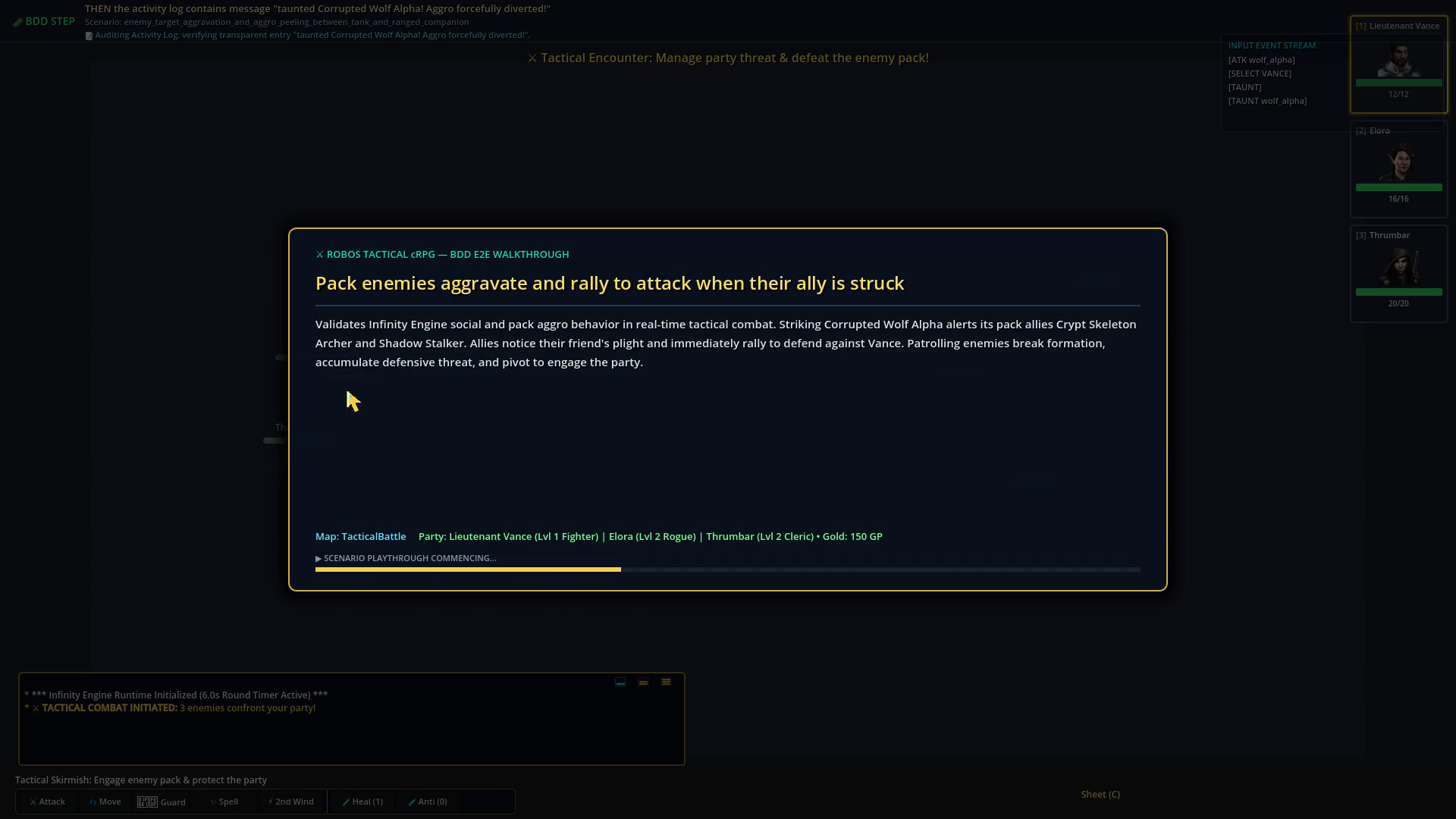 A scenario splash card: the title, a description, the map and the party. The step banner and the input stream are visible behind it.
Write a scene-layer scenario
This example asserts a trap’s disarm DC. It adds a step to crpg_steps.py, which exposes each trap’s disarm_dc in /api/v1/state.
-
Write the scenario in a new
normal/<nn>_<name>.feature(or add it to an existing file):Feature: Trap data overrides Background: Given the cRPG game is running and healthy Scenario: Glyph of Warding uses the modded disarm DC Given an isolated test starting in scene "AncientCatacombs" with party "Bramble" the "rogue" Then the scene contains concealed traps And the trap "glyph-of-warding" has disarm DC 17 -
Add the step in
tests/e2e/features/steps/crpg_steps.py, following the file’s pattern (parsematcher,context.web_port,api_get):@then('the trap "{trap_id}" has disarm DC {dc:d}') def step_trap_has_disarm_dc(context, trap_id, dc): state = api_get(context.web_port, "/api/v1/state") found = next((t for t in state.get("traps", []) if t.get("id") == trap_id), None) assert found is not None, f"Trap '{trap_id}' not found" assert found.get("disarm_dc") == dc, f"Expected disarm DC {dc}, got: {found}"If you put a step after a
use_step_matcher("re")block, switch back withuse_step_matcher("parse"). Step text must not match an existing step in any step file, orbehaveraises an ambiguous-step error. - Optionally add a
(regex, template)tuple toSTEP_PATTERNSintests/e2e/step_descriptions.pyso the video banner shows a readable sentence. - If the step needs a new game action, add a branch to the
matchinGameControlServer._execute_game_action(). - Run the file:
python3 run_cucumber_tests.py tests/e2e/features/normal/<nn>_<name>.feature.