
Quest: Warrior Dragon
A fan remake of the 1986 NES classic Dragon Warrior, built in Godot 4 and living in games/quest-warrior-dragon. You start in King Lorik’s throne room with a few gold coins and leave it to take the Ball of Light back from the Dragonlord. The game ships with an AI that plays the whole thing, start to finish, with the same buttons you press. This page explains how the engine is put together, how that AI thinks, and how to work on both.
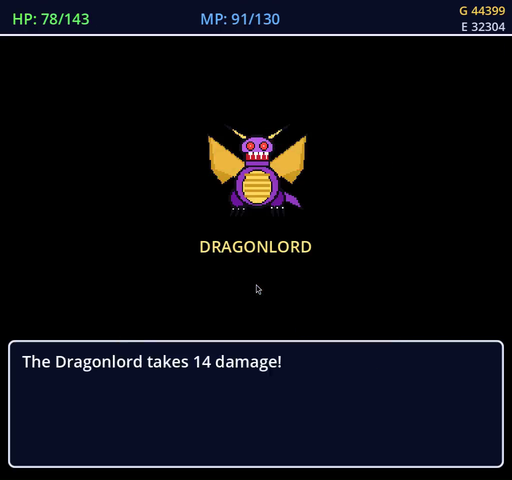
The end of the road, from the AI’s winning run.
Play it
cd games/quest-warrior-dragon
./play.sh                 # title screen, then start a new quest or load a save
./launch.sh --demo        # let the demo AI play the opening for you
play.sh (and play.ps1 on Windows) finds the Godot binary for you: it looks at DW_GODOT_BIN, then godot4 on your PATH, then the usual install folders. It boots the game the way an exported build would, through the title screen and into the save screen.
The save screen is the Adventure Log. It lists the logs King Lorik has recorded for you, newest first, and below them a set of chapter presets that drop you in anywhere from the throne room to the gates of Charlock. A card beside the list shows the hero, gear, location and how far the quest has got before you commit.
It plays the way the NES game did. Caves are pitch black until you light a torch or learn RADIANT, and RADIANT burns down step by step, surviving stairs and the walk between caves. Buying a sword trades your old one in at half price. The pack holds eight kinds of tools, and herbs, torches, keys and wings stack. Every locked door eats a Magic Key. The townspeople give you real directions, and Erdrick’s Tablet tells you, in leagues from Tantegel, where his token lies buried.
How we built it
We started from data rather than art. The game’s facts (monsters and their stats, spells, the experience table, every shop’s stock and price, every chest, door and staircase, what each townsperson says) were taken from public strategy guides, cleaned up, and written out as JSON under data/v1/. Each file has a JSON Schema in schemas/v1/. Damage, dodging, criticals and spell resistance follow Ryan8bit’s NES formula guide, recorded in combat_formulas.json along with where each formula came from.
Nothing in the game is ripped from the cartridge. tools/generate_original_assets.py draws every tile, map, sprite, monster, spell effect and the title screen with Pillow, and synthesizes the chiptune music and sound effects, all from the semantic data. If a chest moves or a map changes, you regenerate the art rather than repainting it. That keeps the project original work while staying faithful to the layout of the original world.
Before anyone tried to beat the game, we checked that it could be beaten. A headless breadth-first search starts at King Lorik and walks every move a player could make, across maps, through doors and up and down stairs, and fails if any town, chest or the Dragonlord’s altar is out of reach. It caught broken stairs and dead-end maps early.
Then came the AI. First a small demo player that could get from the throne room to the first Slime fight. Then the full “play the game” brain, which we ran over and over at high speed, overnight, with a rule we stuck to: when the AI gets stuck, fix the game, not the brain. Almost every stall turned out to be a bug a human would have hit too. The throne room counted each herb as a separate pack slot and wouldn’t let you eat one. An innkeeper stood behind the weapon counter. Opened chests never disappeared. A townsperson sent you looking for a “Silver Flute” that doesn’t exist. Charlock’s exit gate couldn’t be walked through. Monster resistances were wrong, Cantlin’s shop had nothing on its shelves, and Wings did nothing outside. Each fix made the game more like the original, and eventually the AI walked from the throne room to the credits in one sitting. That run is on YouTube, with chapters for every part of the quest.
How the engine works
The screen and the camera
The game runs in a 512 by 480 viewport, the NES’s 256 by 240 doubled. Source tiles are 16 pixels and are drawn at 32 on screen, so the hero sits in the centre with eight tiles of world visible on each side. Each map is a pre-rendered PNG drawn as one background texture; the camera keeps the hero centred and slides the whole map under him as he walks, easing from tile to tile. The map’s own border tile is repeated past its edges (src/ui/MapBackdrop.gd), so walking up to the edge of a town shows more grass or castle wall rather than empty space. Rendering uses Godot’s GL Compatibility profile so it runs on modest laptops and inside a virtual display for recording.
Scenes
There is a scene per map in scenes/ with a script of the same name in scripts/. Three of them are written by hand because they do a lot of their own work: ThroneRoom.gd (King Lorik, saving, the opening and the ending), Castle1F.gd (Tantegel’s courtyard, treasury and key shop) and WorldMap.gd (the overworld, random encounters, the Rainbow Bridge, the Golem’s gate, the poison swamp).
Every town and dungeon floor extends one shared base, DungeonMap.gd. A town script is short. It names its map image and size, its music, and lists its townspeople with their tile, sprite, facing and lines, or a shop_id or inn_cost. The base class does the rest: it loads the walkability grid, places NPC sprites and paints plain floor under them, binds shopkeepers to their counters from shops.json, wires stairs from stair_registry.json and chests from chest_registry.json, handles TALK, TAKE, SEARCH, DOOR, ITEM and SPELL, and darkens the screen in caves. When you face a counter, TALK reaches whoever is standing behind it, as it did on the NES.
What you can walk on
Walkability comes from data/v1/map_grids.json, which stores every interior map as a grid of tile ids, and tile_walkability.json, which says which ids are floor. The TileWalkability autoload answers the question for any tile, and NPCs block the tile they stand on. The overworld is different: assets/maps/worldmap_terrain.json holds its grid of terrain codes (water, forest, bridge, grass, desert, mountain, swamp, hills, wall), and water, mountains and walls stop you. Doors are locked until a key is spent on them, and unlocked doors are remembered in the save.
Encounters and battles
On the overworld every step can start a fight. The world is split into an eight by eight grid of zones, each with its own pool of monsters (worldmap_zones.json), and the chance of a fight depends on the terrain under your feet, so forests and hills are more dangerous than grass. Dungeons have their own monster sets. Once the Dragonlord falls, encounters stop for good.
A fight opens BattleOverlay.gd on top of the map. It’s a small state machine that moves from the intro through your turn, the spell list, your action and the enemy’s turn to victory, defeat or escape, and every message waits for you to press a button. Your attack is your strength plus your weapon; your defence is half your agility plus your armour and shield. Each hit is rolled from the NES formulas: monsters can dodge you, you land an “excellent move” one time in thirty-two (never against the Golem or the Dragonlord), and spells can be resisted. Monsters follow their own patterns from monsters.json: some breathe fire, some cast SLEEP or STOPSPELL, and some are much harder to run from than others. The Dragonlord fights in two forms. The Golem at Cantlin’s gate hits harder than anything around it, but playing the Fairy Flute puts it to sleep every time.
Menus
Every window with a cursor (the command grid, shop lists, the item and spell lists, YES and NO prompts, the status screen) is drawn by one module, src/ui/MenuKit.gd. It measures text with the real font, right-aligns prices and MP costs, scrolls long lists with arrows, wraps prompts, and sizes each window to what’s in it. Scenes keep their own cursor state and call MenuKit to draw. The item list shows one row per kind of item (“Herb ×5”), and the game service tells the AI about those rows, so the AI picks from the list exactly as it’s drawn.
Game state and saves
GameState.gd is an autoload that holds everything that outlives a scene: the hero’s stats and name, gold, the pack, what’s equipped, spells learned, opened chests, unlocked doors, quest flags (Gwaelin rescued and returned, the Golem beaten, the bridge built, the Dragonlord defeated) and the torch and RADIANT state. Scenes read it in _ready() and write it back when you leave. export_state_dict() turns all of it into the save format, and load_state_dict() reads it back, accepting both the camelCase keys the game writes and the snake_case keys in the bundled presets. King Lorik’s saves go to user://saves/.
The data layer
DataManager.gd loads every dataset at startup through typed classes generated from the schemas (src/generated/v1/), so a malformed file fails loudly instead of misbehaving later. Those classes are produced by ./generate-schema-classes.sh, which runs a pinned release of json-schema-to-gdscript; never edit them by hand. tools/validate_v1_schemas.py checks the data against the schemas, and tools/generate_kgraph_package.py publishes the game’s monsters, items and places into the RobOS knowledge graph.
Controlling the game from outside
GameControlServer.gd is a small HTTP server built into the game. GET /api/v1/state returns what’s on screen: the scene, the hero’s tile and facing, stats, which window is open and where its cursor is, the current battle, the shop’s stock, the light level, and a save of the current moment. POST /api/v1/input presses a button for a moment, the same way a keyboard would. POST /api/v1/command does the rest: take a screenshot, save or load a checkpoint, start or stop the AI, read its progress. The full contract is in docs/api_contract.yaml and GET /contract serves it live. The port is set with --web-service-port or DW_WEB_SERVICE_PORT. Tests, the AI driver and the Game Playthrough app all talk to the game through this.
How the AI plays
Two layers
The AI lives inside the game as the AIEngine autoload. It owns the plumbing: on each tick it asks for a decision and turns it into real input events from a short allow-list of actions (the four directions, accept, cancel and the command menu). For long straight walks it “strides”: it holds the direction down across a run of tiles and lets go as the hero starts the last step, which is how a person walks. It never moves the hero or edits a stat directly. Speed comes from Godot’s time scale, so a run at eight times speed is the same game played faster.
The thinking happens in PlayGameBrain.gd, which only returns decisions such as “tap accept” or “stride right to this tile”. On every tick it deals with things in order. An open window comes first: answer the YES or NO, move the shop cursor to the item it wants, pick the herb in the item list, close the status screen, page through dialog. A battle comes next. Then survival: heal, eat an herb, light a torch in the dark, go to an inn. Only then does it work on the actual goal.
What it’s trying to do
The goals come from data/v1/milestones.json, which tools/gen_milestones.py writes from the shops, chests and quest data. It’s the quest in story order: hear King Lorik, take the throne-room chests, buy each better weapon, armour and shield as they become affordable, open every chest, find the Fairy Flute, rescue Gwaelin, gather the Stones of Sunlight, the Staff of Rain and Erdrick’s Token, put the Golem to sleep, build the Rainbow Bridge, take Erdrick’s Sword, defeat the Dragonlord and watch the credits. Each goal says where to stand, which way to face, what to do there and how to tell it’s done, such as “the hero owns a Broad Sword” or “the bridge is built”. Some carry a minimum level, so the AI doesn’t walk into Charlock at level ten. The brain checks goals against the real game state, never against what it thinks it did.
When a goal is out of reach it grinds. If it needs gold for a sword or levels for a dangerous area, it picks a patch of the overworld whose monsters suit its level, walks there and fights until it has enough. It keeps track of how much each fight hurts. If monsters barely scratch it, it moves to a tougher zone; if fights get expensive, it drops back. A death makes it more careful for a while, and the goal it died on demands one more level next time. The run’s milestone list marks those goals “Grind +” so you can see where the levelling happened.
Getting there
Routes come from RoutePlanner.gd, which searches across every map at once using the same grids, stairs and world entrances the game loads. Walking a tile costs one step and changing maps costs more, so it never leaves a town and comes back in just to cross it. It knows which doors are still locked, prefers routes without them, and if the only way is through a locked door it first goes and buys a key. The plan is a list of legs, one per map, each ending where you arrive or where you take the stairs. While walking, the brain checks the live scene too, so a townsperson stepping into the corridor makes it go around rather than bump into them.
Fighting
In battle it does arithmetic with the same formulas as the game. It estimates the hardest the monster could hit it, physically or with a spell, and how many rounds it needs to win. If it can win before it dies, it fights. If not, it heals, casts SLEEP or STOPSPELL on monsters likely to be hurt by them, or runs. Against the hardest hitters it won’t gamble on a SLEEP that might be resisted when two more hits would kill it. It saves MP inside Charlock and heals only with HEALMORE against the Dragonlord, and before setting out for Charlock it rests until it has the MP that fight needs. In caves it buys torches until it knows RADIANT, then recasts RADIANT before the light fades.
When it gets stuck
Two watchdogs keep a run honest. Inside the game, if nothing changes for ninety seconds of real time (no new goal, battle, level, gold, position or HP), the brain drops what it’s doing and plans again, and if the same goal keeps stalling it either skips it, when it’s optional, or fails the run with a reason. Outside, the Python driver ends any run that stops making progress and keeps a screenshot and the brain’s event log, so the cause is easy to find.
Watching and recording it
tests/e2e/play_full_game.py is the driver. It starts Godot under a virtual display, turns the AI on, and polls the game twice a second. It checks rules a player can see (the hero never stands in water or on a mountain, HP never goes below zero) and writes live.json once a second for anything that wants to watch. With --stepped it records one video per goal with ffmpeg and saves a checkpoint after each one, so --only 42 replays and re-records a single goal from its checkpoint in seconds, and --from 42 resumes the whole run from there. Each new full run moves the last one into reports/archive/ instead of overwriting it.
While the AI plays, PlayGameHUD.gd draws a band underneath the game (never over its windows) with the current goal, what the brain is doing about it, a timer, and the hero’s stats and pack, so every frame of a recording explains itself.
The RobOS Game Playthrough app (packages/game-playthrough) is the front end for all of this. It starts, resumes, replays and stops runs, shows the game and the brain’s event log live, lists every goal with its video and checkpoint, keeps the history of earlier runs, and exports any run to a single MP4 with a chapter per goal. A tray icon fills up as the quest advances.
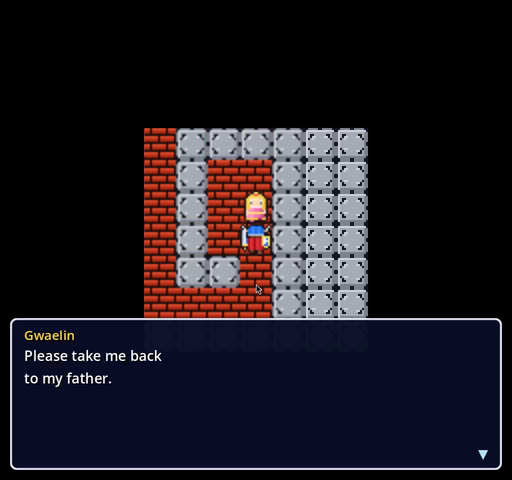
“Please take me back to my father.” The AI found Gwaelin at the end of the Swamp Cave.
Developing on it
Jump straight to what you’re working on
Don’t play from the start to test one room. The debug launcher drops you anywhere with whatever hero you need:
./debug.sh --scene Castle1F --tile 8,8 --facing up --gold 120 --items "Herb;Torch"
./debug.sh --scene BattleTest --monster axe_knight --hero-level 15 --hero-hp 80 --hero-hp-max 80
./launcher.sh            # a small window of presets and saved milestones to click through
The battle test scene fights one monster on its own, which is the fastest way to tune a formula or a monster pattern. In game, Ctrl+E turns random encounters off and Ctrl+T doubles walking speed. The AI’s checkpoints are ordinary saves, so you can load the exact moment a run went wrong and play it yourself.
Changing the world
Most changes are data changes. To add a chest, put it in chest_registry.json. A shop or price lives in shops.json; a staircase in stair_registry.json; a locked door in door_registry.json. Townspeople live in their town’s script under _get_npcs(). After changing shops, chests or quests, run python3 tools/gen_milestones.py so the AI’s goals match the game. After changing the map layout or tiles, run tools/generate_original_assets.py and then godot --import --quit --path . so Godot picks up the new images. After changing a schema, run ./generate-schema-classes.sh.
.agents/skills/ has a step-by-step guide for each kind of change, written for people and coding assistants alike: adding a monster, a spell, an item, a shop or inn, a chest, a locked door, an NPC, a dungeon floor or a whole new map, setting a map’s music, and how tiles and walkability fit together.
Code style
GDScript with types wherever they fit. Files and scenes in PascalCase, functions and variables in snake_case, constants in capitals. Scenes take their node references in _ready() and check for null before touching children, because the AI and the tests load scenes in unusual orders.
Testing
python3 tests/test_map_completeness.py              # can every place be reached?
python3 tests/test_map_completeness.py --screenshots
python3 run_cucumber_tests.py                       # the behaviour suite, recorded to video
python3 tests/e2e/play_full_game.py --until 13      # the AI's first stretch, to the Copper Sword
python3 tests/e2e/play_full_game.py --stepped       # the whole game, one video per goal
The reachability test is the quick safety net for map and data changes. The behaviour suite in tests/e2e/features/ covers the throne room, every town’s people and shops, each dungeon’s chests, torches and RADIANT, and random encounters; each scenario starts from a saved checkpoint and is recorded, and the report server under tools/report-server shows the results with their videos. The AI run is the real end-to-end test. A short --until run catches most regressions in a few minutes, and the full run is the proof the game can still be won. When the AI fails, start with its event log and the screenshot it left, then load the checkpoint before the failure and play it yourself.
More: the AI playthrough page walks through the app and the AI with pictures, the interactive tour steps through the quest stop by stop, and the game page has screenshots from every corner of Alefgard.