

RobOS cRPG Editor
Desktop editor for the cRPG in games/crpg-realm: campaigns, characters, items, enemies, spells, abilities and battle maps.
The cRPG Editor is the authoring tool for the robos-crpg game (“Realm of Heroes”, in games/crpg-realm). Each campaign, character, map and so on is one JSON-LD file in that folder, so the files can be committed and reviewed like code. The game itself and its test suite are described in Tactical cRPG & Infinity AI Engine; a worked example is the Campaign Editor Tutorial.
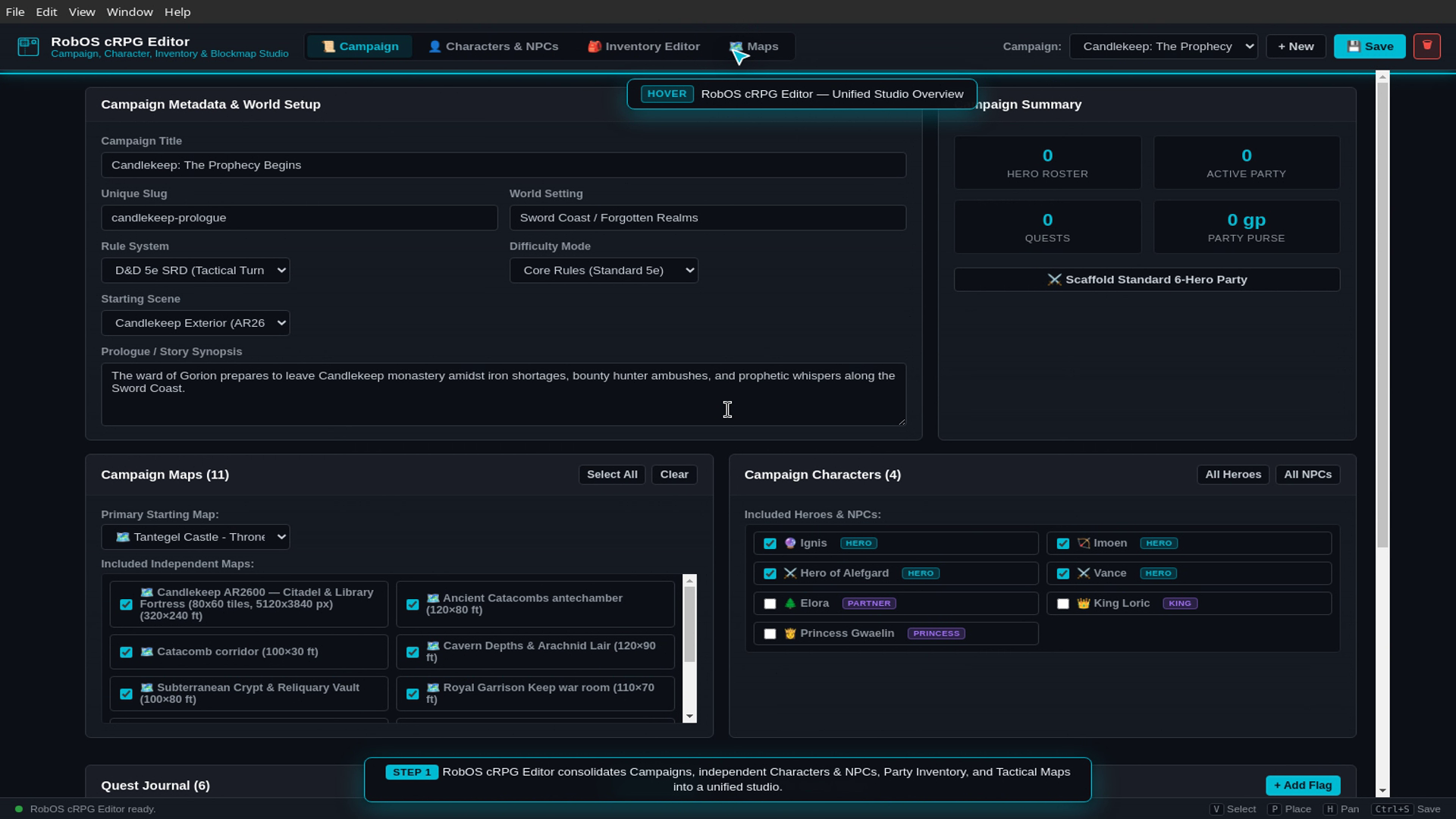
The Campaign tab: metadata and starting scene at the top, then the maps and characters the campaign includes. This capture is older and shows fewer tabs than the current app.
Tabs
| Tab | What you edit | Folder under games/crpg-realm |
|---|---|---|
| Campaign | Title, slug, world setting, rule system, difficulty, starting scene and map, story synopsis, which maps and characters are included, quest journal and world flags | campaigns/ |
| Characters & NPCs | Heroes and non-player characters | characters/ |
| Items | Items | items/ |
| Enemies | Enemies | enemies/ |
| Spells | Spells | spells/ |
| Abilities | Abilities | abilities/ |
| Maps | Battle maps: terrain, size in feet, optional artwork underlay and a list of placed objects (select, place and pan tools; Ctrl+Z undoes and Ctrl+Y redoes while the Maps tab is open) | maps/ |
Events, scenes and imported art (portraits, icons, tokens, sprites, backgrounds, models) are also read from their folders under events/, scenes/ and assets/. The editor creates any missing folder on start.
Things the buttons do
- Save writes the open campaign as a
.jsonldfile incampaigns/. - Build PNG & Grid (Maps) runs
python3 -m robos_crpg_blockout build <map>.jsonld --game-dir <folder>frompackages/robos-crpg-blockout. It writes a PNG toassets/blockouts/and stores blocked, opaque, difficult and cover cells in the map file. It needspython3. Export PNG copies the built image elsewhere. - Generate Cartridge bundles the campaign into
<slug>.cartridge.jsonwithCartridgeBundlerfrompackages/crpg-builder. - Render as Game saves the campaign, bundles a cartridge into
cartridges/, then starts Godot with--path games/crpg-realm --cartridge <slug>andCRPG_MODE=real. It looks for Godot 4 in$GODOT_BIN,~/.local/bin/godot,~/.local/bin/godot4,~/apps/godot4,/usr/bin/godot4,/usr/local/bin/godot4and/usr/bin/godot, and falls back togames/crpg-realm/play.sh. If none exists it reports “Godot 4 binary not found.”
Setup
electron packages/crpg-editor
Set ROBOS_CRPG_DIR to edit a game folder other than games/crpg-realm. Tests run with npm test in the package (node --test tests/*.test.js). Source: packages/crpg-editor.