
Import an existing app
How to bring an existing codebase, or a list of repositories and services, into RobOS with the App Wizard’s import mode. The import mostly builds graph nodes from names and top-level files; it does not connect to GitHub, Confluence, databases or clusters. This page lists what it actually reads and writes so you can decide what to check by hand.
On this page
Run it
Start the wizard from inside the repository whose knowledge graph you want to update, then click Import Existing Code in the header:
electron packages/app-wizard
The wizard looks for .robos in the working directory and up to four parent directories. The sidebar steps are What to Import, Deep Inspection and Catalog & Ingest. The app page is App Wizard.
Do not queue a database connection string that contains a password. The importer copies the full URI into the node’s dcterms:description, which is saved in .robos/kgraphs/core-platform/package.jsonld. The built-in sample stack contains one such string (admin:secret), so do not load it into a graph you commit.
Step 1: What to Import
Add targets one at a time with Add Resource Target (URL, Local Path, or Connection URI) and + Add Resource, or paste text into the prompt box and click Deep Thinking AI Extract & Queue Targets. The queue is shown under Queued Resources for Ingestion.
The type menu defaults to Auto-Detect Type. Auto-detection looks at the text:
| Text | Type |
|---|---|
http(s) URL containing confluence, wiki, /spaces/ or /display/ | Confluence |
github.com/<org> or github.com/<org>/<repo> | GitHub organization or repository |
gitlab.com URL | GitLab |
Any other http(s) URL | HTTP / Backstage catalog |
s3://... | S3 bucket |
postgres://, postgresql://, mysql://, redis://, mongodb:// | Database |
Contains kafka, or ends in a 4- or 5-digit port | Kafka |
Contains k8s, eks, gke or aks | Kubernetes cluster |
Contains mcp or ends in -server | MCP server |
| Anything else | Local directory |
Pick a type from the menu to override the guess.
The prompt box is not a language model. Deep Thinking AI Extract & Queue Targets runs a set of regular expressions (KGraphResourceImporter.parsePrompt in packages/robos-graph) that pull out URLs, absolute paths, database URIs, a Kafka endpoint after the word “kafka”, Kubernetes clusters written as “EKS cluster name”, and MCP servers written as “MCP server name”. It also guesses a company name from phrases such as “for Acme” or “company Acme”.
Load Enterprise Sample Stack queues five fixed example targets for a fictional company, Acme. Use it to see the screens, not for real work.
Set Company / Organization, Company Slug and Default Assigned Team before you continue. The defaults are Acme Global and acme-global, and they name the nodes the importer creates.
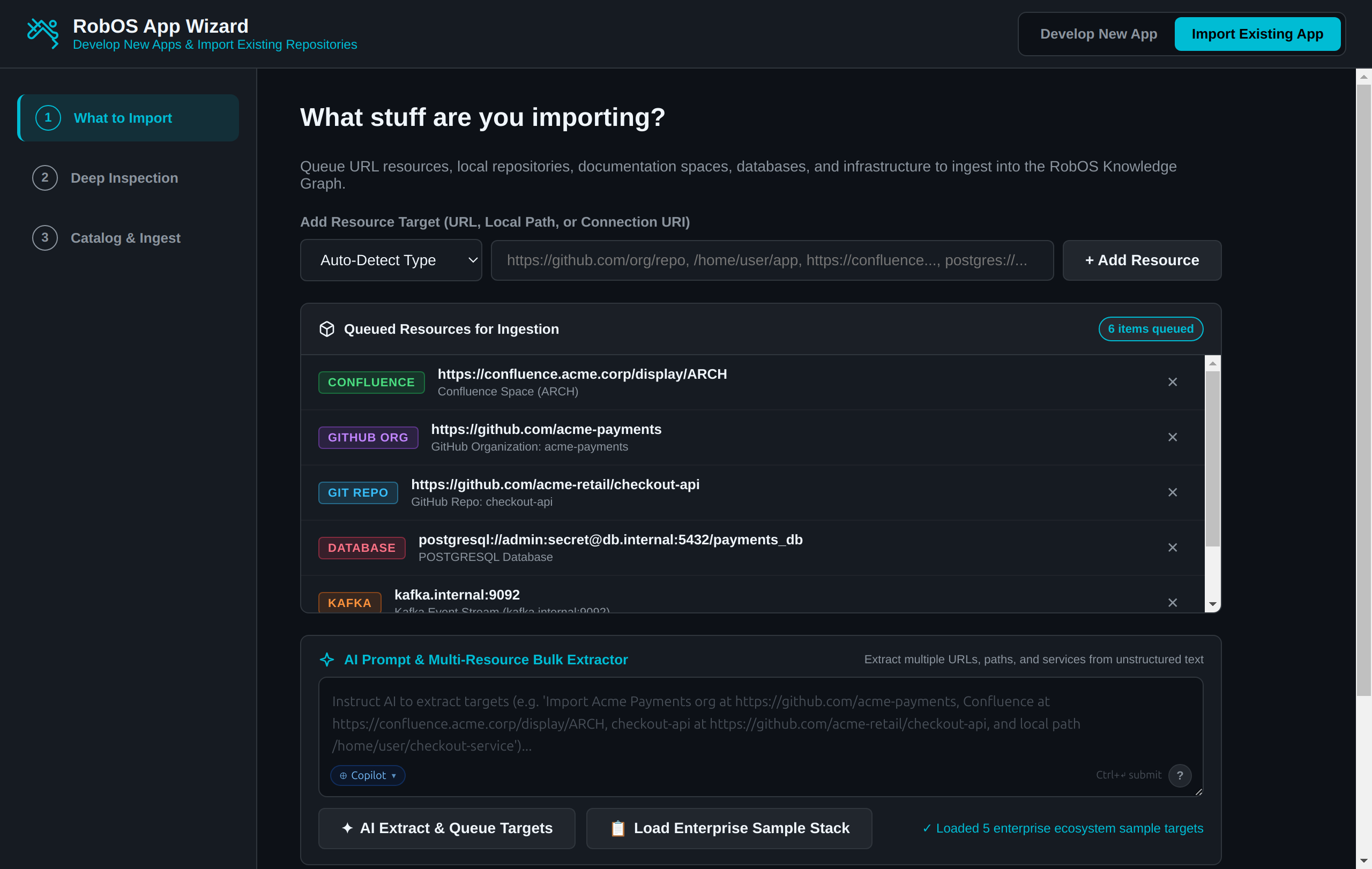 Look at the colored badges: each queued target shows the type the wizard chose. Some button labels have changed since this capture.
Step 2: Deep Inspection
Click Deep Inspect & Analyze Targets. This click does the ingestion, not the last step: the wizard calls the importer, validates the generated nodes against the built-in SHACL shapes, and saves them into the .robos/kgraphs/ package files. It also appends entries to .robos/packages.yaml.
Step 2 then shows:
- Counts by node type and a per-package breakdown. The green banner above them is fixed text; check the violation count in the line beside it.
- A summary of the first local directory in the queue: Target Directory, Detected Archetype, Language & Framework, Contracts Discovered, Docker Support and Dev Setup.
- Editable fields: Package Identifier / Name, Application Archetype, Technology Stack and Assign Team Ownership (.robos/teams.yaml).
- A Deep Thinking AI Refine box.
If the queue held no local directory and the importer created no Microservice, Desktop Application or Front End Application node, the summary shows a placeholder record named Payment Gateway API. Correct it or go back.
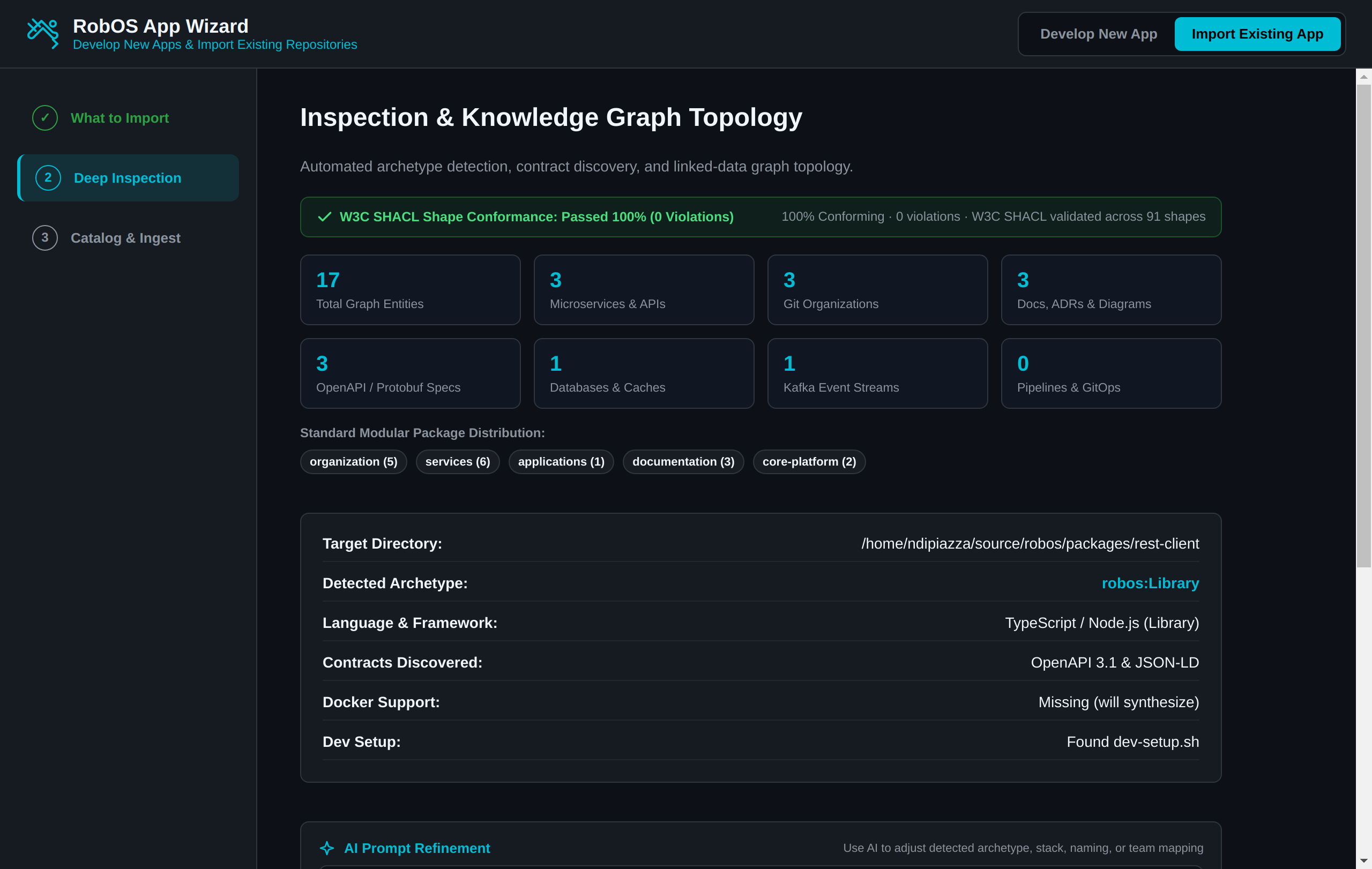 Look at the lower box: the archetype and language come from the folder scan described below.
How the local folder is scanned
The wizard lists only the top level of the folder and applies the first matching rule:
| Top-level file | Archetype | Language and framework shown |
|---|---|---|
pom.xml | Microservice | Java 21 / Spring Boot 3 |
package.json with electron | Desktop Application | Node.js 20 / Electron |
package.json with react-native, or an app.json file | Mobile Application, or Mobile Game if the folder name contains “game” | TypeScript / React Native |
package.json with vite, next, nuxt, vue, svelte, @angular/core or react-scripts, or react without express | Front End Application | TypeScript / Vue, Next.js, Svelte, Angular or React |
package.json with express, fastify or koa | Microservice | Node.js 20 / Express |
Any other package.json | Library | TypeScript / Node.js |
*.uproject or project.godot | PC Game, or Mobile Game if the folder name contains “mobile” | Unreal Engine or Godot |
go.mod | Microservice | Go 1.22 / Gin |
Cargo.toml | Console & CLI Tool | Rust / Tokio |
requirements.txt or pyproject.toml | Microservice | Python 3.11 / FastAPI |
| None of these | Library | Unknown |
Rules are checked in the order shown. The language and framework are fixed labels for the matching rule. The wizard reads dependencies only from package.json, and it does not read version numbers anywhere, so correct Technology Stack by hand. A build.gradle project is not recognised.
It also flags openapi.yaml, openapi.json or swagger.json (shown as “OpenAPI 3.1”), schema.graphql, and any .proto file. When none is found, Contracts Discovered still shows “OpenAPI 3.1 & JSON-LD”. Docker Support says “will synthesize” for a missing Dockerfile, but the import never writes one.
Refinement
Deep Thinking AI Refine applies keyword rules in packages/app-wizard/main.js; it does not call a model. It changes the archetype when the text contains phrases such as “mobile game”, “front end”, “cli”, “desktop”, “microservice”, “pipeline” or “library”. It reads a name after “rename to”, “name”, “named”, “named as” or “slug”, a stack when the text says “runtime”, “technology”, “language”, “stack” or “framework” followed by a value (or mentions Go, Python, Rust or Java), and a team if its id or name appears in the text. Matching is by substring, so a word like “google” also counts as Go. The message under the box lists what changed. You can also edit the fields directly.
Step 3: Catalog & Ingest
Complete Ingestion & Map runs only for a local directory. It writes two files into that folder if they are missing:
| File | Content |
|---|---|
catalog-info.yaml | A Backstage Component with the name, title, spec.type set to the lower-cased archetype, lifecycle: production and the chosen owner. The description is the fixed text “Imported into RobOS via App Import Wizard”. |
dev-setup.sh | An executable script that prints a heading and “All dependencies verified!”. It checks nothing. Replace it with a real setup script. |
It then appends an entry to .robos/packages.yaml if the URN is not already there, and tries to append one to ~/.config/robos/git-projects.json. The repository in that entry is always github.com/acme/<slug>; edit it.
The console box prints “Registered in .robos/packages.yaml” and “Added to ~/.config/robos/git-projects.json” whether or not those writes succeeded. Git Projects stores { "projects": [...] } in that file and the wizard treats it as a bare array, so the entry is skipped when Git Projects has created the file and is not listed by Git Projects otherwise. Add the repository in Git Projects yourself.
If the inspected source is not a local path (for example a URL), step 3 writes nothing, although the console still prints “Synthesized Backstage catalog metadata”. Only the graph nodes from step 2 exist.
What the importer does not do
The importer does not clone repositories, call the Confluence or GitHub APIs, connect to databases or brokers, or query clusters. The nodes it creates come from these rules:
| Target | What you get |
|---|---|
| Repository URL | One node. The archetype is guessed from the repository name (for example cli, sdk, worker, mobile, game) and defaults to Microservice. Two example URLs (acme-retail/checkout-api and a GitLab acme-devops/gitops-deployments) have canned titles. For Microservice and Library nodes it also creates a placeholder OpenAPI contract with made-up endpoints (/api/v1/<name>, /healthz). |
| GitHub organization | Built-in sample data for acme-payments and acme-identity. Any other organization gets one placeholder repository named <org>-service. |
| Confluence space | The same sample pages and ADRs for any Confluence URL. |
| Database | A node with the engine, host, port and database name parsed from the URI. |
| Kafka | A node with the endpoint you gave and two fixed topics, events.incoming and events.processed. |
| Kubernetes cluster | A node with the fixed namespaces default and production. |
| Local directory | A scan of its subfolders for projects (those with .git, package.json or pom.xml), plus one ADR node per Markdown file in docs/adr/. |
Treat the graph after an import as a draft. Review and edit the nodes in Knowledge Graph Explorer. When you need source evidence on every node, use the reviewed two-step import (propose, then apply) described in WORKSPACES.md; see also Knowledge graph.
The wizard’s tests are packages/robos-test/tests/app-wizard/import-mode-e2e.test.js and multi-resource-import.test.js.