
CRPG world systems
The systems behind click-to-move, the 3D miniature pawns, NPC dialogue and fog of war in the hand-built scenes of games/crpg-realm. Each section names the script and the constants that decide the behavior.
On this page
Pathfinding
scripts/Pathfinder.gd is a RefCounted class with static functions. Only HeroPlayer calls Pathfinder.get_nav_path(), from move_to_point() and queue_move_point(). Companions and enemies walk in straight lines and slide along walls.
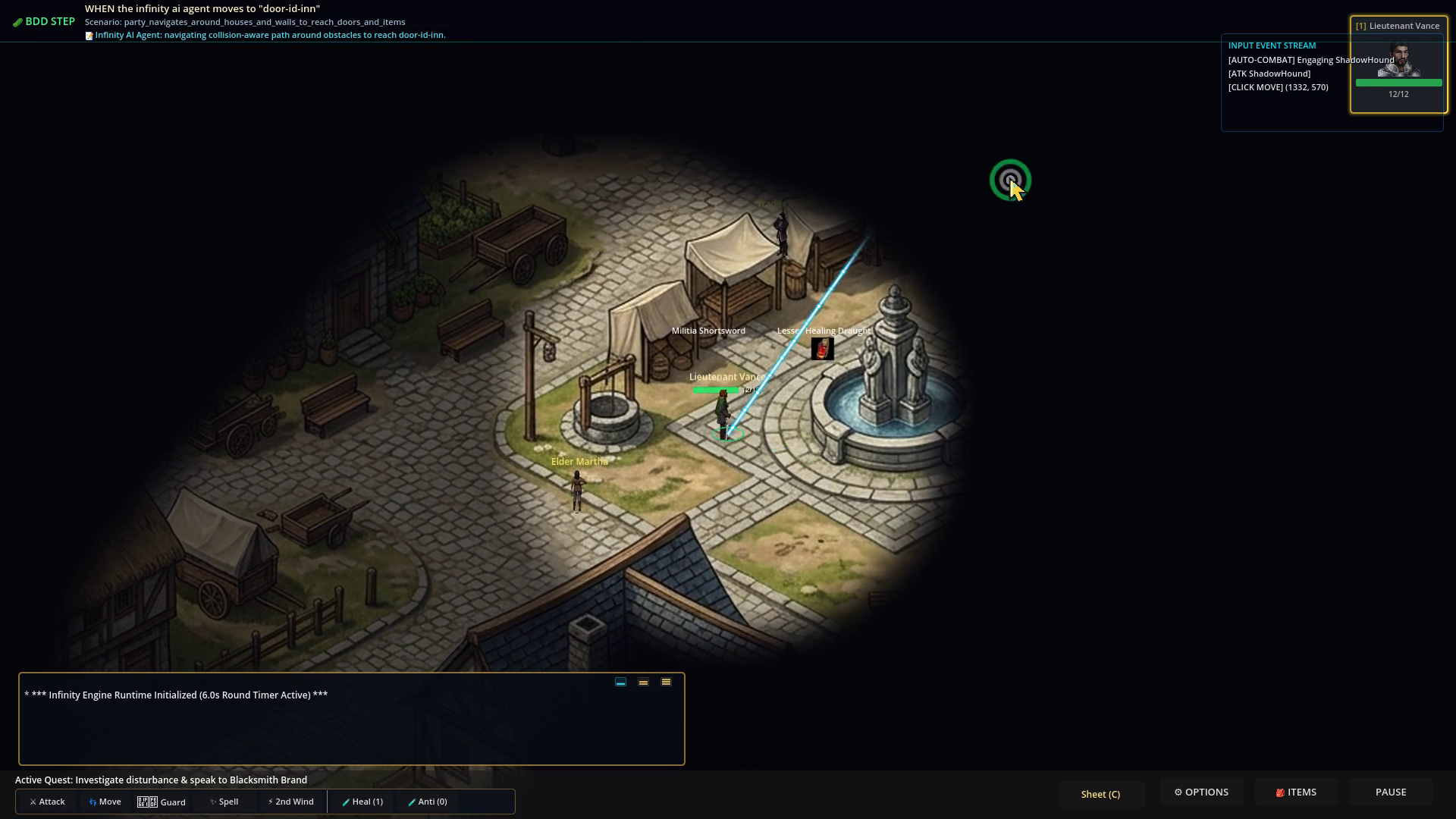 Look for the cyan line from the hero and the ring at the click point: the line is the route that
 PathVisualizer draws for a click.
get_nav_path(world_2d, start, target, scene, exclude) works in four steps:
is_line_clear()casts three rays against collision layer 1: one down the middle and two offset sideways by the check radius (10 px here). If none hits, the path is[target].get_or_build_grid()builds anAStarGrid2Dover the scene bounds, with 20x20 px cells, diagonal moves allowed only when no obstacle is adjacent, and a Euclidean heuristic. It marks a cell solid when a 14 px circle at the cell centre overlaps a layer-1 body. The bounds come from the hero’s camera limits, or aRoomBGorBackgroundcontrol, or default to 2560x1440. The grid is cached against the scene’s instance id. CallPathfinder.invalidate_grid()after changing collision at run time;CartridgeWorlddoes this on every map load.- If the start or target cell is solid (a click on a wall, say),
find_nearest_walkable_cell()searches square rings out to 8 cells for the closest free cell. smooth_path()walks the raw grid path and, from each point, jumps to the furthest later point with a clear three-ray line, so a staircase of cells becomes a few corner points.
If the grid cannot be built, _legacy_nav_points_path() falls back to an AStar2D over the points returned by the scene’s get_nav_points(), or to a straight line if the scene has none.
PartyCompanion preloads Pathfinder but does not call it, and TacticalEnemy chases straight at its target.
3D miniature pawns
Characters and monsters are 3D miniatures drawn into the 2D world by scripts/CharacterModel3D.gd. Each pawn owns a 160x160 SubViewport with a transparent background, its own 3D world and 4x MSAA, a camera with a 36 degree field of view, a sun and a fill light, and a ModelPivot node holding the mesh. A Sprite2D named DisplaySprite shows the viewport texture with an offset of (0, -18), which lines the pedestal up with the actor’s 2D feet collider.
ModelPivot has three sockets:
| Socket | Position | Holds |
|---|---|---|
WeaponSocket | (0.24, 0.45, 0.12) | Main-hand weapon |
ShieldSocket | (-0.25, 0.46, 0.12) | Shield |
HelmSocket | (0.0, 0.78, 0.0) | Helmet |
equip_weapon(), equip_shield() and equip_helmet() replace whatever is in the socket with a .glb mesh. They take a path ending in .glb, or an item id that the script matches by substring (greatsword, warhammer, mace, rapier, and so on). apply_armor_styling(armor_type, color) tints the pawn’s materials by armor type. The sockets are children of ModelPivot, so equipment turns and bobs with the pawn.
Motion is procedural. update_facing(velocity) and face_point(pos) turn the pivot toward the movement or a target. While moving, set_moving(true) makes the model hop (abs(sin(t)) * 0.14) and roll slightly, like a miniature being pushed along a table. At rest it sways gently. The attack swing animation is on HeroPlayer, not on the model.
The meshes are in assets/models/: pawns for a knight, wizard, rogue, king and princess, monsters (goblin, hound, skeleton, minotaur, skirmisher, dragon), shields, helmets and armor suits, and spell effects. SpellModel3D.gd renders spell projectiles and bursts the same way, through isolated viewports.
NPCs and dialogue
data/v1/npcs.json has 18 records and data/v1/dialogue.json has 18 trees. In the village, VillageSquare.tscn holds 12 townsfolk: eleven NPCCharacter nodes named NPC_* and Blacksmith Brand, a ClickableObject. The forest has three NPC nodes and the catacombs one (SirJustinGhost). Elora is a ClickableObject in Homestead.
NPCCharacter (scenes/components/NPCCharacter.tscn) is a CharacterBody2D. Its exports include npc_id, npc_name, custom_sprite_path, portrait_path, dialogue_text, dialogue_choices and waypoints. On a click, interact() faces the NPC toward the hero, then looks for a dialogue tree in this order:
DataStore.dialogue_trees[npc_id]DataStore.dialogue_trees["dialogue-" + npc_idwithout thenpc-id-ornpc-prefix]. This is hownpc-id-innkeeperfindsdialogue-innkeeper.- The
dialogue_treenamed byDataStore.npcs[npc_id] - A one-node tree built from the exported
dialogue_textanddialogue_choices
It then calls ActionLog.start_dialogue(tree, tree.rootNode) and restores the idle state on dialogue_ended. A tree is an object with id, title, rootNode and a nodes map. Each node has speaker, text and choices, and each choice has text and nextNode. An empty choices array ends the conversation.
ClickableObject is a plain Area2D that emits body_clicked. The scene script owns the dialogue and the walking, as VillageSquare.talk_to_blacksmith() and Homestead.talk_to_elora() do.
Not built: wandering NPCs. No scene sets waypoints on an NPCCharacter, so the townsfolk stand still.
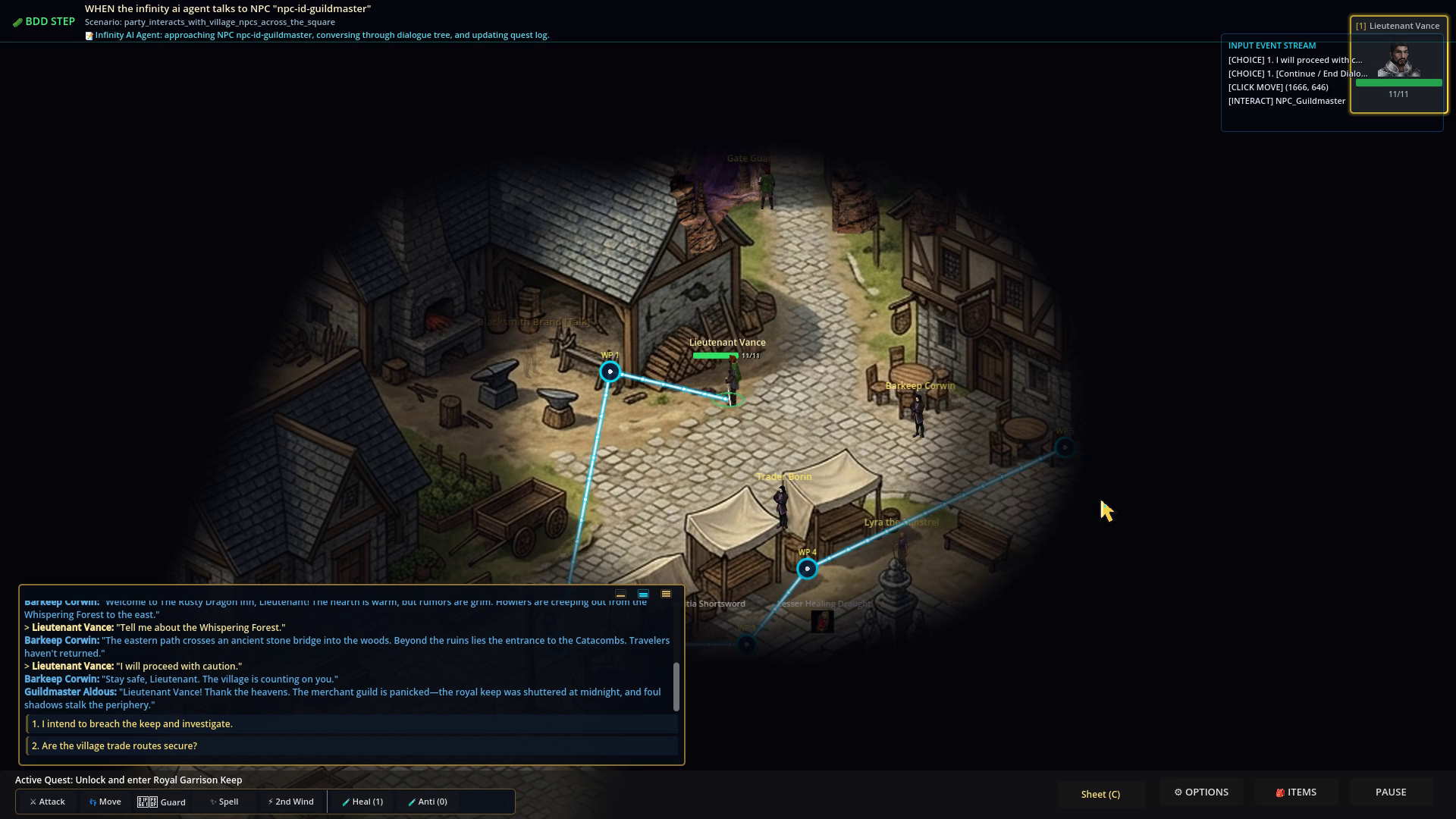 The activity log during a conversation: each reply is a numbered line you pick with a number key or a click.
Fog of war
scripts/FogOfWar.gd (instanced from scenes/components/FogOfWar.tscn) keeps a low-resolution grid of the map and draws it as a shader overlay (shaders/fog_of_war.gdshader).
| Export | Default | Meaning |
|---|---|---|
map_width, map_height | 2560, 1440 | Map size in pixels |
grid_scale | 8 | One cell is 8x8 px, so a 2560x1440 map is a 320x180 grid |
vision_radius | 425 | Outer edge of the hero’s sight, in pixels |
inner_vision_radius | 300 | Fully clear core; the edge fades with a smooth curve |
memory_darkness | 0.65 | Darkness over ground you have seen but cannot see now |
Each cell stores two values: red for explored (kept across visits) and green for in sight now. When the hero moves more than 5 px the script stamps a circular brush into the grid. The shader turns that into alpha: unexplored is fully dark, explored but out of sight is 0.65, in sight is clear. Actors passed to register_actor() fade out when their cell is not in sight. Explored cells are cached per scene in GameState metadata (fog_cache), so exploration survives scene changes.
Fog is classified per map. A scene starts with fog off if its script sets is_town_or_interior = true. Otherwise it uses its default_fog_of_war export if it has one, and otherwise fog is off only when the scene name contains homestead, village, town, interior, shop or inn. The wilderness, catacombs and keep start with fog on. The HUD has a button that toggles fog for the current area. The options window sets the global switch and a vision radius slider from 200 to 800 px (default 425); FogOfWar rescales inner_vision_radius to 300/425 of whatever you pick.
Fog interacts with traps. While fog is on, a trap in a cell you have not explored or seen cannot be detected or revealed by Find Traps.
Test it
python3 run_cucumber_tests.py tests/e2e/features/normal/10_house_wall_collision_pathfinding.feature
python3 run_cucumber_tests.py tests/e2e/features/normal/11_dozens_npc_dialogue_and_trading.feature
python3 run_cucumber_tests.py tests/e2e/features/normal/01_fog_of_war_exploration.feature
GameControlServer clamps the cursor position for /user_input/click_object to the screen, so an off-screen object is “clicked” at the screen edge. Pickups ignore distance for a human click, but the agent’s pickup_item action walks there first.