
Zero-Trust P2P App Mesh (packages/app-mesh)
Connect any two or more RobOS computers—on the same LAN or across the internet—without opening unauthenticated ports or locking yourself into a single VPN vendor.
Table of contents
1. Architecture Overview
By default, RobOS desktop applications bind their IPC, DOM snapshot, and service endpoints to local loopback (127.0.0.1) so untrusted devices on a LAN or Wi-Fi network cannot probe or control your apps. RobOS App Mesh (packages/app-mesh + packages/robos-lib/app-mesh-engine.js) creates an application-layer Zero-Trust P2P mesh that mounts remote RobOS app ports onto 127.0.0.1 on peer machines over mutually authenticated TLS 1.3 tunnels.
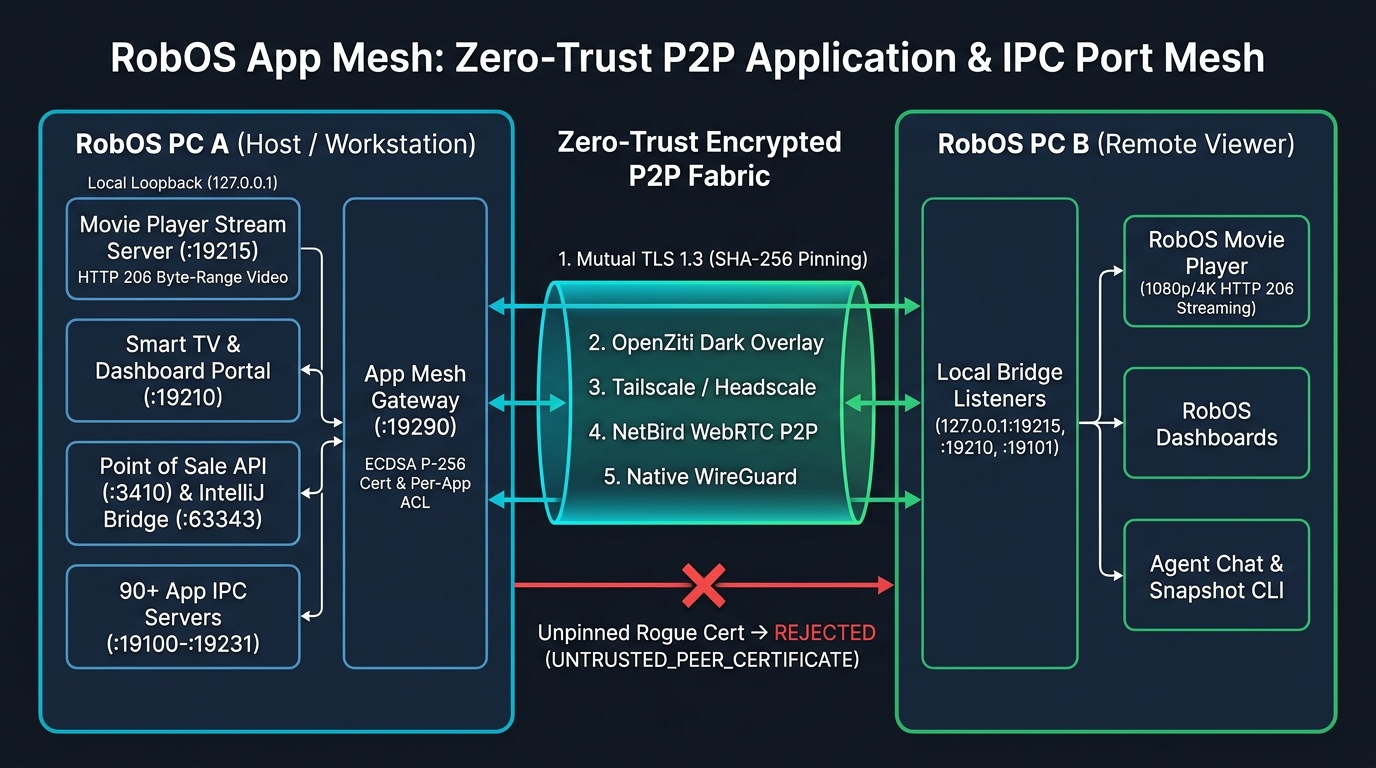
flowchart LR
  subgraph PCA["RobOS PC A (Host / Media & Dev Workstation)"]
    direction TB
    MP_A["RobOS Movie Player Stream Server<br/>127.0.0.1:19215 (HTTP 206 Byte-Range + Catalog)"]
    TV_A["Smart TV & Dashboard 10-Foot Portal<br/>127.0.0.1:19210"]
    POS_A["Point of Sale Register API (:3410)<br/>IntelliJ IDEA IPC Bridge (:63343)"]
    IPC_A["90+ RobOS App IPC & Snapshot Servers<br/>127.0.0.1:19100–19231"]
    GW_A["RobOS App Mesh Gateway (:19290)<br/>TLS 1.3 requestCert=true<br/>SHA-256 Cert Pinning + Per-App ACLs"]

    GW_A -->|Loopback Pipe| MP_A
    GW_A -->|Loopback Pipe| TV_A
    GW_A -->|Loopback Pipe| POS_A
    GW_A -->|Loopback Pipe| IPC_A
  end

  subgraph FABRIC["Pluggable Zero-Trust P2P Transport Fabric"]
    direction TB
    DRIVERS["1. Built-in Mutual TLS 1.3 (Zero External Daemons)<br/>2. OpenZiti Dark Overlay Fabric (ziti-edge-tunnel)<br/>3. Tailscale / Headscale WireGuard Mesh (100.x.y.z)<br/>4. NetBird WebRTC + WireGuard P2P<br/>5. Native Kernel/Userspace WireGuard (wg0)"]
    ROGUE["Unpinned / Rogue X.509 Certificate<br/>Immediate Drop: UNTRUSTED_PEER_CERTIFICATE"]
  end

  subgraph PCB["RobOS PC B (Remote Viewer / Workstation)"]
    direction TB
    BRIDGE_B["App Mesh Local Bridge Listeners<br/>127.0.0.1:19215 -> PC A :19215<br/>127.0.0.1:19210 -> PC A :19210<br/>127.0.0.1:19101 -> PC A :19101"]
    VIEW_B["RobOS Movie Player / Browser / MPV<br/>Streams 1080p/4K Movies with HTTP 206 Seeking"]
    TOOLS_B["Agent Chat / Snapshot CLI / Dashboards<br/>Talks to 127.0.0.1 as if PC A Apps Were Local"]

    VIEW_B --> BRIDGE_B
    TOOLS_B --> BRIDGE_B
  end

  BRIDGE_B <-->|Mutually Pinned TLS 1.3 Tunnel| DRIVERS
  DRIVERS <-->|Verified Peer SHA-256 Fingerprint| GW_A
  ROGUE -.->|Blocked at TLS Handshake| GW_A
2. Five Pluggable Zero-Trust Transport Fabrics
| Driver ID | Transport Fabric | How It Works |
|---|---|---|
mtls (Default) | Built-in Zero-Trust Mutual TLS 1.3 | Pure Node.js TLS 1.3 (requestCert: true) with ECDSA P-256 X.509 certificates and SHA-256 fingerprint pinning. Zero external daemons or root privileges required. |
openziti | OpenZiti Overlay Fabric | Generates dark-network OpenZiti service/intercept definitions (robos.ipc.<app-id>) and integrates with ziti / ziti-edge-tunnel. |
tailscale | Tailscale / Headscale Mesh | Routes RobOS IPC tunnels over authenticated 100.x.y.z WireGuard overlay peers and exports least-privilege HuJSON ACLs. |
netbird | NetBird Zero-Trust P2P | Uses WebRTC STUN/TURN + WireGuard peer-to-peer tunnels for NAT traversal across networks. |
wireguard | Native WireGuard Interface | Binds App Mesh traffic strictly to wg0 / wg-robos0. |
3. Pairing Two RobOS Machines & Bridging IPC Ports
- Launch RobOS App Mesh on both machines:
electron packages/app-mesh - Exchange Zero-Trust Enrollment Tokens (
robos-mesh://…):- Copy PC A’s enrollment token from the top toolbar and paste it into 1. Trusted RobOS Peers on PC B → click Pin & Trust Peer.
- Copy PC B’s enrollment token into PC A so both machines mutually pin each other’s X.509 certificate SHA-256 fingerprints.
- Click Ping mTLS to verify the live TLS 1.3 handshake.
- Mount Any Remote RobOS App Port Locally:
- Under 2. Cross-Machine IPC Bridges, select the peer and the remote RobOS app port (from 95+ registered IPC and service ports), pick a local bind port (
0= auto), and click Bridge IPC Port.
- Under 2. Cross-Machine IPC Bridges, select the peer and the remote RobOS app port (from 95+ registered IPC and service ports), pick a local bind port (
4. Streaming Movies from One RobOS PC to Another
Once PC A (Media Server) and PC B (Viewer PC) are paired in RobOS App Mesh, you have two ways to stream movies across the encrypted tunnel:
Method 1: Bridge the Movie Player Stream Server (:19215) via App Mesh
- On PC A, launch RobOS Movie Player (
electron packages/movie-player), which starts its HTTP Range stream & cinema catalog server on:19215(movie-player-stream). - On PC B, open RobOS App Mesh and bridge PC A’s
:19215 — movie-player-streamto local port19215(and optionally bridge:19210 — smart-tv-portalto19210). - On PC B, browse and stream over
http://127.0.0.1:19215with fullHTTP 206 Partial Contentbyte-range seeking and watch-progress sync:
# 1. Browse PC A's movie & TV show catalog on PC B
curl -s http://127.0.0.1:19215/api/tv-library | jq '.items[] | {id, title, year, qualityBadge, streamUrl}'

# 2. Request a playable HTTP 206 stream URL for any movie
curl -s "http://127.0.0.1:19215/api/tv-play?id=<TRACK_ID>" | jq .

# 3. Sync playback progress back to PC A
curl -s -X POST "http://127.0.0.1:19215/api/tv-progress?id=<TRACK_ID>&positionSec=1840&durationSec=9300"
Method 2: Link PC A as a Remote SFTP Library Folder in PC B’s Movie Player
In RobOS Data Sources on PC B, add an SFTP connection to PC A over its Zero-Trust address and link PC A’s movies folder. RobOS Movie Player on PC B automatically imports the linked folder (packages/movie-player/lib/library-folders.js) and streams movies on demand via /cloud-stream/<trackId>.mp4.
5. Live End-to-End Zero-Trust Verification Proof
Click Verify Zero-Trust Proof in the RobOS App Mesh header or run the automated test suite from the terminal:
node --test packages/robos-lib/app-mesh-engine.test.cjs