

RobOS VPN Servers
Manage OpenVPN providers (IPVanish built-in with 3,598 server profiles), encrypted VPN accounts, live TLS 1.3 credential tests, and server locations.
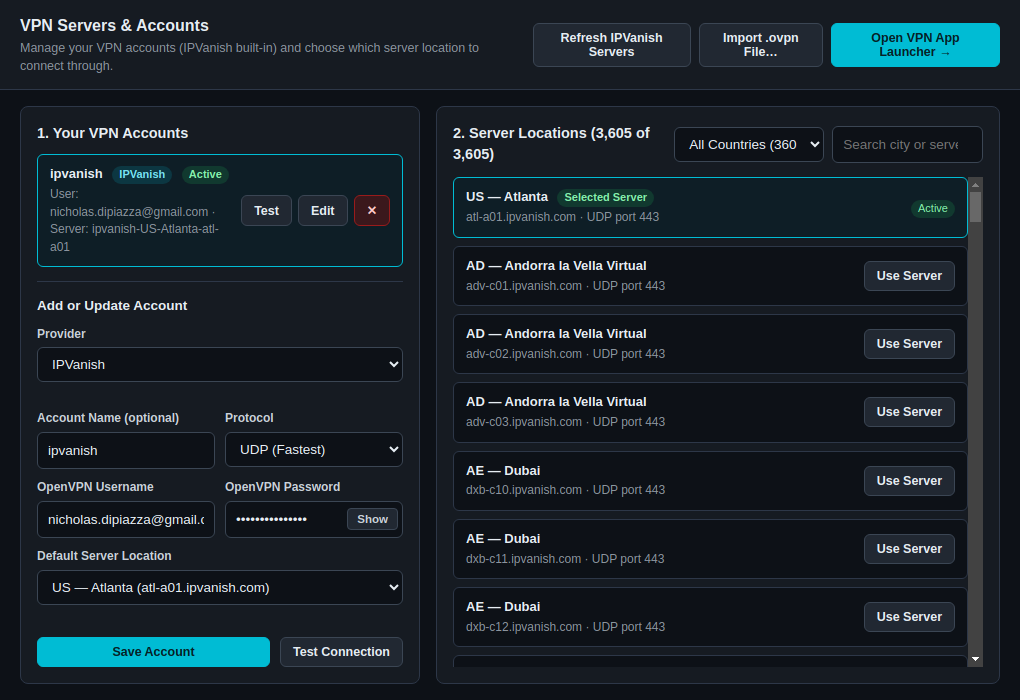
RobOS VPN Servers (packages/vpn-servers, window title VPN Servers & Accounts) manages the OpenVPN providers, encrypted account credentials, and .ovpn server profiles used by RobOS VPN Sandbox and RobOS Preferences.
Key Capabilities
- Built-In IPVanish Provider with 3,598 Official
.ovpnServer Profiles:- Ships with all 3,598 official IPVanish
.ovpnserver configurations andca.ipvanish.com.crt(packages/robos-lib/assets/ipvanish-configs.tar.xz), pre-sanitized for OpenVPN 2.6/2.7 compatibility (data-ciphers AES-256-GCM:AES-128-GCM:CHACHA20-POLY1305:AES-256-CBCand removal of deprecatedkeysizedirectives). - Includes a one-click Refresh IPVanish Servers button to pull the latest
configs.zipcatalog fromhttps://configs.ipvanish.com/configs/, plus Import .ovpn File… for custom OpenVPN profiles.
- Ships with all 3,598 official IPVanish
- Encrypted Credential Storage (Never Plaintext):
- Account metadata is stored in
~/.config/robos/ovpn-accounts.jsonwhile passwords are stored encrypted in Pass Manager (robos/ovpn/<provider>/<account>) with an automatic AES-256-GCM local vault fallback (~/.config/robos/ovpn/.vault/) whenpassis not initialized. - Includes a Show / Hide toggle on the OpenVPN password field for easy entry and verification of service credentials.
- Account metadata is stored in
- Live OpenVPN Credential & Tunnel Handshake Verification (
TestButton):- Click Test on any saved account card or Test Connection in the account form to perform a live OpenVPN TLS 1.3 handshake (
--auth-user-pass,--connect-retry-max 1) against the selected server profile and verifyPUSH_REPLYalong with the assigned VPN tunnel IP and negotiated cipher.
- Click Test on any saved account card or Test Connection in the account form to perform a live OpenVPN TLS 1.3 handshake (
- Country & City Filtering Across 3,600+ Locations:
- Filter server profiles by country (
All Countries,US,NL,GB,DE, etc.) or search by city, region, or hostname (atl-a01,nyc,ams), and click Use Server to set the active default server for your account.
- Filter server profiles by country (
Run it
Launch RobOS VPN Servers from the desktop, from the VPN Servers & Accounts… button inside RobOS VPN Sandbox, or run:
scripts/dev-launch.sh vpn-servers
Related guides
More in Security & Credentials
DocuVault Desktop Offline-first secure markdown notes, personal snippet vault, and local workstation storage starter app. Git Login Manager Checks that GitHub access works (gh login, SSH key, SSH connection, git identity) and walks you through fixing what fails. Pass Manager Vault Desktop front end for the standard Unix password store (pass), with entries encrypted by GPG. Pass Unlock Daemon Small dialog that asks for your GPG passphrase once a day and caches it in gpg-agent. RobOS Setup Wizard Eleven-step first-run wizard for GPG, pass, pinentry, git identity, SSH, Chrome, GitHub login, AI agent keys and optional tools. RobOS VPN Sandbox Launch any desktop or CLI app inside an isolated Linux network namespace (ip netns) routed exclusively through OpenVPN with a 3-barrier kernel kill-switch. Security Setup Wizard Five-step wizard that configures GPG pinentry, a GPG key, the pass store and an SSH key.