

RobOS VPN Sandbox
Launch any desktop or CLI app inside an isolated Linux network namespace (ip netns) routed exclusively through OpenVPN with a 3-barrier kernel kill-switch.
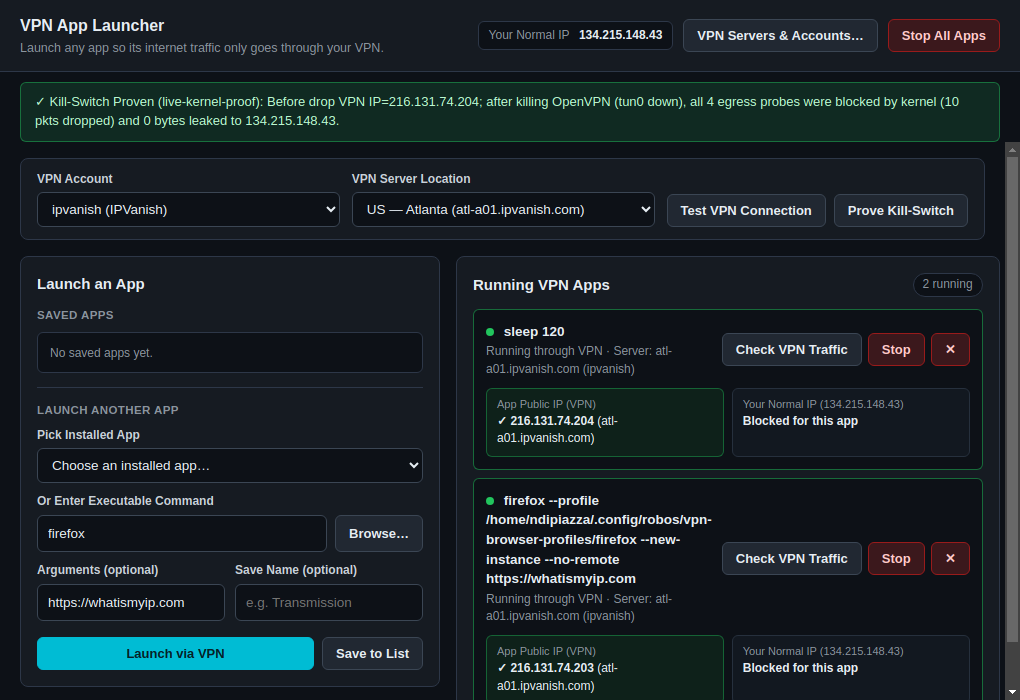
RobOS VPN Sandbox (packages/vpn-sandbox, window title VPN App Launcher) launches individual desktop or CLI applications (such as Firefox, Transmission, or curl) inside a dedicated Linux network namespace (ip netns) bound to your OpenVPN provider so that the application’s traffic can only exit through the VPN tunnel (tun0) and your normal public IP is completely unreachable.
Requirements
- Linux with
iproute2(ip netns),iptables/ip6tables,openvpn, andutil-linux(setpriv). - At least one OpenVPN account configured in RobOS VPN Servers or RobOS Preferences.
- On first launch of a sandboxed app, GNOME Polkit (
pkexec) prompts once to install/etc/sudoers.d/robos-vpn-sandboxso the sandbox engine can create and tear down isolated network namespaces without repeated prompts.
Use it
- Choose VPN Account & Server Location. Pick your account (
IPVanish,ProtonVPN,Mullvad,NordVPN, or custom.ovpn) and server location (3,598 built-in IPVanish servers) in the top selector bar. The header displays Your Normal IP (your real external public IPv4 address outside the VPN) so you can always contrast it against the app’s VPN exit IP. - Test VPN Connection or Prove Kill-Switch.
- Test VPN Connection runs a 6-point Zero-Leak Audit against the selected account and server profile.
- Prove Kill-Switch runs a live 5-step fault-injection proof in the Linux kernel: it starts an isolated namespace and OpenVPN tunnel, verifies the external VPN IP from inside the namespace as an unprivileged user (
uid 1000), force-kills the OpenVPN daemon (kill -9) mid-flight while keeping the namespace andvethdefault route up, attempts 4 egress probes (HTTPS, direct TCP1.1.1.1:80, direct UDP8.8.8.8:53, and direct UDP to the VPN server IP asuid 1000), and confirms via kerneliptables -L OUTPUT -v -n -xcounters that 100% of post-drop packets are dropped with 0 bytes leaked to your normal IP.
- Launch a Saved App or Any Executable.
- Saved Apps: If
transmission-gtkis installed (for example via RobOS Software Center), a default Transmission profile is pre-populated automatically alongside a Web Browser profile. - Launch Another App: Pick any installed desktop application from the dropdown, browse for a binary, or type a command (e.g.,
firefox,transmission-gtk) and optional arguments, then click Launch via VPN (or Save to List). - For browsers like Firefox (including Ubuntu Snap Firefox) and Chromium/Chrome, the engine automatically isolates the browser profile (
~/.config/robos/vpn-browser-profiles/<browser>), passes--no-remote --new-instance, and wraps execution indbus-run-sessionso the browser never hands off windows to an existing non-VPN desktop process.
- Saved Apps: If
- Manage Running VPN Apps.
- Each card in Running VPN Apps shows the active command, VPN server, verified App Public IP (VPN), and confirmation that Your Normal IP is blocked for that app.
- Click Check VPN Traffic to re-verify the tunnel, Stop to terminate the process and tear down its
robos_vpn_<id>namespace, ✕ to remove a card from the list, Clear Stopped to prune finished sessions, or Stop All Apps in the header for an immediate emergency kill of all sandboxed apps.
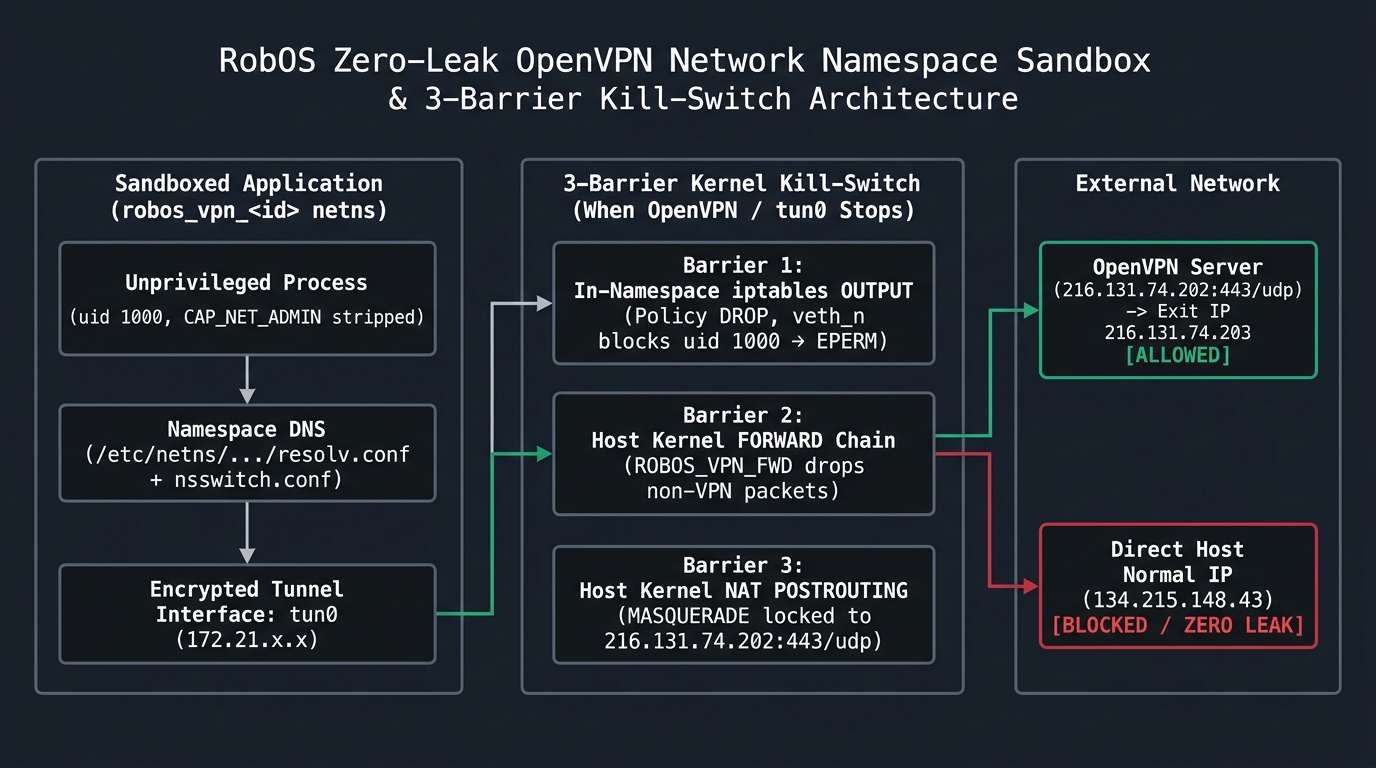
3-Barrier Kernel Kill-Switch Architecture
- Barrier 1 — In-Namespace
iptablesDefault-DROP + UID Owner Lock: Insiderobos_vpn_<id>,iptables -P OUTPUT DROPandip6tables -P OUTPUT DROPblock all traffic by default. The target app runs as your unprivileged desktop user (uid 1000) withCAP_NET_ADMINandCAP_NET_RAWstripped (setpriv --inh-caps=-net_admin,-net_raw). Only-o tun+is open touid 1000; onveth_n_<id>, onlyuid 0(openvpn) to<vpn_server_ip>:<vpn_port>is accepted, followed by-A OUTPUT -o veth_n_<id> -j DROP. - Barrier 2 — Host Kernel
FORWARDChain (ROBOS_VPN_FWD_<id>): On the host side (veth_h_<id>), the kernel only forwards packets from10.203.X.2/32to<vpn_server_ip>/32:<vpn_port>and drops all other packets before NAT. - Barrier 3 — Destination-Scoped Host
POSTROUTINGNAT: TheMASQUERADErule only matches-s 10.203.X.2/32 -d <vpn_server_ip>/32 -p udp --dport 443, so the kernel has no NAT rule to translate namespace packets to your normal public IP for any other destination. - Namespace-Scoped DNS & NSS: Writes
/etc/netns/robos_vpn_<id>/resolv.confand/etc/netns/robos_vpn_<id>/nsswitch.conf(hosts: files dns) and launches OpenVPN with--dns-updown disableso sandboxed apps resolve DNS exclusively overtun0and never touch hostsystemd-resolved.
Run it
Launch RobOS VPN Sandbox from the desktop or App Launcher, or run:
scripts/dev-launch.sh vpn-sandbox
Related guides
More in Security & Credentials
DocuVault Desktop Offline-first secure markdown notes, personal snippet vault, and local workstation storage starter app. Git Login Manager Checks that GitHub access works (gh login, SSH key, SSH connection, git identity) and walks you through fixing what fails. Pass Manager Vault Desktop front end for the standard Unix password store (pass), with entries encrypted by GPG. Pass Unlock Daemon Small dialog that asks for your GPG passphrase once a day and caches it in gpg-agent. RobOS Setup Wizard Eleven-step first-run wizard for GPG, pass, pinentry, git identity, SSH, Chrome, GitHub login, AI agent keys and optional tools. RobOS VPN Servers Manage OpenVPN providers (IPVanish built-in with 3,598 server profiles), encrypted VPN accounts, live TLS 1.3 credential tests, and server locations. Security Setup Wizard Five-step wizard that configures GPG pinentry, a GPG key, the pass store and an SSH key.