

RobOS Smart TV Studio
Pair Smart TVs, build & sideload Developer Mode TV apps (LG webOS, Samsung Tizen, Google TV/ADB, Roku), serve the 10-foot D-Pad TV Portal (:19210), and stream 4K games.
RobOS Smart TV Studio (packages/robos-tv) makes living-room and office wall Smart TVs first-class citizens of RobOS. Because commercial TV app stores restrict full Linux/Electron suites, RobOS Smart TV Studio bridges your workstation or appliance VM to any Smart TV on your local network through Developer Mode sideloading, a 10-Foot Big-Screen Spatial Navigation Portal (:19210), Zero-Cloud Google Cast, and Moonlight / Sunshine 4K 120Hz streaming.
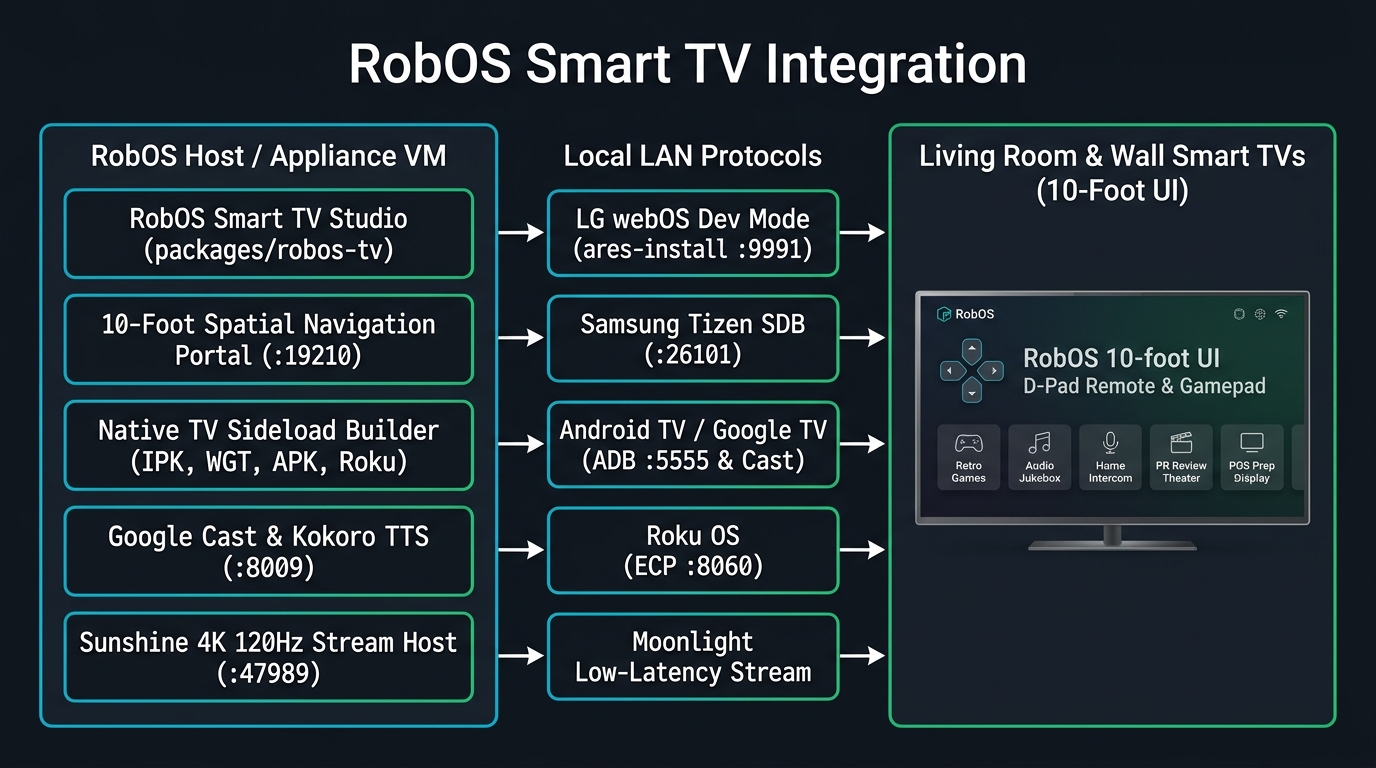
Supported Smart TV Platforms & Developer Mode Sideloading
- Google TV / Android TV / Amazon Fire TV (
adb+ Google Cast):- Generates an Android TV Leanback launcher project (
AndroidManifest.xml,assets/index.html, andsideload-android-tv.sh). - Connects over wireless ADB (
<TV-IP>:5555) to install the launcher onto the TV home row or immediately open the 10-Foot Portal URL (am start -a android.intent.action.VIEW -d http://<HOST-IP>:19210).
- Generates an Android TV Leanback launcher project (
- LG webOS Smart TVs (
ares-package/ares-install/ares-extend-dev):- Generates a complete webOS
.ipkproject (appinfo.json,index.html, andsideload-webos.sh). - Fetches the SSH developer key from the LG Key Server (
:9991), installscom.robos.tv, and includes one-click + background Auto-Renewal of LG’s 1,000-hour Developer Mode timer (ares-extend-dev).
- Generates a complete webOS
- Samsung Tizen Smart TVs (
tizen/sdb):- Generates a Tizen Web Widget project (
config.xmlwithtv.inputdeviceremote key privileges,index.html, andsideload-tizen.sh) and deploysRobOSTV.wgtover Smart Development Bridge (:26101).
- Generates a Tizen Web Widget project (
- Roku OS TVs & Players (
ECP :8060+ SceneGraph.zip):- Generates a Roku SceneGraph channel bundle (
manifest,source/Main.brs,components/MainScene.xml, andsideload-roku.sh) and controls the TV with zero-auth Roku External Control Protocol (http://<TV-IP>:8060/keypress/*).
- Generates a Roku SceneGraph channel bundle (
- Moonlight / Sunshine 4K 120Hz Full Desktop & Godot 4 Game Streaming:
- Pairs with the native Moonlight client on any Smart TV or Apple TV to stream the full RobOS desktop and Godot 4 games (
Realm of Heroes cRPG,Quest: Warrior Dragon,Tabletop RPG,Starfall Command RTS) with full Bluetooth gamepad support.
- Pairs with the native Moonlight client on any Smart TV or Apple TV to stream the full RobOS desktop and Godot 4 games (
The 10-Foot Big-Screen Portal (:19210)
When you launch the sideloaded RobOS TV app from your TV’s native app bar, it opens the live RobOS 10-Foot Portal (http://<HOST-IP>:19210) designed specifically for viewing from 10 feet away:
- Full TV Remote D-Pad & Gamepad Spatial Navigation: Navigate the 4×2 tile grid using your TV remote’s directional pad (
Up,Down,Left,Right,OK/Enter,Back) or any connected controller via the HTML5 Gamepad API. - 8 Big-Screen Experiences:
- RobOS 10-Foot Home — Active agents, sprint status, and system health.
- Realm of Heroes cRPG — Party-based tactical D&D 5e cRPG in Godot 4.
- Quest: Warrior Dragon — NES-authentic 2D JRPG playable with a TV remote D-Pad.
- RobOS Tabletop RPG — 26×19 living-room dungeon board for tabletop game nights.
- Audio Player & Virtual DJ — 100,000-song jukebox with full-screen lyrics and Kokoro Virtual DJ intros.
- Home Speaker Intercom — Multi-room walkie-talkie and neural TTS announcements.
- PR Review Theater — Watch narrated 1080p agent proof-of-work walkthrough videos from the couch.
- POS Order & Prep Display — Turn any wall-mounted TV into a café/bar order prep board or menu display.
Run it
Launch RobOS Smart TV Studio from the App Launcher, click 📺 Smart TV Studio inside RobOS Home Speaker, or run:
electron packages/robos-tv