

Remote Execution Studio
Records Remote Execution API (REAPI v2) clusters and generates .bazelrc, .buckconfig, Buildbarn and NativeLink configuration for them. Endpoint probes and cache statistics are sample values.
Remote Execution Studio helps you write configuration for a remote build cluster that speaks the Remote Execution API (REAPI v2), such as Buildbarn or NativeLink. You enter the cluster endpoints once, and the app generates the matching text for Bazel, Buck2 and the cluster’s own services.
What works
- Clusters. + New REAPI Cluster registers a cluster: title, provider (Buildbarn, NativeLink, BuildGrid or BuildBuddy), instance name, execution, CAS and browser endpoints, and TLS. Save & Sync to KGraph writes it to the knowledge graph (
.robos/kgraphs/devops/package.jsonld) and to~/.config/robos/remote-execution.json. - Build Clients (Bazel & Buck2). Generates a
.bazelrcwithremoteandcacheconfigs, or a.buckconfig, from the selected cluster’s endpoints, instance name and first worker pool. Copy Config copies it. With the generated Bazel file,bazel build //... --config=remoteruns remotely and--config=cacheuses the remote cache only. Settings such as--jobs=100are fixed in the template, so review them. - Provider Configurations. Generates JSON for the Buildbarn services (
bb-storage,bb-scheduler,bb-worker,bb-runner,bb-browser) or for NativeLink, with a Copy JSON button. Check the output against your Buildbarn or NativeLink version before deploying. - Knowledge Graph & SHACL. Shows the cluster as a JSON-LD node (
robos:RemoteExecutionCluster).
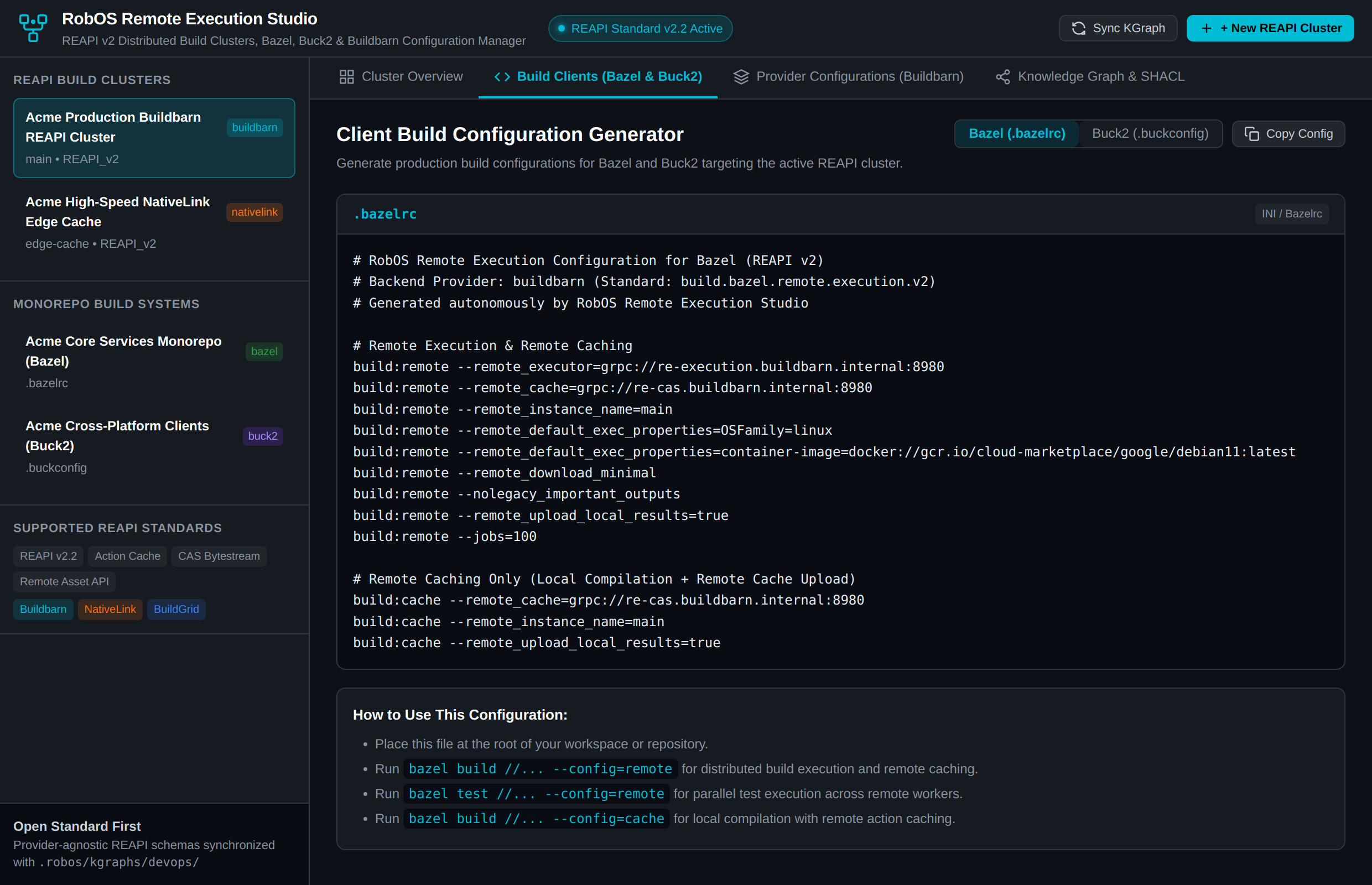
The Build Clients tab: clusters and build systems on the left, the generated .bazelrc and usage notes on the right.
What is sample data
- On first run the app loads two sample clusters (a Buildbarn and a NativeLink cluster) and two sample build systems, with
.internalhost names. Replace or delete them. - Test REAPI Endpoints returns a fixed result: execution and CAS “HEALTHY” with latencies of 14 ms and 11 ms, and the browser endpoint “AVAILABLE”. It does not contact the cluster, so a green result means nothing about your cluster.
- The cache hit ratios (89.4% and 72.1%) and the 500 GB capacity shown in Cluster Overview are default values from the sample cluster unless your cluster record sets them.
- Validate SHACL Constraints only shows a confirmation message. It does not run validation here; use Validate SHACL in Knowledge Graph Explorer.
Workspace mode
If ROBOS_GRAPH_ROOT is set, the app shows only the cluster and build-system nodes found in that graph, as read-only source declarations. Saving, deleting and endpoint tests are disabled and point you to Import & Refine in the graph explorer.
Run it
Launch Remote Execution Studio from the app launcher, or run npm start in packages/remote-execution-studio.