

Data Sources Explorer
A catalog of database, object-storage and Kafka entries stored in the knowledge graph; connection tests, schemas and query results are simulated.
Data Sources Explorer is a registry of the data stores your services use. The useful part is the catalog and its link to the knowledge graph. The live-looking panels are placeholders.
Test Connection waits about half a second and reports success. Schema Inspector returns a fixed sample schema (pets, vaccination_certificates, and so on), and Execute Query returns canned rows for any query that mentions pets or vaccin, or a one-row “SUCCESS” otherwise. Nothing connects to a database, bucket or broker.
What you do in it
- Filter the catalog by category (All Data Sources, SQL / Relational, NoSQL & Document, Cloud & Object Storage, Streaming & Queues) or by bound microservice.
- Click New Data Source and fill in the Configure Data Source form. Driver types are PostgreSQL, MySQL / MariaDB, Oracle, Microsoft SQL Server, SQLite / DuckDB, Snowflake, MongoDB, Redis, DynamoDB, Amazon S3 / MinIO, Google Drive / GCS and Apache Kafka. Save Data Source stores the entry.
- Select an entry to see its bound services and use its tabs: Schema Inspector, Interactive Query Console (run with
Ctrl+Enter, Export CSV for results) and All Data Sources Catalog.
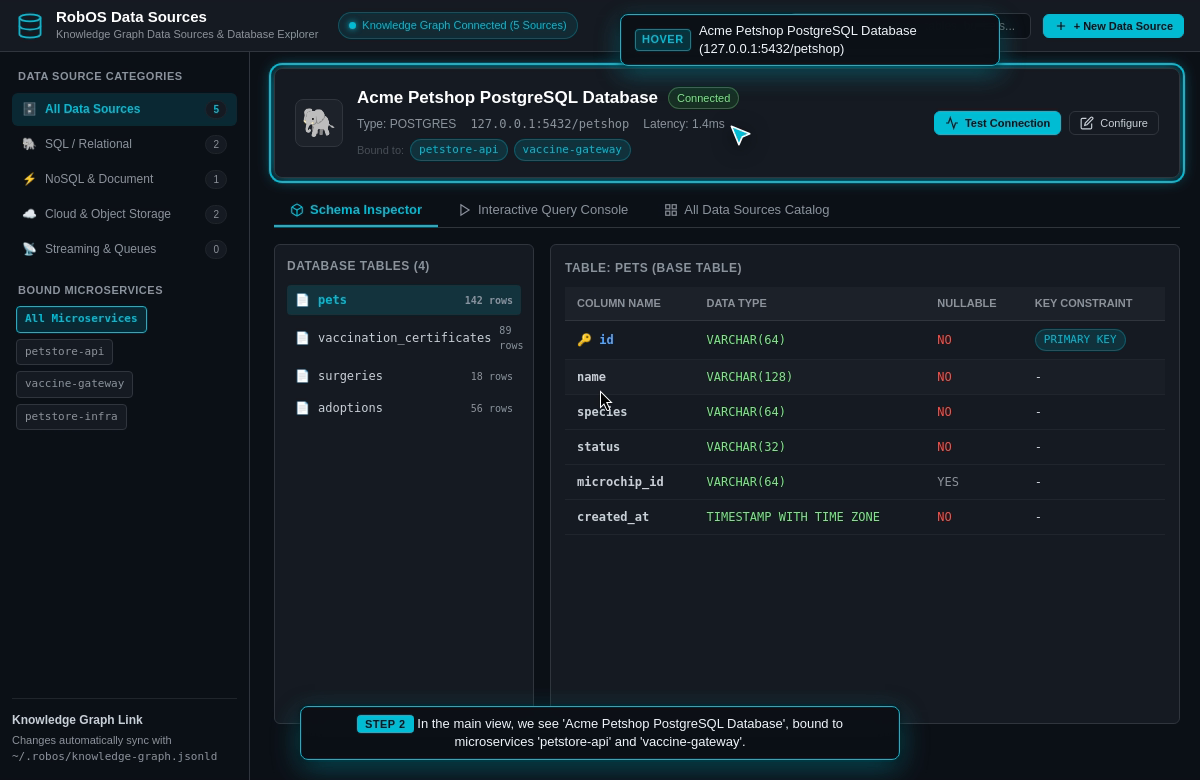
A sample entry with its bound microservices and the Schema Inspector tab. The tables and row counts are fixed sample data.
Where the data lives
- Entries are saved to
~/.config/robos/data-sources.json. If that file is missing or empty, five sample entries (an Acme Petshop PostgreSQL database, an S3 vault, a Google Drive hub, an Oracle billing database and a Redis cache) are shown instead. - Each save also writes the entry into the SDLC knowledge graph through
SDLCKnowledgeGraphStoreinpackages/robos-graph(default file~/.robos/knowledge-graph.jsonld). Databases becomecreateDatabasenodes and other types becomerobos:DataSourcenodes. The form’s password field is discarded, and a new entry is marked “Connected” without any check. - Setting
ROBOS_GRAPH_ROOTswitches the app to a read-only view of the data-store nodes in that graph workspace. Saving, deleting and the demo panels are disabled in that mode.
Run it with electron packages/data-sources. Source: packages/data-sources.