

RobOS AI Multiplayer Game Theater: Dynamic Godot 4 HTTPS Games, Per-Player Google Doc Launchers, and 2-Player Hangman
We built RobOS AI Multiplayer Game Theater (packages/game-theater), a dynamic multiplayer game stage where each player enters through a personal 1-button Google Doc (?auth=<256-bit-token>) into a Godot 4.3 HTTPS WebAssembly Client. Starting from an empty stage, any authenticated RobOS Game User in the lobby can ask the RobOS Agent to generate or modify both the authoritative Node.js multiplayer server (server.js) and the Godot 4 GDScript client (client.gd) live — verified end-to-end by dynamically generating a 2-player game of Hangman with random Round 1 starter selection, alternating Phrase Chooser turns, server-side secret masking, and vector outline symbol font rendering.
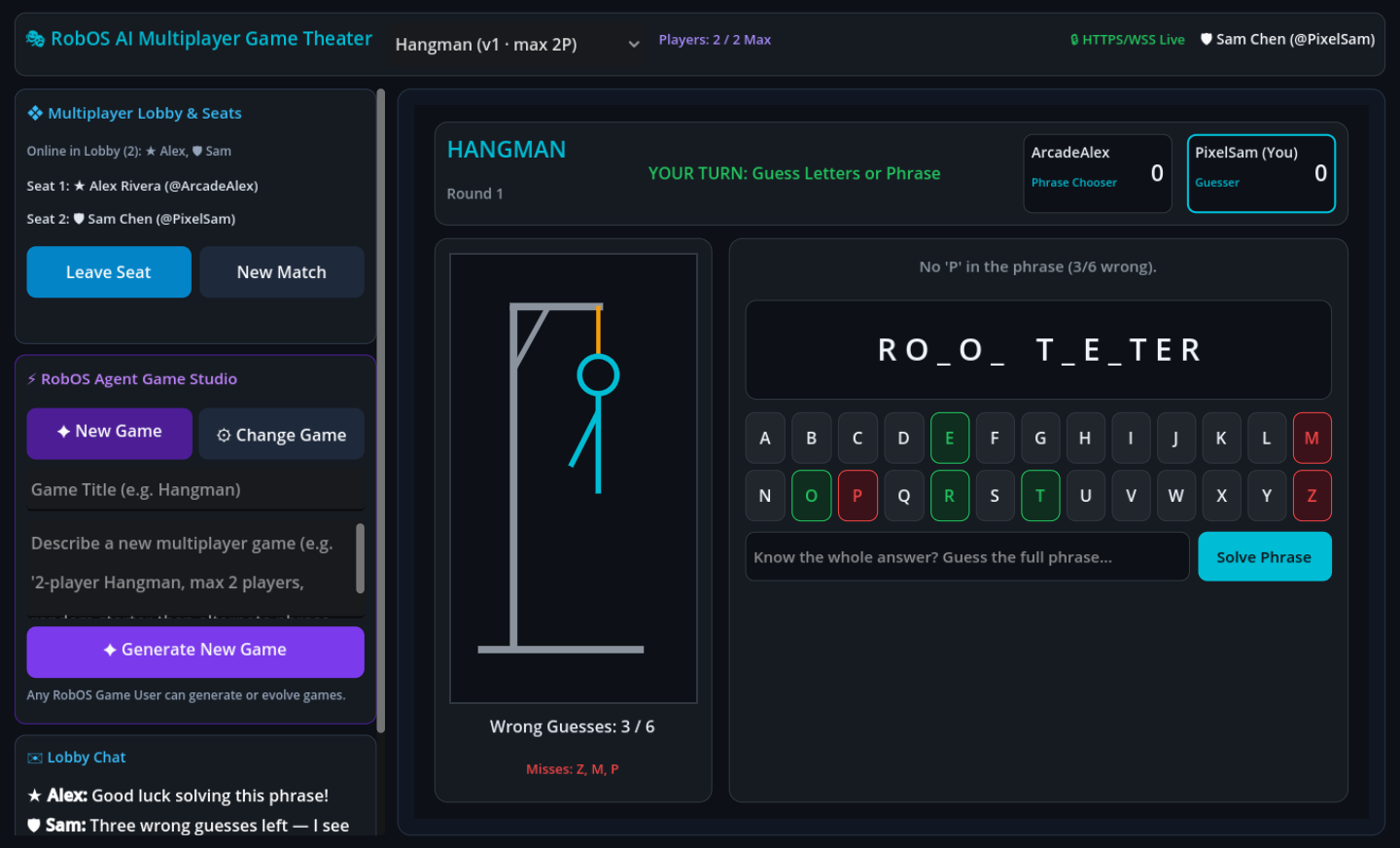
server.js and the Godot 4 client.gd stage — enforcing a strict 2-player seat cap, randomly picking the Round 1 Phrase Chooser, alternating roles every round, and drawing the gallows procedurally via Control._draw().Why start with a blank stage instead of a fixed game? Most multiplayer party platforms ship a hardcoded catalog of mini-games. With RobOS AI Multiplayer Game Theater (packages/game-theater), we inverted the model: the app boots as an empty multiplayer lobby backed by an authoritative Node.js HTTP/HTTPS + WebSocket server (:19228 / :19229) and a Godot 4.3 HTTPS WebAssembly Client. Once players join the lobby through their personal Google Docs, any authenticated RobOS Game User can describe a brand-new multiplayer game — or ask the RobOS Agent to change the active game’s rules, scoring, or visuals — and watch the stage hot-reload live across every connected browser.
1. Architecture: Per-Player Google Docs → Node VM Server → Godot 4 WebAssembly Stage
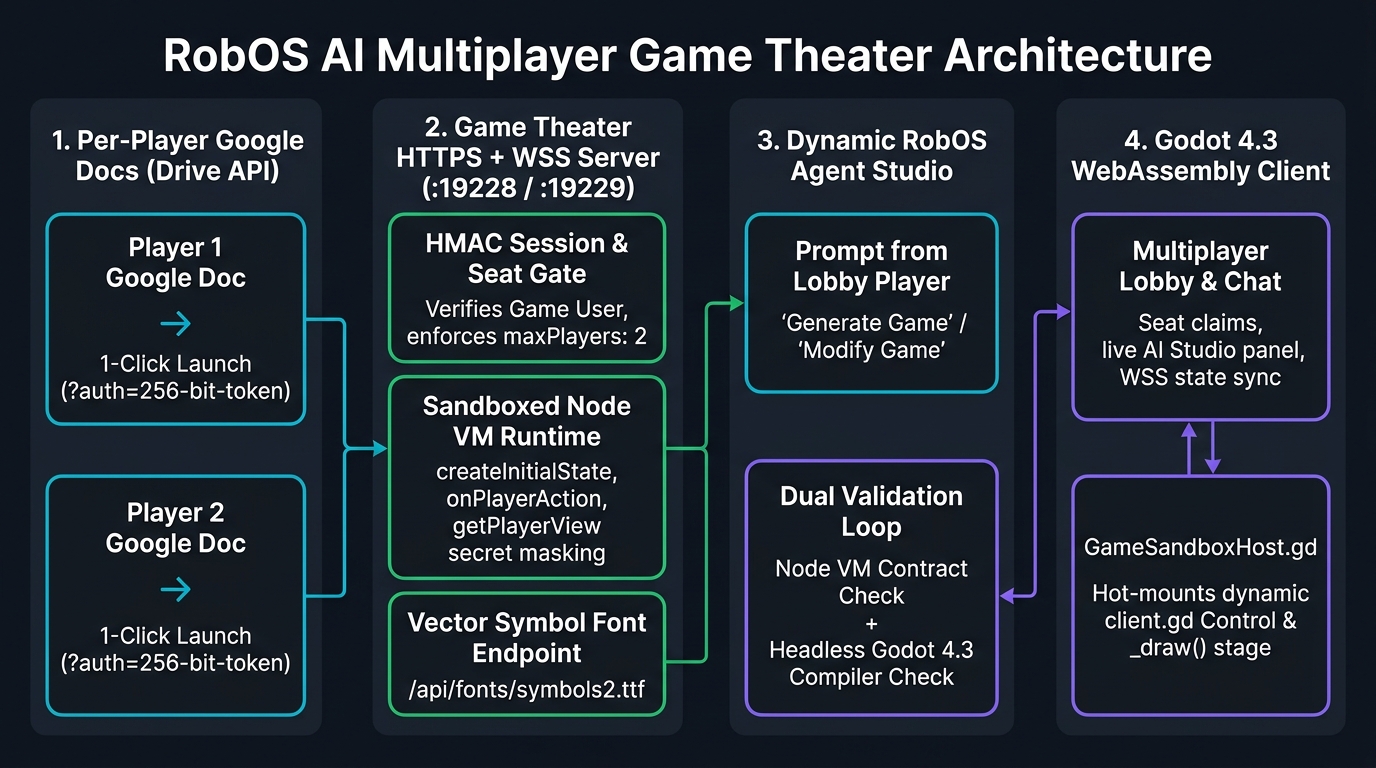
server.js + client.gd before hot-mounting the stage inside every player’s Godot 4 WebAssembly client.
flowchart LR
  subgraph Docs["1. Per-Player Google Docs (Drive API)"]
    direction TB
    D1["Player 1 Google Doc
1-Click Launch (?auth=256-bit-token)"]
    D2["Player 2 Google Doc
1-Click Launch (?auth=256-bit-token)"]
  end

  subgraph Server["2. Game Theater HTTPS + WSS Server (:19228 / :19229)"]
    direction TB
    AUTH["HMAC Session & Seat Gate
Verifies RobOS Game User & maxPlayers"]
    VM["Sandboxed Node VM Runtime
createInitialState · onPlayerAction · getPlayerView"]
    FONT["Vector Symbol Font Endpoint
/api/fonts/symbols2.ttf · dejavu.ttf"]
  end

  subgraph Agent["3. Dynamic RobOS Agent Studio"]
    direction TB
    PROMPT["Prompt from Any Lobby Player
Generate New Game / Modify Active Game"]
    VAL["Dual Validation & Self-Repair Loop
Node VM Check + Headless Godot 4.3 Compiler"]
    PROMPT --> VAL
  end

  subgraph Godot["4. Godot 4.3 HTTPS WebAssembly Client"]
    direction TB
    LOBBY["TheaterClient.gd
Lobby Presence, Seats, Chat & AI Prompt UI"]
    STAGE["GameSandboxHost.gd
Hot-Mounts GDScript.new() Control Stage"]
    LOBBY <--> STAGE
  end

  D1 --> AUTH
  D2 --> AUTH
  AUTH --> VM
  VM <--> LOBBY
  LOBBY --> PROMPT
  VAL --> VM
  VAL --> STAGE
  FONT --> LOBBY
2. Passwordless Player Identity via Per-Player Google Docs
Typing passwords or pairing codes on phones, tablets, or laptops before a quick game slows everyone down. Following the same capability-launcher pattern we built for RobOS Google Calendar and RobOS Shopping Lists, packages/game-theater/lib/player-doc-sync.js provisions a dedicated RobOS AI Multiplayer Game Theater folder in Google Drive containing:
- One Personal Google Doc per Player (
RobOS Game Theater — <Player> (Player Launch Doc)): Each player receives a cryptographically random 256-bit token embedded in a prominent launch button (?auth=<token>) and shared exclusively with that player’s Google account via Drive permissions (role: 'reader'). - HMAC-Signed Session Cookie + Dual HTTPS Delivery: Clicking the launch button exchanges the capability token for an
HttpOnlyHMAC-SHA256 session cookie (robos_theater_player) over either the outbound HTTPS tunnel or the LAN ECDSA P-256 HTTPS server on:19229(generated automatically bylib/tls-cert.jsso Godot 4’s WebAssemblySharedArrayBuffer/ Secure Context requirements are satisfied on local Wi-Fi too). - Host Directory Google Doc: An owner-only index doc keeps quick links to every player’s launch document in one place.
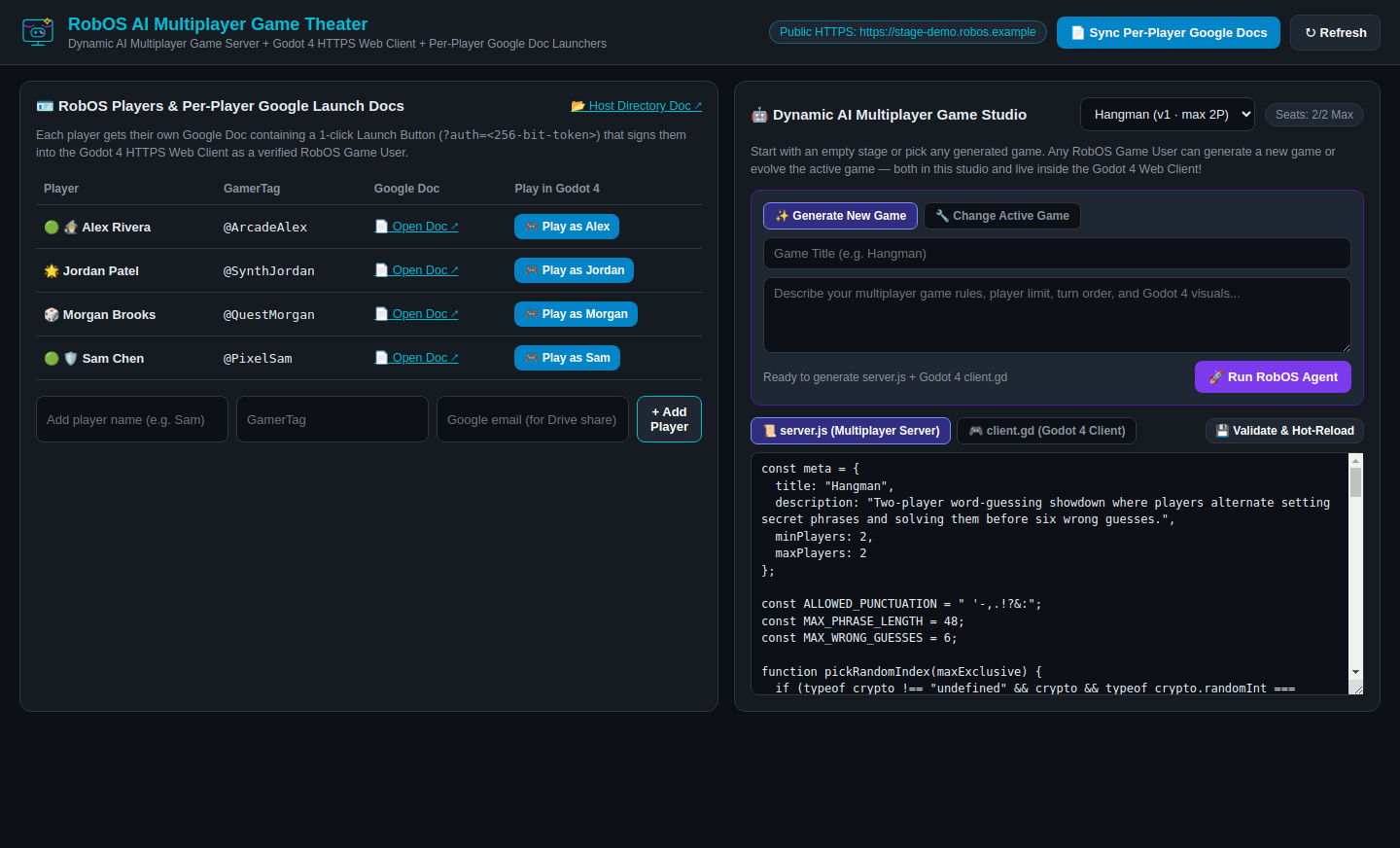
packages/game-theater). Manage players, sync per-player Google Docs, inspect or hot-reload server.js and client.gd, or open isolated per-player Godot 4 windows.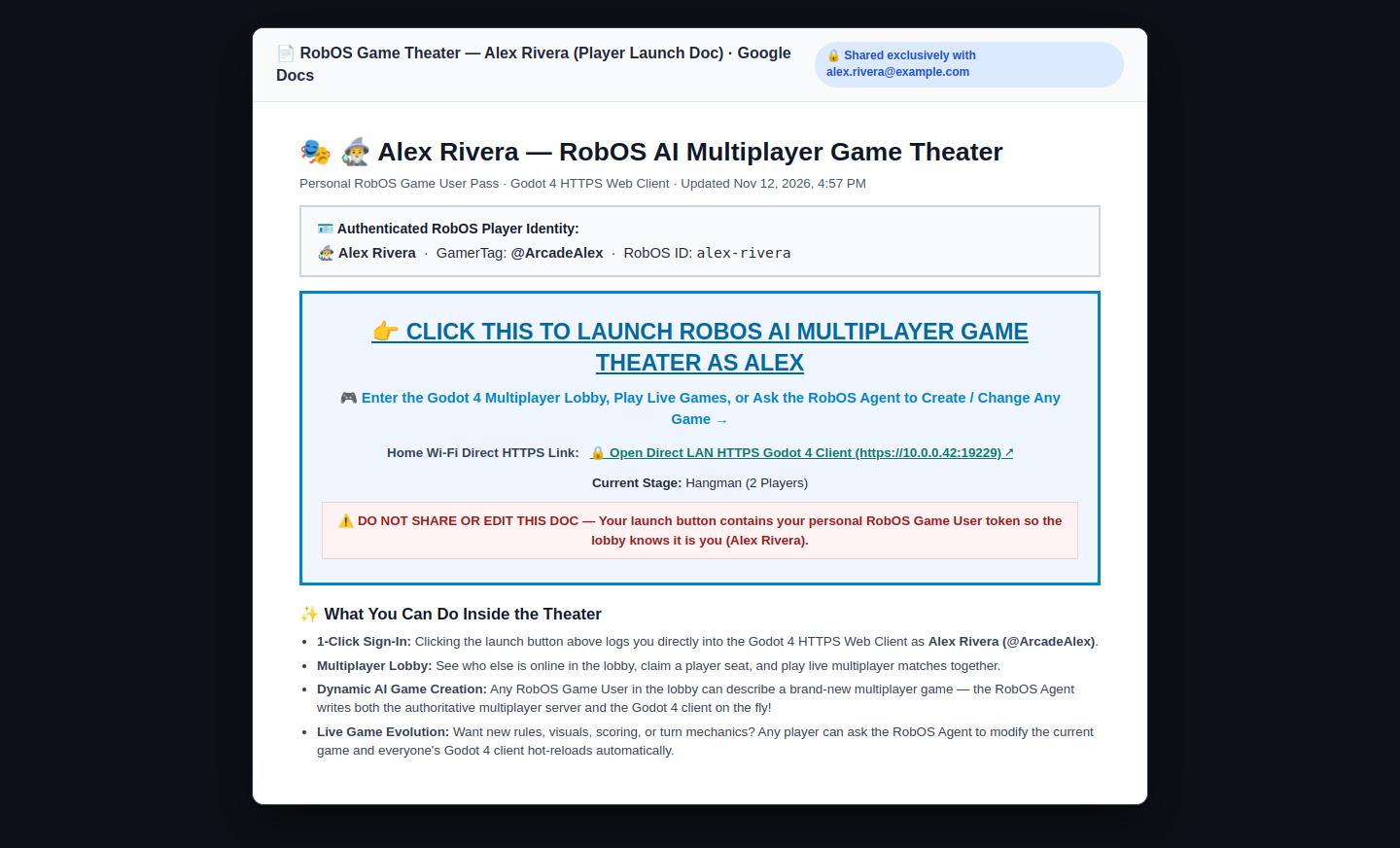
3. Dual-Validated Dynamic Generation: Building 2-Player Hangman Live
Whether triggered from the desktop studio, CLI, or directly inside the Godot 4 Web Client by any player in the lobby, lib/agent-builder.js asks the configured RobOS Agent (robos-lib/ai-agent) to emit a complete JSON game cartridge containing manifest, CommonJS serverJs, and Godot 4.3 clientGd. Before any cartridge reaches connected players, it must pass a two-stage compiler gate (with automatic error-feedback repair retries if either check fails):
- Restricted Node VM Server Contract Check (
lib/game-runtime.js): Compilesserver.jsinside an isolatednode:vmcontext (no filesystem or network access), verifiesmeta, callscreateInitialState(mockPlayers), and asserts thatgetPlayerView(state, viewerUid)returns valid per-player dictionaries without leaking opponent secrets. - Headless Godot 4.3 GDScript Compiler & Render Check (
godot/scripts/validate_client.gd): Runsgodot4 --headless -s res://scripts/validate_client.gdto compileclient.gdwithGDScript.reload(), instantiate theControlnode, and pump both player views and empty waiting states throughapply_view(view, me, lobby)to catch Godot 4 strict type-inference errors before broadcast.
Using this live pipeline, we prompted the empty stage to create 2-Player Hangman:
- Strict 2-Player Cap (
minPlayers: 2, maxPlayers: 2): Once two players claim seats, any third player attemptingjoin_seatreceives an explicitMAX_PLAYERS_REACHEDrejection while still being able to watch or chat in the lobby. - Random Starter, Strictly Alternating Phrase Chooser: Round 1 picks
chooserIdxviacrypto.randomInt(0, 2); everynext_roundadvanceschooserIdx = (state.chooserIdx + 1) % 2so both players alternate setting phrases and solving them. - Zero-Leak Secret Phrase Masking: During the
choosingandguessingphases,getPlayerView(state, viewerUid)sendssecretPhrase: nulland only the masked pattern (R O _ O _ T _ E _ T E R) to the Guesser, revealing the full phrase to both players only whenphase === 'round_over'.
4. Solving Broken Emoji Tofu Boxes in Godot 4 WebAssembly
When we first opened the exported Godot 4.3 WebAssembly client in a live desktop window, Unicode emojis across headers, buttons, and multi-codepoint ZWJ player avatars (such as 🧙♂️ = U+1F9D9 U+200D U+2642 U+FE0F) rendered as hex tofu boxes. Investigating with headless Godot 4 shaping tests revealed two subtle engine details:
- Godot 4’s built-in
ThemeDB.fallback_fontbundles only Latin/CyrillicOpenSans(even basic symbols like▶and✓are absent). - Attaching Linux’s
NotoColorEmoji.ttfpassesFontFile.has_char()(because thecmaptable lists every emoji), but Godot 4’swasm32FreeType build does not rasterize PNG-compressedCBDT/CBLCcolor bitmap tables in WebAssembly.
We fixed this cleanly in lib/theater-server.js and godot/scripts/TheaterClient.gd by serving lightweight, pure TrueType vector outline symbol fonts (NotoSansSymbols2-Regular.ttf, NotoSansSymbols-Regular.ttf, and DejaVuSans.ttf) from /api/fonts/{symbols2,symbols,dejavu}.ttf, attaching them via FontFile.data to ThemeDB.fallback_font.fallbacks, stripping ZWJ/variation selectors (U+200D, U+FE0F), and verifying every codepoint through _has_glyph() before rendering.