

1. Why an Application-Layer Zero-Trust Mesh Instead of a Traditional LAN or OS VPN?
By default, RobOS desktop applications bind their IPC, DOM snapshot, and service endpoints to local loopback (127.0.0.1) so untrusted devices on a coffee-shop, office, or home Wi-Fi network can never probe or control your apps. When you want two RobOS machines to collaborate—such as streaming a 4K movie from your home media workstation to your laptop, linking a Point of Sale self-checkout kiosk to a back-office register, or letting Agent Chat inspect a remote app's DOM snapshot—exposing raw TCP ports on 0.0.0.0 breaks zero trust. RobOS App Mesh solves this at the application layer.
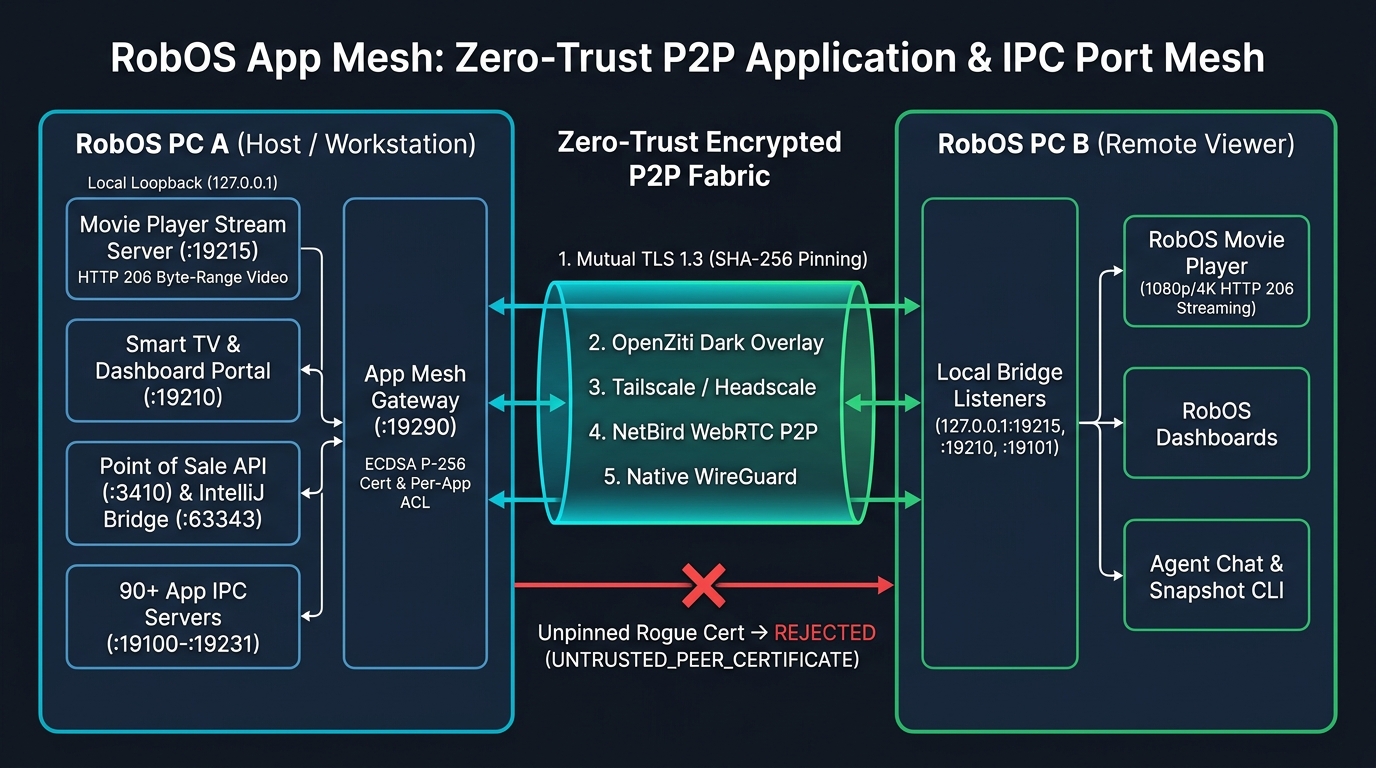
packages/app-mesh) and packages/robos-lib/app-mesh-engine.js: remote RobOS app ports are mounted onto 127.0.0.1 on peer machines over mutually authenticated TLS 1.3 tunnels.
flowchart LR
  subgraph PCA["RobOS PC A (Host / Media & Dev Workstation)"]
    direction TB
    MP_A["RobOS Movie Player Stream Server
127.0.0.1:19215 (HTTP 206 Byte-Range + Catalog)"]
    TV_A["Smart TV & Dashboard 10-Foot Portal
127.0.0.1:19210"]
    POS_A["Point of Sale Register API (:3410)
IntelliJ IDEA IPC Bridge (:63343)"]
    IPC_A["90+ RobOS App IPC & Snapshot Servers
127.0.0.1:19100–19231"]
    GW_A["RobOS App Mesh Gateway (:19290)
TLS 1.3 requestCert=true
SHA-256 Cert Pinning + Per-App ACLs"]

    GW_A -->|Loopback Pipe| MP_A
    GW_A -->|Loopback Pipe| TV_A
    GW_A -->|Loopback Pipe| POS_A
    GW_A -->|Loopback Pipe| IPC_A
  end

  subgraph FABRIC["Pluggable Zero-Trust P2P Transport Fabric"]
    direction TB
    DRIVERS["1. Built-in Mutual TLS 1.3 (Zero External Daemons)
2. OpenZiti Dark Overlay Fabric (ziti-edge-tunnel)
3. Tailscale / Headscale WireGuard Mesh (100.x.y.z)
4. NetBird WebRTC + WireGuard P2P
5. Native Kernel/Userspace WireGuard (wg0)"]
    ROGUE["Unpinned / Rogue X.509 Certificate
Immediate Drop: UNTRUSTED_PEER_CERTIFICATE"]
  end

  subgraph PCB["RobOS PC B (Remote Viewer / Workstation)"]
    direction TB
    BRIDGE_B["App Mesh Local Bridge Listeners
127.0.0.1:19215 -> PC A :19215
127.0.0.1:19210 -> PC A :19210
127.0.0.1:19101 -> PC A :19101"]
    VIEW_B["RobOS Movie Player / Browser / MPV
Streams 1080p/4K Movies with HTTP 206 Seeking"]
    TOOLS_B["Agent Chat / Snapshot CLI / Dashboards
Talks to 127.0.0.1 as if PC A Apps Were Local"]

    VIEW_B --> BRIDGE_B
    TOOLS_B --> BRIDGE_B
  end

  BRIDGE_B <-->|Mutually Pinned TLS 1.3 Tunnel| DRIVERS
  DRIVERS <-->|Verified Peer SHA-256 Fingerprint| GW_A
  ROGUE -.->|Blocked at TLS Handshake| GW_A
2. Five Pluggable Zero-Trust Transport Fabrics (No Vendor Lock-In)
RobOS App Mesh never locks you into a single networking stack or external coordination service. You can switch between five transport drivers at any time from the top toolbar:
-
Built-in Zero-Trust Mutual TLS 1.3 (
mtls— Default, Zero Dependencies):- Runs 100% in Node.js / Electron user space with zero external daemons and no
sudo/root privileges required. - On first launch, each RobOS node generates an ECDSA Prime256v1 (P-256) keypair and self-signed X.509 identity certificate stored in
~/.config/robos/app-mesh/identity.json(mode0600). - Both the client and server enforce
minVersion: 'TLSv1.3'andrequestCert: true, verifying the peer's exact SHA-256 certificate fingerprint against the pinned peer registry before a single command or payload byte is forwarded.
- Runs 100% in Node.js / Electron user space with zero external daemons and no
-
OpenZiti Overlay Fabric (
openziti— Identity-Based Dark Network):- Integrates with
zitiandziti-edge-tunnelso your RobOS machines have zero listening LAN/WAN ports. - Includes a one-click OpenZiti Service Provisioning Generator that exports ready-to-run
ziti edge create config,ziti edge create service, andBind/Dialservice policies for every shared RobOS IPC port (robos.ipc.<app-id>).
- Integrates with
-
Tailscale / Headscale WireGuard Mesh (
tailscale):- Automatically detects your machine's
100.x.y.zTailscale/Headscale overlay address and embeds it into your enrollment token. - Generates least-privilege Tailscale/Headscale HuJSON ACL manifests (
tag:robos-mesh) scoped strictly to your shared RobOS ports (19100–19231,3410,63343,19290).
- Automatically detects your machine's
-
NetBird Zero-Trust P2P (
netbird):- Uses NetBird's WebRTC STUN/TURN hole-punching + WireGuard peer-to-peer tunnels to connect RobOS machines across symmetric NATs and firewalls, layered with App Mesh's per-app TLS 1.3 ACLs.
-
Native WireGuard Interface (
wireguard):- Binds App Mesh traffic directly to a private kernel or userspace WireGuard interface (
wg0/wg-robos0).
- Binds App Mesh traffic directly to a private kernel or userspace WireGuard interface (
3. Step-by-Step: Pairing Two RobOS Machines & Bridging IPC Ports
-
Launch RobOS App Mesh on Both Machines:
electron packages/app-mesh
-
Exchange Zero-Trust Enrollment Tokens (
robos-mesh://…):- At the top of RobOS App Mesh on PC A, click Copy Token. The token is a compact base64url-encoded JSON descriptor containing PC A's
nodeId, LAN/Overlay IP, gateway port (:19290), and X.509 SHA-256 certificate fingerprint. - On PC B, paste PC A's token into 1. Trusted RobOS Peers → Paste Peer Enrollment Token and click Pin & Trust Peer.
- Repeat in reverse (copy PC B's token into PC A) so both machines mutually pin each other's X.509 certificates.
- Click Ping mTLS next to the peer to verify a live TLS 1.3 mutual-authentication handshake.
- At the top of RobOS App Mesh on PC A, click Copy Token. The token is a compact base64url-encoded JSON descriptor containing PC A's
-
Mount Any Remote RobOS App Port Locally:
- In 2. Cross-Machine IPC Bridges, pick your target peer (e.g., PC A) and choose any of the 95+ RobOS App IPC & Service Ports from the dropdown (or filter and toggle per-app permissions in Column 3).
- Choose a local bind port (e.g., match the standard port like
19215or enter0for an automatic ephemeral port) and click Bridge IPC Port. - App Mesh opens a local listener on
127.0.0.1:<localPort>that transparently pipes every TCP socket through a mutually pinned TLS 1.3 connection to PC A's127.0.0.1:<remotePort>.
4. How to Stream Movies from One RobOS PC to Another
Once PC A (your RobOS media workstation holding your film & TV library) and PC B (your laptop, bedroom PC, or office workstation) are paired in RobOS App Mesh, you have two ways to stream movies with instant seeking, TMDB/TVmaze posters, and watch-progress sync:
Method A: Bridge the Movie Player HTTP 206 Stream Server (:19215) via App Mesh (Zero Disk Sync)
RobOS Movie Player (packages/movie-player) runs a built-in HTTP Range stream and cinema catalog server on port 19215 (registered in App Mesh as movie-player-stream).
- On PC A (Media Host): Open RobOS Movie Player (
electron packages/movie-player). Its stream server starts automatically on port19215. - On PC B (Viewer PC): In RobOS App Mesh under 2. Cross-Machine IPC Bridges:
- Select Target RobOS Peer:
PC A - Select Remote Port:
:19215 — RobOS Movie Player HTTP Range Stream & Cinema Library Server (movie-player-stream) - Set Local Bind Port to
19215and click Bridge IPC Port.
- Select Target RobOS Peer:
- Watch & Scrub in Real Time on PC B:
- 10-Foot Cinema UI in Browser or Smart TV Portal: Bridge
:19210(smart-tv-portal) as well and openhttp://127.0.0.1:19210/movie-playeron PC B to browse 2:3 movie posters, TV show seasons/episodes, and play any film in full screen. - Direct JSON Catalog & HTTP 206 Byte-Range Stream: Query PC A's catalog and play any movie URL in RobOS Movie Player, MPV, VLC, or any HTML5 video player on PC B:
- 10-Foot Cinema UI in Browser or Smart TV Portal: Bridge
Method B: Link PC A as an SFTP Library Folder Inside PC B's Movie Player
If you want PC A's movies and TV series to merge directly into PC B's native RobOS Movie Player library (complete with AI Watchlists, the spoken Virtual Cinema Host, and synced .srt/.vtt subtitles):
- Open RobOS Data Sources on PC B and add an SFTP connection pointing to PC A's Zero-Trust overlay IP (or a bridged SSH port) and link PC A's movies directory (e.g.
/home/robos/Videos). - Open RobOS Movie Player on PC B. As implemented in
packages/movie-player/lib/library-folders.js, Movie Player automatically syncs linked folders from Data Sources, indexes metadata without downloading full video files, and streams movies on demand via/cloud-stream/<trackId>.mp4with local LRU caching.
5. Other Cross-Machine RobOS App Workflows Enabled by App Mesh
- Remote DOM Snapshots & Autonomous Agent Debugging (
19100–19231): Bridge a remote machine's app debug port (e.g.,dev-centralon:19101orpoint-of-saleon:19202) to a local port on your laptop and runnode packages/robos-lib/snapshot-cli.js dev-central --text --port <localPort>or--screenshotover the Zero-Trust tunnel. - Multi-Terminal Point of Sale (
:3410): Bridge a customer-facing self-checkout kiosk or barista prep-queue screen on Machine B to the main cash register server (point-of-sale-registeron:3410) on Machine A—replacing unencrypted LAN HTTP with mutually pinned TLS 1.3. - Remote Wallboard Dashboards & Smart TVs (
:19210): Bridgesmart-tv-portal(:19210) across offices or subnets so remote displays can render live KGraph<robos-dashboard>cards securely. - Remote IntelliJ IDEA IPC Bridge (
:63343): Allow a coding agent running inside an isolated RobOS VM or remote build box to trigger breakpoints and run configurations in your local IDE over a pinned mTLS bridge.
6. Live End-to-End Zero-Trust Cryptographic Proof
Like RobOS VPN Sandbox, RobOS App Mesh includes a built-in one-click Verify Zero-Trust Proof button in the header (backed by runZeroTrustVerificationProof() in packages/robos-lib/app-mesh-engine.js and the automated test suite in packages/robos-lib/app-mesh-engine.test.cjs). It verifies three invariants live:
- Unpinned / Rogue Certificate Rejection: Generates a fresh rogue ECDSA P-256 X.509 certificate not present in the trusted peer registry, connects to the TLS 1.3 Mesh Gateway, and proves the gateway immediately rejects the connection with
UNTRUSTED_PEER_CERTIFICATEand records aREJECT_UNTRUSTED_PEERsecurity audit event. - Mutual Enrollment between Distinct Nodes: Instantiates two separate RobOS Mesh nodes (Node A and Node B), exchanges
robos-mesh://enrollment tokens, and verifies mutual TLS 1.3 ping authentication. - End-to-End Encrypted IPC Port Tunneling: Mounts Node A's IPC server onto a local bridge port on Node B and verifies that HTTP IPC requests (
/healthand/snapshot) traverse the encrypted TLS 1.3 tunnel intact.