


RobOS AI Multiplayer Game Theater
Dynamically generate and evolve multiplayer game servers and Godot 4 HTTPS web clients with per-player Google Doc launch links
packages/game-theater
RobOS AI Multiplayer Game Theater
RobOS AI Multiplayer Game Theater (packages/game-theater) starts with a blank multiplayer stage and lets any authenticated RobOS Game User dynamically create, play, and evolve multiplayer games on the fly using the RobOS Agent.
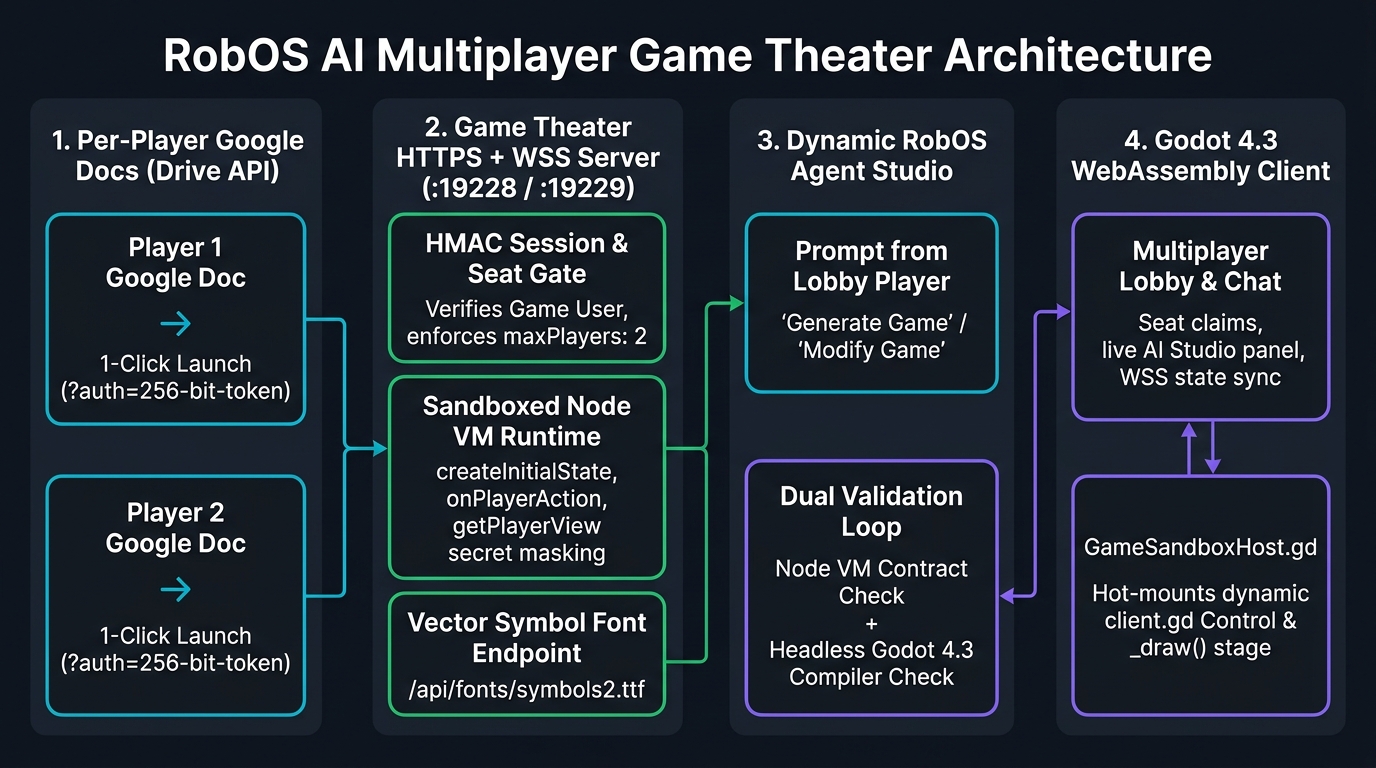
flowchart LR
  D1["Player Google Doc<br/>1-Click Launch (?auth=256-bit-token)"] --> AUTH["Game Theater HTTPS/WSS Server<br/>(:19228 / :19229) + Node VM"]
  AUTH <--> GODOT["Godot 4.3 HTTPS Web Client<br/>Lobby + GameSandboxHost.gd"]
  GODOT --> AGENT["RobOS Agent Builder<br/>Node VM + Headless Godot 4 Check"]
  AGENT --> AUTH
  AGENT --> GODOT
How it works
- Per-Player Google Doc Launchers: Using the same Google Drive v3 capability-token launcher architecture as RobOS Google Calendar and RobOS Shopping Lists, each RobOS player gets their own personal Google Doc (
RobOS Game Theater — <Player> (Player Launch Doc)) with a 1-click Launch Button (?auth=<256-bit-token>). Clicking it authenticates them straight into the lobby as a verified RobOS Game User. - Godot 4 HTTPS Web Client & Multiplayer Lobby: Players connect over HTTPS/WSS (
:19229on LAN or an outboundcloudflaredHTTPS tunnel fronting:19228) into a Godot 4.3 Web Client with real-time lobby presence, player seats, strictminPlayers/maxPlayersenforcement, and lobby chat. - Dynamic AI Game Generation & Live Modification: Any game user in the lobby can describe a new game or request changes to the active game. The RobOS Agent generates both the authoritative Node.js multiplayer game server (
server.js) and the Godot 4 GDScript scene (client.gd), validates both in a Node VM and headlessgodot4compiler check, and hot-loads the stage live across all connected browsers.
CLI & Server Commands
# Start the HTTP (:19228) + Native HTTPS (:19229) server + Outbound HTTPS Tunnel
node packages/game-theater/serve.js

# List RobOS Game Users & launch URLs
node packages/game-theater/bin/game-theater.js players

# Sync per-player Google Launch Docs to Google Drive
node packages/game-theater/bin/game-theater.js sync-docs

# Dynamically generate or modify a multiplayer game via the RobOS Agent
node packages/game-theater/bin/game-theater.js generate "Create a 2-player Hangman game..." --title "Hangman"
node packages/game-theater/bin/game-theater.js modify hangman "Add a round streak counter..."
Validation
node --test packages/robos-test/tests/game-theater/unit.test.js
