

Exposing RobOS Shopping Lists to Android Without a Custom App or VPN: Google-Gated PWA, Outbound HTTPS Tunnel & "Ok Nabu" Voice Sync
We upgraded RobOS Shopping Lists (packages/shopping-lists) so you can use it on an Android phone over 5G or Wi-Fi without installing any custom Android APK or turning on a mobile VPN: an outbound-only Cloudflare HTTPS tunnel fronts the installable Android Progressive Web App (:19225), guarded by a 401 Google Login & 256-bit Google-Doc Capability Gate, while "Ok Nabu" all-day voice commands normalize Whisper phonetic mishearings and auto-sync a redesigned, newest-first 4-column table (with ADDED timestamps) to your private Google Docs.
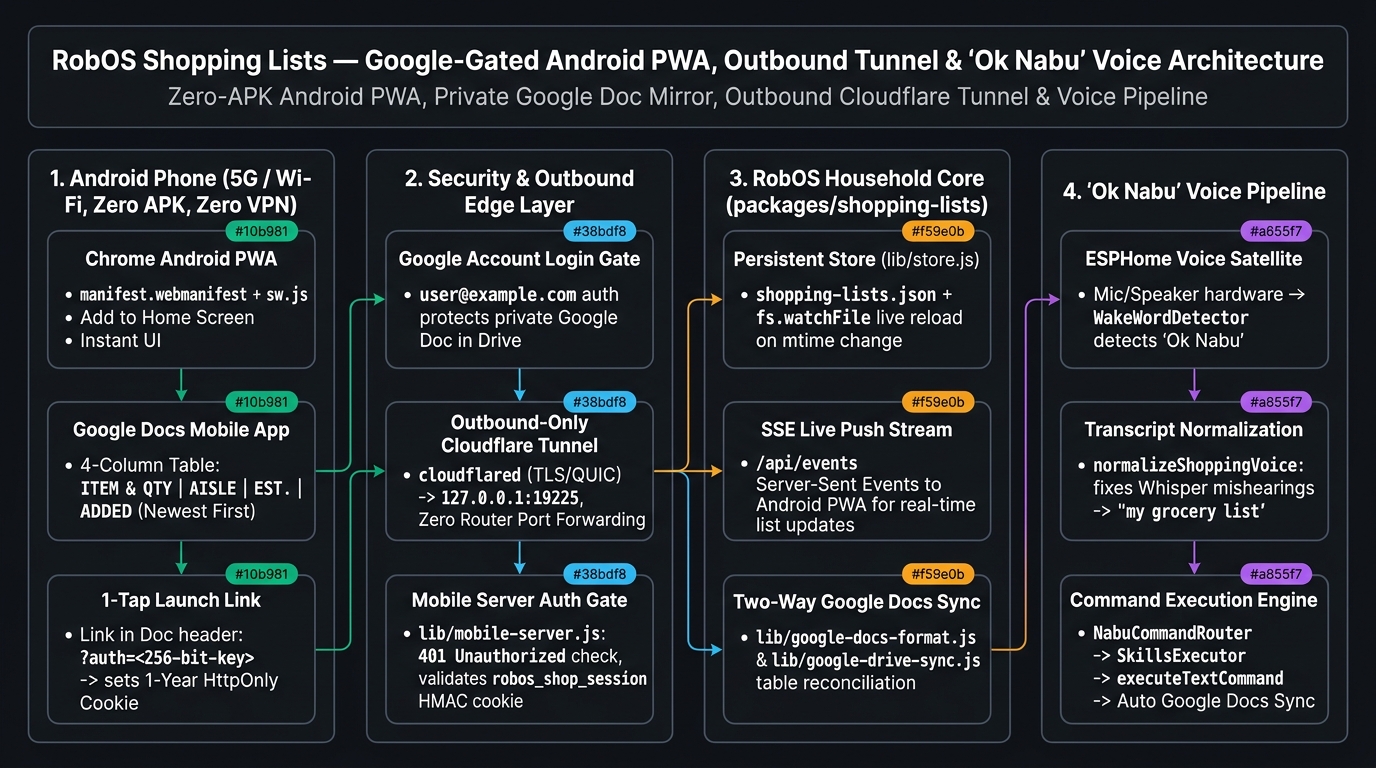
HttpOnly Session Cookie Gate, 3) Persistent Store with fs.watchFile SSE push & two-way Google Docs sync, and 4) All-day "Ok Nabu" voice pipeline with Whisper phonetic normalization.The problem in the grocery aisle. After shipping RobOS Shopping Lists for 1) Grocery, 2) Target, and 3) Costco, three real-world usability and security questions came up immediately:
- Can we expose the local webapp (
:19225) to an Android phone without any custom Android app or mobile VPN? Sideloading a custom APK or remembering to toggle a VPN on your phone in the middle of Costco adds friction. - How do we make that public URL secure without opening router ports? If the webapp is reachable over 5G cellular, what stops a stranger on the internet (or another device on Wi-Fi) from finding it? Can we wrap access in our existing Google login?
- Why did the Google Docs format bury newly added voice items? Speaking "Ok Nabu, add 2 gallons of whole milk and blueberries to my grocery list" suffered from two issues: small local Whisper models (
Xenova/whisper-tiny.en) phonetically misheard"my grocery list"as"the Mike Rotary list"or"my grodery list", and the Google Doc grouped items by aisle without timestamps — burying newly spoken items halfway down the page.
1. Architecture Overview (Mermaid Schematic)
flowchart LR
    subgraph Phone["1. Android Phone (5G / Wi-Fi, Zero APK, Zero VPN)"]
        PWA["Chrome Android PWA\n(manifest.webmanifest + sw.js)"]
        GDocApp["Google Docs Mobile App\n(4-Col Table: ITEM & QTY | AISLE | EST. | ADDED)"]
        LaunchLink["1-Tap Launch Link in Google Doc\n(?auth=256-bit-key -> 1-Yr HttpOnly Cookie)"]
        GDocApp --> LaunchLink --> PWA
    end

    subgraph Edge["2. Security & Outbound Edge Layer"]
        GoogleGate["Google Account Login Gate\n(Protects Private Google Docs in Drive)"]
        Tunnel["Outbound-Only Cloudflare Tunnel\n(cloudflared TLS/QUIC -> 127.0.0.1:19225)"]
        AuthGate["lib/mobile-server.js Auth Gate\n(401 Unauthorized without robos_shop_session)"]
        GoogleGate --> GDocApp
        PWA <--> Tunnel <--> AuthGate
    end

    subgraph Core["3. RobOS Household Core (packages/shopping-lists)"]
        Store[("Persistent Store\nshopping-lists.json + fs.watchFile")]
        SSE["SSE Live Push Stream\n(/api/events to Android PWA)"]
        DriveSync["Two-Way Google Docs Sync\n(lib/google-docs-format.js & google-drive-sync.js)"]
        AuthGate <--> Store
        Store --> SSE --> PWA
        Store <--> DriveSync <--> GDocApp
    end

    subgraph Voice["4. 'Ok Nabu' All-Day Voice Pipeline"]
        Satellite["ESPHome Voice Satellite\n+ WakeWordDetector ('Ok Nabu')"]
        Phonetic["normalizeShoppingVoiceTranscript\n(Fixes Whisper phonetic store mishearings)"]
        Router["NabuCommandRouter -> SkillsExecutor\n-> executeTextCommand -> Auto Drive Sync"]
        Satellite --> Phonetic --> Router --> Store
    end
2. Outbound-Only HTTPS Tunnel + 256-Bit Google-Doc Capability Gate
Instead of opening any inbound port on the home router or Linux firewall (no UPnP, no NAT port forwarding), packages/shopping-lists/serve.js spawns an outbound-only Cloudflare Quick Tunnel (cloudflared tunnel --url http://127.0.0.1:19225):
- Zero Inbound Ports Exposed: Your machine initiates an outbound encrypted TLS/QUIC connection (port
443) to Cloudflare's edge and proxies traffic strictly to127.0.0.1:19225. Your home IP remains completely hidden. - 401 Google Login Gate for Strangers: Every request arriving through the tunnel (or from any non-loopback address) carries proxy headers (
cf-connecting-ip/x-forwarded-for).isLocalLoopbackRequest()inpackages/shopping-lists/lib/mobile-server.jsintercepts unauthenticated requests and returns401 Unauthorizedwith a 🔒 Protected by Google Login screen. - Wrapped in Your Google Login via Private Google Docs: How does your Android phone authenticate without typing passwords? On startup,
store.jsgenerates a persistent 256-bit cryptographic token (64 hex characters, $2^{256}$ combinations) and embeds the authenticated launch URL (https://<tunnel>.trycloudflare.com/?auth=<256-bit-key>) into the 📱 Open Interactive Add/Remove Form link at the very top of your private Grocery, Target, and Costco Google Docs. - 1-Year
HttpOnly; Secure; SameSite=LaxCookie Exchange: Because your Google Docs in Google Drive are already protected by your Google account login, only you (and family members you share the Drive folder with) can open the Google Doc and tap that link. The first time you tap it on your Android phone,mobile-server.jsverifies the 256-bit token in constant time (crypto.timingSafeEqual), sets a 1-yearHttpOnlyHMAC session cookie (robos_shop_session), and issues a302redirect to/so the secret token is immediately stripped from the browser address bar.
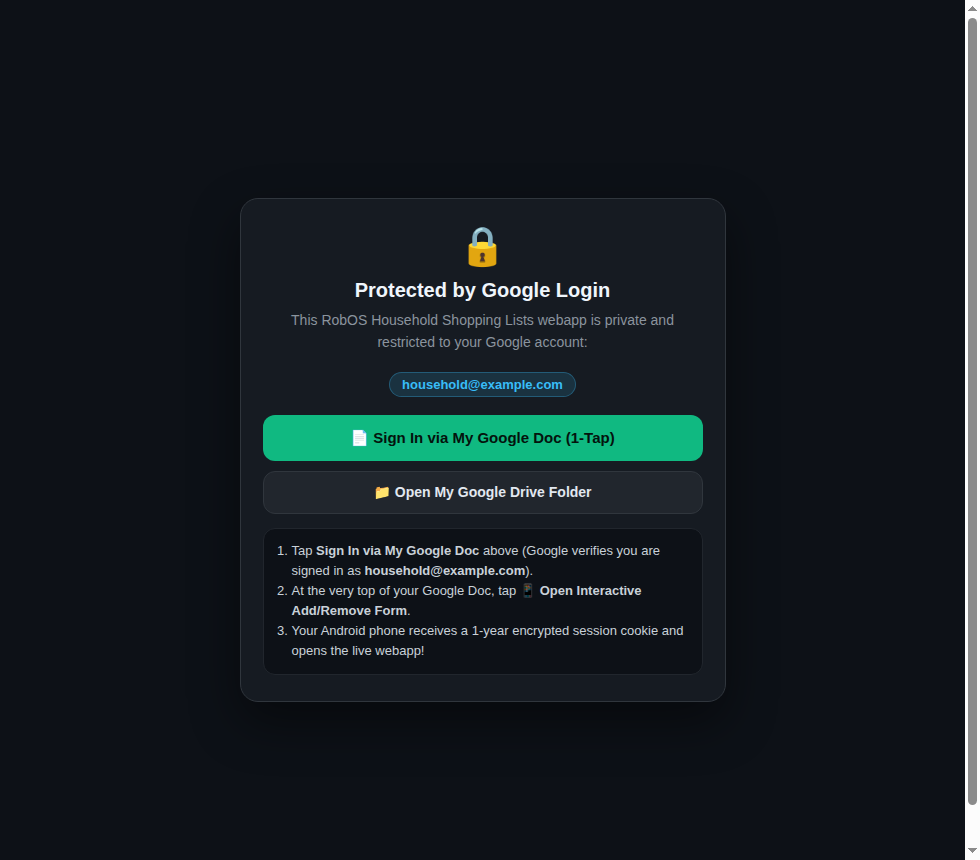
lib/mobile-server.js). Unauthenticated visitors on the tunnel or LAN see a locked gate directing them to sign in via their private Google Doc or Google OAuth.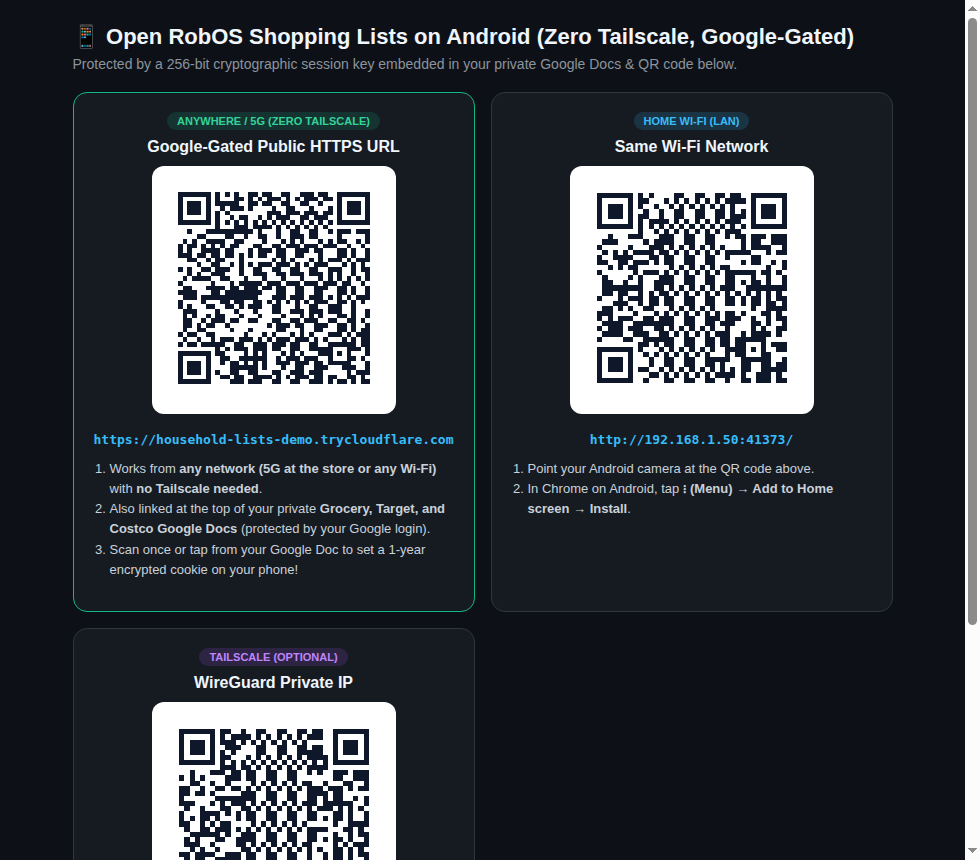
/qr). Scan once or tap from your Google Doc, then tap Chrome's ⋮ → Add to Home screen to install the standalone PWA.3. Redesigned Google Docs Layout: 4-Column Tables, Newest-First Sorting & Added Timestamps
We replaced the multi-heading paragraph layout in packages/shopping-lists/lib/google-docs-format.js with a clean, scannable 4-column table designed for mobile readability in the Google Docs Android app:
- Columns:
ITEM & QTY|AISLE|EST.|ADDED(human-readable timestamp, e.g.,Nov 10, 2026, 11:48 AM). - Newest First at Row #1: Unchecked items in
🛒 Items To Buyare sorted byupdatedAt || addedAtdescending. When you say "Ok Nabu, add 2 gallons of whole milk and blueberries to my grocery list" (or re-add an existing item, which refreshes its timestamp and increments its quantity), those items immediately appear at Row #1 and Row #2 at the top of the table. - Separate Checked-Off Table & Two-Way Round-Trip: Completed items sit in a clean
✅ Checked Off / In Carttable at the bottom with aCHECKED OFFtimestamp column, whileparseGoogleDocText()preserves full two-way plain-text table parsing when pulling mobile edits back from Google Docs.
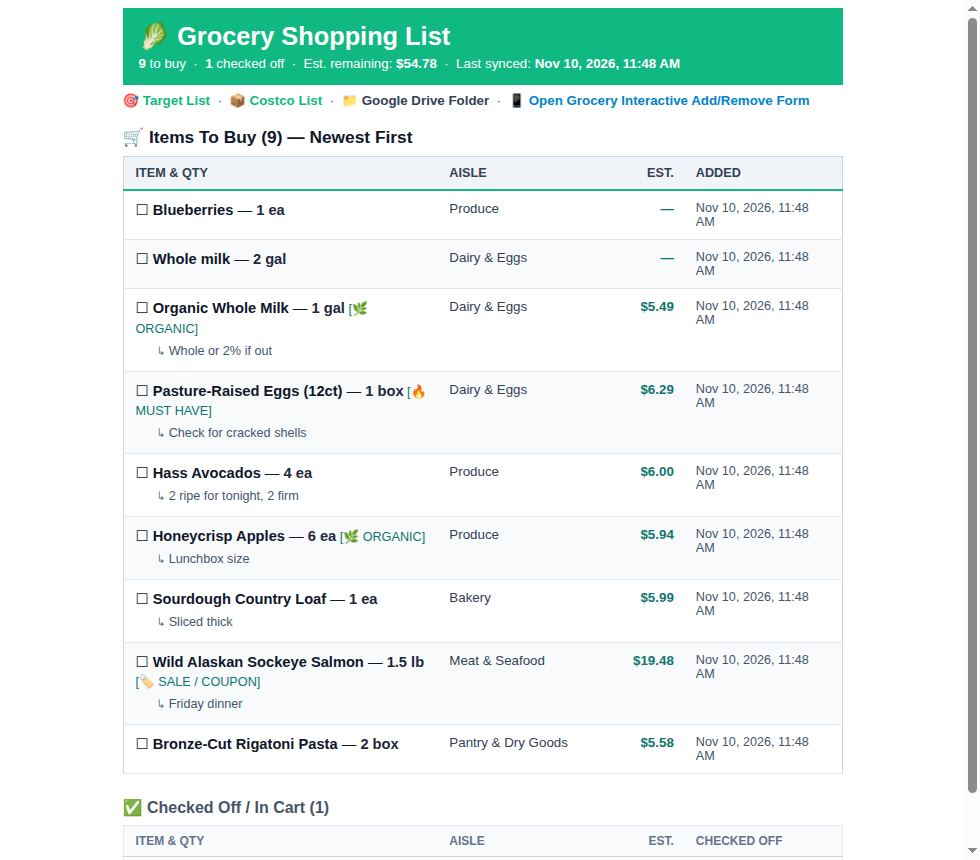
renderGoogleDocHtml). Newly spoken items (Blueberries — 1 ea and Whole milk — 2 gal) appear at Row #1 and Row #2 with their aisle and ADDED timestamp.4. All-Day "Ok Nabu" Voice Commands & Whisper Phonetic Store Normalization
When running all-day voice listening through an ESPHome voice satellite (packages/robos-voice/lib/esphome-voice-service.js and packages/robos-voice/lib/nabu-command-router.js), small local STT models like Xenova/whisper-tiny.en frequently mishear store names in casual speech (for example, transcribing "my grocery list" as "the Mike Rotary list", "my grodery list", or "my glossary list"). We added normalizeShoppingVoiceTranscript() in packages/shopping-lists/lib/defaults.js and wired it across the voice pipeline:
- Normalizes phonetic Whisper store variants (
mike rotary,grodery,groshery,glossary,rosary$\rightarrow$grocery;cosco,cost go,cuzco$\rightarrow$costco) before intent routing and store extraction. - Automatically triggers
syncWithGoogleDrive()after every spoken or CLI mutation so your Google Docs update within ~1 second of speaking to Nabu. - Watches
~/.config/robos/household/shopping-lists.jsonviafs.watchFileinmobile-server.jsso any item added by voice immediately broadcasts over SSE (/api/events) to open Android phone browsers.
# 1. Start the Google-Gated Android PWA server (:19225) + Outbound HTTPS Tunnel
node packages/shopping-lists/serve.js

# 2. Or run local Wi-Fi only (disable outbound Cloudflare tunnel)
SHOPPING_LISTS_NO_TUNNEL=1 node packages/shopping-lists/serve.js

# 3. Test an "Ok Nabu" spoken command from the CLI (auto-syncs Google Docs)
node packages/shopping-lists/bin/shopping-lists.js "Ok Nabu, add 2 gallons of whole milk and blueberries to my grocery list"

# 4. Run the full 9-test unit suite (store, Google Docs table round-trip, voice & Nabu routing)
node --test packages/robos-test/tests/shopping-lists/unit.test.js