


RobOS Movie Player
Open-source cinema, TV series & Tablo OTA DVR player sharing the warm theater theme of RobOS Audio Player: 100,000-movie & TV series library, Show & Season Navigator, Tablo 4th Gen OTA DVR live & recorded broadcast streaming, TMDB/TVmaze posters, AI Watchlists, Virtual Cinema Host, synced .srt/.vtt subtitles, and a 3-row visual image-card Roku & Smart TV app.
packages/movie-player
Full Interactive Walkthrough & Live Roku TV Tour: See the flagship landing page at
/movie-player/(or/video-player/).
RobOS Movie Player (packages/movie-player) is the cinema and video companion to RobOS Audio Player. It shares the exact same warm dark theater palette (#15120f, #1c1814, #26211b, #e8a33d, #f1e9dc) and multi-pane architecture, translating every audio player capability—100,000-item virtualized libraries, cloud byte-range streaming, AI playlists, a spoken Virtual Host, open-source metadata/artwork enrichment, procedural soundscapes, and zero-cloud Smart TV & Roku OS streaming—to movies, TV series, and video collections.
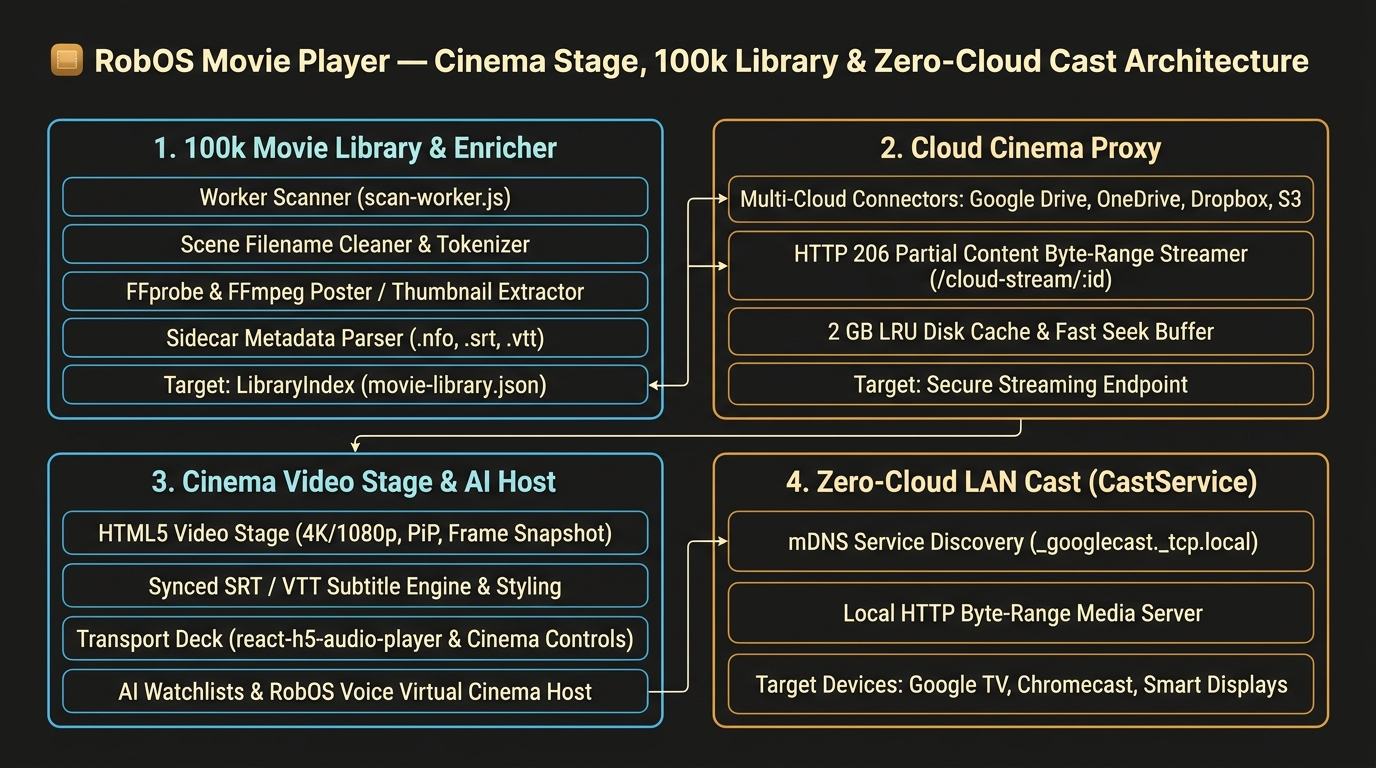
flowchart TD
    subgraph LibraryAndWatchlists["100k Movie Library & Watchlist Engine"]
        Scanner["Worker Thread Scanner\n(scan-worker.js)"] --> Cleaner["Scene Filename Cleaner &\nffprobe / .nfo / music-metadata"]
        Cleaner --> LibIndex[("Movie Library Cache\nmovie-library.json")]
        ArtStore[("Content-Addressed Poster Cache\n~/.cache/robos/movie-player/art")]
        Cleaner --> ArtStore
        WLStore[("Watchlist Store\nmovie-playlists.json")] <--> WLEngine["Watchlist & M3U Engine\n(AI Watchlists / Reorder / Seed)"]
    end

    subgraph CloudCinema["Cloud Cinema Byte-Range Proxy"]
        CloudProviders["Google Drive / OneDrive /\nDropbox / S3"] --> RangeProxy["HTTP 206 Partial Content Server\n(/cloud-stream/:trackId)"]
        RangeProxy <--> LRUCache[("2 GB LRU Video Cache\n~/.cache/robos/movie-player/cloud")]
    end

    subgraph CinemaStage["Now Playing Cinema Stage & AI Host"]
        VideoStage["HTML5 Video Stage\n(4K/1080p, Speed, Fit, PiP, Frame Snapshot)"]
        TransportDeck["Synchronized Transport Deck\n(react-h5-audio-player .robos-rhap-theme)"]
        Subtitles["Synced Subtitles & Dialogue\n(.srt / .vtt / .lrc / ffmpeg stream)"]
        VirtualHost["Virtual Cinema Host\n(AI Intros + RobOS Voice TTS)"]
        VideoStage <--> TransportDeck
        Subtitles --> VideoStage
        VirtualHost --> VideoStage
    end

    subgraph OutputRouting["Local & Zero-Cloud Smart TV Cast"]
        LocalScreen["Local Cinema Display &\nPicture-in-Picture"]
        CastSvc["CastService HTTP Range Server\n& CastV2 Media Receiver"]
        mDNS["LAN mDNS Discovery\n(_googlecast._tcp.local :8009)"]
        SmartTVs["Google TV / Chromecast /\nSmart Displays"]
    end

    LibIndex --> VideoStage
    WLEngine --> VideoStage
    RangeProxy --> VideoStage
    VideoStage --> LocalScreen
    VideoStage --> CastSvc
    mDNS --> CastSvc
    CastSvc -- "HTTP 206 Video/Audio Stream" --> SmartTVs
Features
1. Cinema Video Stage & Synchronized Transport Deck (Now Playing)
- Theater Video Viewport: Plays
.mp4,.mkv,.webm,.mov,.m4v,.avi,.ogv,.ts,.m2ts, and.mpgfiles locally or over HTTP byte-range streams. - Live On-Screen Closed Captions: Renders active subtitle cues in a high-contrast amber-bordered theater caption pill directly over the bottom of the video stage (
CC On / Off). - Stage Controls:
- Playback Speed: Cycle between
0.5x,0.75x,1x,1.25x,1.5x, and2x. - Aspect Fit: Switch between
CONTAIN(letterbox),COVER(fill frame), andFILL(stretch). - Theater Mode & Fullscreen: Expand the stage vertically (
Theater) or double-click the video viewport for native fullscreen. - Picture-in-Picture (
PiP): Float the movie in an always-on-top Picture-in-Picture window while working in other apps. - Frame Snapshot (
Frame): Captures the exact current video frame at native resolution to a PNG in~/Pictures/RobOS Movie Snapshots/.
- Playback Speed: Cycle between
- Synchronized Transport Deck: Uses the
.robos-rhap-themetransport bar (react-h5-audio-player) with 10-second jump steps, shuffle, repeat, and a Screen Output selector for one-click switching between local playback and LAN Google Cast TVs.
2. Synced Subtitles & Dialogue Panel
- Multi-Format Subtitle Parser (
lib/lyrics.js): Automatically discovers sidecar.srt(SubRip),.vtt(WebVTT),.en.srt,.en.vtt, or.lrcfiles beside any video, or extracts embedded subtitle tracks (0:s:0) on the fly viaffmpeg. - Interactive Transcript: Highlights and auto-scrolls the current dialogue line as the movie plays. Clicking any line in the panel seeks the video (and any active Cast TV) directly to that timestamp.
- One-Click Subtitle Import: Load external
.srt,.vtt, or.lrcfiles for any movie via the Load .SRT/.VTT button; imported captions are cached in~/.cache/robos/movie-subtitles/<trackId>.json.
3. 100,000-Movie Virtualized Library Browser
- Browse by Cinema Category: Collections (franchises, box sets, TV series), Directors, Movies, Genres, Decades, Studios (writers/composers), Watchlist (Loved), Recently Added, Recently Watched, Most Watched, and Folders.
- Scene Release Filename Cleaner (
cleanMovieFilename): Automatically strips scene tags (2160p,1080p,720p,4K,UHD,HDR10,BluRay,WEB-DL,WEBRip,x264,x265,HEVC,AV1,AAC,DTS, release groups) while extracting the 4-digit release year,SxxExxseason/episode numbers, resolution badges (4K,1080p,720p), and video codecs. - Content-Addressed Poster Cache: Embedded cover art, folder posters (
poster.jpg,cover.jpg,fanart.jpg,folder.jpg), and extracted video frames are hashed (sha1) into~/.cache/robos/movie-player/art/so 100,000 movies never hold image buffers in RAM.
4. AI Watchlists & Virtual Cinema Host (Optional AI)
- ✦ AI Watchlist (
src/AiPlaylist.jsx/lib/ai-playlist.js): Describe a movie marathon, director retrospective, era, or mood (e.g., “4K sci-fi double feature for a rainy night” or “short animated films under 20 minutes”). Your configured RobOS agent picks and orders films from your indexed library, falling back to a deterministic local scorer when offline. - Virtual Cinema Host (
src/useVirtualDj.js): The movie counterpart to the Audio Player’s Virtual DJ. When enabled, the agent writes short 1–2 sentence cinema introductions a few movies ahead in the screening queue (in personas like Classic Theater Host, Film Festival Curator, or Late-Night Drive-In), spoken aloud between films with RobOS Voice (or cast to your Smart TV).
5. AI & Open-Data Movie Metadata / Poster Fixer
- ✦ AI Fix Metadata (
src/AiFixMetadata.jsx/lib/ai-metadata.js):- Cleans messy scene filenames and folder hierarchies (
Director/Collection/Movie (Year).mkv). - Reads Kodi/Jellyfin/Plex
.nfosidecar XML files (<title>,<director>,<set>,<studio>,<year>,<genre>). - Probes video/audio streams with
ffprobefor exact dimensions (3840x2160→4K), codec (HEVC,AV1,H.264), and duration. - Extracts a representative video frame (at 10% runtime) via
ffmpegas a real thumbnail poster when no poster image exists, or synthesizes a warm cinema SVG poster. - Optionally invokes your RobOS coding agent with
@skill(robos:fix-media-metadata)and writes updated tags/posters back to local.mp4/.mkvcontainers via losslessffmpeg -c copy.
- Cleans messy scene filenames and folder hierarchies (
6. Cloud Cinema Storage & Zero-Cloud Smart TV Cast
- Metadata-Only Cloud Indexing (
lib/cloud-storage.js): Indexes movies across Google Drive, Microsoft OneDrive, Dropbox, and S3 without downloading video bodies. On play or Cast, streams video on demand through a local HTTP206 Partial Contentproxy (/cloud-stream/:trackId) backed by a configurable 2 GB LRU disk cache. - Zero-Cloud LAN Smart TV Streaming (
lib/cast-service.js): Discovers Google TV, Chromecast, and Nest Hub displays via mDNS (_googlecast._tcp.local) and streams local or cloud movies directly over the LAN. Also includes the Theater Lobby Clock Display and Cast Theater Ambient Soundscape cards.
7. Tablo 4th Gen OTA DVR & 3-Row Roku OS Channel
- Tablo 4th Gen LAN Client (
packages/robos-lib/tablo-client.js): Discovers Tablo 4th Gen OTA DVR appliances on the LAN (:8887), signs REST requests withHMAC-MD5(Authorization: tablo:<key>:<sig>), and fetches sports events, series episodes, movies, and local news recordings alongside OTA guide channels (47.1 WMSNFOX,15.1 WMTVNBC,27.1 WKOWABC,3.1 WISC-TV). - Broadcast Recording Thumbnails + Live Frame Capture: Caches 16:9 broadcast recording snapshots (
~/.cache/robos/tablo-images/) and automatically captures a live 640×360 JPEG frame viaffmpeg -frames:v 1for active in-progress (state: "recording") broadcasts. - Dual-Path Streaming & 3rd Roku Top Tab (
TABLO DVR): Adds a 3rd top-levelTABLO DVRtab to the 3-row Roku OS SceneGraph channel and:19210/movie-playerportal, serving real-timeH.264/AACfragmented MP4 streams (/api/tablo/stream) to desktop players and rewritten native 60fpsMPEG-2/AC-3HLS playlists (/api/tablo/roku.m3u8) to Roku TVs.
8. Same Library and Watch History on Every Computer
- Portable watch history (
packages/robos-lib/media-history.js): every resume point, finished episode, unwatched mark and loved title is also kept by what it is (tv:the office:s3:e12,movie:dune:2021) rather than by its file path, so another computer that streams the same Google Drive folder knows where you left off. - Google Drive sync: with RobOS Preferences → Config Sync → Back up to my Google Drive on each computer, the player syncs its folders, playlists and watch history with the vault itself (a few seconds after it opens, every 2 minutes, and shortly after you watch something). Watch history changed on two computers merges entry by entry, so it never needs a conflict decision. Folders added on the other computer are indexed when they arrive, and the open window shows “Watch history updated from
". - Where did we leave off?: RobOS Voice and Home Speaker answer “what season of The Office did we leave off on?”, “what episode are we on in Severance?”, “have we seen Dune?”, “what are we watching?” and “continue watching The Office”. Agents use the
robos-mediaMCP server (node packages/movie-player/bin/media-mcp.js) or the CLI (node packages/movie-player/bin/watch-status.js show "the office"); see themedia-watch-statusskill. - Control API:
GET /api/watch-status?show=,/api/movie-status?title=,/api/continue-watching,/api/history,/api/shows,/api/media-sync;POST /api/set-watched,/api/play-next-episode,/api/media-sync-now(token in~/.config/robos/movie-player-control.json).
Files & Configuration
- App directory:
packages/movie-player/ - Library cache:
~/.config/robos/movie-library.json(stays on each computer; rebuilt from the folders) - Watchlists storage:
~/.config/robos/movie-playlists.json - Watch history (synced):
~/.config/robos/media-history/movie-player.json - Watch counts & Loved marks (this computer’s track IDs):
~/.config/robos/movie-track-stats.json - Managed folders:
~/.config/robos/movie-folders.json - Poster art cache:
~/.cache/robos/movie-player/art/ - Subtitles cache:
~/.cache/robos/movie-subtitles/ - Cloud LRU video cache:
~/.cache/robos/movie-player/cloud/ - Frame snapshots:
~/Pictures/RobOS Movie Snapshots/ - Control API:
~/.config/robos/movie-player-control.json - Snapshot debug port:
19214
More in Desktop & Command Center

App Launcher
A searchable grid of the desktop applications installed on the machine, including the RobOS apps.

Desktop Customizer
A slash-command console that changes GNOME settings (clock, taskbar, theme, shortcuts, startup apps) and keeps git-backed snapshots to roll back.

Desktop Dashboard
A full-screen window that sits at desktop level and shows a grid of widgets; today it contains one clock and date widget.

Desktop Manager
The background process that launches RobOS apps, restarts the ones marked keep-alive, owns the tray icon and listens on a Unix socket.

Desktop Shell
Full-screen top bar and bottom dock for RobOS on a GNOME/X11 session, replacing the GNOME panel while it runs.

Desktop Widgets
A transparent panel on the right edge of the desktop with five status widgets: active task, system stats, AI agent, work journal and security.

Dev Central
Your daily task list: issues from your task servers as an epic tree, with buttons to start design or implementation agents and to open the related PR.

Dev Discussions
A chat-style view of discussion threads attached to tasks and pull requests, stored in a local cache with optional posting to GitHub.

Icon Manager
Shows the icon of every installed RobOS app, lets you replace one, and rewrites the apps' installed icon.svg and .desktop Icon= lines.

Manager Dashboard
Team metrics for one GitHub repository: open issues, merged PRs, PR cycle time, deploy frequency, approval rate, tasks by stage and PRs per developer.

Notifications Center
Shows the notification history stored in ~/.config/robos/notifications.json, with filters by category, tier and date, and edits the notification preferences.

Package Manager
Prototype screen for listing apps and daemons with start, stop and health-probe buttons. It shows built-in sample data.

RobOS App Manager
Choose, download, launch and remove RobOS apps

RobOS Audio Player
Open-source audio player, custom playlist engine, procedural focus soundscapes, and zero-cloud Google Cast smart speaker streaming.

RobOS Dashboards
Create KGraph graphical dashboards from card layouts where each widget is any RobOS component, embeddable via <robos-dashboard> and castable to Smart TVs

RobOS GNOME Desktop App Installer
Install, manage, and repair GNOME Desktop shortcuts, App Grid launchers, multi-scale icons, and Dock favorites for all RobOS apps.

RobOS Google Calendar
Installs Mozilla Thunderbird if needed and writes Google Calendar, Google Contacts and optional Gmail settings into its profile for a Google account from Cloud Accounts.
RobOS Home for Android
The home screen of the RobOS phone: the time, the date and every app, with the RobOS apps first.

RobOS Home Speaker
Two-way smart speaker intercom, Home Assistant Voice PE (NC-VK-9727) hands-free voice approval, neural TTS broadcast, and soundboard.

RobOS Preferences
Settings window for RobOS apps: Config Sync & Sharing (cloud backup and shared configs), optional AI API mode, agent tiers, prompt security, GitHub accounts, IDE, notifications, journal and theme.
RobOS Preferences for Android
Signs in to Google Drive on an Android phone, opens your RobOS Config Sync backups and restores the settings phone apps use.

RobOS Smart TV Studio
Pair Smart TVs, build & sideload Developer Mode TV apps (LG webOS, Samsung Tizen, Google TV/ADB, Roku), serve the 10-foot D-Pad TV Portal (:19210), and stream 4K games.

Search Indexer
Builds plain-text lists of file paths under folders you choose, which RobOS text areas search for @-mentions.

Software Center
Install and manage coding-agent CLIs, IDEs, browsers, game tools and utilities on Windows or Linux.

System Logs Viewer
Viewer for the structured logs that RobOS apps write to ~/.config/robos/logs, with search and level filters.

Toast Daemon
Shows overlay toast windows for new entries in ~/.config/robos/notifications.json, with tiers, categories, do-not-disturb and anti-spam limits.

Workspace Manager
Window showing a sample multi-repo task workspace with sync, teardown and open-in-IDE buttons that return canned results. Discovery helpers exist in the code but are not wired to the window.