

App Suite · Home Theater, TV Series & Big-Screen Casting
RobOS Movie & Video Player
Your movies and TV shows, on your desktop and on your living-room TV. RobOS Movie Player (packages/movie-player) shares the warm dark theater theme and multi-pane architecture of RobOS Audio Player, scaled for 100,000 films and multi-season TV series — with automatic scene-filename cleaning, official TMDB & TVmaze posters, a dedicated TV Shows & Season Navigator, synced .srt / .vtt subtitles, SFTP & cloud byte-range streaming, optional ✦ AI Watchlists and a spoken Virtual Cinema Host, plus a native 3-row visual image-card app for Roku OS and Smart TVs.
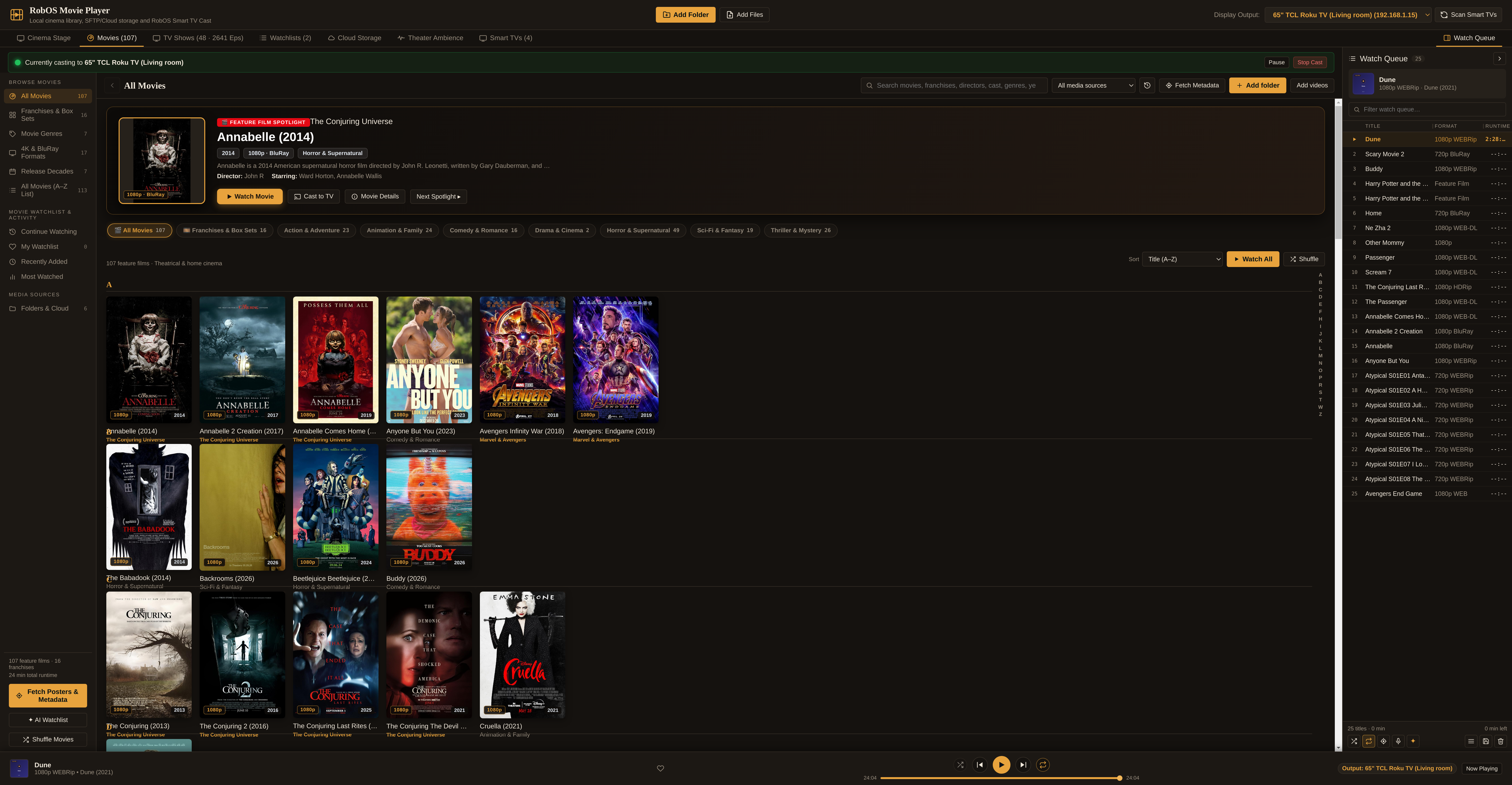
- 1. Movies Theater2:3 posters, spotlight hero, franchises, genres & 4K/BluRay filters
- 2. TV Shows & Seasons48 series & 2,641 episodes grouped by Show → Season → Episode
- 3. Roku & Smart TV App100% visual image-card 3-row TV interface with D-Pad navigation
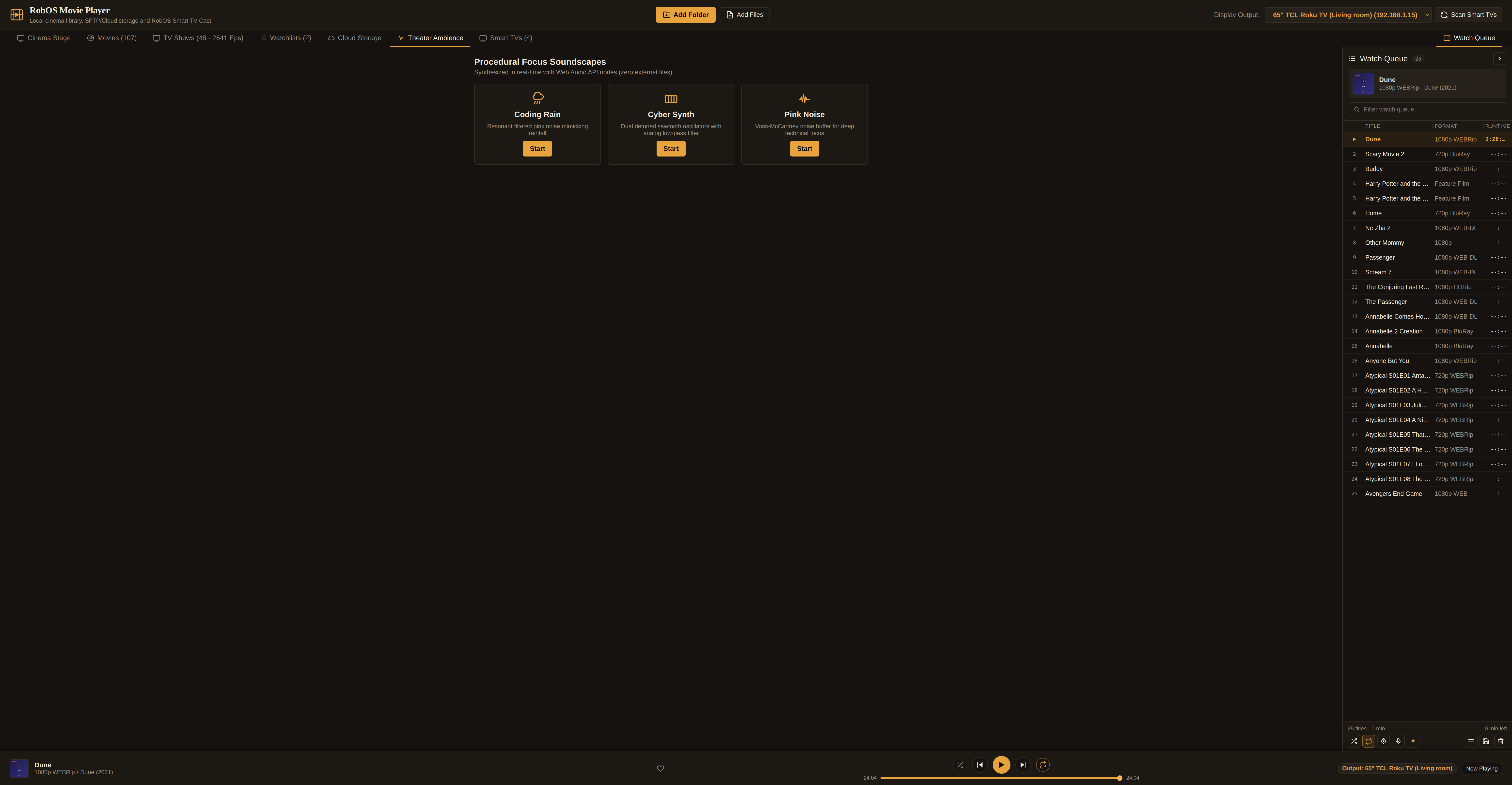
- 4. Cinema Stage & Subtitles16:9 HTML5 video, synced .srt/.vtt dialogue, PiP & frame capture
- 5. AI Watchlists & HostOptional AI movie marathons & spoken RobOS Voice introductions
- 6. Poster & Metadata FixerTMDB, TVmaze, Wikidata, .nfo sidecars, ffprobe & ffmpeg
- 7. SFTP & Cloud StreamingZero-download indexing + HTTP 206 byte-range streaming
- 8. Architecture & CLISystem diagram, file layout, and reproducible test commands
Works 100% without AI. Like every app in RobOS, Movie Player is a complete, fast local and LAN home theater out of the box. Public poster and plot enrichment uses open public APIs (TMDB/TVmaze/Wikidata) and local
ffprobe/ffmpeginspection. AI features (✦ AI Watchlist, Virtual Cinema Host, and agentic ✦ AI Fix Metadata) are optional buttons that use the coding-agent CLI you already signed in to.
1. Movies Theater: 100,000-Film Virtualized Poster Browser
Movie folders rarely arrive with clean metadata: filenames look like Avengers.Endgame.2019.2160p.UHD.BluRay.x265.10bit.HDR-GROUP.mkv, and duplicate encodes (`720p`, `1080p BluRay`, `2160p WEB-DL`) often sit side by side. During background worker-thread scanning (lib/track-metadata.js), cleanMovieFilename() strips release noise while extracting the canonical film title, 4-digit release year, resolution badge (4K UHD, 1080p, 720p), source medium (BluRay, WEB-DL, HDRip), and video codec (HEVC, AV1, H.264).
- Feature Film Spotlight Banner: Highlights a featured film at the top of the library with its 2:3 theatrical poster, franchise badge (e.g. The Conjuring Universe, Marvel & Avengers, The Lord of the Rings, Harry Potter Wizarding World), release year, resolution badge, director and cast credits, plot synopsis, and one-click ▶ Watch Movie or 📺 Cast to TV actions.
- Cinema Navigation Views: Switch between All Movies (virtualized 2:3 poster grid with an A–Z jump rail), Franchises & Box Sets (auto-grouped sagas and trilogies), Movie Genres (Action & Adventure, Animation & Family, Comedy & Romance, Drama & Cinema, Horror & Supernatural, Sci-Fi & Fantasy, Thriller & Mystery), 4K & BluRay Formats, Release Decades, and All Movies (A–Z List).
- Watch Progress & Resume Tracking: Remembers your exact playback timestamp (`positionSec`, `progressPct`, `inProgress`, `completed`) across desktop and Smart TV sessions, surfacing partially watched films under Continue Watching.
2. TV Shows & Season Navigator: 48 Series & 2,641 Episodes
Movies and episodic television need different browsing ergonomics. Instead of dumping 2,600 episodes into a flat movie grid, RobOS Movie Player automatically detects episodic patterns (`S01E01`, `1x02`, `Season 1`, `Book One`, `Part II`, `Extras/Specials`) in lib/library-index.js and separates them into a dedicated top-level TV Shows tab.
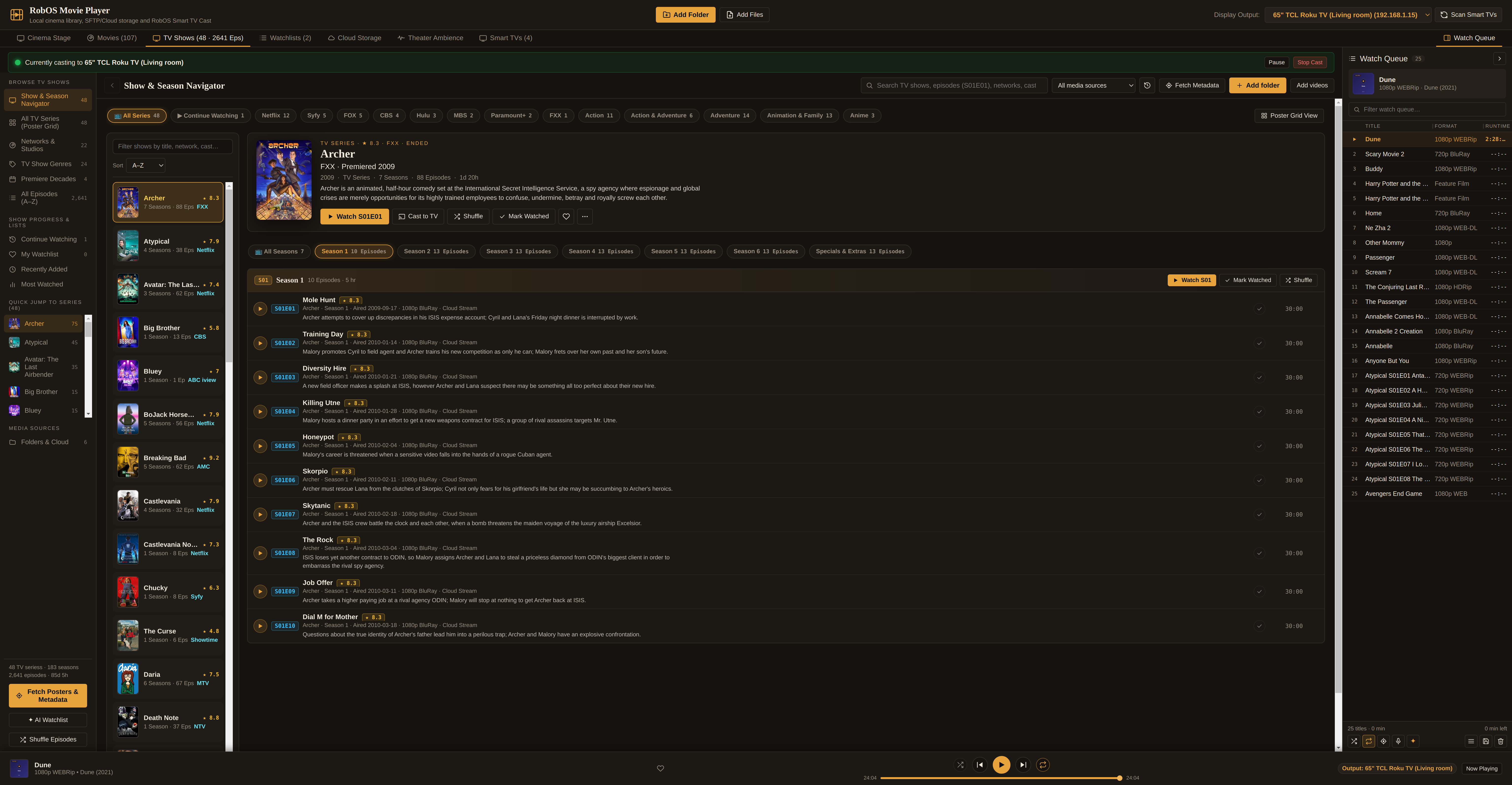
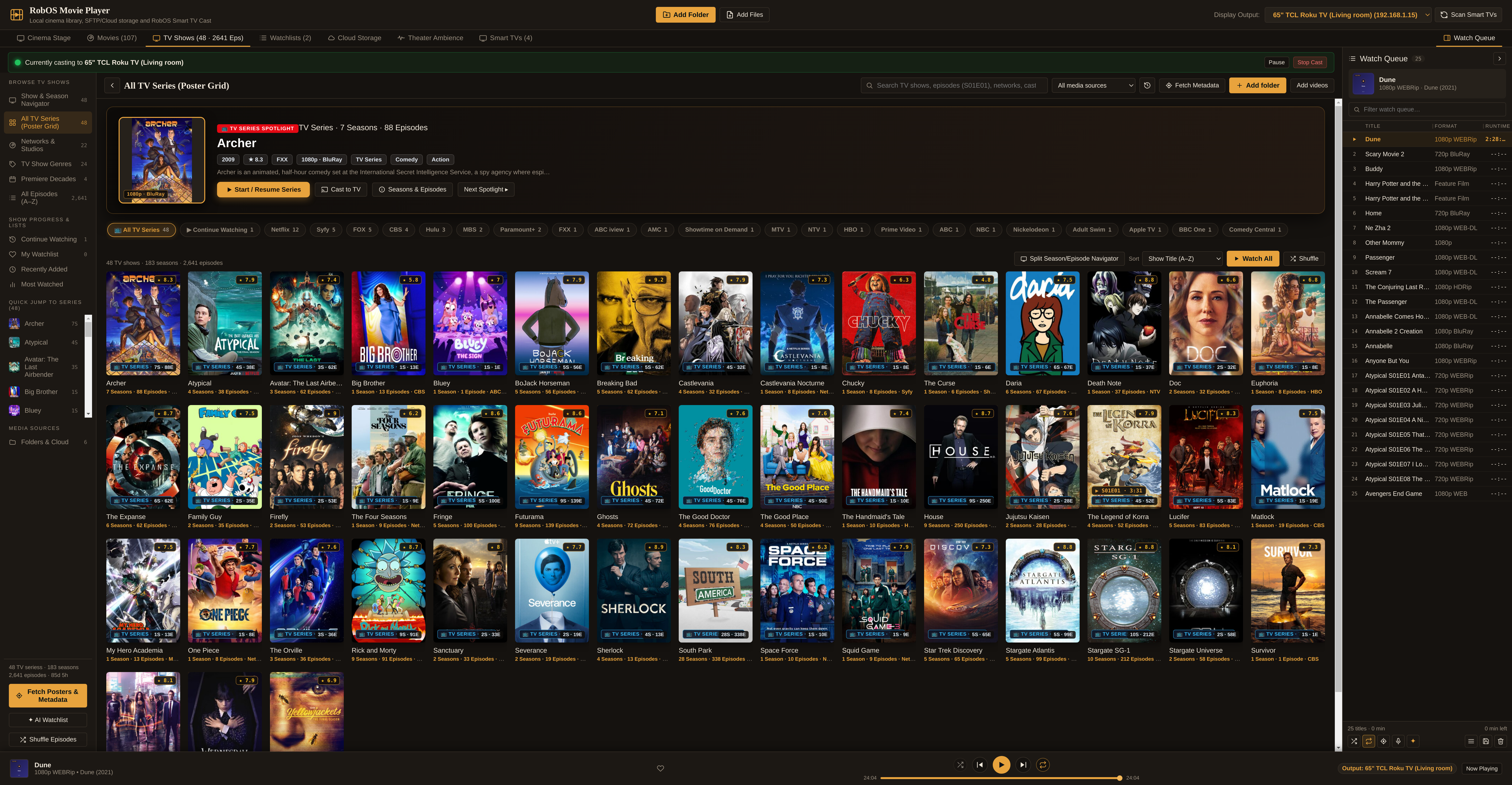
| TV Shows Workspace View | What it organizes |
|---|---|
| Show & Season Navigator | Three-tier master-detail browser: searchable Series list on the left → Series Hero header & horizontal Season pills (All Seasons, Season 1, Season 2, …, Specials & Extras) → Episode list with S01E01 badges, TVmaze star ratings, air dates, and plot summaries. |
| All TV Series (Poster Grid) | 2:3 poster wall of every series in your library with one-click filter chips by network (Netflix, Syfy, FOX, CBS, Hulu) and genre. Clicking any series poster opens its seasons and episodes. |
| Networks & Studios | Groups series by original broadcast network or streaming studio (HBO, Netflix, Apple TV+, FX / FXX, AMC, Nickelodeon, Cartoon Network, Showtime). |
| TV Show Genres & Decades | Filter series across 24 television genres (Sci-Fi & Fantasy, Crime & Mystery, Animated Sitcom, Espionage) or premiere decade (1990s–2020s). |
| Up Next & Continue Watching | Tracks watch progress per episode and computes each show's Up Next episode (the currently in-progress episode or the next unwatched episode in season order). |
3. Roku OS & Smart TV App: 3-Row 100% Visual Image-Card UX
When you sit 10 feet from a 65-inch TV with a directional remote, plain text menus feel dated and slow. RobOS Movie Player pairs with RobOS Smart TV Studio (packages/robos-lib/tv-engine.js) to sideload a native Roku OS SceneGraph channel (and serve an identical 10-foot web portal at :19210/movie-player for LG webOS, Samsung Tizen, and Google TV / Android TV) where every selectable item in every row is an image card with text.
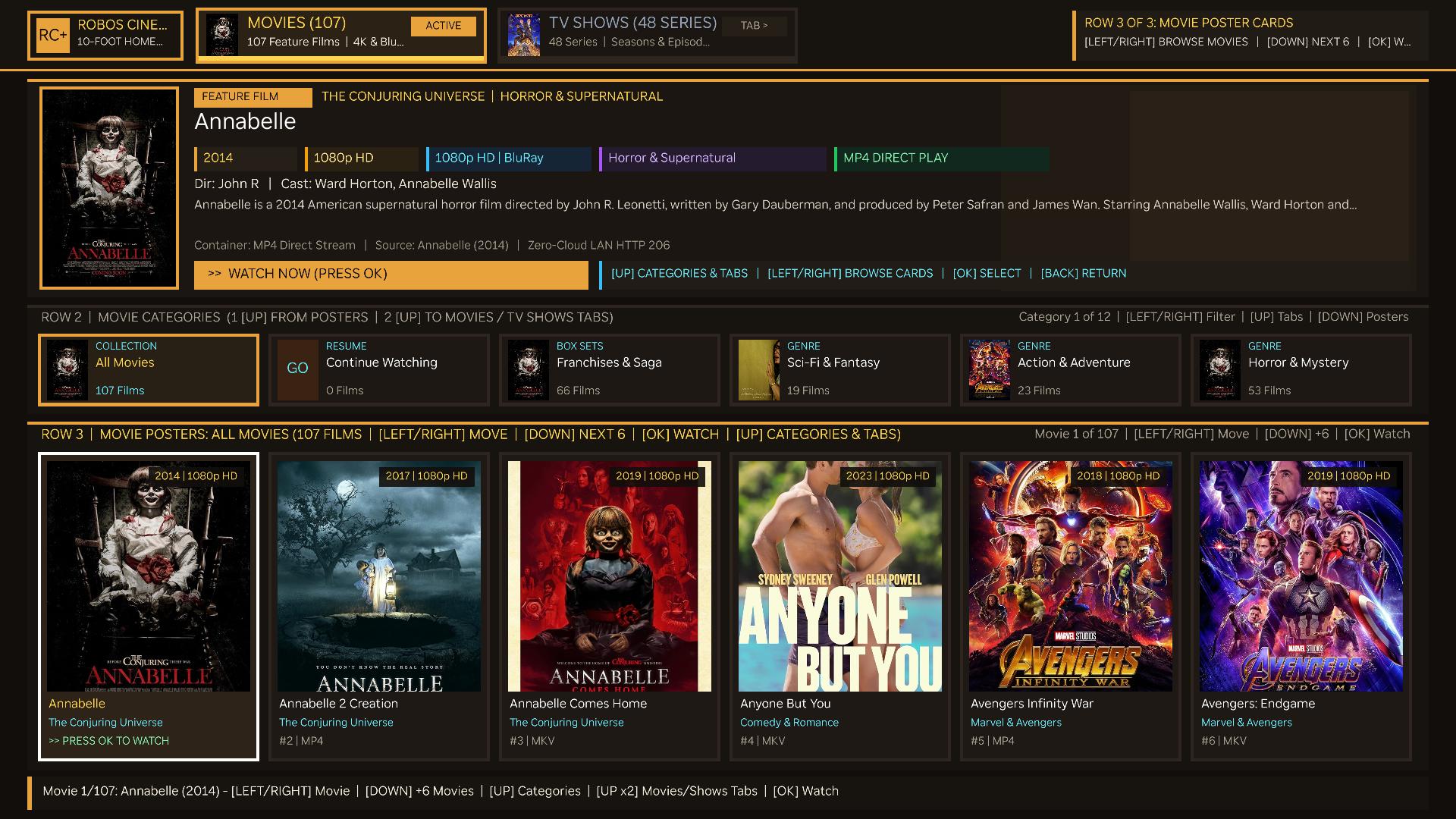
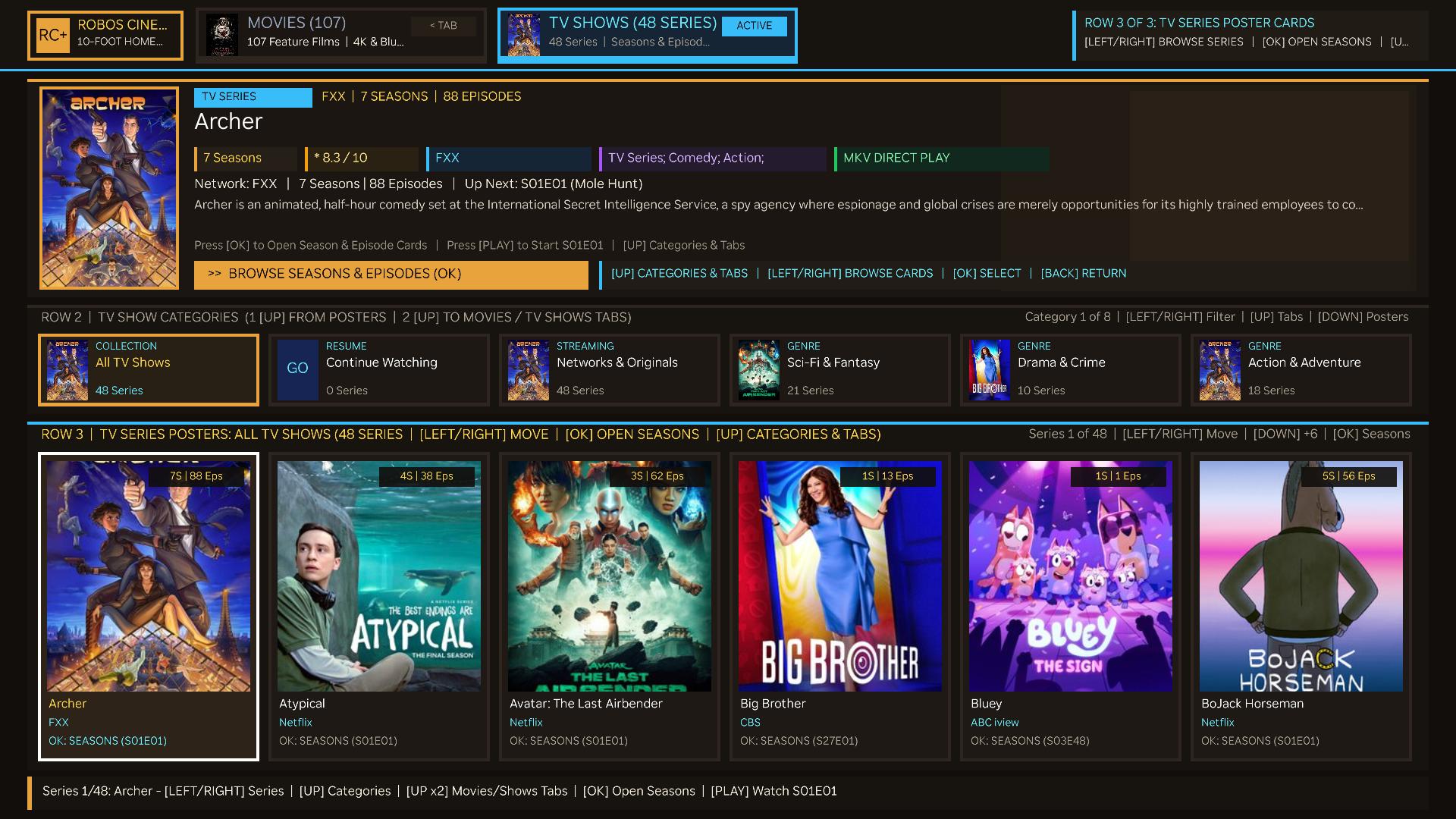
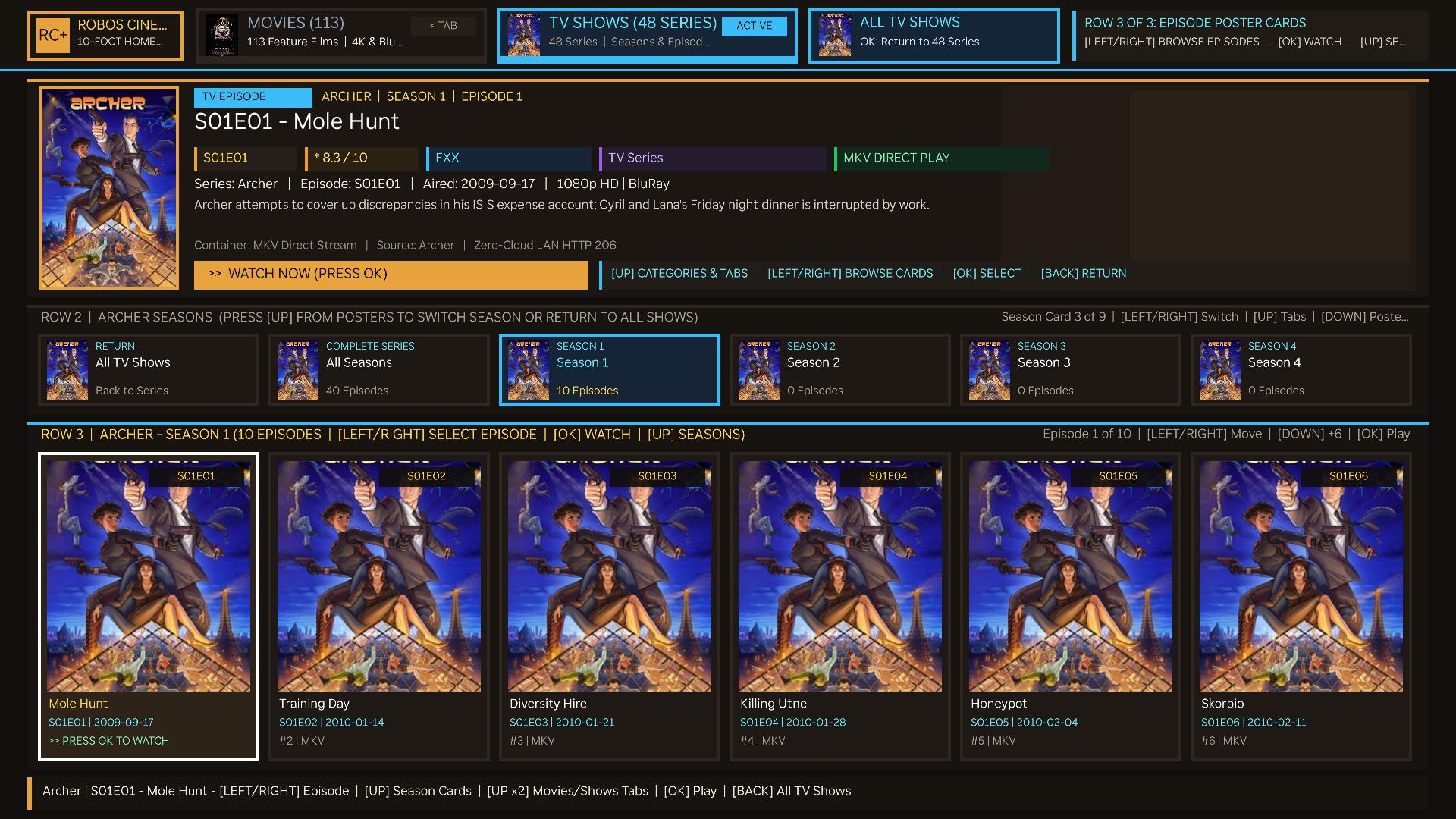
All All Episodes, S01 Season 1, S02 Season 2…) and Row 3 into Episode Cards (S01E01 Mole Hunt, S01E02 Training Day…).Thoughtful 2D Remote D-Pad Navigation
The entire 10-foot TV experience is organized into 3 visual rows so you can reach the Movies and TV Shows tabs in at most two presses of [UP] from anywhere on screen, and move [LEFT] / [RIGHT] smoothly across whichever row is focused:
| Row | What is in the row | [LEFT] / [RIGHT] behavior | [UP] / [DOWN] & [OK] behavior |
|---|---|---|---|
| Row 1: Top Image Tabs | Movies (107) image tab card, TV Shows (48 Series) image tab card, and contextual All TV Shows back-card when viewing a show's seasons. | Instant live-switch between the Movies theater and TV Shows library (wrapping cleanly at ends). | [DOWN] or [OK] drops into Row 2 Category/Season cards. |
| Row 2: Category & Season Image Cards | 6-card sliding shelf of visual category cards (each with a representative thumbnail poster, category title, and live film/series count) — or Season Image Cards (`All Seasons`, `Season 1`, `Season 2`…) when inside a TV series. | Slides the 6-card window across all 12 Movie categories, 8 TV Show categories, or all Seasons of the active show, live-filtering Row 3 posters as you move. | [UP] jumps straight to Row 1 Tabs; [DOWN] or [OK] drops into Row 3 Poster cards. |
| Row 3: Poster & Episode Cards | 6-card sliding shelf of large 2:3 Movie posters, TV Series posters, or Episode cards, synchronized with the Hero Spotlight banner above. | Moves across posters one by one (wrapping around the collection) and updates the Hero Spotlight title, ratings, cast, and synopsis in real time. | [UP] moves to Row 2 Categories/Seasons (and one more [UP] reaches Row 1 Tabs); [DOWN] pages ahead +6 posters; [OK] starts hardware video playback (or opens a TV show's seasons). |
4. Cinema Stage, Synced Subtitles & Smart TV Output
Clicking any movie or episode (or switching to the Cinema Stage tab) opens the 16:9 theater viewport and synchronized transport deck:
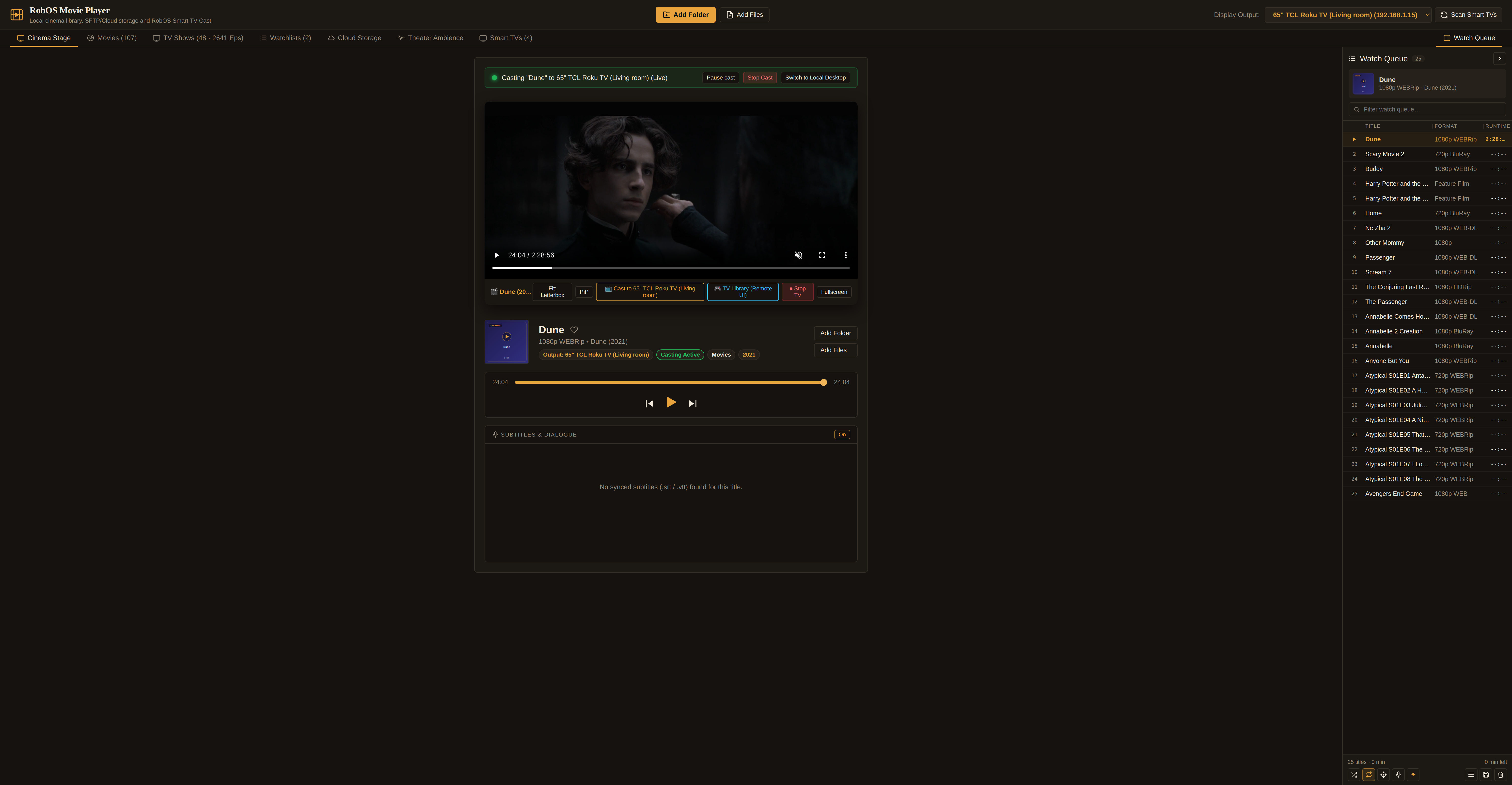
<video> viewport with letterbox/cover aspect controls, Picture-in-Picture (PiP), one-click Cast to 65" TCL Roku TV and TV Library (Remote UI) buttons, synchronized transport bar, and the Subtitles & Dialogue transcript panel below.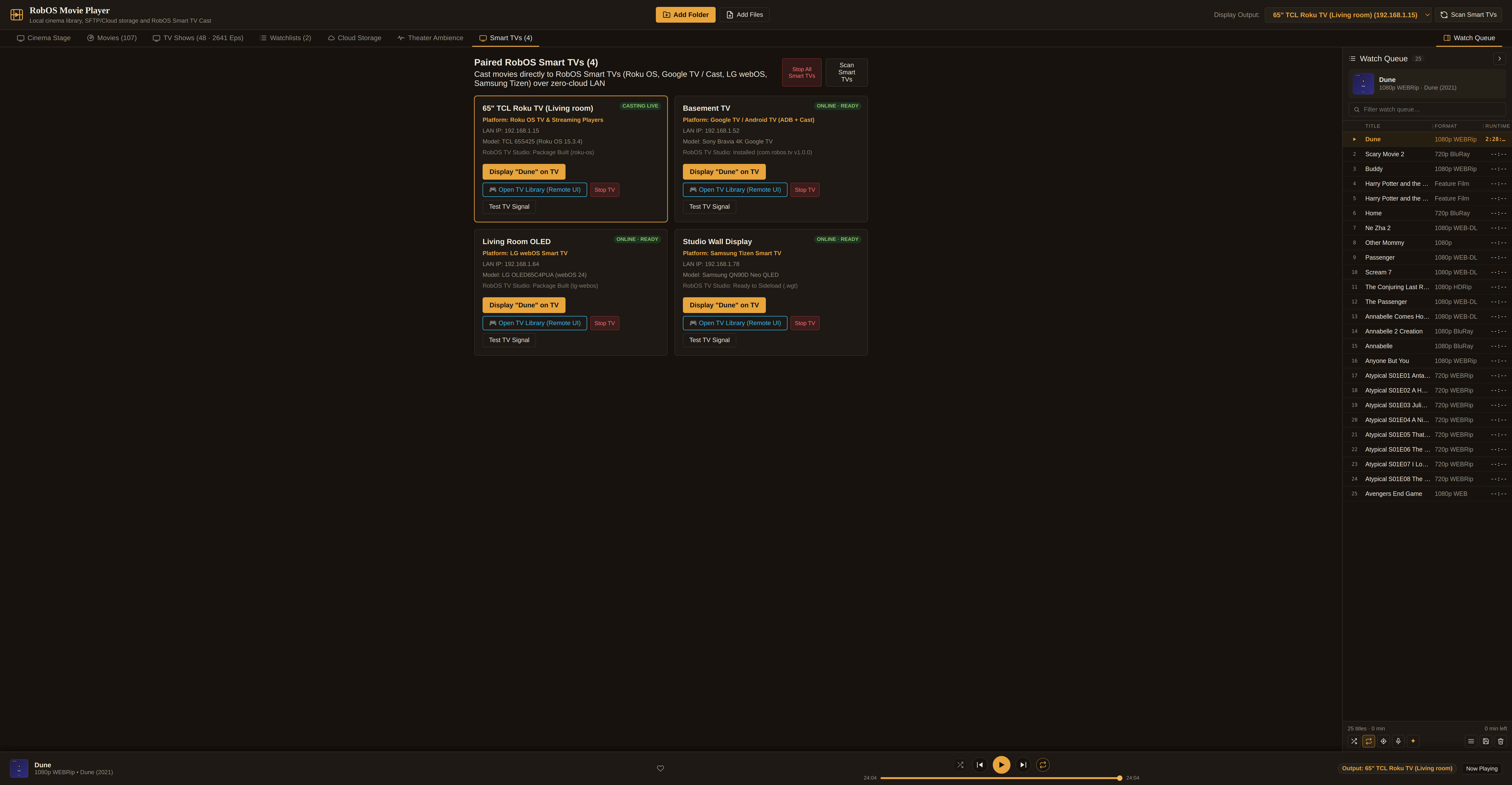
- Synced
.srt/.vttSubtitles & Click-to-Seek Dialogue (lib/lyrics.js): Automatically loads sidecar.srt,.vtt, or.lrcfiles or extracts embedded subtitle tracks viaffmpeg. Active lines render as a theater caption overlay on the video stage and auto-scroll in the transcript panel; clicking any dialogue line seeks both the local video and active Smart TV stream to that exact second. - Playback Speed, Aspect Fit, PiP & Frame Snapshots: Cycle speed (`0.5x`–`2x`), aspect fit (`Letterbox`, `Cover`, `Fill`), float the stage in an always-on-top Picture-in-Picture window, or capture native-resolution PNG stills to
~/Pictures/RobOS Movie Snapshots/.
5. Optional AI Watchlists & Spoken Virtual Cinema Host
Just like RobOS Audio Player offers AI Playlists and a Virtual DJ, RobOS Movie Player includes optional AI curation grounded in your own library:
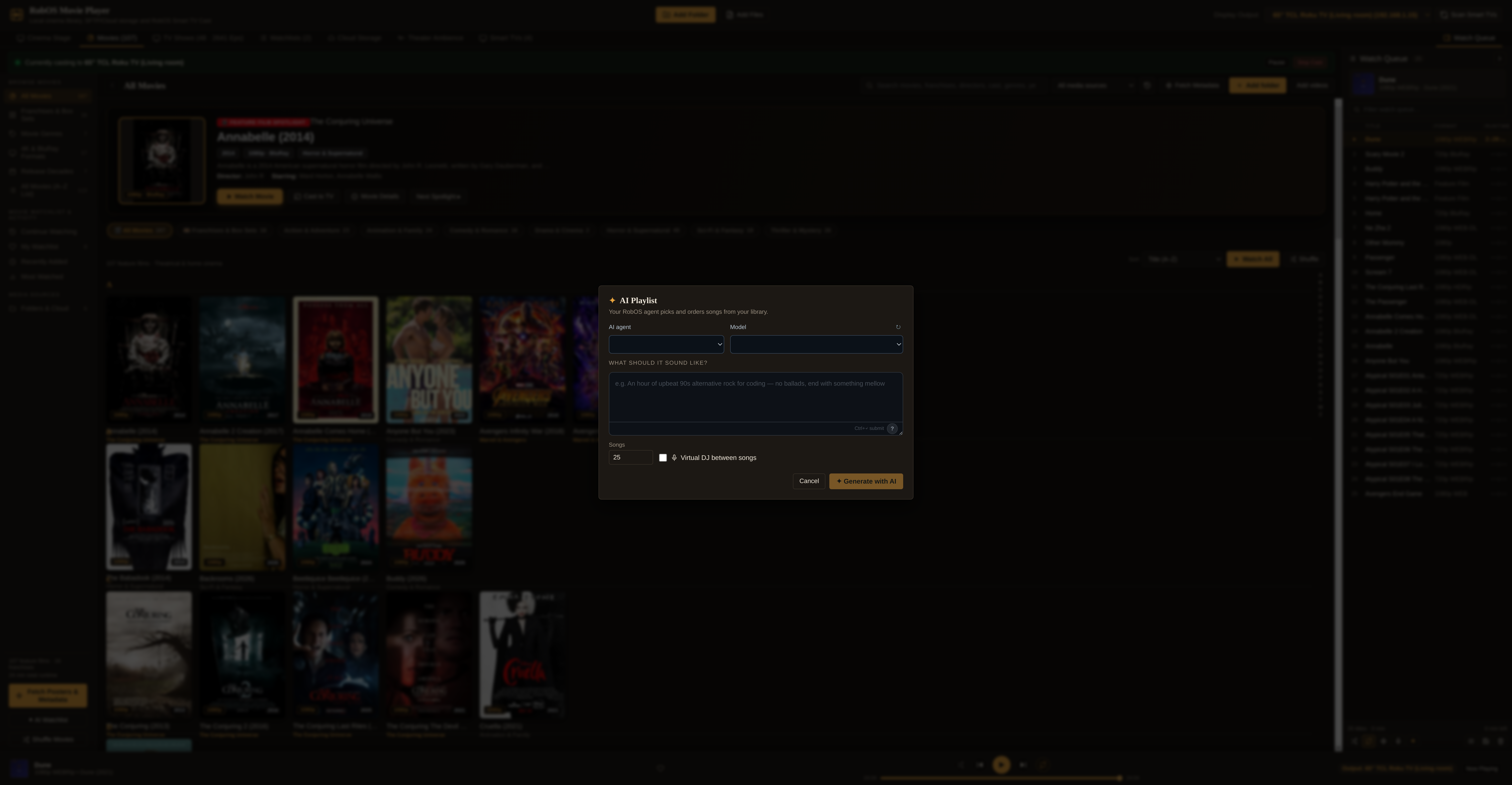
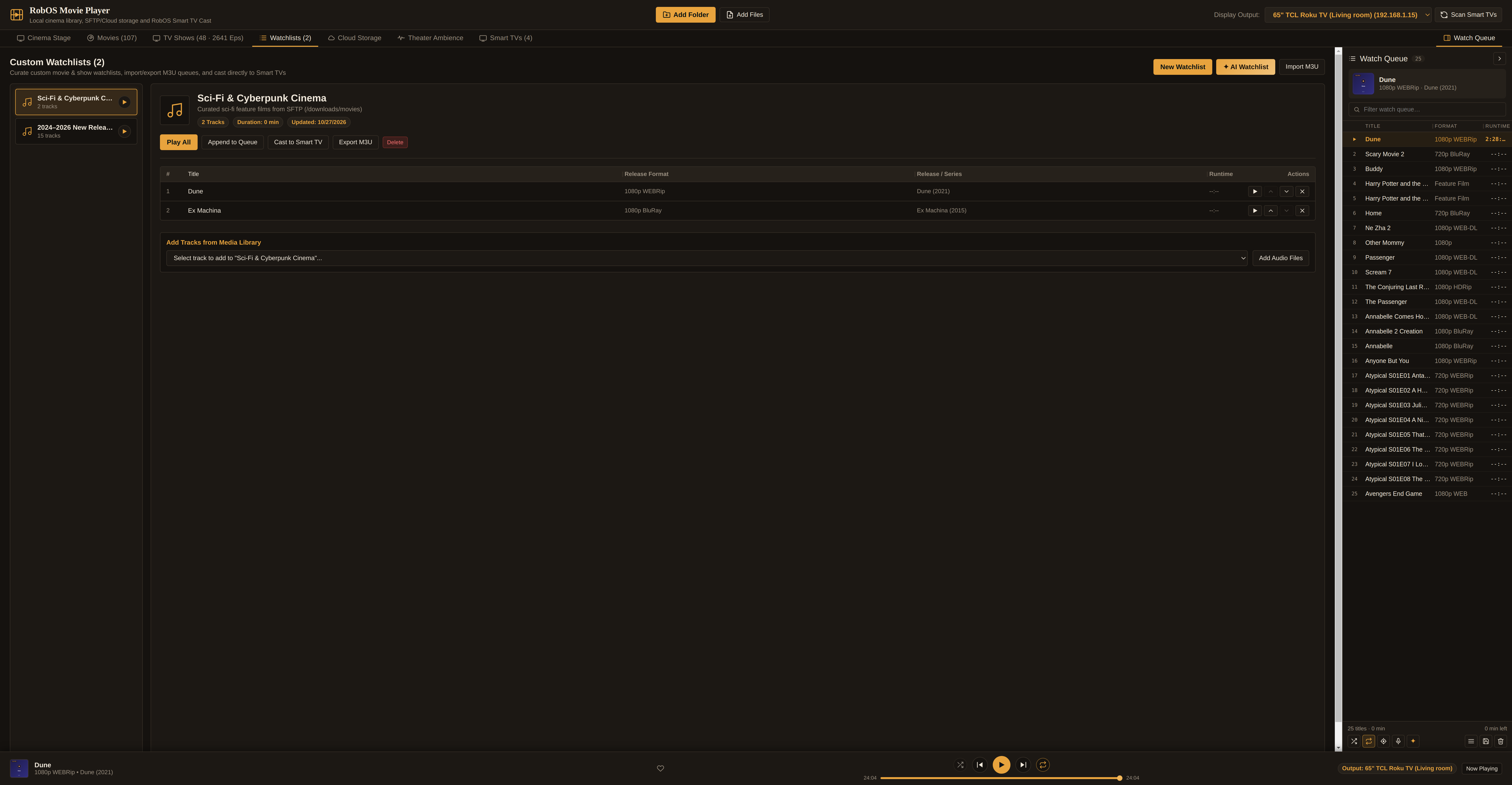
.m3u8), and screen saved movie marathons or AI-generated double features.- ✦ AI Watchlist (
src/AiPlaylist.jsx): Describe a theme (e.g. "90-minute supernatural horror double feature from the 2010s" or "family-friendly animated adventure night") and your active coding agent selects and orders matching titles from your library. - Virtual Cinema Host (
src/useVirtualDj.js): Writes short 1–2 sentence TCM-style presenter intros ahead of each film in your queue and speaks them aloud via RobOS Voice (locally or over your Smart TV).
6. Public TMDB / TVmaze Enrichment & AI Metadata Fixer
Clicking Fetch Posters & Metadata in the library sidebar (or Fetch Metadata in the toolbar) runs lib/public-metadata.js across your movies and TV series:
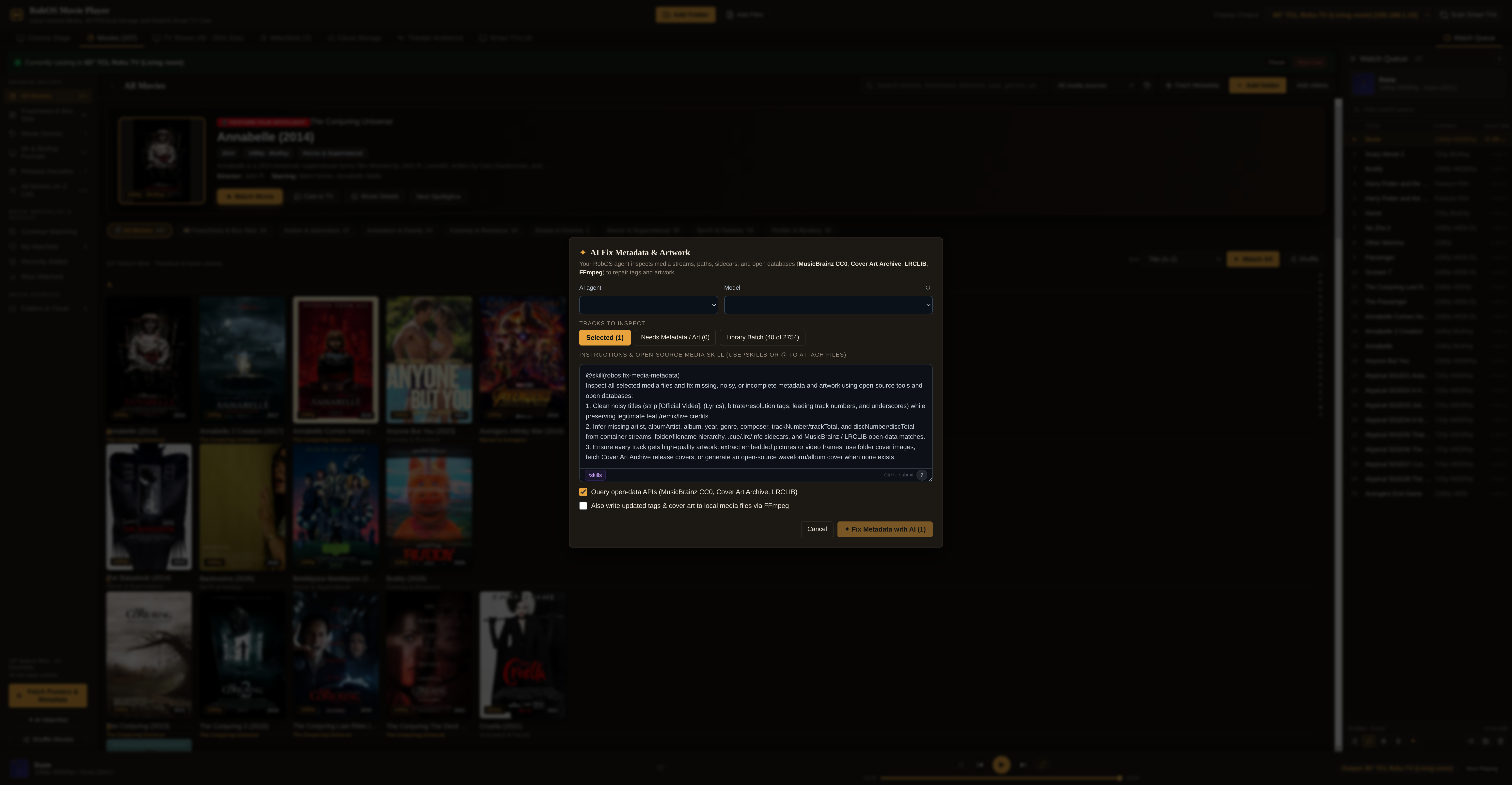
.nfo sidecar parsing, ffprobe stream inspection, public poster lookup, and ffmpeg frame extraction.- TV Series & Episode Enrichment (TVmaze Public API): Matches each TV series title, downloads the official 2:3 series poster into the content-addressed art cache (
~/.cache/robos/movie-player/art/), and populates series plot synopses, network names, star ratings, premiere years, and per-episode titles, air dates, and episode overviews. - Feature Film Enrichment (TMDB / Wikidata / Wikipedia REST + Apple iTunes Search): Fetches official theatrical 2:3 poster artwork, release years, MPAA/content ratings, director & cast credits, and plot synopses, persisted in
~/.config/robos/movie-public-metadata-cache.json. - Local Sidecars &
ffprobe/ffmpegFallback: Parses Kodi/Jellyfin.nfoXML files, inspects container streams viaffprobe, and extracts a real video frame at 10% runtime viaffmpegwhenever a personal home video has no public poster.
7. SFTP Data Sources & Cloud HTTP 206 Byte-Range Streaming
Your video library doesn't have to fit on your laptop's internal SSD. RobOS Movie Player connects directly to RobOS Data Sources (SSH/SFTP servers) and RobOS Cloud Accounts (Google Drive, Microsoft OneDrive, Dropbox, S3):
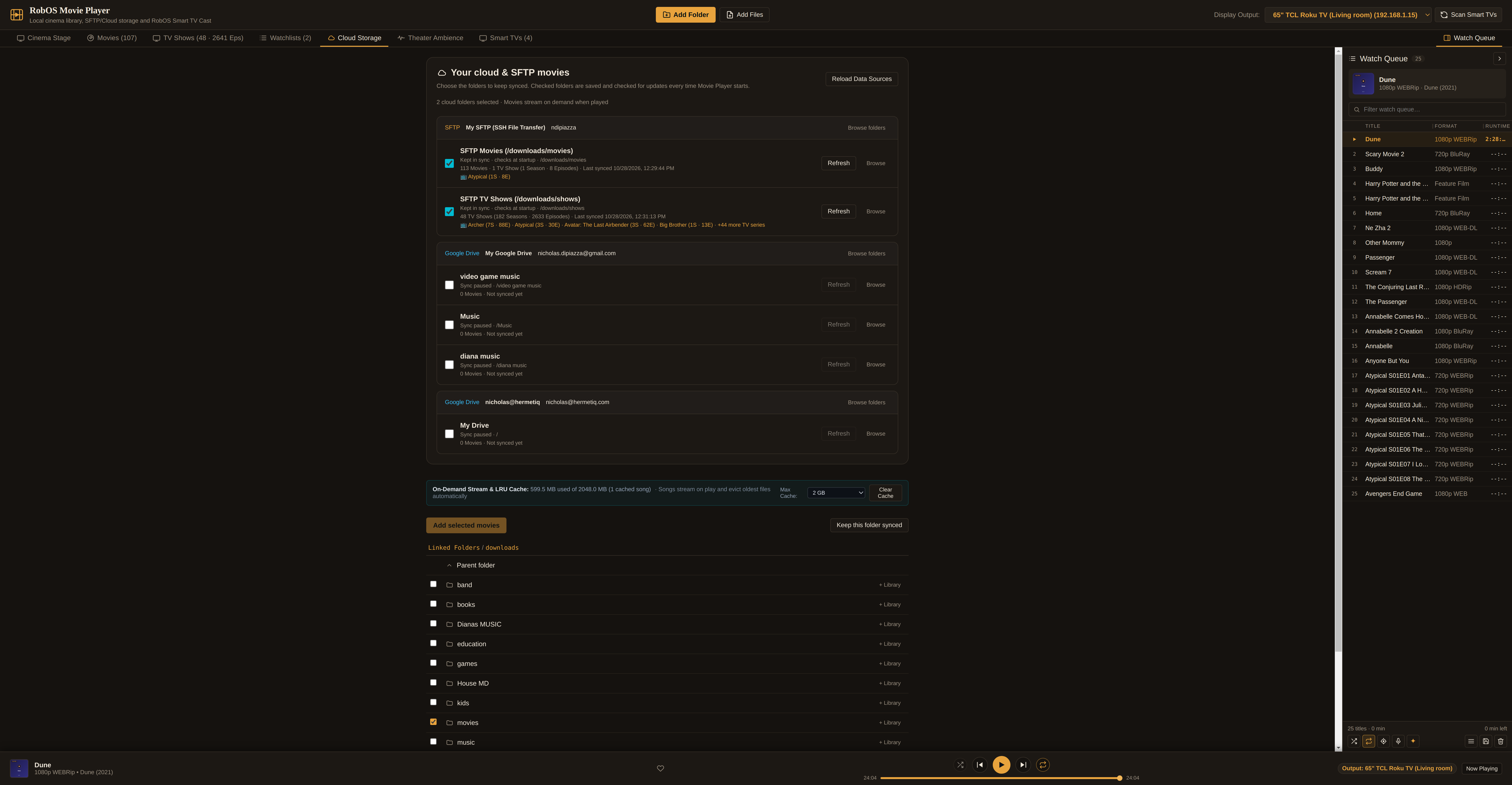
- Metadata-Only Indexing (
lib/cloud-storage.js): Walks remote SFTP directories (such as/downloads/moviesand/downloads/shows) or cloud folders and indexes filenames, sizes, and season/episode structures in seconds without copying video bytes. - Zero-Cloud LAN HTTP
206 Partial ContentStreamer (lib/cast-service.js): When you press Play on desktop or on your Roku TV, Movie Player serves `/cloud-stream/:trackId` with full HTTP byte-range (`Range: bytes=...`) support and a 2 GB LRU disk cache (`~/.cache/robos/movie-player/cloud`), enabling instant scrubbing and hardware decoding on Roku OS, Google TV, and desktop.
8. Architecture, File Layout & Reproducible CLI
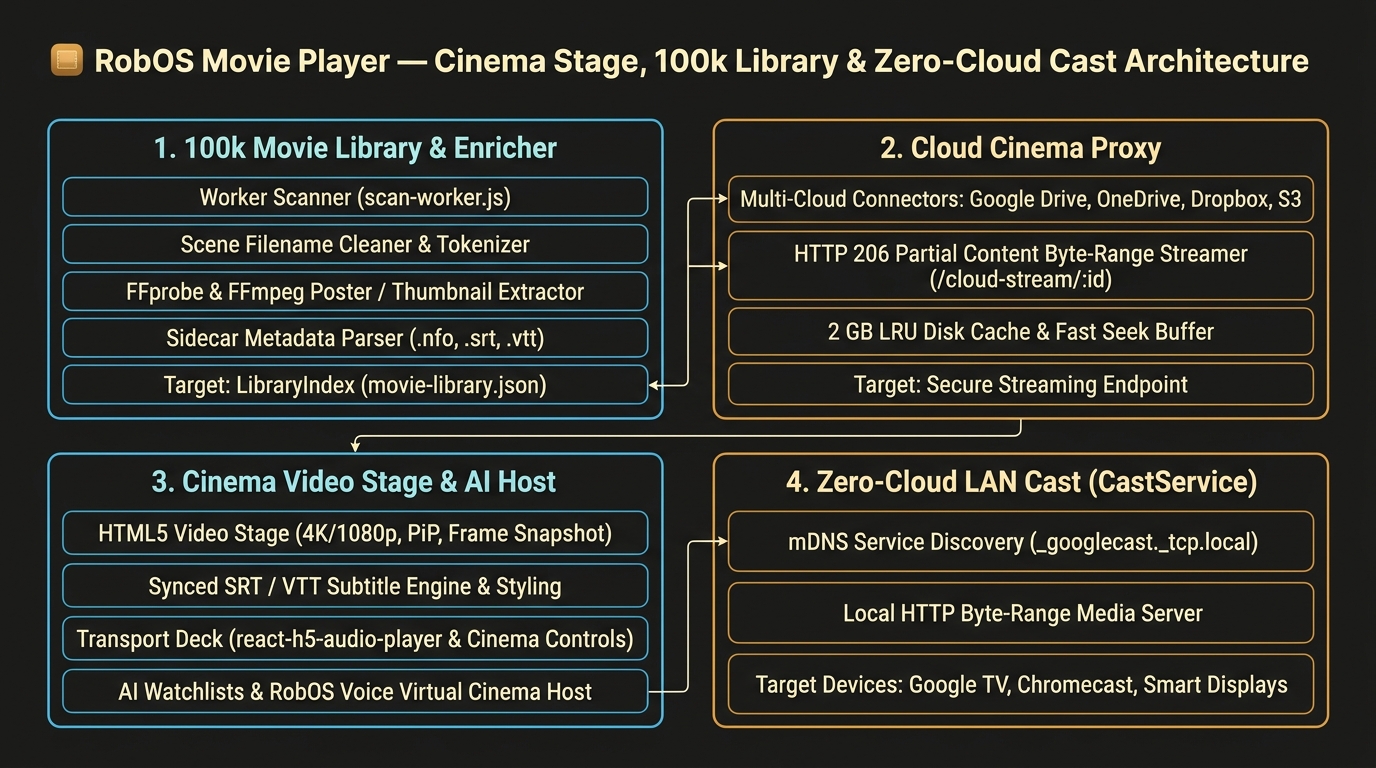
packages/movie-player) and its LAN streaming & Smart TV bridge.| Path / Port | Purpose |
|---|---|
packages/movie-player/ | Electron + React desktop application, worker-thread scanner, public metadata enricher, and LAN stream server. |
packages/movie-player/lib/library-index.js | Separates Movies from TV Shows, groups episodes into Show → Season → Episode trees, and computes watch progress. |
packages/movie-player/lib/public-metadata.js | Fetches official 2:3 theatrical posters, ratings, networks, cast, and synopses from TVmaze, Wikidata/Wikipedia, and iTunes. |
packages/movie-player/lib/cast-service.js | HTTP 206 byte-range media & poster server (:19215), Google Cast controller, and Roku ECP / Smart TV Studio bridge. |
packages/robos-lib/tv-engine.js | Generates the 3-row visual image-card Roku SceneGraph channel (MainScene.xml / MainScene.brs) and serves :19210/movie-player. |
~/.config/robos/movie-library.json | Indexed movie & TV episode catalog with public metadata and artwork IDs. |
~/.cache/robos/movie-player/art/ | Content-addressed SHA-1 JPEG poster cache served at http://<HOST-IP>:19215/art/<artId>.jpg. |
# Build the renderer bundle and run the 19-test Movie & TV Show verification suite
cd packages/movie-player && npm run build && npm test

# Launch RobOS Movie Player and inspect via the DOM Snapshot server (:19214)
npx electron packages/movie-player --no-sandbox
node packages/robos-lib/snapshot-cli.js movie-player --text
node packages/robos-lib/snapshot-cli.js movie-player --screenshot /tmp/movie-player.png