


RobOS Smart TV Studio
Pair Smart TVs, build & sideload Developer Mode TV apps (LG webOS, Samsung Tizen, Google TV/ADB, Roku), serve the 10-foot D-Pad TV Portal (:19210), and stream 4K games.
packages/robos-tv
RobOS Smart TV Studio (packages/robos-tv) makes living-room and office wall Smart TVs first-class citizens of RobOS. Because commercial TV app stores restrict full Linux/Electron suites, RobOS Smart TV Studio bridges your workstation or appliance VM to any Smart TV on your local network through Developer Mode sideloading, a 10-Foot Big-Screen Spatial Navigation Portal (:19210), Zero-Cloud Google Cast, and Moonlight / Sunshine 4K 120Hz streaming.
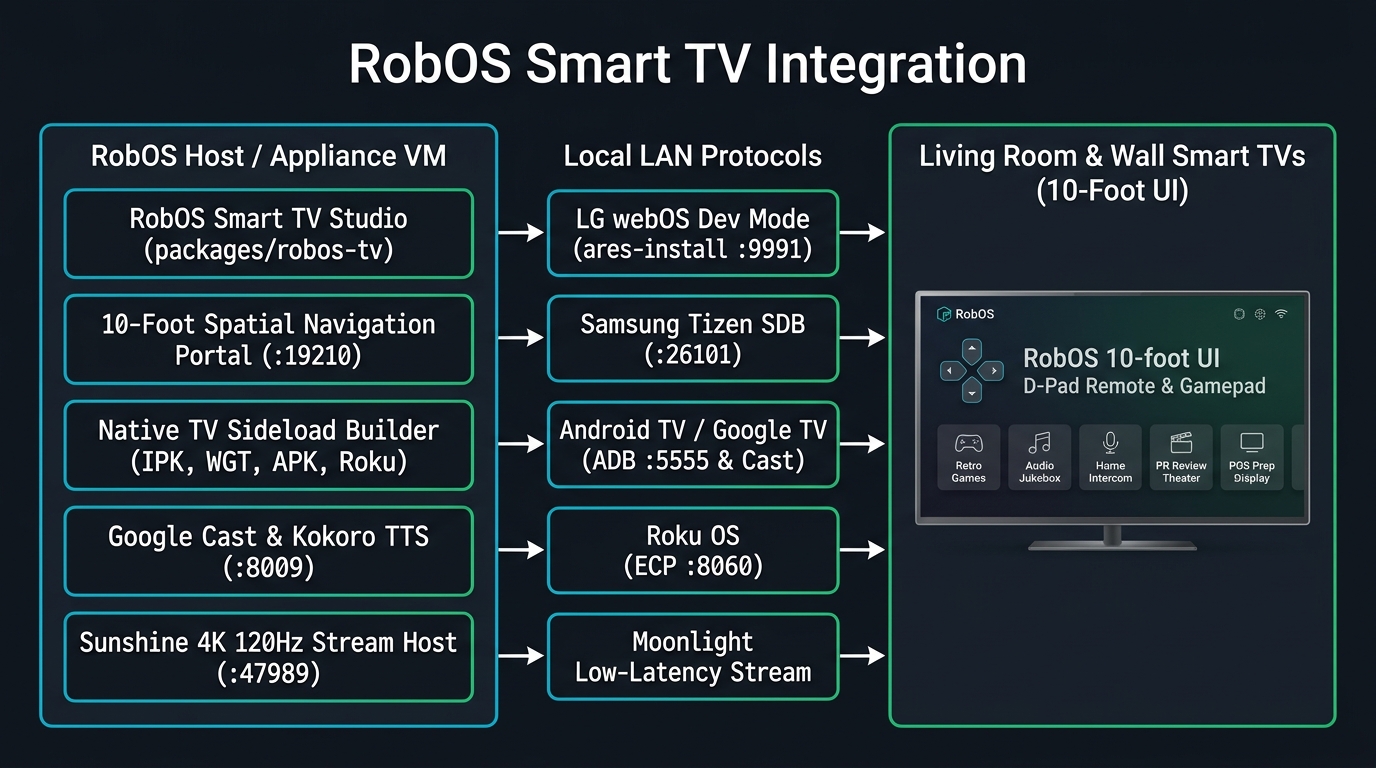
Supported Smart TV Platforms & Developer Mode Sideloading
- Google TV / Android TV / Amazon Fire TV (
adb+ Google Cast):- Generates an Android TV Leanback launcher project (
AndroidManifest.xml,assets/index.html, andsideload-android-tv.sh). - Connects over wireless ADB (
<TV-IP>:5555) to install the launcher onto the TV home row or immediately open the 10-Foot Portal URL (am start -a android.intent.action.VIEW -d http://<HOST-IP>:19210).
- Generates an Android TV Leanback launcher project (
- LG webOS Smart TVs (
ares-package/ares-install/ares-extend-dev):- Generates a complete webOS
.ipkproject (appinfo.json,index.html, andsideload-webos.sh). - Fetches the SSH developer key from the LG Key Server (
:9991), installscom.robos.tv, and includes one-click + background Auto-Renewal of LG’s 1,000-hour Developer Mode timer (ares-extend-dev).
- Generates a complete webOS
- Samsung Tizen Smart TVs (
tizen/sdb):- Generates a Tizen Web Widget project (
config.xmlwithtv.inputdeviceremote key privileges,index.html, andsideload-tizen.sh) and deploysRobOSTV.wgtover Smart Development Bridge (:26101).
- Generates a Tizen Web Widget project (
- Roku OS TVs & Players (
ECP :8060+ SceneGraph.zip):- Generates a Roku SceneGraph channel bundle (
manifest,source/Main.brs,components/MainScene.xml, andsideload-roku.sh) and controls the TV with zero-auth Roku External Control Protocol (http://<TV-IP>:8060/keypress/*).
- Generates a Roku SceneGraph channel bundle (
- Moonlight / Sunshine 4K 120Hz Full Desktop & Godot 4 Game Streaming:
- Pairs with the native Moonlight client on any Smart TV or Apple TV to stream the full RobOS desktop and Godot 4 games (
Realm of Heroes cRPG,Quest: Warrior Dragon,Tabletop RPG,Starfall Command RTS) with full Bluetooth gamepad support.
- Pairs with the native Moonlight client on any Smart TV or Apple TV to stream the full RobOS desktop and Godot 4 games (
The 10-Foot Big-Screen Portal (:19210)
When you launch the sideloaded RobOS TV app from your TV’s native app bar, it opens the live RobOS 10-Foot Portal (http://<HOST-IP>:19210) designed specifically for viewing from 10 feet away:
- Full TV Remote D-Pad & Gamepad Spatial Navigation: Navigate the 4×2 tile grid using your TV remote’s directional pad (
Up,Down,Left,Right,OK/Enter,Back) or any connected controller via the HTML5 Gamepad API. - 8 Big-Screen Experiences:
- RobOS 10-Foot Home — Active agents, sprint status, and system health.
- Realm of Heroes cRPG — Party-based tactical D&D 5e cRPG in Godot 4.
- Quest: Warrior Dragon — NES-authentic 2D JRPG playable with a TV remote D-Pad.
- RobOS Tabletop RPG — 26×19 living-room dungeon board for tabletop game nights.
- Audio Player & Virtual DJ — 100,000-song jukebox with full-screen lyrics and Kokoro Virtual DJ intros.
- Home Speaker Intercom — Multi-room walkie-talkie and neural TTS announcements.
- PR Review Theater — Watch narrated 1080p agent proof-of-work walkthrough videos from the couch.
- POS Order & Prep Display — Turn any wall-mounted TV into a café/bar order prep board or menu display.
Run it
Launch RobOS Smart TV Studio from the App Launcher, click 📺 Smart TV Studio inside RobOS Home Speaker, or run:
electron packages/robos-tv
More in Desktop & Command Center

App Launcher
A searchable grid of the desktop applications installed on the machine, including the RobOS apps.

Desktop Customizer
A slash-command console that changes GNOME settings (clock, taskbar, theme, shortcuts, startup apps) and keeps git-backed snapshots to roll back.

Desktop Dashboard
A full-screen window that sits at desktop level and shows a grid of widgets; today it contains one clock and date widget.

Desktop Manager
The background process that launches RobOS apps, restarts the ones marked keep-alive, owns the tray icon and listens on a Unix socket.

Desktop Shell
Full-screen top bar and bottom dock for RobOS on a GNOME/X11 session, replacing the GNOME panel while it runs.

Desktop Widgets
A transparent panel on the right edge of the desktop with five status widgets: active task, system stats, AI agent, work journal and security.

Dev Central
Your daily task list: issues from your task servers as an epic tree, with buttons to start design or implementation agents and to open the related PR.

Dev Discussions
A chat-style view of discussion threads attached to tasks and pull requests, stored in a local cache with optional posting to GitHub.

Icon Manager
Shows the icon of every installed RobOS app, lets you replace one, and rewrites the apps' installed icon.svg and .desktop Icon= lines.

Manager Dashboard
Team metrics for one GitHub repository: open issues, merged PRs, PR cycle time, deploy frequency, approval rate, tasks by stage and PRs per developer.

Notifications Center
Shows the notification history stored in ~/.config/robos/notifications.json, with filters by category, tier and date, and edits the notification preferences.

Package Manager
Prototype screen for listing apps and daemons with start, stop and health-probe buttons. It shows built-in sample data.

RobOS App Manager
Choose, download, launch and remove RobOS apps

RobOS Audio Player
Open-source audio player, custom playlist engine, procedural focus soundscapes, and zero-cloud Google Cast smart speaker streaming.

RobOS Dashboards
Create KGraph graphical dashboards from card layouts where each widget is any RobOS component, embeddable via <robos-dashboard> and castable to Smart TVs

RobOS GNOME Desktop App Installer
Install, manage, and repair GNOME Desktop shortcuts, App Grid launchers, multi-scale icons, and Dock favorites for all RobOS apps.

RobOS Google Calendar
Installs Mozilla Thunderbird if needed and writes Google Calendar, Google Contacts and optional Gmail settings into its profile for a Google account from Cloud Accounts.
RobOS Home for Android
The home screen of the RobOS phone: the time, the date and every app, with the RobOS apps first.

RobOS Home Speaker
Two-way smart speaker intercom, Home Assistant Voice PE (NC-VK-9727) hands-free voice approval, neural TTS broadcast, and soundboard.

RobOS Movie Player
Open-source cinema, TV series & Tablo OTA DVR player sharing the warm theater theme of RobOS Audio Player: 100,000-movie & TV series library, Show & Season Navigator, Tablo 4th Gen OTA DVR live & recorded broadcast streaming, TMDB/TVmaze posters, AI Watchlists, Virtual Cinema Host, synced .srt/.vtt subtitles, and a 3-row visual image-card Roku & Smart TV app.

RobOS Preferences
Settings window for RobOS apps: Config Sync & Sharing (cloud backup and shared configs), optional AI API mode, agent tiers, prompt security, GitHub accounts, IDE, notifications, journal and theme.
RobOS Preferences for Android
Signs in to Google Drive on an Android phone, opens your RobOS Config Sync backups and restores the settings phone apps use.

Search Indexer
Builds plain-text lists of file paths under folders you choose, which RobOS text areas search for @-mentions.

Software Center
Install and manage coding-agent CLIs, IDEs, browsers, game tools and utilities on Windows or Linux.

System Logs Viewer
Viewer for the structured logs that RobOS apps write to ~/.config/robos/logs, with search and level filters.

Toast Daemon
Shows overlay toast windows for new entries in ~/.config/robos/notifications.json, with tiers, categories, do-not-disturb and anti-spam limits.

Workspace Manager
Window showing a sample multi-repo task workspace with sync, teardown and open-in-IDE buttons that return canned results. Discovery helpers exist in the code but are not wired to the window.