

Smart Light Is Now Smart Home, and It Can See Your LG Washer and Dryer
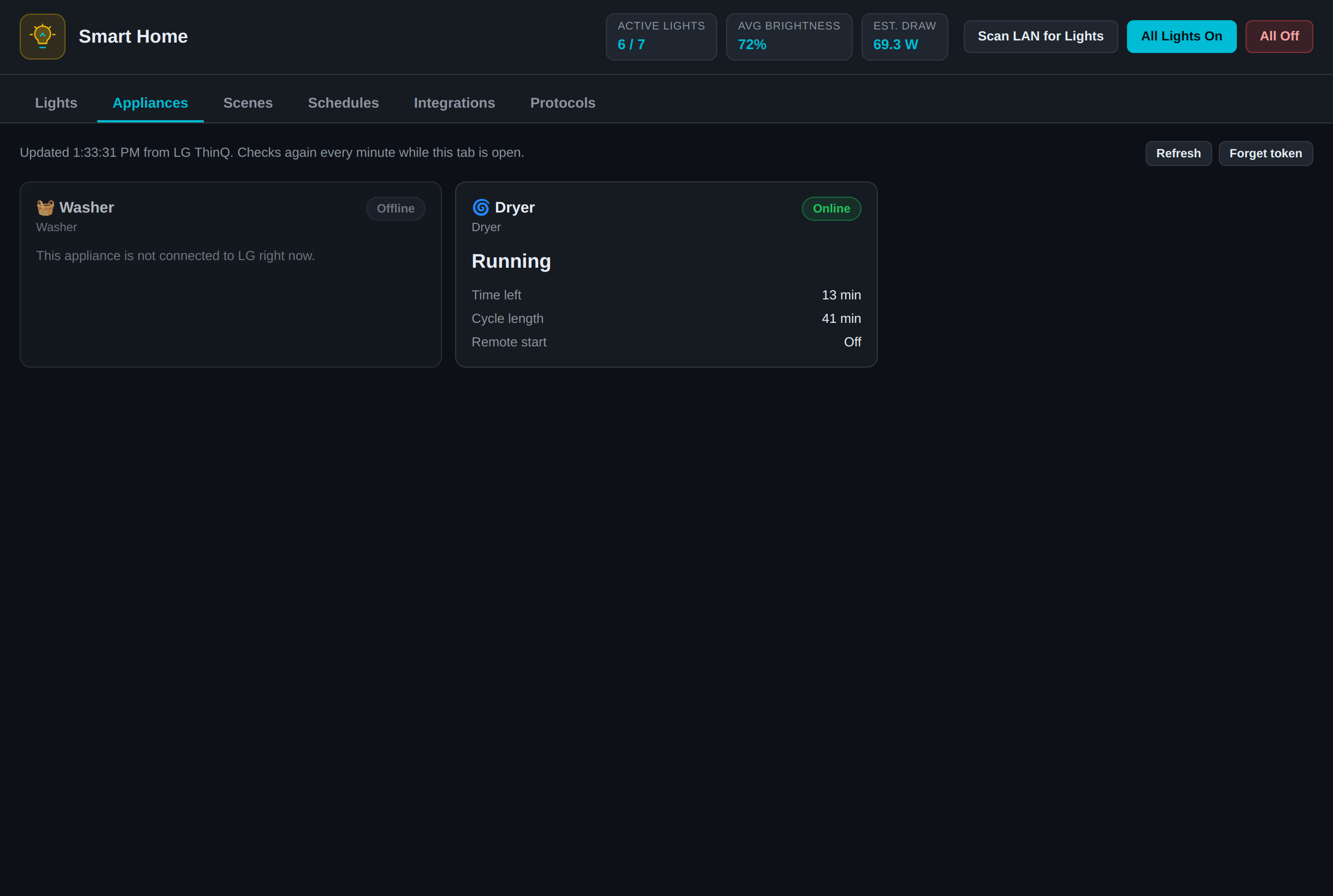
RobOS Smart Light is now RobOS Smart Home, with a new Appliances tab that reads LG washers, dryers and refrigerators through LG ThinQ. It only reads status. We checked it against a real LG account: the dryer reported its cycle live and the washer correctly showed as offline. That account has no refrigerator, so the refrigerator card has only been tested with simulated responses.
Why the rename. The app started with one job, controlling lights, and was named for it. Adding a washer and dryer to something called Smart Light Studio made no sense, so it is now RobOS Smart Home. The long header line listing every protocol is gone, and the tabs have short names: Lights, Appliances, Scenes, Schedules, Integrations and Protocols. Your saved lights carry over, because the app still uses smart-lights.json. Old links to /apps/smart-light/ forward to the new page, and "smart light" still works as a voice command.
What the tab shows. A washer or dryer card shows its state, time left, cycle length and whether remote start is on. A WashTower shows both halves on one card. A refrigerator card shows whether the door is open, the temperature each compartment is set to, filter status and modes such as quick freeze. LG reports the set temperature rather than a measured one, so the card says "Fridge set to". Any other LG appliance on the account appears with the plain values LG sends.
This part uses LG's cloud. Your lights are still controlled directly on your local network. LG appliances are different: the only official route we found is LG's ThinQ Connect API, so this tab needs an internet connection and sends a token to LG. The tab says so before you connect. You create a personal access token on LG's site, paste it into the app, and that's the whole setup.
Direct from Node. LG publishes its client as a Python SDK. RobOS apps run on Electron, so rather than ship a Python helper, robos-lib/lg-thinq.js makes the same requests itself: GET /devices, then GET /devices/<id>/state for each appliance, against the regional host for your country (api-aic.lgthinq.com in the US). The headers, regions and error codes come from LG's SDK source.
Where the token goes. The token is saved only after LG accepts it, so a mistyped one leaves nothing behind. It gets its own file, ~/.config/robos/lg-thinq.json, readable only by your user. It is not encrypted. It stays out of smart-lights.json because Config Sync copies that file and shared bundles can include it. The window never receives the token after you submit it. Neither the token nor appliance status is available through the app's local API on :19219, because that API has no login and accepts requests from any web page.
Staying inside LG's limits. LG temporarily blocks accounts that make too many requests. The app reads one appliance at a time and checks once a minute, only while the tab is showing. If LG does limit the account, the app waits five minutes and keeps showing the last status it read. One offline appliance doesn't hide the others, which is what you can see in the screenshot.
What it can't do yet.
- It can't control anything. There is no way to start a cycle or change a temperature, which also means a bug here can't run your washer.
- It doesn't send alerts. You only see "the dryer is done" if you are looking at the tab, and a change can take up to a minute to appear.
- The refrigerator and WashTower cards have not been tried on real appliances. The account we tested has neither, so those cards are built from LG's SDK and checked against a fake LG server. Real models may send fields we don't show yet.