

Step 1 of 9 · about 10 minutes
Before you start
What Auto Center replaces, what you need, and a tour of the four menus.
Auto Center is a desktop app for a car repair shop. It keeps your customers, their cars, every repair ticket, estimates, parts, hours, invoices and payments in one place on your own computer, and backs them up to a private GitHub repository.
This tutorial walks you through everything you need to do to stop using your current system and run your shop on Auto Center. Follow the pages in order. Each one ends with a short checklist so you know you are ready for the next.
What it replaces
| What you do today | Where it lives in Auto Center |
|---|---|
| Write down a customer's call on paper or a sticky note | Front desk, intake wizard |
| Keep a customer and vehicle list | Admin, Customers, and the intake wizard |
| Write estimates and get approval | Front desk, open the ticket |
| Hand a job card to a mechanic | Mechanic bench, work ticket |
| Track parts you ordered | Mechanic bench, parts requested |
| Track mechanic hours | Mechanic bench, log hours or timer |
| Write the invoice and take payment | Checkout |
| See what is in the shop and what you earned | Center reports |
| Keep backups | Admin, Backup |
What you need
- A computer that stays at the shop, with the RobOS desktop suite installed. Auto Center is one of its apps. If you run it from the source code instead, use
npm startinsidepackages/auto-center. - A free GitHub account and a private repository for your backups. You will set this up in Protect your data.
- Your customer list as a spreadsheet or CSV file, if your old system can export one. You will bring it in on Bring in your data.
Good to know. Auto Center is built for one shop on one computer. Several people can take turns on it, but it is not a hosted service that everyone logs into from their own phone.
Switch to the maintenance center
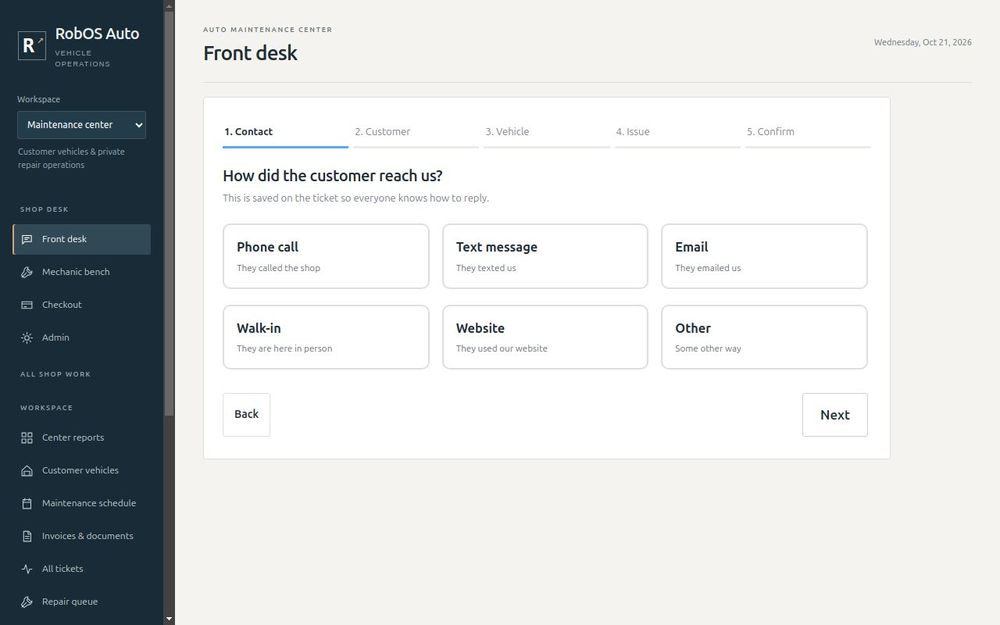
Open Auto Center. In the left menu, set Workspace to Maintenance center. This is the shop side of the app. (The other choice, Vehicle owner, is a personal garage for someone's own car and keeps its records separate.)
Under Shop desk you now have four menus:
- Front desk is for whoever answers the phone, texts and the door.
- Mechanic bench is for the people fixing cars.
- Checkout is for taking payment and handing back keys.
- Admin is for you, the owner.
Optional: load the vehicle catalog
Auto Center can suggest makes, models, years and trouble codes as you type. For that it needs a public vehicle catalog, which you download once:
- Open Sources & imports in the left menu.
- Press Collect public data. This downloads the public lists.
- Review the proposed import, then press Apply reviewed import. It can take several minutes and uses a lot of memory.
If you skip this, everything still works. You just type makes and models yourself.
You are ready when
- Auto Center opens and Workspace is set to Maintenance center
- You can see Front desk, Mechanic bench, Checkout and Admin in the left menu
Next: Set up your shop.