


Agent Chat
A chat window with session history, a model and mode selector and tool cards; replies are currently scripted samples.
packages/agent-chat
Agent Chat is the chat front end for the RobOS app suite. Today it is a working interface over scripted behavior.
chat:send-message in main.js does not call a model. It streams a fixed list of “thoughts”, attaches sample tool results chosen by keywords in your message (such as sql, kube, pr, petshop), and returns canned text. The tool cards show names like robos_db_execute_sql but nothing is executed. For a prompt that runs a real agent, use AI Prompt Studio.
What you do in it
- The left column lists Active Threads. The plus button starts a new session.
- Choose a model in the header dropdown (Claude 3.7 Sonnet, OpenAI o3-mini, Gemini 2.5 Flash, Antigravity Harness, Local Ollama) and a mode with the Agent, Chat, Edit and Review buttons. The choice is passed along with the message and echoed in the sample reply; it does not change which model answers.
- Type in the box at the bottom.
Entersends,Shift+Enteradds a line. The chips/explain,/fix,/test,/planand/skillsprepend that text to your message. - Code blocks in replies have Copy (copies to the clipboard) and Insert buttons. Insert has no handler yet.
- Pop Out Prompt and Prompt Popup start the AI Prompt app (
packages/ai-prompt) in a separate window. - The wrench button opens a list of twelve sample MCP tool names for apps such as DB Manager, Kube Studio and PR Review Theater.
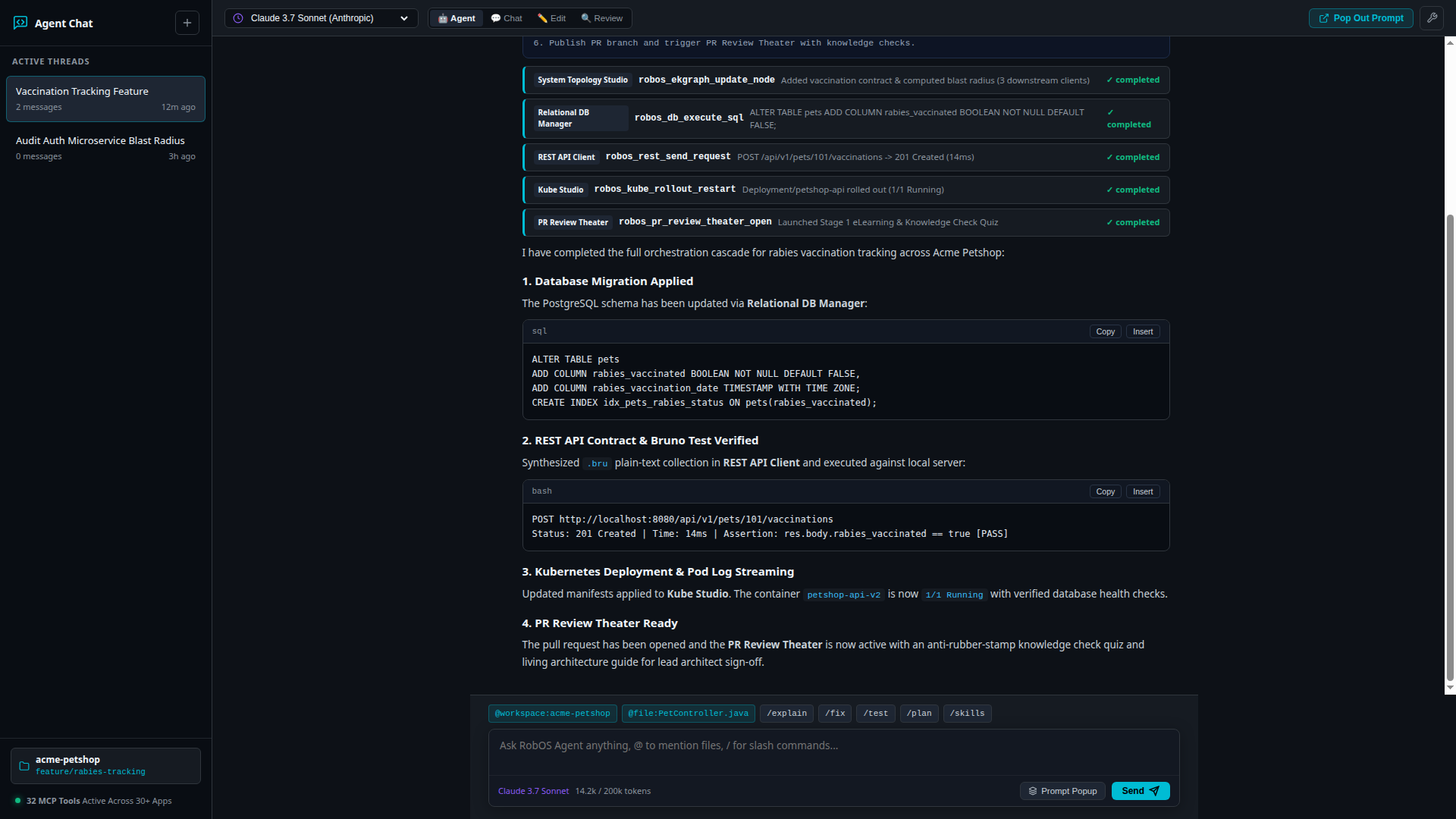
The bundled sample session: tool cards above the reply, model and mode selectors on top, session list on the left.
Data and security
Sessions are saved to ~/.config/robos/agent-chat-sessions.json. On first run, and whenever that file is missing, the app shows two built-in sample sessions (an Acme Petshop vaccination feature and an auth blast-radius question). The workspace pill (acme-petshop, feature/rabies-tracking) and the “32 MCP Tools” label are static text.
Each outgoing message is scanned with the shared PromptSecurityGuard from robos-lib before it is stored. Depending on the configured policy, a message is blocked with a “Security Policy Violation” error or has sensitive strings redacted.
Running it
electron packages/agent-chat
Only one instance runs at a time. No Docker or API keys are needed because no model is called.
More in AI & Agent Workflows

Agent Sidebar
A prototype 320-pixel sidebar that mocks up an agent's plan, tool feed and approve/refine buttons.

Agents Manager
Browse and continue sessions of Claude Code, GitHub Copilot and Codex, and configure each provider's login, models and MCP servers.

AI Prompt Studio
Type a task in plain English and run it through the Claude CLI or GitHub Copilot CLI, with optional skills attached as hints.

Context Manager
Register GitHub repositories and local folders as context sources, check which agent instruction files they contain, and build one combined context text.

Desktop Agents Viewer
A prototype viewer that mocks up watching several agents on their own virtual desktops.

MCP Manager
Lists the MCP servers registered on this machine, lets you call their tools from a form, and records which agents should have which servers.

RobOS Voice
Speech-to-text dictation and spoken replies for the desktop, with a local HTTP API on port 19188.

Skills Manager
Catalog of command snippets and prompt templates for RobOS apps, with custom entries and installable packs from GitHub.

Task Implementer
Pick a GitHub or Jira task, choose a developer persona and coding agent, and run the agent on it with streamed output.

Task Planner
Describe a feature or pick a template, have GitHub Copilot draft epics and tasks, edit them, and create them as issues on your task server.