

Thunderbird on Windows: Software Center install, automatic Gmail setup, and an AI skill that sends mail
Mozilla Thunderbird now installs on Windows from the Software Center through WinGet, and the Google account you add in Cloud Accounts sets up Gmail, Calendar and Contacts in it on Windows and macOS, not only Linux. Thunderbird has no SDK that outside programs can call, so we built the RobOS Thunderbird Bridge: a small Thunderbird add-on plus a helper that Thunderbird starts. Through it, the new /send-email-thunderbird skill sends mail from your own Gmail account. Tested end to end on a Windows 11 laptop.
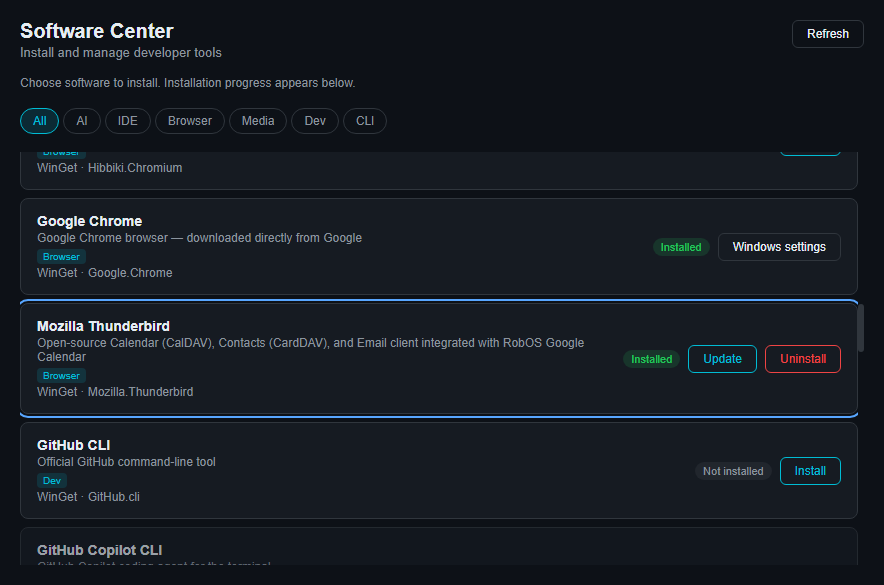
The goal. RobOS already had a Google account → Thunderbird integration: add your Google account in Cloud Accounts and RobOS writes the Gmail, Google Calendar and Google Contacts settings into Thunderbird for you. It only worked on Linux. We wanted three things on a Windows laptop: install Thunderbird from the RobOS Software Center, connect it to Gmail with no manual account setup, and give AI agents a skill that sends email through it.
1. Thunderbird in the Software Center
Thunderbird was already in the catalog, but on Windows its card said "No Windows installer". On Windows the Software Center installs everything through WinGet, using exact package IDs from one table in packages/software-center/windows-tools.js. Two lines fixed it: thunderbird: 'Mozilla.Thunderbird' for the install, and a display name pattern so the Software Center can tell it is installed. The install runs winget install --id Mozilla.Thunderbird --exact --source winget with the agreement and silent flags, then checks that WinGet lists it.
2. Google account → Thunderbird, now on Windows
The setup code, packages/robos-lib/thunderbird-google.js, assumed Linux everywhere: the profile folder in ~/.thunderbird, the program found with which, and an install through the package manager. It now knows the profile folders on all three systems (%APPDATA%\Thunderbird, ~/Library/Thunderbird and ~/.thunderbird), finds thunderbird.exe under Program Files, and installs with WinGet when it is missing. Testing it on a real machine found two more bugs:
- Windows ignored the profile we made. Since version 67, Thunderbird on Windows and macOS gives each install its own profile. A new install only uses an existing default profile if that profile's
compatibility.inisays it was last used by the same install. Ours had none, so the first start created a new, empty profile, and the Gmail settings sat in a profile nobody opened. RobOS now writescompatibility.ini(version and build ID, OS and platform, and the install folder) when it creates a profile, and Thunderbird adopts it:profiles.inigets an[Install…]section that points at the RobOS profile. - The account was never in the account list. RobOS wrote the Gmail server settings into
user.js, but not intomail.accountmanager.accounts, the list of accounts Thunderbird actually loads. Putting the list inuser.jsis no good either, because Thunderbird appliesuser.jsat every start and would drop any account you add yourself. RobOS now merges its accounts into the lists inprefs.js, and only while Thunderbird is closed. If Thunderbird is running, it says so instead of writing to a file Thunderbird is about to overwrite.
Gmail uses OAuth, so the one step left to you is signing in to Google in the window Thunderbird opens. Your RobOS sign-in only gives RobOS access to Google Drive, and RobOS never stores or types your password. After that, the window title read Inbox - Gmail (…) - Mozilla Thunderbird and all the Gmail folders synced.
3. Sending mail from an AI skill
We looked for a Thunderbird SDK and there isn't one that outside programs can call. The supported way to drive Thunderbird from code is its add-on interface, MailExtensions, which only add-ons can use. messenger.compose.beginNew() opens a message and messenger.compose.sendMessage(tab, {mode: 'sendNow'}) sends it through the account's own SMTP server and OAuth login, exactly as if you had clicked Send. To make that reachable from a script, the RobOS Thunderbird Bridge has three parts:
- An add-on (
packages/robos-lib/thunderbird-bridge/extension/) with the permissionscompose.send,accountsReadandnativeMessaging. It answersping,identitiesandsend, picks the default Gmail identity unless you give a From address, and attaches files. - A native messaging host (
host.cjs). Thunderbird starts it when the add-on callsconnectNative(). It talks to Thunderbird over stdin/stdout and listens on a per-user named pipe (\\.\pipe\robos-thunderbird-bridge-<user>) or Unix socket. No network port is opened, so only programs running as you can reach it. Its log records the action and the number of recipients, never addresses or message text. - A CLI and Node API (
packages/robos-lib/thunderbird-mail.js):install,statusandsendwith--to/--cc/--bcc, HTML bodies, attachments and send-later. If Thunderbird is closed, it starts it and waits for the bridge.
thunderbird-mail.js install copies the add-on into ~/.config/robos/thunderbird-bridge/, registers the host (on Windows under HKCU\Software\Mozilla\NativeMessagingHosts), and puts a pointer file for the add-on in the profile's extensions folder.
You approve the add-on, not RobOS. Thunderbird keeps add-ons it didn't install itself switched off until you turn them on and accept their permissions. Our first version set two Thunderbird settings so add-ons like ours would switch on by themselves. Claude Code's safety check stopped that change, and it was right to: those settings would have stayed for every add-on that ever lands in the profile, which is exactly how malware gets into a mail program. Now you turn on RobOS Thunderbird Bridge once in Add-ons and Themes, and a test checks that RobOS never writes those settings. This add-on can send mail as you, so that question should be yours to answer.
The test message took about four seconds from request to Gmail's reply, and it arrived in the inbox. The bridge log for that run, in full:
The skill
/send-email-thunderbird (plugins/robos/skills/send-email-thunderbird/SKILL.md) works the same in Claude Code, Codex, Antigravity, Copilot and Gemini CLI. It checks status, does the one-time setup if needed, and sends. Its rules require the agent to show you the recipients, subject and body and get a clear yes before anything is sent.