

Castable Smart Dashboards: KGraph Card Layouts, Live Voice Dictation & Audio HUD Sync, and Zero-Sleep Roku Wallboards
RobOS Dashboards (packages/robos-dashboards) turns the RobOS Knowledge Graph (.robos/kgraphs/dashboards/package.jsonld) into composable desktop and 10-foot Smart TV wallboards where every card is a reusable <robos-widget-...> custom element (packages/robos-ui/robos-dashboard.js). Cast a synchronized 3-slide wallboard deck—Slide 1: Daily Engineering & Agent Ops, Slide 2: GitHub CI Status & App Popularity, and Slide 3: RobOS Voice Dictation — Most Recent Chats—to any LG webOS, Samsung Tizen, Google TV, or Roku OS television via :19210/dashboard, complete with live Howler.js audio verification (:19196), live RobOS Voice HUD dictation streaming (:19188), and a muted 160×90 H.264/AAC hardware <Video> keep-alive that prevents Roku TVs from entering standby without triggering remote-navigation click sounds.
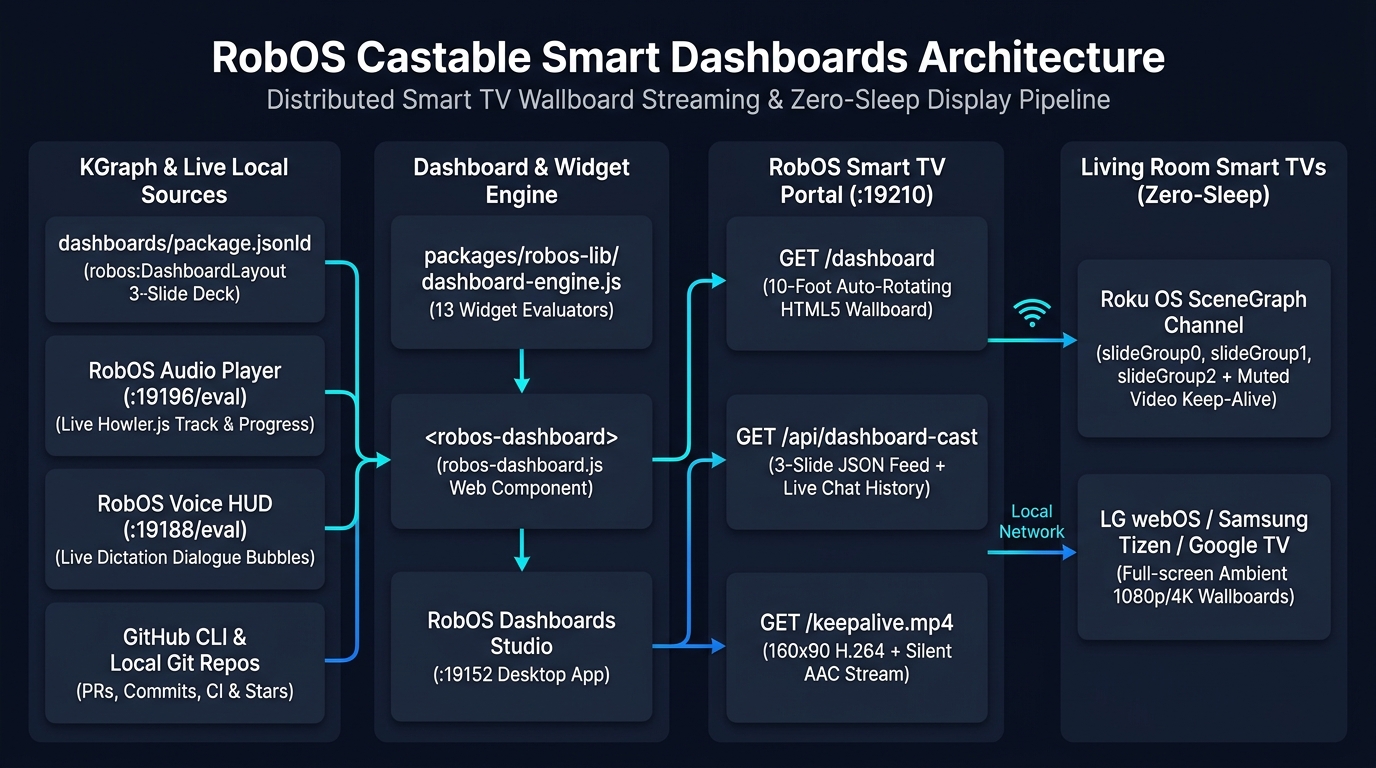
.robos/kgraphs/dashboards/package.jsonld) and live local services (RobOS Audio Player :19196, RobOS Voice HUD :19188, GitHub CLI & local Git repos) feed 13 widget evaluators in packages/robos-lib/dashboard-engine.js, rendering identically in the desktop studio (:19152), the 10-foot HTML5 portal (GET /dashboard on :19210), and the native Roku SceneGraph channel (GET /api/dashboard-cast + GET /keepalive.mp4).flowchart LR subgraph Sources["1. KGraph & Live Local Sources"] KG[".robos/kgraphs/dashboards/package.jsonld
(robos:DashboardLayout 3-Slide Deck)"] AUD["RobOS Audio Player (:19196/eval)
Live Howler.js Track & Progress"] VOC["RobOS Voice HUD (:19188/eval)
Live Dictation Dialogue Bubbles"] GH["GitHub CLI & Local Git Repos
PRs, Commits, CI & Stars"] end subgraph Engine["2. Dashboard & Widget Engine"] DE["packages/robos-lib/dashboard-engine.js
13 Composable Widget Evaluators"] WC["<robos-dashboard>
(packages/robos-ui/robos-dashboard.js)"] APP["RobOS Dashboards Studio (:19152)"] end subgraph Portal["3. RobOS Smart TV Portal (:19210)"] HTML["GET /dashboard
10-Foot Auto-Rotating HTML5 Wallboard"] API["GET /api/dashboard-cast
3-Slide JSON Feed + Live Chat History"] MP4["GET /keepalive.mp4
160x90 H.264 + Silent AAC Stream"] end subgraph TVs["4. Living Room Smart TVs (Zero-Sleep Wallboard)"] ROKU["Roku OS SceneGraph Channel
(slideGroup0, slideGroup1, slideGroup2 +
Muted Hardware Video Keep-Alive)"] WEBTV["LG webOS / Samsung Tizen / Google TV
Full-Screen Ambient 1080p/4K Wallboards"] end KG --> DE AUD --> DE VOC --> DE GH --> DE DE --> WC WC --> APP WC --> HTML DE --> API Portal --> ROKU Portal --> WEBTV
A 3-Slide Wallboard Deck Built for the Living Room & War Room
Instead of cramming every engineering metric, CI pipeline, and voice transcript onto a single crowded screen, RobOS Dashboards organizes your wallboard into a synchronized 3-slide rotation deck (DEFAULT_SLIDESHOW in packages/robos-lib/dashboard-engine.js) that cycles automatically every 15–30 seconds or responds immediately to your TV remote's D-Pad:
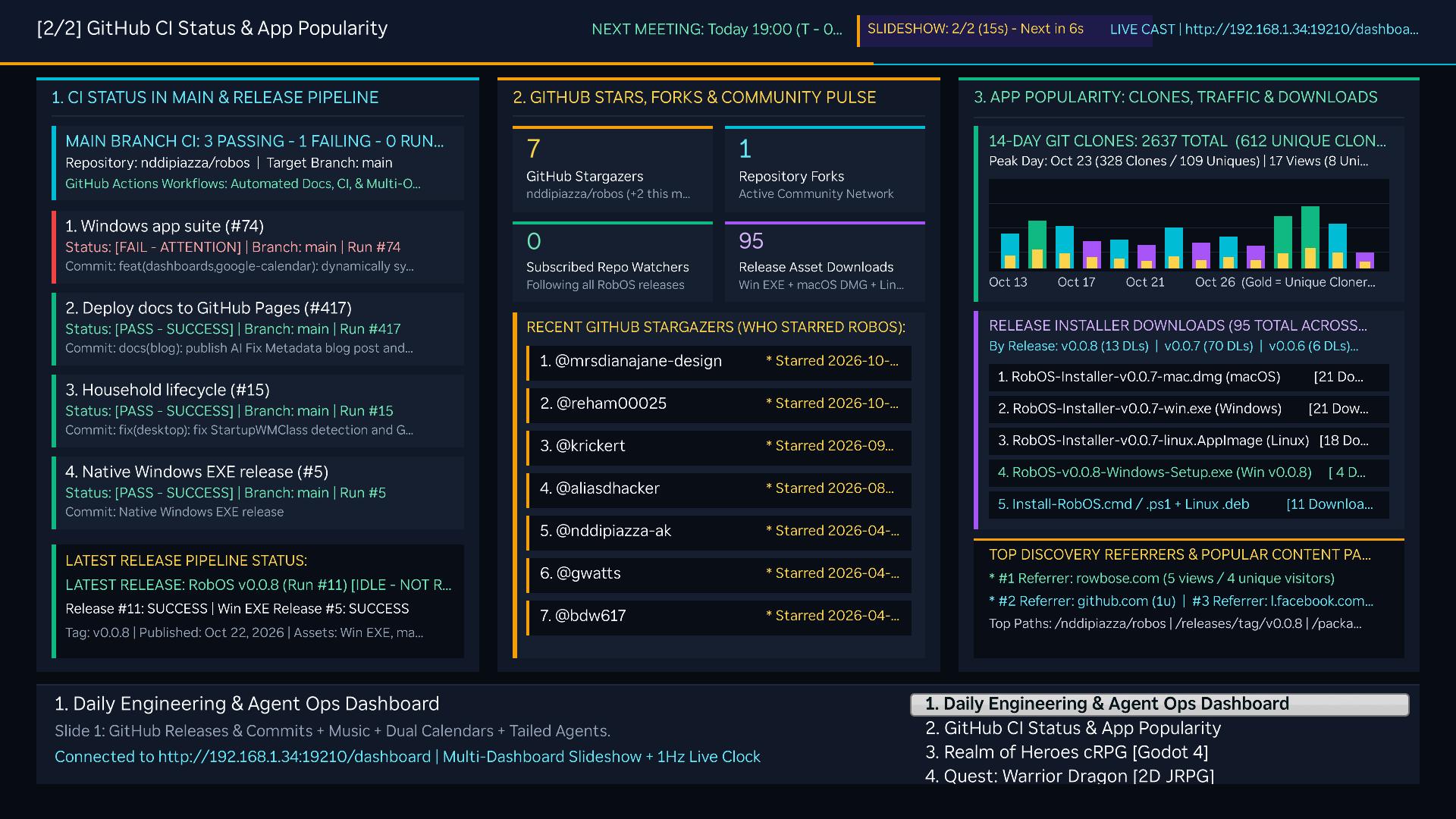
github-ci-popularity) captured live from the Roku TV: Column 1 monitors main branch GitHub Actions workflows (Deploy docs to GitHub Pages, Household lifecycle, Native Windows EXE release, Windows app suite) and the latest release pipeline (v0.0.8); Column 2 highlights Stars, Forks, Watchers, Release Asset Downloads (95), and the chronological stargazer feed; Column 3 graphs 14-day Git clones (2,637 total / 612 unique cloners), per-installer download counts (.dmg, .exe, .AppImage, .deb), and top discovery referrers.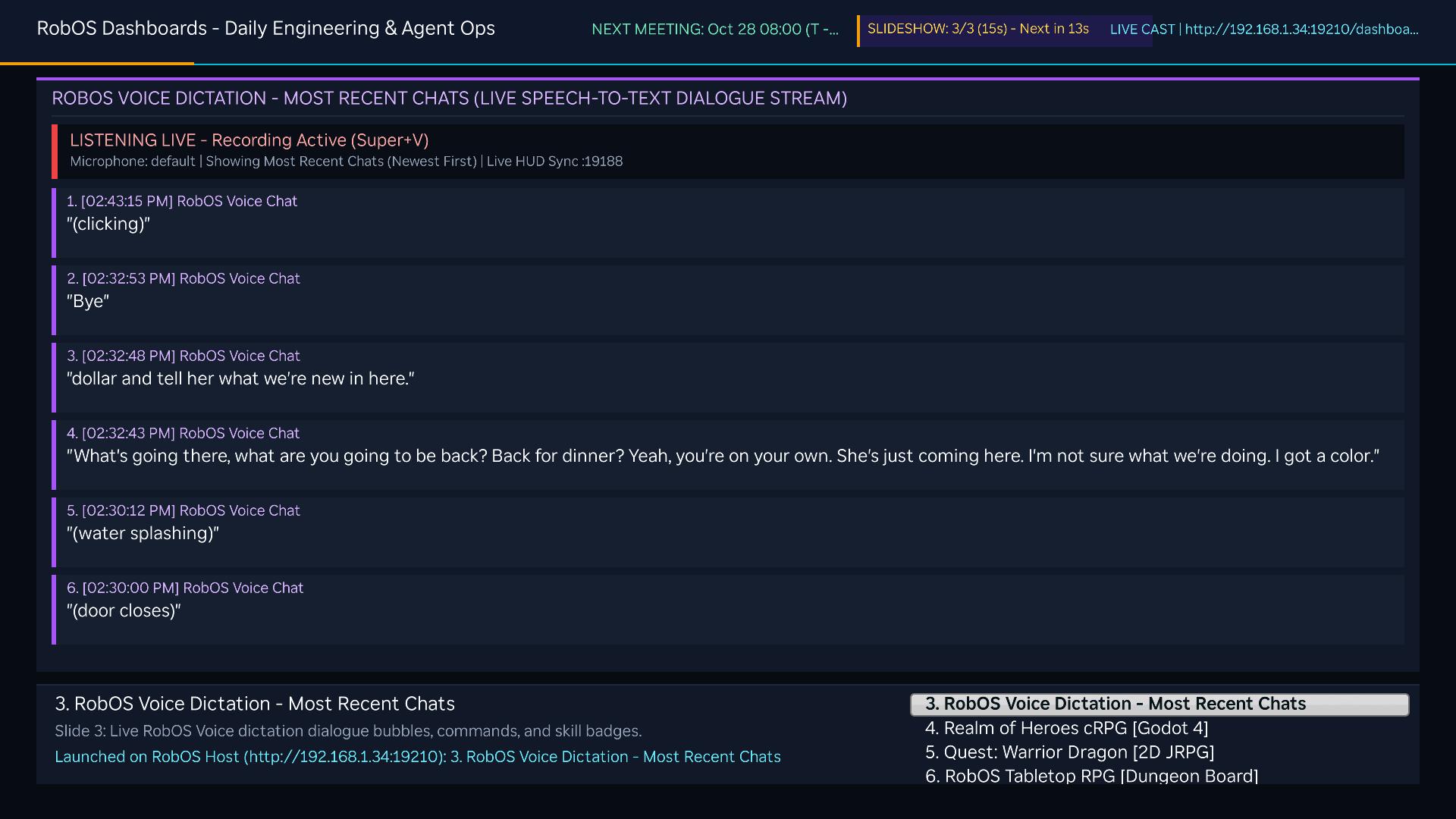
robos-voice-dictation) captured live from the Roku TV: A dedicated single-canvas wallboard view (layout-single-canvas) showing the most recent spoken prompts and voice-dictated chats from RobOS Voice in newest-first order, synced directly from the live RobOS Voice HUD on port 19188.Under the Hood: Live HUD Sync & Solving the Roku Standby / Menu-Click Problem
- Composable
<robos-dashboard>& 13 Widget Evaluators: Every dashboard card in.robos/kgraphs/dashboards/package.jsonldmaps to a custom element inpackages/robos-ui/robos-dashboard.js(<robos-widget-git-commits>,<robos-widget-github-prs-waiting>,<robos-widget-github-repo-activity>,<robos-widget-calendar-today>,<robos-widget-audio-now-playing>,<robos-widget-voice-dictation>,<robos-widget-agent-sessions>,<robos-widget-smart-tv>,<robos-widget-smart-lights>,<robos-widget-kgraph>,<robos-widget-sprint-radar>,<robos-widget-vpn-status>, and<robos-widget-custom>). - Live RobOS Voice Dictation Streaming (
:19188/eval): When you dictate with RobOS Voice (Super+V), the floating HUD appends.dictation-bubblenodes to#chat-feedin real time.collectVoiceDictation()inpackages/robos-lib/dashboard-engine.jsqueries the running HUD's DOM snapshot/eval port (http://127.0.0.1:19188/eval), merges persisted entries from~/.config/robos/voice-bubbles-live.jsonand~/.config/robos/voice-prompts.json, and streams the newest chats directly onto Slide 3 (`robos-voice-dictation`). - Verified Live Audio Player State (
:19196/eval): If an Electron audio player exits or pauses while its laststate.jsonon disk still saysplaying: true, naive dashboards falsely show music playing.collectAudioNowPlaying()probes the live RobOS Audio Player debug endpoint (http://127.0.0.1:19196/eval) to verify bothstate.playingand Howler.jsplayer.playing()before reportingPLAYINGon Slide 1—automatically falling back toSTOPPEDwhen the player process is closed. - Zero-Sound Hardware
<Video>Keep-Alive for Roku OS: Keeping a Roku TV wallboard awake 24/7 exposed two firmware quirks: sending standard ECP remote keys resets the sleep timer but plays Roku's audible menu-move sound effect on every tick, whereas sending silentkeypress/Lit_characters produces no sound but is ignored by Roku OS's 20-minuteIdlepower-saving timer. RobOS solves both by serving a tiny 160×90 H.264 + silent AAC MP4 stream atGET /keepalive.mp4frompackages/robos-lib/tv-engine.jsand binding it to a1×1muted (mute="true",loop="true") SceneGraph<Video id="keepAliveVideo">node inMainScene.xml/MainScene.brs. Because the hardware media decoder sees active video playback, Roku OS suppresses screensaver and standby indefinitely with zero audio clicks.