Audio Player: AI Playlists, a Virtual DJ You Can Hear, and Casting That Keeps Time
The RobOS Audio Player now browses a 100,000-song library, keeps a VLC-style play queue on screen, builds playlists with your RobOS agent and puts a Virtual DJ between songs, on your desk or on a Google Cast speaker. Most of the work after the first version went into making the DJ loud enough to hear and the speaker keep time.
The library groups music into albums, artists, genres, decades and composers, sorts names the way people expect ("Track 2" before "Track 10", "The Beatles" under B) and only draws the rows on screen, so a 100,000-song library stays smooth. Songs in Google Drive or OneDrive get their real artist and album without being downloaded: the player fetches only the bytes that hold the tags (the ID3 tag at the start of an MP3, FLAC's metadata blocks, an M4A's moov box wherever it sits) and guesses from folder names until then.
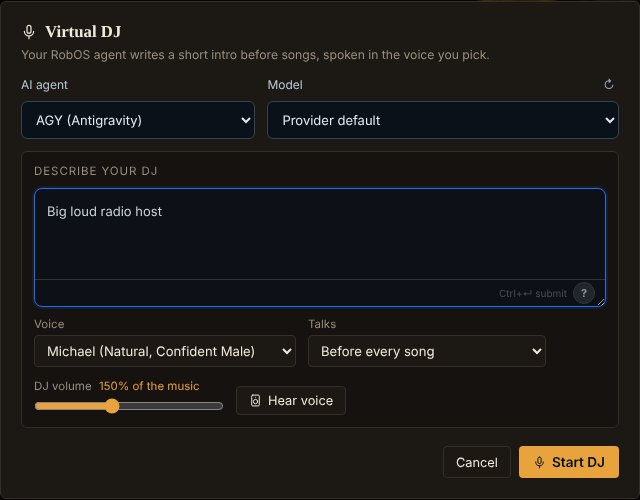
AI Playlists: describe what you want ("late-night jazz and moody electronic for coding") and your RobOS agent picks and orders songs from your library. The agent is chosen with the same <robos-agent-selector> PR Review uses, so it defaults to whichever agent you have installed and signed in. Tick Virtual DJ, describe a host, and the agent writes a short intro for each song, a few songs ahead, spoken with RobOS Voice. The speaker button in the queue (or right-click → Announce this song) plays the intro the DJ has ready, so you can hear it before the song ends.
The first version worked on paper and failed in the kitchen. What we fixed:
- The DJ was a whisper. Voice engines produce speech far quieter than mastered music, and a Cast speaker plays the DJ at the music's volume, so turning the DJ up had to happen in the audio itself. Each line is now loudness-normalised to music level (−14 LUFS), set to a new DJ volume (default 150%, about 3.5 dB louder than a typical song) and run through a limiter, then saved as MP3 for both the computer and the speaker.
- "No text-to-speech engine produced audio." Kokoro loads its model on first use and the first line gave up after 12 seconds. The fallback then handed Edge-TTS a Kokoro voice name it rejects. The voice engine now starts as soon as the DJ is on, DJ lines may wait 60 seconds, each fallback engine uses its own voice, and the message names what failed for each engine.
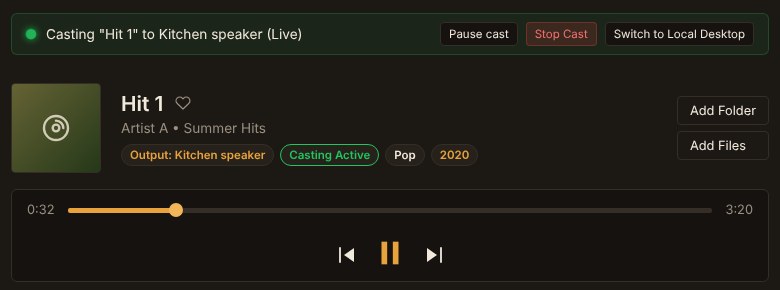
- The speaker stopped and restarted between songs. Every song shut down the speaker's Cast app and launched it again. A muted local copy of the song also sent the song again whenever it started playing, so each song was loaded at least twice. One receiver session now stays open, and each song is sent once.
- The progress bar sat at 00:00. It followed that muted local copy, which for a cloud song might never load. While casting, the speaker is now the clock: the app asks for its position every second, and the progress bars, play counts, synced lyrics and the move to the next song all follow it. Dragging the bar seeks the speaker.
- Speakers refused some DJ lines. Every file went out labelled as MP3, including WAV voice clips, and the voice cache stores MP3s under
.wavnames. Files are now typed by their first bytes.
Smaller things from the same stretch: dividers and table columns can be dragged to resize, and the sizes are remembered. Lyrics have an on/off switch and a Follow button that keeps the current line in view until you scroll yourself.
Unit tests cover tag reading from synthetic MP3, FLAC and M4A layouts, ranged reads from a fake Drive, Cast session reuse, the speaker's position reports and file typing. The DJ and casting screens were exercised in headless Chromium against a scripted Cast speaker.